
การแนะนำ
Welcome to the Kurzweil SP1 88-Key Stage Piano. This manual provides essential information for setting up, operating, and maintaining your instrument. The SP1 is designed for musicians seeking a high-quality, portable stage piano with a focus on essential sounds and intuitive controls.
เนื้อหาแพ็คเกจ
โปรดตรวจสอบว่าสินค้าทั้งหมดมีอยู่ในแพ็คเกจของคุณ:
- Kurzweil SP1 88-Key Stagอี เปียโน
- อะแดปเตอร์แปลงไฟ
- ซัสเทนเพดัล
- คู่มือการใช้งาน (เอกสารนี้)
สินค้าเกินview
The Kurzweil SP1 features a streamlined design with an intuitive control panel and a fully-weighted hammer-action keyboard.
แผงควบคุมด้านหน้า
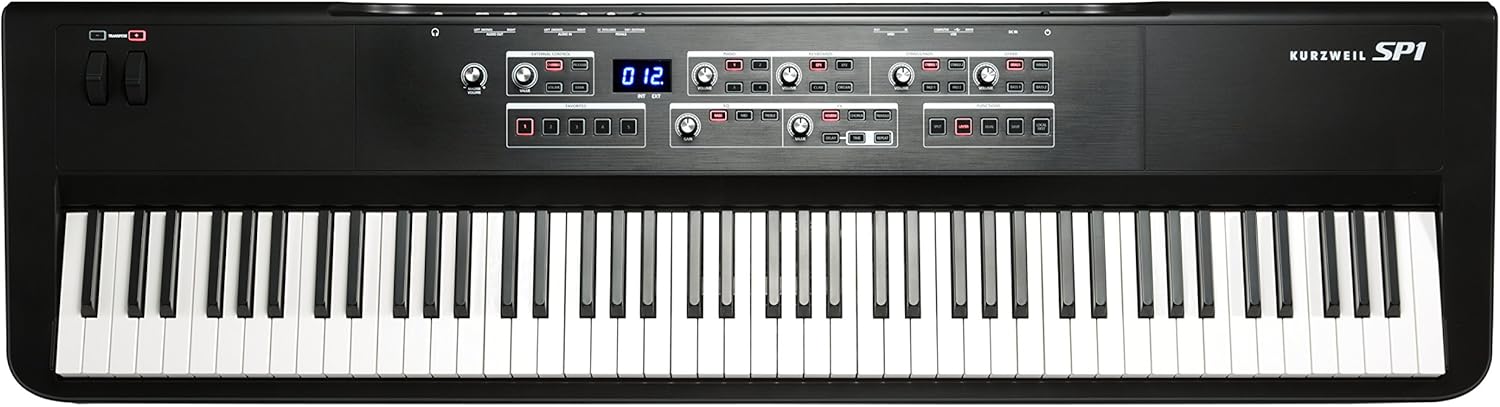
The main control panel is centrally located above the keyboard, providing access to sound categories, effects, and functions.

- หมวดหมู่เสียง: Dedicated sections for Piano, Keyboards (EP1, EP2, Clav, Organ), Strings/Pads (Strings 1, Strings 2, Pad 1, Pad 2), and Other (Brass, Winds, Bass 1, Bass 2). Each category has volume controls and sound selection buttons.
- ส่วน EQ: 3-Band Master EQ with Bass, Mid, and Treble controls.
- ส่วน FX: Individually adjustable effects including Reverb, Chorus, Tremolo, Delay, and Repeat.
- ฟังก์ชั่น: Buttons for Split, Layer, Dual, Save, and Local Dest.
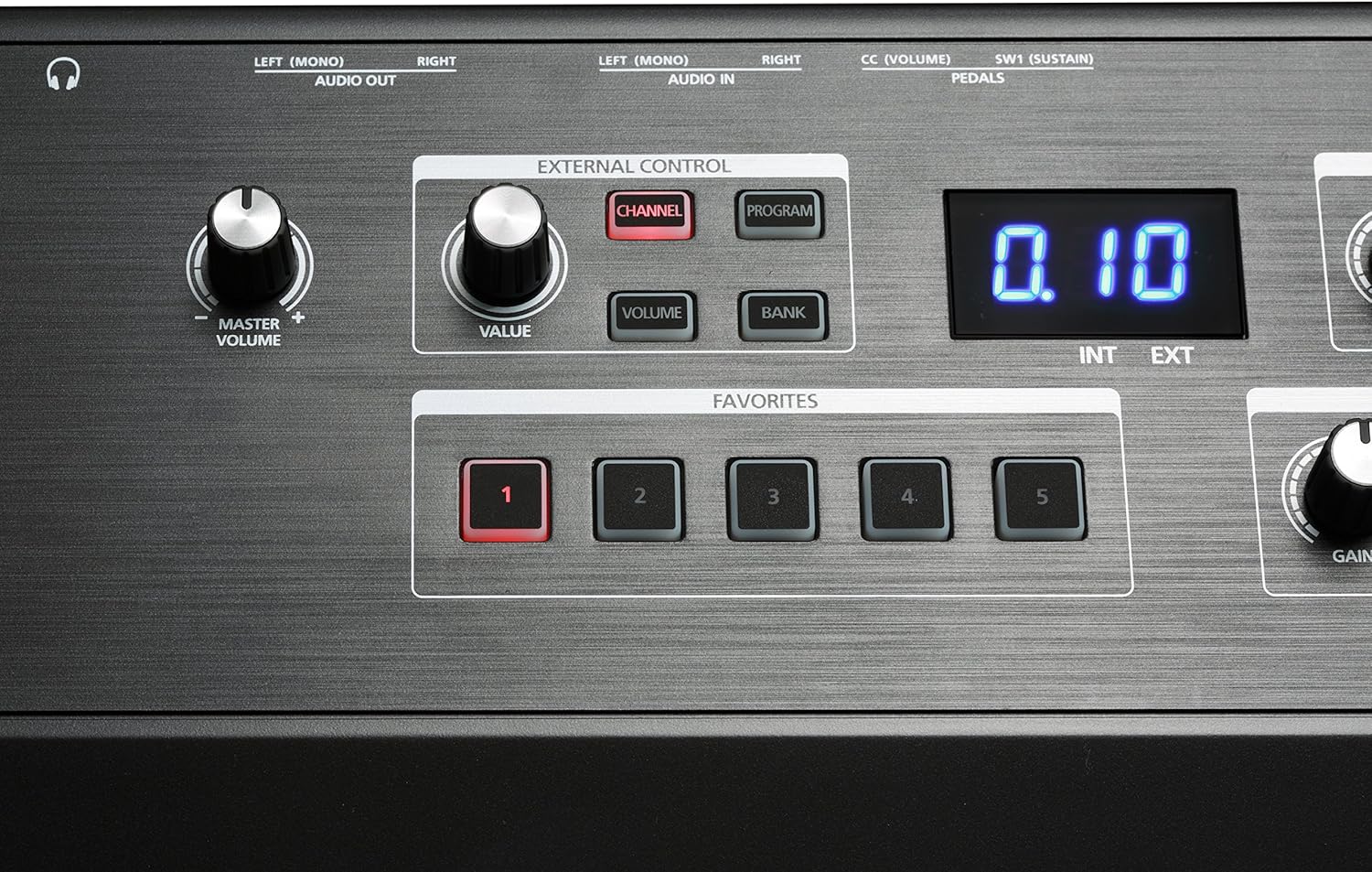
- การควบคุมภายนอก: Section with Channel, Program, Volume, and Bank buttons for controlling external MIDI instruments/software.
- รายการโปรด: Five dedicated buttons for saving and recalling custom settings.
- Pitch/Modulation Wheels: Located on the left side for expressive control.
- Transpose Buttons: Located near the pitch/mod wheels for quick key changes.
การเชื่อมต่อแผงด้านหลัง

The rear panel provides all necessary connections for power, audio, MIDI, and pedals.
- DC IN: ช่องเสียบอะแดปเตอร์ไฟ
- ยูเอสบี: USB-A and USB-B ports for computer connection and USB drive.
- MIDI เข้า/ออก: Standard MIDI connectors for external MIDI devices.
- AUDIO IN (Left/Mono, Right): 1/4" audio jacks for connecting external audio sources like an MP3 player.
- AUDIO OUT (Left/Mono, Right): 1/4" audio jacks for connecting to an ampเครื่องขยายเสียง มิกเซอร์ หรืออินเทอร์เฟซเสียง
- หูฟัง: 6.35mm jack for private practice.
- ช่องต่อแป้นเหยียบ: SW1 (Sustain) and CC (Volume) pedal inputs.
การตั้งค่า
- การจัดวาง: Place the SP1 on a stable, flat surface or a keyboard stand. Ensure adequate ventilation around the instrument.
- การเชื่อมต่อไฟฟ้า: Connect the included power adapter to the DC IN jack on the rear panel of the SP1, then plug the adapter into a suitable AC power outlet.
- เหยียบคันเร่ง: Connect the sustain pedal (if included or purchased separately) to the SW1 (Sustain) jack on the rear panel.
- เอาต์พุตเสียง:
- สำหรับการเชื่อมต่อกับ amplifier or mixer: Use 1/4" cables to connect the AUDIO OUT (Left/Mono, Right) jacks to your audio system.
- For headphones: Plug your headphones into the 6.35mm Headphones jack.
- อินพุตเสียงภายนอก (ตัวเลือกเสริม): To play along with an external audio device (e.g., MP3 player), connect it to the AUDIO IN (Left/Mono, Right) jacks using appropriate cables.
- MIDI/USB Connection (Optional): For connecting to a computer or other MIDI devices, use the USB or MIDI IN/OUT ports.
คำแนะนำการใช้งาน
เปิด/ปิดเครื่อง
To power on the SP1, press the power button located on the rear panel. To power off, press the power button again.
ปรับระดับเสียงหลัก
ใช้ มาสเตอร์ วอลุ่ม knob, located on the left side of the control panel, to adjust the overall output level of the instrument.
การเลือกเสียง
The SP1 organizes its 16 presets into four main categories: Piano, Keyboards, Strings/Pads, and Other.
- Locate the desired sound category section on the control panel.
- กดปุ่มที่เกี่ยวข้อง (เช่น 1 for German D Artis Grand Piano, EP1 for Electric Piano 1) to select a sound. The selected button will illuminate.
- ปรับแต่ง ปริมาณ knob within that category to balance the sound level.
Using Effects (FX)
The SP1 includes four individually adjustable effects.
- ใน FX section, press the button for the desired effect (e.g., เสียงสะท้อน, ประสานเสียง). The button will illuminate when active.
- ใช้ ค่า knob to adjust the intensity or parameter of the selected effect.
- For Delay and Repeat, additional เวลา knobs are available for fine-tuning.
Adjusting Equalization (EQ)
The 3-Band Master EQ allows you to shape the overall tone.
- ใน EQ section, turn the เบส, กลาง, และ เสียงแหลม knobs to boost or cut frequencies.
- การ ได้รับ knob adjusts the overall output level after EQ.
Saving and Recalling Favorites
The SP1 allows you to save up to five custom setups (combinations of sounds, effects, and EQ settings) as Favorites.

- Configure your desired sound, effects, and EQ settings.
- กดปุ่ม บันทึก ปุ่มใน ฟังก์ชั่น ส่วน.
- ในขณะที่ บันทึก button is flashing, press one of the five รายการโปรด buttons (1-5) to store your settings.
- To recall a saved Favorite, simply press the corresponding รายการโปรด ปุ่ม.
Split, Layer, and Dual Modes
These functions allow for combining or dividing sounds across the keyboard.
- แยก: Divides the keyboard into two sections, allowing different sounds to be played on each. Press the แยก ปุ่มเพื่อเปิดใช้งาน
- ชั้น: Stacks two sounds together to be played simultaneously across the entire keyboard. Press the ชั้น ปุ่มเพื่อเปิดใช้งาน
- คู่: Similar to Layer, but often implies a specific combination or a more complex layering setup. Press the คู่ ปุ่มเพื่อเปิดใช้งาน
Refer to the full Kurzweil SP1 manual for detailed instructions on configuring Split, Layer, and Dual modes, including setting split points and selecting sounds for each part.
ทรานสโพส
The transpose function allows you to shift the pitch of the entire keyboard up or down in semitone steps.
ใช้ - buttons located near the pitch/mod wheels to transpose the keyboard.
การซ่อมบำรุง
- การทำความสะอาด: Use a soft, dry cloth to clean the surface of the instrument. For stubborn dirt, a slightly damp สามารถใช้ผ้าเช็ดทำความสะอาดได้ ตามด้วยผ้าแห้งเช็ดอีกครั้ง หลีกเลี่ยงน้ำยาทำความสะอาดที่มีฤทธิ์กัดกร่อน สารละลาย หรือแว็กซ์
- การดูแลรักษาคีย์บอร์ด: Keep the keys clean. If they become dirty, wipe them gently with a soft, damp ผ้า.
- พื้นที่จัดเก็บ: When not in use for extended periods, store the SP1 in a dry, dust-free environment, away from direct sunlight and extreme temperatures.
- การขนส่ง: When transporting the instrument, use a padded case to protect it from physical damage.
การแก้ไขปัญหา
| ปัญหา | สาเหตุที่เป็นไปได้ | สารละลาย |
|---|---|---|
| ไม่มีเสียง |
|
|
| คีย์ไม่ตอบสนอง |
|
|
| เสียงเพี้ยน |
|
|
If you encounter issues not covered here, please consult the Kurzweil support webเว็บไซต์หรือติดต่อฝ่ายบริการลูกค้า
ข้อมูลจำเพาะ
| คุณสมบัติ | รายละเอียด |
|---|---|
| ชื่อรุ่น | SP1 |
| หมายเลขรุ่นสินค้า | AMS-SP1-LB |
| จำนวนคีย์ | 88 |
| ประเภทแป้นพิมพ์ | Fully-weighted hammer-action |
| เสียง | 16 programs (Piano, EP, Strings, Pads, Woodwinds, Basses) |
| โพลีโฟนี | 256 เสียง |
| ผลกระทบ | Reverb, Chorus, Tremolo, Delay, Repeat |
| อีควอไลเซอร์ | 3-Band Master EQ |
| การเชื่อมต่อ | 1/4" audio jacks (In/Out), USB-A, USB-B, MIDI In/Out, 6.35mm Headphones Jack, Pedal Inputs (Sustain, CC) |
| แหล่งพลังงาน | USB (via power adapter) |
| ขนาด (กว้าง x ยาว x สูง) | 52.5 x 15 x 5.75 นิ้ว |
| น้ำหนักสินค้า | 6.6 ปอนด์ (ประมาณ 3 กก.) |
| สี | สีดำ |
| ยูพีซี | 883793413512 |
การรับประกันและการสนับสนุน
For warranty information and technical support, please refer to the official Kurzweil webหรือติดต่อตัวแทนจำหน่ายที่ได้รับอนุญาต เก็บใบเสร็จรับเงินไว้เป็นหลักฐานการซื้อ