
1. สินค้าหมดview
The Riwbox XBT-80 are folding stereo wireless Bluetooth headphones designed for versatile use with various devices. They feature 50mm large diameter aperture drivers for clear audio and a built-in microphone for communication. The design prioritizes comfort with memory-protein ear cushions and an adjustable headband.

รูปที่ 1 : ด้านหน้า view of the Riwbox XBT-80 Bluetooth Headphones.
These headphones support both wireless Bluetooth connectivity and a wired connection via the included audio cable, ensuring continuous use even when the battery is depleted. The foldable design enhances portability, making them suitable for travel and daily activities.
2. อะไรอยู่ในกล่อง
- Riwbox XBT-80 Bluetooth Headphones
- สายสัญญาณเสียง (แจ็ค 3.5 มม.)
- สายชาร์จ USB
- คู่มือการใช้งาน
3. การควบคุมและฟังก์ชั่น
Familiarize yourself with the control buttons located on the ear cup for easy operation.

Figure 2: Labeled diagram of headphone controls and ports.
- ปุ่มเปิด/ปิด: กดค้างเพื่อเปิด/ปิด
- ปุ่มเล่น/หยุดชั่วคราว: กดเพื่อเล่นหรือหยุดเสียงชั่วคราว
- เพิ่มระดับเสียง (+): Long press to increase volume. Short press for next song.
- ลดเสียงลง (-): กดค้างเพื่อลดระดับเสียง กดสั้นๆ เพื่อเล่นเพลงก่อนหน้า
- ปุ่มโหมด: Switches between Bluetooth Mode and Card Mode (if applicable).
- ปุ่มโทรออก: Press to answer/end calls. Long press to reject calls.
- ไมโครโฟน: สำหรับการป้อนข้อมูลด้วยเสียงระหว่างการโทร
- ช่องเสียบ AUX 3.5 มม.: สำหรับการเชื่อมต่อเสียงแบบมีสาย
- Charge USB Port: สำหรับการชาร์จหูฟัง
- ไฟแสดงสถานะ LED: แสดงสถานะพลังงาน การจับคู่ และการชาร์จ
4. การตั้งค่า
4.1. การชาร์จหูฟัง
Before first use, fully charge the headphones. Connect the USB charging cable to the headphone's charge port and the other end to a USB power source (e.g., computer, wall adapter). The LED indicator will show charging status.
- เวลาในการชาร์จ: ประมาณ 3 ชั่วโมงสำหรับการชาร์จเต็ม
- อายุการใช้งานแบตเตอรี่: Up to 13 hours of music playback or 15 hours of talk time on a single charge.
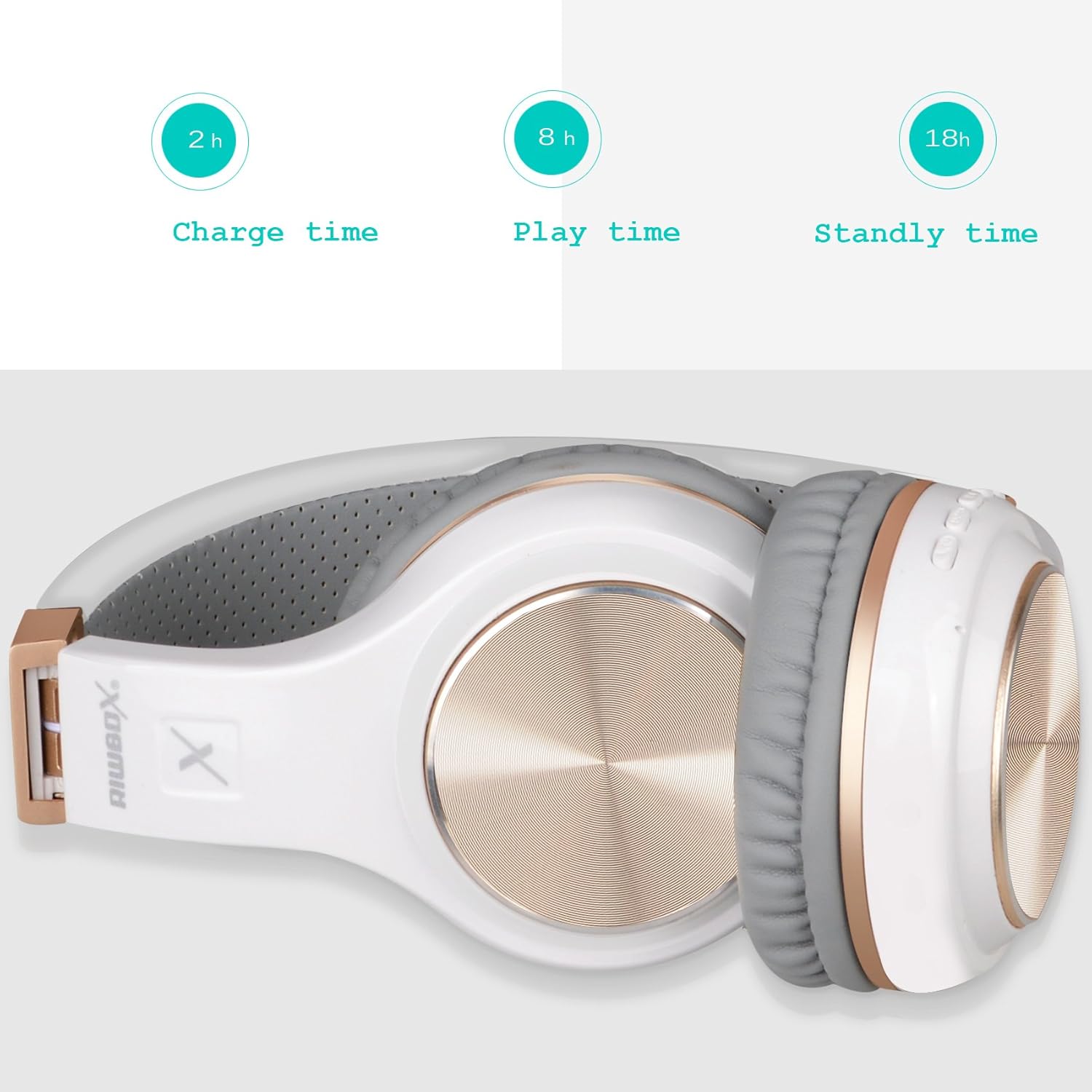
Figure 3: Headphones folded, illustrating battery performance metrics.
4.2. การจับคู่บลูทู ธ
- ตรวจสอบให้แน่ใจว่าหูฟังได้รับการชาร์จและปิดเครื่องแล้ว
- กดปุ่มเปิด/ปิดค้างไว้จนกว่าไฟ LED จะกะพริบเป็นสีน้ำเงินและสีแดงสลับกัน ซึ่งแสดงว่าเข้าสู่โหมดจับคู่แล้ว
- บนอุปกรณ์ของคุณ (สมาร์ทโฟน แท็บเล็ต พีซี) เปิดใช้งานบลูทูธและค้นหาอุปกรณ์ที่มีอยู่
- เลือก "Riwbox XBT-80" จากรายการอุปกรณ์ที่พบ
- เมื่อเชื่อมต่อแล้ว ไฟ LED จะแสดงแสงสีน้ำเงินค้าง หรือกะพริบสีน้ำเงินช้าๆ
4.3. การเชื่อมต่อแบบมีสาย
To use the headphones in wired mode, connect one end of the provided 3.5mm audio cable to the AUX jack on the headphones and the other end to your audio device's 3.5mm audio output. The headphones will function as a wired headset and do not require battery power in this mode.
5. คู่มือการใช้งาน
- เปิด/ปิดเครื่อง: กดปุ่มเปิด/ปิดค้างไว้
- เล่น/หยุดเพลง: กดปุ่มเล่น/หยุดชั่วคราว
- ปรับระดับเสียง: กดปุ่ม '+' ค้างไว้เพื่อเพิ่มระดับเสียง กดปุ่ม '-' ค้างไว้เพื่อลดระดับเสียง
- เพลงถัดไป / ก่อนหน้า: กดปุ่ม '+' สั้นๆ เพื่อไปยังแทร็กถัดไป กดปุ่ม '-' สั้นๆ เพื่อไปยังแทร็กก่อนหน้า
- รับ/วางสาย: กดปุ่มโทร
- ปฏิเสธสาย: Long press the Call button.
- โหมดสวิตซ์: Press the Mode button to cycle through available modes (e.g., Bluetooth, SD Card).
6. การบำรุงรักษา
- Keep the headphones dry. Do not expose them to water or moisture. The headphones are not water resistant.
- ทำความสะอาดฟองน้ำรองหูและแถบคาดศีรษะด้วยผ้าแห้งนุ่มๆ หลีกเลี่ยงการใช้สารเคมีรุนแรงหรือวัสดุที่มีฤทธิ์กัดกร่อน
- Store the headphones in a cool, dry place, away from direct sunlight and extreme temperatures. The foldable design allows for compact storage.
- หลีกเลี่ยงการทำหูฟังตกหรือได้รับแรงกระแทกรุนแรง
7 การแก้ไขปัญหา
| ปัญหา | วิธีแก้ปัญหาที่เป็นไปได้ |
|---|---|
| หูฟังไม่สามารถเปิดเครื่องได้ | ตรวจสอบให้แน่ใจว่าหูฟังชาร์จเต็มแล้ว เชื่อมต่อกับแหล่งจ่ายไฟโดยใช้สายชาร์จ USB |
| ไม่สามารถจับคู่กับอุปกรณ์ได้ | Ensure headphones are in pairing mode (LED flashing blue/red). Turn off and on Bluetooth on your device. Move headphones closer to the device. Clear previous Bluetooth connections on your device if necessary. |
| ไม่มีเสียงหรือเสียงเบา | Check volume levels on both headphones and the connected device. Ensure the headphones are properly paired or the audio cable is securely connected. Test with another audio source. |
| ไมโครโฟนไม่ทำงาน | Ensure the headphones are connected via Bluetooth (microphone functionality is typically not available in wired mode unless the cable supports it). Check microphone settings on your device. |
| การเชื่อมต่อไม่ต่อเนื่อง | Ensure the headphones are within the 10-meter Bluetooth range. Avoid obstacles between the headphones and the device. Reduce interference from other wireless devices. |
8. ข้อมูลจำเพาะ
| คุณสมบัติ | รายละเอียด |
|---|---|
| ยี่ห้อ | ริวบ็อกซ์ |
| หมายเลขรุ่น | เอ็กซ์บีที-80 |
| การวางตำแหน่งหู | ครอบหู |
| เทคโนโลยีการเชื่อมต่อ | บลูทูธ, แบบมีสาย (แจ็ค 3.5 มม.) |
| เวอร์ชันบลูทูธ | 5.3 |
| ช่วงบลูทูธ | 10 เมตร |
| ขนาดไดร์เวอร์เสียง | 50 มิลลิเมตร |
| อิมพีแดนซ์ | 32 โอห์ม |
| การตอบสนองความถี่ | ความถี่ 2 กิโลเฮิรตซ์ |
| เวลาในการชาร์จแบตเตอรี่ | 3 ชั่วโมง |
| อายุการใช้งานแบตเตอรี่โดยเฉลี่ย | 13 hours (music), 15 hours (talk) |
| ประเภทการควบคุม | การควบคุมระดับเสียง, รีโมท |
| คุณสมบัติเพิ่มเติม | พับได้ น้ำหนักเบา มีไมโครโฟนในตัว |
| ระดับความต้านทานต่อน้ำ | ไม่ทนน้ำ |
| วัสดุของตู้หุ้ม | พลาสติก |
9. การรับประกันและการสนับสนุน
The Riwbox XBT-80 Bluetooth Headphones come with a การรับประกันจากผู้ผลิต 1 ปี.
For any issues or support inquiries, please refer to the contact information provided with your purchase documentation or visit the official Riwbox website. The manufacturer is committed to assisting customers with product-related concerns.