
1. บทนำ
ขอบคุณสำหรับการซื้อasing the CONTEC SolarView Compact SV-CPT-MC310. This device is designed for efficient monitoring and data logging of solar power generation. It integrates essential functions such as power measurement, data display, and storage into a compact form factor. This manual provides detailed instructions for the proper setup, operation, and maintenance of your device.
โปรดอ่านคู่มือนี้อย่างละเอียดก่อนใช้งานผลิตภัณฑ์ เพื่อให้มั่นใจได้ถึงความปลอดภัยและประสิทธิภาพสูงสุด เก็บคู่มือนี้ไว้เพื่อใช้อ้างอิงในอนาคต
2. สินค้าหมดview
The CONTEC SolarView Compact SV-CPT-MC310 is a versatile device for solar power monitoring. Its slim design houses comprehensive features including a screen display, network connectivity, RS-485 communication, and an SD card slot for data storage.
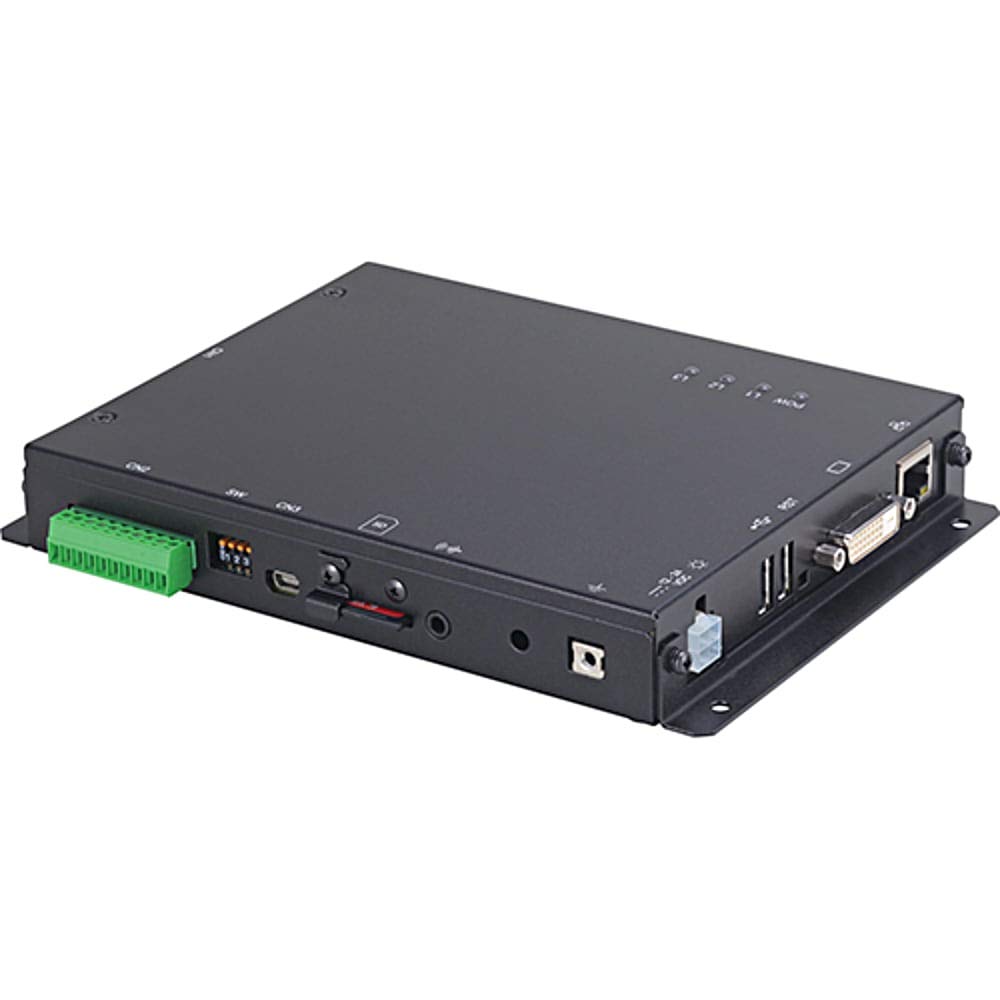
รูปที่ 1: ด้านหน้า view of the CONTEC SolarView Compact SV-CPT-MC310. This image illustrates the compact size and the integrated display panel of the device, highlighting its user-friendly interface for monitoring solar power data.
3. ข้อมูลด้านความปลอดภัย
ปฏิบัติตามข้อควรระวังด้านความปลอดภัยต่อไปนี้เสมอเพื่อป้องกันการบาดเจ็บและความเสียหายต่ออุปกรณ์:
- Ensure the device is installed by qualified personnel.
- อย่าให้อุปกรณ์สัมผัสกับอุณหภูมิ ความชื้น หรือแสงแดดโดยตรง
- โปรดตัดกระแสไฟก่อนดำเนินการบำรุงรักษาหรือติดตั้งใดๆ
- ใช้เฉพาะอะแดปเตอร์และสายไฟที่ระบุไว้เท่านั้น
- Do not attempt to open or repair the device yourself. Refer to authorized service personnel.
4. การตั้งค่า
4.1 การแกะบรรจุภัณฑ์และการตรวจสอบ
Carefully remove the device from its packaging. Inspect for any signs of damage during transit. If any damage is found, contact your supplier immediately.
4.2 การติดตั้งอุปกรณ์
แสงอาทิตย์View Compact SV-CPT-MC310 is designed for indoor installation. Choose a location that is dry, well-ventilated, and free from direct sunlight or excessive heat sources. Ensure adequate space around the device for ventilation and cable connections.
- เลือกพื้นผิวสำหรับติดตั้งที่เหมาะสม
- Secure the device using appropriate screws or mounting brackets (not included).
4.3 การเชื่อมต่อทางไฟฟ้า
Connect the power supply and communication cables as follows:
- กำลังไฟเข้า: Connect the DC power adapter to the device's power input port. Ensure the power source matches the device's voltagข้อกำหนดอี
- การสื่อสาร RS-485: Connect the RS-485 cable to the designated port for communication with other devices or systems.
- เครือข่าย (อีเธอร์เน็ต): For network connectivity, plug an Ethernet cable into the RJ45 port.
- การ์ด SD: Insert a compatible SD card into the SD card slot for data logging. Ensure the card is correctly oriented.
Warning: Ensure all connections are secure before applying power.
5. คู่มือการใช้งาน
5.1 การเปิดเครื่องและการบูตครั้งแรก
Once all connections are made, apply power to the device. The device will perform a self-test and the display will show the boot-up sequence. After successful boot, the main monitoring screen will appear.
5.2 การนำทางในส่วนติดต่อผู้ใช้
The device features an integrated display and control buttons. Use the navigation buttons to scroll through menus and select options.
- ปุ่มขึ้น/ลง: Navigate through menu items or adjust values.
- ปุ่มป้อน: ยืนยันการเลือกหรือเข้าสู่เมนูย่อย
- ปุ่มย้อนกลับ/ออก: กลับไปยังหน้าจอก่อนหน้าหรือออกจากเมนู
5.3 Monitoring Solar Power Data
The main screen typically displays real-time data such as:
- Current Power Generation (W)
- Daily Energy Yield (Wh)
- Total Energy Yield (kWh)
- สถานะระบบ
Refer to the on-screen menu for detailed historical data and system settings.
5.4 การบันทึกและส่งออกข้อมูล
The device automatically logs data to the inserted SD card. To access or export data:
- Navigate to the "Data Management" or "Log" menu.
- Select the desired time range or data type.
- Choose the "Export" option (if available) to transfer data via network or remove the SD card and access data on a computer.
6. การบำรุงรักษา
6.1 การทำความสะอาด
Keep the device clean and free from dust. Use a soft, dry cloth to wipe the exterior. Do not use liquid cleaners or abrasive materials.
การอัปเดตเฟิร์มแวร์ 6.2 รายการ
Periodically check the CONTEC website for firmware updates. Follow the provided instructions carefully for any update procedures to ensure optimal performance and access to new features.
6.3 การจัดการการ์ด SD
Regularly back up data from the SD card. Consider replacing the SD card periodically, especially if it shows signs of wear or data corruption, to ensure reliable data logging.
7 การแก้ไขปัญหา
| ปัญหา | สาเหตุที่เป็นไปได้ | สารละลาย |
|---|---|---|
| อุปกรณ์ไม่เปิดเครื่อง | ไม่มีแหล่งจ่ายไฟ; อะแดปเตอร์แปลงไฟชำรุด; การเชื่อมต่อหลวม | Check power cable connection. Ensure power adapter is functional. Verify power outlet. |
| No data displayed. | Sensor not connected; communication error; incorrect settings. | Verify sensor connections. Check RS-485 or network settings. Restart the device. |
| มีข้อผิดพลาดของการ์ด SD | SD card not inserted correctly; incompatible card; corrupted card. | Reinsert SD card. Try a different compatible SD card. Format the SD card (data will be lost). |
| ความล้มเหลวในการเชื่อมต่อเครือข่าย | Ethernet cable disconnected; incorrect network settings; router issue. | Check Ethernet cable. Verify network settings on the device. Restart router/modem. |
If the problem persists after attempting these solutions, please contact CONTEC technical support.
8. ข้อมูลจำเพาะ
| คุณสมบัติ | รายละเอียด |
|---|---|
| หมายเลขรุ่น | SV-CPT-MC310 |
| ขนาด (กว้าง x ยาว x สูง) | 14 x 17 x 3 ซม. |
| น้ำหนัก | 650 กรัม |
| อินเทอร์เฟซการสื่อสาร | Network (Ethernet), RS-485 |
| การจัดเก็บข้อมูล | การ์ด SD |
| ผู้ผลิต | คอนเทค |
9. การรับประกันและการสนับสนุน
9.1 ข้อมูลการรับประกัน
CONTEC warrants this product against defects in materials and workmanship for a period specified at the time of purchase. Please retain your proof of purchase. The warranty does not cover damage caused by improper installation, misuse, unauthorized repairs, or natural disasters.
For detailed warranty terms and conditions, please refer to the warranty card included with your product or visit the official CONTEC webเว็บไซต์.
9.2 การสนับสนุนด้านเทคนิค
If you require technical assistance or have questions regarding the operation of your SolarView Compact SV-CPT-MC310, please contact CONTEC technical support through their official webไซต์หรือข้อมูลการติดต่อที่ระบุไว้ในเอกสารผลิตภัณฑ์ของคุณ
When contacting support, please have your model number (SV-CPT-MC310) and a detailed description of the issue ready.