
Walfront HA-4012
Walfront Islamic Azan Alarm Clock User Manual
รุ่น : HA-4012
การแนะนำ
The Walfront Islamic Azan Alarm Clock is a digital prayer clock designed to assist Muslims with daily prayer times. It features automatic Azan time calculation for various cities, multiple alarm functions including a special Fajr alarm, temperature display, and a full-screen light for visibility in the dark. This manual provides instructions for setting up, operating, and maintaining your clock.

ภาพ: ด้านหน้า view of the Walfront Islamic Azan Alarm Clock, displaying time, date, and prayer times.
คุณสมบัติหลัก
- Automatic Azan Times: Pre-programmed Azan times for over 1500 cities worldwide, with five daily prayer times.
- Special Fajr Alarm: A unique alarm that adjusts daily relative to the Fajr Azan time, ensuring you wake up consistently after Fajr.
- ฟังก์ชันเลื่อนปลุก 5 นาที: Allows for a brief delay before the alarm sounds again.
- Full Screen Light: Provides illumination for easy viewในสภาพแสงน้อย
- Multi-Display: Shows current time, date, week, and daylight saving time status.
- แสดงอุณหภูมิ: แสดงอุณหภูมิเป็นเซลเซียสหรือฟาเรนไฮต์
- ปริมาณที่ปรับได้: Azan volume can be controlled via a dial switch or set to a beep sound.
- Makkah Music: Includes Makkah music for prayer.
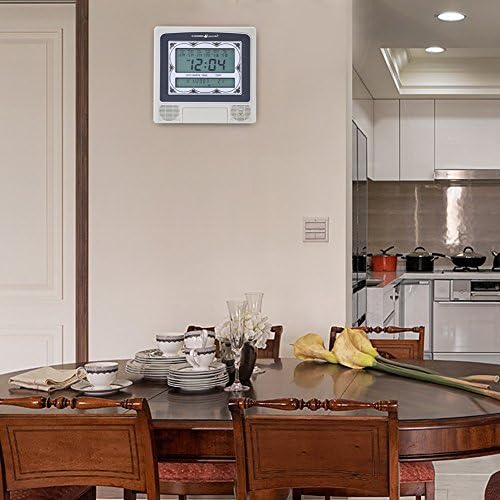
Image: The Walfront Islamic Azan Alarm Clock mounted on a wall, highlighting its function as a Muslim prayer clock.
การตั้งค่า
Before using your clock, ensure it is powered correctly. The clock operates on battery power (batteries not included) or via a DC 6V 300mA power adapter (if applicable, check product packaging for power adapter inclusion).
1. การเปิดเครื่องครั้งแรกและการตั้งค่าพื้นฐาน
- Insert batteries into the designated compartment or connect the power adapter.
- The clock display should illuminate.
- ค้นหาตำแหน่ง ชุด button, typically on the back or side of the unit.
- กด ชุด เพื่อเข้าสู่โหมดการตั้งค่า
- ใช้ UP (▲) และ ลง (▼) buttons to adjust values (e.g., hour, minute, year, month, day).
- กด ชุด again to confirm each setting and move to the next parameter.
2. Setting Your City for Azan Times
The clock has pre-programmed Azan times for 1500 cities. You need to select your current city for accurate prayer times.
- In setting mode, navigate to the city selection option (this may be indicated by a city code or name on the display).
- ใช้ UP และ ลง buttons to scroll through the available city codes or names until you find your location. Refer to the included city code list if provided with your product.
- Once your city is selected, press ชุด to confirm. The clock will automatically calculate the Azan times for your chosen city.
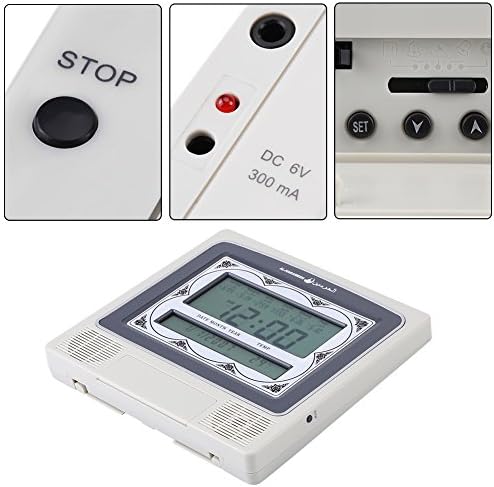
ภาพ: รายละเอียด view of the clock's control buttons (STOP, SET, Y, A) and the DC 6V 300mA power input port.
คำแนะนำการใช้งาน
1. Daily Alarm and Fajr Alarm
- The clock provides five daily Azan times automatically based on your selected city.
- To set a specific daily alarm (non-Azan related), navigate to the alarm setting mode using the ชุด button. Adjust the desired alarm time using the UP และ ลง ปุ่ม
- The special Fajr alarm function allows you to set an alarm relative to the Fajr Azan. For example, if you set it for "5 minutes after Fajr," the alarm time will automatically adjust each day to maintain this interval.
2. ฟังก์ชั่นเลื่อนปลุก
เมื่อสัญญาณเตือนดังขึ้น ให้กดปุ่ม หยุด button (or a designated snooze button if available) to activate the 5-minute snooze function. The alarm will sound again after 5 minutes.
3. การควบคุมระดับเสียง
The Azan volume can be adjusted using the dial switch, typically located on the side or back of the clock. You can also set the clock to beep 3 times instead of playing the full Azan by adjusting this setting in the menu or via the dial.
4. การแสดงอุณหภูมิ
The clock displays the current room temperature. You can switch between Celsius and Fahrenheit units through the settings menu (refer to the setup section for navigating settings).
5. Full Screen Light
The full screen light activates to improve visibility of the display in dark environments. This feature is typically automatic or can be toggled via a dedicated button.
การซ่อมบำรุง
- การทำความสะอาด: Wipe the clock with a soft, dry cloth. Do not use abrasive cleaners or solvents, as they may damage the display or casing.
- การเปลี่ยนแบตเตอรี่: If the display dims or functions become erratic, replace the batteries. Ensure correct polarity when inserting new batteries.
- การจัดวาง: Place the clock on a stable surface or mount it securely on a wall. Avoid direct sunlight, extreme temperatures, or high humidity.
การแก้ไขปัญหา
| ปัญหา | สาเหตุที่เป็นไปได้ | สารละลาย |
|---|---|---|
| จอแสดงผลว่างเปล่าหรือมืดลง | แบตเตอรี่อ่อนหรือหมด; อะแดปเตอร์แปลงไฟไม่ได้เชื่อมต่อหรือชำรุด | Replace batteries or ensure power adapter is securely connected and functional. |
| เวลาอะซานไม่ถูกต้อง | Incorrect city selected; incorrect date/time set. | Verify and re-select your city. Ensure the current date and time are set accurately. |
| สัญญาณเตือนภัยไม่ดัง | Alarm is turned off; volume is too low or muted. | Check alarm settings to ensure it is enabled. Adjust the volume dial. |
| ปุ่มต่างๆ ไม่ตอบสนอง | ข้อผิดพลาดของซอฟต์แวร์ชั่วคราว; แบตเตอรี่เหลือน้อย | Remove and re-insert batteries (power cycle). Replace batteries if low. |
ข้อมูลจำเพาะ
| ยี่ห้อ | Walfront |
| แบบอย่าง | เอชเอ-4012 |
| ประเภทจอภาพ | ดิจิตอล |
| สี | สีเทา, สีขาว |
| ขนาดสินค้า | กว้าง 8.8 นิ้ว x สูง 8.4 นิ้ว |
| น้ำหนักสินค้า | 1.25 ปอนด์ (0.57 กิโลกรัม) |
| แหล่งพลังงาน | ใช้พลังงานจากแบตเตอรี่ (ไม่รวมแบตเตอรี่) |
| วัสดุ | พลาสติก |
| ประเภทการติดตั้ง | ติดผนัง |
| คุณสมบัติพิเศษ | Alarm, Daylight Saving, Temperature Display |
| ยูพีซี | 663862629408 |
การรับประกันและการสนับสนุน
This Walfront product is protected by a รับประกันตลอดอายุการใช้งาน. Walfront is committed to customer satisfaction. If you encounter any issues with the product quality or functionality, please contact Walfront customer support for assistance.
For support, please refer to the contact information provided with your product packaging or visit the official Walfront webเว็บไซต์.
Ask a question about this manual
Ask about setup, troubleshooting, compatibility, parts, safety, or missing instructions. Manuals+ will review the question and use this page’s manual context to help answer it.