
การแนะนำ
This manual provides instructions for the setup, operation, maintenance, and troubleshooting of your Summer Baby Pixel Extra Video Camera. This camera is designed to expand your existing Summer Baby Pixel monitoring system, allowing you to monitor multiple rooms or children with a single parent unit. It is compatible only with the Summer Baby Pixel monitor system and can expand your system up to a total of four cameras.

รูปที่ 1: Summer Baby Pixel Extra Video Camera. This image shows the compact design of the camera unit.
เนื้อหาแพ็คเกจ
- Summer Baby Pixel Extra Video Camera
- อะแดปเตอร์แปลงไฟ
- Wall Mount Hardware (if included)
โปรดตรวจสอบให้แน่ใจว่ามีส่วนประกอบครบถ้วนก่อนดำเนินการติดตั้ง
การติดตั้งและการตั้งค่า
การวางตำแหน่งกล้อง
วางตำแหน่งกล้องในตำแหน่งที่ให้ภาพที่ชัดเจน view of the desired monitoring area. Ensure the camera is placed out of reach of children. The camera can be placed on a flat surface or wall-mounted.
การจ่ายไฟให้กับกล้อง
- เชื่อมต่ออะแดปเตอร์ไฟฟ้าเข้ากับพอร์ตอินพุตไฟฟ้าของกล้อง
- เสียบอะแดปเตอร์จ่ายไฟเข้ากับเต้ารับไฟฟ้ามาตรฐาน
- The camera will power on automatically.
Pairing the Extra Camera with Your Parent Unit
To add the extra camera to your existing Summer Baby Pixel monitoring system, follow these steps:
- Ensure your parent unit is powered on and within range of the new camera.
- Access the camera management menu on your parent unit (refer to your main Summer Baby Pixel monitor manual for specific menu navigation).
- Select the option to "Add Camera" or "Pair Camera".
- Follow the on-screen prompts on your parent unit. This typically involves pressing a pairing button on the camera unit (often located on the back or bottom) within a specified timeframe.
- Once successfully paired, the camera's video feed will appear on your parent unit.
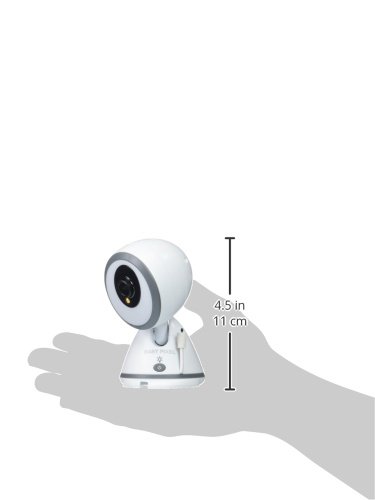
รูปที่ 2: Camera dimensions. The camera measures approximately 4.5 inches (11 cm) in height.
คำแนะนำการใช้งาน
This extra camera integrates seamlessly with your Summer Baby Pixel parent unit, offering enhanced monitoring capabilities.
คุณสมบัติหลัก
- Multi-Camera Monitoring: Expand your system to monitor up to 4 cameras from a single parent unit.
- รีโมทคอนโทรล: Control camera functions such as pan, tilt, and zoom directly from your parent unit. The camera mimics your movement for a better view.
- การซูม 3 ระดับ: Digitally zoom in on your child for a closer look.
- Moonlite Night Vision Boost: Provides a clearer, temporary, in-color view ในสภาวะแสงน้อย
- SleepZone Virtual Boundary: Set a virtual boundary box on your parent unit. The system will alert you if your child exits this defined safe space.
- Voice-Activated Video On/Off (VOX): The parent unit screen can automatically activate when sound is detected from the camera, conserving battery life.
- แสดงอุณหภูมิ: The parent unit displays the nursery temperature detected by the camera.
- ระยะสัญญาณไร้สาย: Enjoy a wireless range of up to 1,000 feet (300 meters) in open spaces.

รูปที่ 3: Example of the Summer Baby Pixel Monitor System. This image illustrates the parent unit and camera working together.
การซ่อมบำรุง
เพื่อให้กล้องของคุณทำงานได้อย่างมีประสิทธิภาพสูงสุดและใช้งานได้ยาวนาน โปรดปฏิบัติตามคำแนะนำในการบำรุงรักษาเหล่านี้:
- การทำความสะอาด: ใช้ผ้าแห้งเนื้อนุ่มเช็ดทำความสะอาดเลนส์และตัวกล้อง ห้ามใช้สารทำความสะอาดที่มีฤทธิ์กัดกร่อนหรือตัวทำละลาย
- พลัง: Always use the provided power adapter. Disconnect the power adapter from the outlet when not in use for extended periods.
- สิ่งแวดล้อม: Keep the camera in a dry environment, away from direct sunlight, heat sources, and moisture. The camera has an IP65 waterproof rating, but it is not designed for submersion.
การแก้ไขปัญหา
If you encounter issues with your Summer Baby Pixel Extra Video Camera, refer to the following common problems and solutions:
| ปัญหา | สาเหตุที่เป็นไปได้ / วิธีแก้ไข |
|---|---|
| No video feed from the camera. |
|
| Poor video quality or signal interference. |
|
| Parent unit screen turns on frequently due to sound (VOX). |
|
| Camera pan/tilt/zoom not responding. |
|
| การอ่านอุณหภูมิไม่แม่นยำ |
|
ข้อมูลจำเพาะ
- หมายเลขรุ่น: 29970
- การเชื่อมต่อ: ไร้สาย (Wi-Fi)
- แหล่งพลังงาน: สายไฟ
- ความละเอียดการจับภาพวิดีโอ: 720p
- การมองเห็นตอนกลางคืน: สีกลางคืน
- วิธีการควบคุม: Remote (via parent unit)
- ประเภทการติดตั้ง: ติดผนัง
- ระดับการกันน้ำ: IP65
- ขนาดสินค้า: 3 x 3 x 4.75 นิ้ว
- น้ำหนักสินค้า: 16 ออนซ์
- จำนวนช่องสัญญาณ: รองรับกล้องได้สูงสุด 4 ตัว
ข้อมูลการรับประกัน
This Summer Baby Pixel Extra Video Camera is covered by a การรับประกันจากผู้ผลิต 1 ปี นับจากวันที่ซื้อ โปรดเก็บหลักฐานการซื้อไว้เพื่อใช้ในการเรียกร้องการรับประกัน การรับประกันครอบคลุมข้อบกพร่องในวัสดุและฝีมือการผลิตภายใต้การใช้งานปกติ ไม่ครอบคลุมความเสียหายที่เกิดจากการใช้งานผิดวิธี อุบัติเหตุ การซ่อมแซมโดยไม่ได้รับอนุญาต หรือการสึกหรอตามปกติ
การสนับสนุนลูกค้า
For further assistance, technical support, or warranty inquiries, please contact Summer Infant customer service. Refer to the contact information provided in your original Summer Baby Pixel monitor system manual or visit the official Summer Infant webเว็บไซต์.
ยี่ห้อ: ซัมเมอร์เอเพน