
1. บทนำ
This manual provides instructions for the safe and efficient use of your Woods 50012WD 2-Outlet Outdoor 24-Hour Heavy Duty Mechanical Timer. This device is designed to automate the on/off cycles of outdoor electrical devices, such as seasonal lighting or pond pumps, for convenience and energy saving.
The timer features two grounded outlets and a durable, weather-resistant housing suitable for outdoor use. Please read this manual thoroughly before installation and operation.
2. ข้อมูลด้านความปลอดภัยที่สำคัญ
คำเตือน: เพื่อลดความเสี่ยงจากไฟไหม้ ไฟฟ้าช็อต หรือการบาดเจ็บ ควรปฏิบัติตามข้อควรระวังด้านความปลอดภัยขั้นพื้นฐานเหล่านี้เสมอ:
- Do not immerse the timer in water or expose it to direct water spray. It is weather-resistant, not waterproof.
- Ensure the timer is plugged into a Ground Fault Circuit Interrupter (GFCI) protected outlet when used outdoors.
- Do not exceed the electrical ratings of the timer: 125V, 15A, 1875W, 60Hz.
- ควรดึงปลั๊กตัวตั้งเวลาออกจากแหล่งจ่ายไฟทุกครั้งก่อนทำความสะอาดหรือบำรุงรักษา
- ห้ามใช้กับสายไฟต่อพ่วงที่ไม่ได้รับการจัดอันดับให้ใช้ภายนอกอาคาร
- ให้เด็กอยู่ห่างจากตัวจับเวลาและอุปกรณ์ที่เชื่อมต่อ
- Do not disassemble the timer. There are no user-serviceable parts inside.
- Ensure all connections are secure and dry before applying power.
3. เนื้อหาบรรจุภัณฑ์
- Woods 50012WD Outdoor Mechanical Timer
- คู่มือการใช้งาน (เอกสารนี้)
4. สินค้าหมดview
The Woods 50012WD timer features a rotating dial with segments for setting ON/OFF times, a manual override switch, and two grounded outlets.
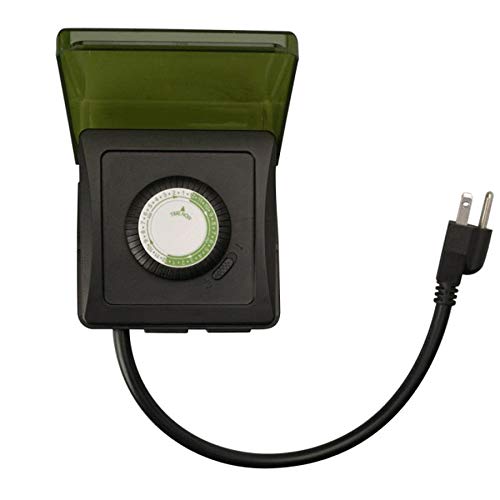
ภาพที่ 1: ด้านหน้า view of the Woods 50012WD Outdoor Mechanical Timer. The timer is black with a green central dial and a short power cord extending from the bottom. Two grounded outlets are visible on the side.
5. การตั้งค่าและการติดตั้ง
- เลือกตำแหน่ง: Select a suitable outdoor location that is protected from direct heavy rain and snow, preferably under an overhang or in a sheltered area. Ensure the timer is placed on a stable surface or mounted securely.
- เสียบปลั๊กตัวตั้งเวลา: Insert the timer's power cord into a 125V, 60Hz GFCI-protected outdoor electrical outlet.
- เชื่อมต่ออุปกรณ์: Plug the devices you wish to control into the two grounded outlets on the timer. Ensure the total wattagกำลังไฟรวมของอุปกรณ์ที่เชื่อมต่อต้องไม่เกิน 1875 วัตต์
6. คู่มือการใช้งาน
The Woods 50012WD is a 24-hour mechanical timer. Its operation relies on setting the current time and then pushing down segments on the dial to define ON periods.
6.1 การตั้งเวลาปัจจุบัน
- Locate the rotating dial on the front of the timer. The dial is marked with 24 hours (1-24 or AM/PM indicators).
- Rotate the entire dial clockwise until the current time aligns with the "TIME NOW" arrow or indicator on the timer's housing. For example, if it's 6 PM, align the "18" (or "6 PM") mark with the indicator.
6.2 Setting ON/OFF Times
The dial is surrounded by small segments. Each segment typically represents a 15 or 30-minute interval. Pushing a segment ลง activates the connected device during that time interval. Pulling a segment up deactivates the device.
- Identify the time periods when you want your connected devices to be ON.
- For each desired ON period, push the corresponding segments on the dial ลง.
- For all other times, ensure the segments are pulled up.
- The timer will now cycle ON and OFF according to your settings every 24 hours.
6.3 สวิตช์ควบคุมด้วยตนเอง
The timer includes a manual override switch, usually located near the dial. This switch allows you to bypass the programmed settings.
- ตั้งเวลาเปิด: The timer will operate according to the programmed ON/OFF segments.
- เปิดตลอดเวลา: The connected devices will remain ON, overriding any programmed OFF times.
- ปิดเสมอ: The connected devices will remain OFF, overriding any programmed ON times.
Refer to the specific markings on your timer for the exact positions of the manual override switch.
7. การบำรุงรักษา
- การทำความสะอาด: ถอดปลั๊กตัวตั้งเวลาออกจากเต้ารับไฟฟ้าก่อนทำความสะอาด เช็ดภายนอกด้วยผ้าเนื้อนุ่มและแห้งamp ผ้า ห้ามใช้สารทำความสะอาดที่มีฤทธิ์กัดกร่อนหรือตัวทำละลาย
- พื้นที่จัดเก็บ: หากต้องเก็บรักษานาฬิกาจับเวลาไว้เป็นเวลานาน ควรตรวจสอบให้แน่ใจว่าสะอาดและแห้งสนิท เก็บไว้ในที่แห้งและเย็น หลีกเลี่ยงแสงแดดโดยตรง
- การตรวจสอบ: Periodically inspect the timer and its cord for any signs of damage, such as cracks, fraying, or discoloration. If damage is found, discontinue use and replace the unit.
8 การแก้ไขปัญหา
| ปัญหา | สาเหตุที่เป็นไปได้ | สารละลาย |
|---|---|---|
| อุปกรณ์ไม่เปิด/ปิดตามเวลาที่ตั้งโปรแกรมไว้ |
|
|
| Timer is not working at all. |
|
|
9. ข้อมูลจำเพาะ
- แบบอย่าง: รถขับเคลื่อน 50012 ล้อ
- พิมพ์: Heavy Duty Outdoor Mechanical Timer
- ช่องทางการจำหน่าย: เต้ารับสายดิน 2 ช่อง
- เล่มที่tagอี คะแนน: 125 โวลต์
- Ampยุค คะแนน: 15 ก
- อัตราความถี่: 60 เฮิรตซ์
- ระดับพลังงาน: 1875 วัตต์
- ประเภทตัวจับเวลา: ช่างเครื่อง 24 ชั่วโมง
- ยี่ห้อ: Woods (Southwire/Coleman Cable)
- ยูพีซี: 078693500121
10. การรับประกันและการสนับสนุน
Woods products are manufactured to high-quality standards. For warranty information or technical support, please refer to the official Woods (Southwire/Coleman Cable) webเว็บไซต์หรือติดต่อฝ่ายบริการลูกค้าของพวกเขา
โปรดเก็บหลักฐานการซื้อของคุณไว้เพื่อเรียกร้องการรับประกัน
ข้อมูลติดต่อ: สำหรับข้อมูลการสนับสนุนล่าสุด โปรดเยี่ยมชม [ที่อยู่เว็บไซต์] Woods Store on Amazon or the official manufacturer's webเว็บไซต์.


