
1. บทนำ
The Marshall MG10G is a compact 10-watt solid-state guitar amplifier designed for practice and home use. It features two channels (Clean and Overdrive), a Contour control for tone shaping, an auxiliary input for connecting external audio devices, and a headphone output for silent practice. This manual provides essential information for the safe and effective operation of your MG10G ampชีวิต.
2. ข้อมูลด้านความปลอดภัย
WARNING: SHOCK HAZARD. DO NOT OPEN. TO REDUCE THE RISK OF FIRE OR ELECTRIC SHOCK DO NOT REMOVE COVER. NO USER-SERVICEABLE PARTS INSIDE. REFER SERVICING TO QUALIFIED SERVICE PERSONNEL.
มั่นใจเสมอว่า amplifier is connected to a grounded power outlet. Do not expose the amplifier to rain or moisture. Disconnect the power cord before cleaning or if the unit will be unused for extended periods. Ensure adequate ventilation around the ampชีวิต.
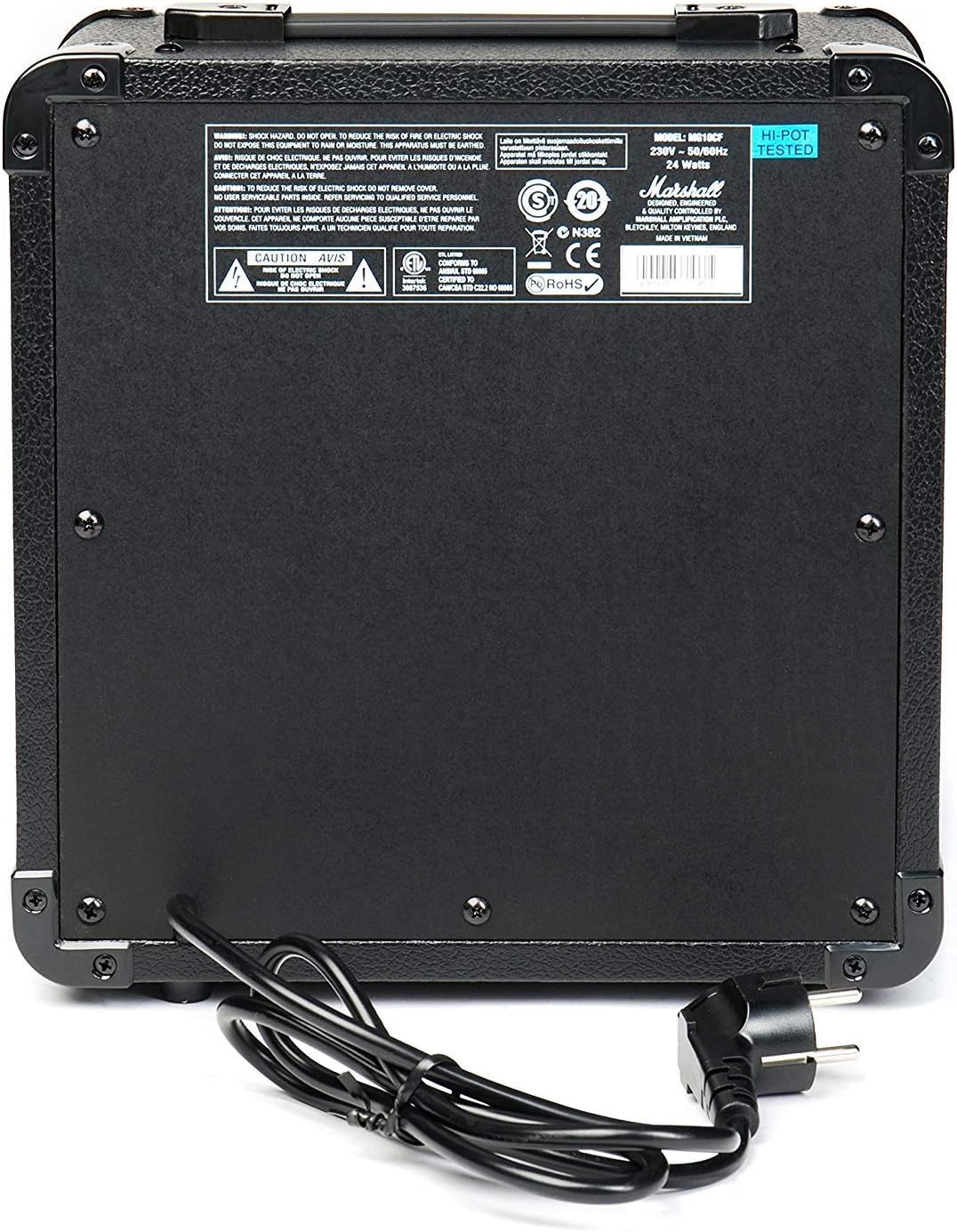
Figure 2.1: Rear panel of the MG10G amplifier, displaying safety warnings and power specifications.
3. สินค้าหมดview
The MG10G amplifier features a straightforward control layout for ease of use. Familiarize yourself with the front panel controls and rear panel connections before operation.

Figure 3.1: Front panel of the MG10G ampชีวิต.
แผงควบคุมด้านหน้า:
- อินพุต: 1/4" jack for connecting your electric guitar.
- ปริมาณที่สะอาด: Controls the volume of the Clean channel.
- เลือกช่อง: ปุ่มสำหรับสลับระหว่างช่องเสียง Clean และ Overdrive
- กำไรเกินพิกัด: Adjusts the amount of distortion on the Overdrive channel.
- ปริมาณโอเวอร์ไดรฟ์: Controls the volume of the Overdrive channel.
- คอนทัวร์: Shapes the mid-range frequencies of your tone. Turning it clockwise scoops the mids, while counter-clockwise adds mids.
- MP3/LINE IN: 3.5mm jack for connecting external audio sources (e.g., MP3 player, phone).
- หูฟัง: 3.5mm jack for connecting headphones for silent practice. Connecting headphones mutes the main speaker.
- พลัง: สวิตช์เปิด/ปิดสำหรับ ampชีวิต.
การเชื่อมต่อแผงด้านหลัง:
- อินพุตพลังงาน: Connects the supplied power cable to a suitable mains power supply.
4. การตั้งค่า
- ให้แน่ใจว่า amplifier's POWER switch is in the OFF position.
- Connect the power cable to the POWER INPUT on the rear panel of the amplifier and then to a grounded electrical outlet.
- เชื่อมต่อกีตาร์ไฟฟ้าของคุณเข้ากับ... ป้อนข้อมูล jack on the front panel using a standard 1/4" instrument cable.
- If desired, connect an external audio device (e.g., MP3 player) to the MP3/LINE IN jack using a 3.5mm stereo cable.
- หากต้องการ สามารถเชื่อมต่อหูฟังเข้ากับอุปกรณ์ได้ หูฟัง แจ็คสำหรับฝึกฝนแบบเงียบๆ
- หมุน ทำความสะอาดระดับเสียง และ โอเวอร์ไดรฟ์โวลุ่ม controls to their minimum settings (fully counter-clockwise).
- สลับสวิตช์ ampลิฟายเออร์ พลัง to the ON position. The power indicator light will illuminate.
5. คู่มือการใช้งาน
5.1 Clean Channel
To use the Clean channel, ensure the เลือกช่อง button is disengaged (out position). Adjust the ทำความสะอาดระดับเสียง control to achieve your desired output level. This channel provides a clear, un-distorted guitar tone.
5.2 Overdrive Channel
To engage the Overdrive channel, press the เลือกช่อง button (in position). Use the กำไรเกินพิกัด control to adjust the amount of distortion, from a subtle crunch to a heavier, saturated sound. The โอเวอร์ไดรฟ์โวลุ่ม control sets the output level for this channel.
5.3 Tone Shaping with Contour
การ คอนทัวร์ control allows you to sculpt the mid-range frequencies of your tone. Experiment with this control to find your preferred sound:
- การเปลี่ยนแปลง คอนทัวร์ clockwise will scoop the mid-range, often resulting in a more modern, aggressive tone.
- การเปลี่ยนแปลง คอนทัวร์ counter-clockwise will boost the mid-range, providing a warmer, fuller sound that can help your guitar cut through a mix.
5.4 Using MP3/LINE IN
เชื่อมต่ออุปกรณ์เสียงภายนอกเข้ากับ MP3/LINE IN jack. The volume of the external device is controlled by its own volume output. This feature allows you to play along with backing tracks or music.
5.5 เอาต์พุตหูฟัง
เสียบหูฟังเข้ากับ หูฟัง jack for silent practice. The amplifier's main speaker will be muted automatically. Adjust the volume using the respective channel volume controls (Clean or Overdrive) or the volume control on your external audio device if using the MP3/LINE IN.
6. การบำรุงรักษา
- การทำความสะอาด: ถอดปลั๊กออก amplifier from the power supply before cleaning. Use a soft, dry cloth to wipe down the exterior. Do not use abrasive cleaners or solvents.
- พื้นที่จัดเก็บ: จัดเก็บ ampควรเก็บเครื่องขยายเสียงไว้ในที่แห้งและเย็น หลีกเลี่ยงแสงแดดโดยตรงและอุณหภูมิที่สูงหรือต่ำเกินไป
- การขนส่ง: เมื่อทำการขนย้าย ampสำหรับเครื่องขยายเสียง โปรดตรวจสอบให้แน่ใจว่าได้บรรจุอย่างแน่นหนาเพื่อป้องกันความเสียหาย
7 การแก้ไขปัญหา
| ปัญหา | สาเหตุที่เป็นไปได้ | สารละลาย |
|---|---|---|
| ไม่มีเสียงออกจากลำโพง |
|
|
| เสียงอ่อนหรือผิดเพี้ยน |
|
|
| ไม่มีเสียงออกจากหูฟัง |
|
|
หากปัญหายังคงมีอยู่หลังจากพยายามแก้ไขปัญหาเหล่านี้แล้ว โปรดติดต่อเจ้าหน้าที่บริการที่มีคุณสมบัติ
8. ข้อมูลจำเพาะ

Figure 8.1: Dimensions of the MG10G ampชีวิต.
| คุณสมบัติ | รายละเอียด |
|---|---|
| ชื่อรุ่น | MG10G |
| Amplifier ประเภท | โซลิดสเตต |
| กำลังขับ | 10 วัตต์ |
| ขนาดลำโพง | 6.5 นิ้ว (16.51 ซม.) |
| ช่องทางการ | 2 (คลีน, โอเวอร์ไดรฟ์) |
| การควบคุม | Clean Volume, Channel Select, Overdrive Gain, Overdrive Volume, Contour, Power |
| ข้อมูลอินพุต | 1/4" Guitar Input, 3.5mm MP3/Line In |
| เอาท์พุต | เอาต์พุตหูฟังขนาด 3.5 มม. |
| แหล่งพลังงาน | Electric Cable (230V~50Hz, 24 Watts) |
| ขนาด (D x W x H) | 31.5 ซม. x 19.8 ซม. x 40 ซม. |
| น้ำหนักสินค้า | 5.13 กิโลกรัม |
| วัสดุ | โลหะ, พลาสติก |
| สี | สีดำ |
| ประเทศต้นกำเนิด | จีน |
9. การรับประกันและการสนับสนุน
9.1 ข้อมูลการรับประกัน
This Marshall MG10G ampเครื่องขยายเสียงมาพร้อมกับ การรับประกันจากผู้ผลิต 1 ปีโปรดเก็บหลักฐานการซื้อไว้เพื่อใช้ในการเคลมประกัน การรับประกันครอบคลุมถึงข้อบกพร่องจากการผลิตและการทำงานผิดปกติภายใต้การใช้งานปกติ ไม่ครอบคลุมถึงความเสียหายที่เกิดจากการใช้งานผิดวิธี อุบัติเหตุ การดัดแปลงโดยไม่ได้รับอนุญาต หรือการสึกหรอตามปกติ
9.2 การสนับสนุนลูกค้า
For technical assistance, service, or warranty inquiries, please contact your authorized Marshall dealer or visit the official Marshall Ampการทำให้บริสุทธิ์ webไซต์สำหรับทรัพยากรสนับสนุนและข้อมูลการติดต่อ