
1. บทนำ
This manual provides detailed instructions for the installation, operation, and maintenance of the Aiphone IX-MV IP Video Master Station. The IX-MV is an IP addressable video and audio master station designed for use with Aiphone IX Systems, offering both handset and hands-free communication capabilities.
Please read this manual thoroughly before attempting to install or operate the unit to ensure correct usage and to prevent damage.
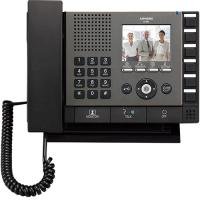
รูปที่ 1 : ด้านหน้า view of the Aiphone IX-MV IP Video Master Station, showing the display, buttons, and handset.
2. ข้อมูลด้านความปลอดภัย
Observe the following safety precautions to prevent injury, damage to the product, or property damage.
- ความปลอดภัยทางไฟฟ้า: Ensure all power connections are made according to local electrical codes. Disconnect power before servicing.
- สิ่งแวดล้อม: Do not expose the unit to water, high humidity, extreme temperatures, or direct sunlight. Install in a well-ventilated area.
- การจัดการ: โปรดใช้งานด้วยความระมัดระวัง หลีกเลี่ยงการทำตกหรือการกระแทกอย่างแรง
- การปรับเปลี่ยน: Do not attempt to modify or disassemble the unit. Refer all servicing to qualified personnel.
- การทำความสะอาด: ใช้ผ้านุ่มและแห้งทำความสะอาด หลีกเลี่ยงน้ำยาทำความสะอาดหรือตัวทำละลายที่มีฤทธิ์กัดกร่อน
3. เนื้อหาบรรจุภัณฑ์
ตรวจสอบว่ามีรายการทั้งหมดอยู่ในบรรจุภัณฑ์ก่อนดำเนินการติดตั้ง
- Aiphone IX-MV IP Video Master Station
- ขายึดและสกรู
- คู่มือการติดตั้ง (เอกสารนี้)
- Network cable (may be sold separately)
4. การตั้งค่า
4.1 การติดตั้งทางกายภาพ
- เลือกสถานที่: Select a suitable indoor location, away from direct heat sources, moisture, and strong electromagnetic fields. Ensure adequate space for wiring and operation.
- การติดตั้ง:
- Secure the mounting bracket to a wall using appropriate screws and anchors.
- ตรวจสอบให้แน่ใจว่าตัวยึดอยู่ในระดับและยึดแน่นดีแล้ว
- Attach the IX-MV unit to the mounting bracket.
- การเดินสายไฟ:
- Connect a standard Ethernet cable (Cat5e or higher) from your network switch/router to the LAN port on the back of the IX-MV unit.
- If using Power over Ethernet (PoE), no separate power adapter is needed. Otherwise, connect the appropriate DC power adapter (sold separately) to the power input.
4.2 การกำหนดค่าเริ่มต้น
After physical installation and power-up, the unit will attempt to obtain an IP address via DHCP. For detailed network configuration and system integration, refer to the Aiphone IX System programming manual or consult a qualified installer.
- การเข้าถึง Web อินเทอร์เฟซ: ใช้ web browser to access the unit's IP address for advanced settings. The default IP address or method to discover it can be found in the Aiphone IX System documentation.
- การรวมระบบ: The IX-MV must be registered with an Aiphone IX System server for full functionality. Follow the server's configuration guide.
5. คู่มือการใช้งาน
5.1 ฟังก์ชันการโทรพื้นฐาน
- รับสาย: When an incoming call is received, the unit will ring and display the caller's information on the screen.
- To answer hands-free, press the พูดคุย ปุ่ม.
- To answer using the handset, lift the handset.
- การโทร:
- Use the keypad or directory function to select the desired station or contact.
- กดปุ่ม เรียก ปุ่มสำหรับเริ่มการโทร
- การวางสาย:
- If using hands-free, press the จบ ปุ่ม.
- If using the handset, replace the handset in its cradle.
5.2 การแสดงผลวิดีโอ
During a video call, the caller's video feed will be displayed on the IX-MV screen. The video quality depends on network conditions and the camera capabilities of the calling station.
5.3 Door Release (if configured)
If connected to a door station with door release functionality, a dedicated ปล่อยประตู button may be available on the screen or physical panel. Press this button during a call with a door station to activate the door release mechanism.
6. การบำรุงรักษา
6.1 การทำความสะอาด
To clean the unit, gently wipe the surfaces with a soft, dry cloth. For stubborn marks, slightly dampen the cloth with water. Do not use harsh chemicals, abrasive cleaners, or solvents, as these can damage the finish and electronic components.
6.2 การอัปเดตซอฟต์แวร์
Periodically check the Aiphone website or consult your system administrator for available firmware updates. Keeping the software updated ensures optimal performance, security, and access to new features. Firmware updates are typically performed via the system server or the unit's web อินเทอร์เฟซ
7 การแก้ไขปัญหา
| ปัญหา | สาเหตุที่เป็นไปได้ | สารละลาย |
|---|---|---|
| ไม่มีไฟฟ้า/เครื่องไม่เปิด | No power supply; faulty power adapter; PoE issue. | Check power cable connection. Verify PoE switch is active. Test power adapter if not using PoE. |
| ไม่สามารถเชื่อมต่อกับเครือข่ายได้ | Network cable disconnected; incorrect IP settings; network switch issue. | Ensure Ethernet cable is securely connected. Verify network settings (DHCP/Static IP). Check network switch status. |
| No audio during calls. | Microphone/speaker issue; volume too low; network latency. | Adjust volume settings. Check for physical obstructions. Verify network connection stability. |
| No video display. | Camera issue at calling station; network bandwidth; display settings. | Ensure calling station's camera is operational. Check network bandwidth. Adjust display settings on IX-MV. |
| เครื่องไม่ตอบสนอง | ความผิดพลาดของซอฟต์แวร์; ปัญหาด้านพลังงาน | Perform a power cycle (disconnect and reconnect power). If issue persists, contact technical support. |
If the problem persists after attempting these solutions, please contact Aiphone technical support or your system integrator.
8. ข้อมูลจำเพาะ
| คุณสมบัติ | รายละเอียด |
|---|---|
| ยี่ห้อ | ไอโฟน |
| หมายเลขรุ่น | IX-MV.M |
| ขนาดรายการ (ยาว x กว้าง x สูง) | 9.81 x 7.44 x 2.31 นิ้ว |
| น้ำหนักสินค้า | 3.3 ปอนด์ |
| การเชื่อมต่อ | ไอพี (อีเธอร์เน็ต) |
| แหล่งจ่ายไฟ | PoE (Power over Ethernet) or external DC power supply (not included) |
| ประเภทการสื่อสาร | Video and Audio, Handset / Hands-free |
9. การรับประกันและการสนับสนุน
9.1 ข้อมูลการรับประกัน
Aiphone products are typically covered by a limited warranty against defects in materials and workmanship. The specific warranty period and terms may vary by region and product. Please refer to the official Aiphone warranty statement available on their website or contact your local distributor for details.
This warranty does not cover damage caused by improper installation, misuse, unauthorized modification, or acts of nature.
9.2 การสนับสนุนด้านเทคนิค
For technical assistance, troubleshooting beyond this manual, or warranty claims, please contact Aiphone technical support. You can find contact information, including phone numbers and online support resources, on the official Aiphone webเว็บไซต์:
https://www.aiphone.com/support
When contacting support, please have your product model number (IX-MV.M) and a detailed description of the issue ready.