
Kaise EM480A Insulation Tester User Manual
รุ่น: EM480A
1. บทนำ
The Kaise EM480A is a robust and reliable insulation tester designed for professional use in electrical fault location, machine commissioning, and preventive maintenance of various electrical installations. This device provides accurate insulation resistance measurements at multiple test voltages, ensuring the safety and efficiency of electrical systems.
คุณสมบัติที่สำคัญ ได้แก่:
- Multiple test voltagเช่น: 250V, 500V และ 1000V
- Measurement range up to 2000 MΩ.
- Clear LCD display with 1999 counts.
2. ข้อมูลด้านความปลอดภัย
โปรดปฏิบัติตามข้อควรระวังด้านความปลอดภัยต่อไปนี้เสมอ เพื่อป้องกันการบาดเจ็บส่วนบุคคลและความเสียหายต่อเครื่องดนตรี:
- อ่านคู่มือทั้งหมด ก่อนใช้เครื่องมือ
- Do not use the tester if it appears damaged or is operating abnormally.
- Ensure the circuit under test is de-energized and locked out before connecting the test leads.
- สวมใส่อุปกรณ์ป้องกันส่วนบุคคล (PPE) ที่เหมาะสม, including insulated gloves and safety glasses.
- Avoid touching the test leads or the circuit under test during measurement, especially when high test voltages ถูกนำไปใช้
- Discharge the circuit completely after testing before disconnecting the leads.
- Do not operate the tester in wet environments or in the presence of explosive gases or dust.
- เปลี่ยนแบตเตอรี่ promptly when the low battery indicator appears.
3. เนื้อหาบรรจุภัณฑ์
ตรวจสอบให้แน่ใจว่าสินค้าทุกชิ้นครบถ้วนและไม่เสียหายก่อนเปิดบรรจุภัณฑ์:
- Kaise EM480A Insulation Tester
- ชุดตะกั่วทดสอบ
- แบตเตอรี่ AA 6 ก้อน (ติดตั้งไว้ล่วงหน้าหรือรวมแยกต่างหาก)
- คู่มือการใช้งาน
4. การตั้งค่า
4.1 การติดตั้งแบตเตอรี่
The Kaise EM480A requires 6 AA batteries for operation. If the batteries are not pre-installed, follow these steps:
- ค้นหาช่องใส่แบตเตอรี่ที่ด้านหลังของเครื่องทดสอบ
- ใช้ไขควงเปิดฝาช่องใส่แบตเตอรี่
- ใส่แบตเตอรี่ AA 6 ก้อน โดยตรวจสอบให้แน่ใจว่าขั้วบวกและขั้วลบถูกต้องตามที่ระบุไว้ภายในช่องใส่แบตเตอรี่
- ใส่ฝาปิดช่องใส่แบตเตอรี่และขันให้แน่นด้วยสกรู
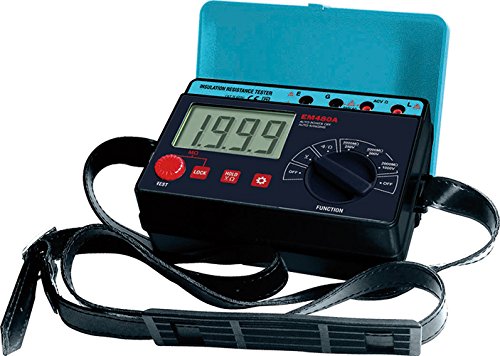
รูปที่ 1 : ด้านหน้า view of the Kaise EM480A Insulation Tester, showing the LCD display, function selector, and test buttons. This image illustrates the general appearance and layout of the device.
4.2 การเชื่อมต่อสายทดสอบ
Connect the red and black test leads to the corresponding input terminals on the tester. Ensure a secure connection to prevent inaccurate readings or hazards.
5. คู่มือการใช้งาน
5.1 การเปิด/ปิดเครื่อง
To power on the tester, rotate the function selector dial to any desired measurement function. To power off, rotate the dial to the 'OFF' position.
5.2 Performing an Insulation Resistance Test
Follow these steps to perform an insulation resistance measurement:
- เพื่อความปลอดภัย: Verify that the circuit under test is completely de-energized and isolated from all power sources. Apply lockout/tagขั้นตอนการดำเนินการ
- เชื่อมต่อสายนำ: Connect the test leads to the circuit or component you wish to test. Typically, one lead connects to the conductor and the other to ground or another conductor.
- เลือกการทดสอบ Voltage: Rotate the function selector dial to the desired insulation test voltage (250V, 500V, or 1000V). Choose a voltage appropriate for the insulation rating of the circuit.
- เริ่มการทดสอบ: กดปุ่ม 'TEST' ค้างไว้ เครื่องทดสอบจะทำการปรับระดับเสียงที่เลือกไว้tage and display the insulation resistance value on the LCD.
- อ่านการวัด: Observe the reading on the LCD. The unit will typically be in MΩ (Megaohms).
- Discharge Circuit: Release the 'TEST' button. The tester will automatically discharge any residual charge in the circuit. Wait for the discharge to complete before disconnecting the leads.
- Disconnect Leads: Once the circuit is safely discharged, disconnect the test leads.
บันทึก: Always refer to relevant electrical codes and standards for acceptable insulation resistance values for specific applications.
6. การบำรุงรักษา
6.1 การทำความสะอาด
Wipe the instrument's casinจีกับโฆษณาamp cloth and a mild detergent. Do not use abrasive cleaners or solvents. Ensure the tester is completely dry before storage or next use.
6.2 การเปลี่ยนแบตเตอรี่
When the low battery indicator appears on the display, replace all 6 AA batteries promptly to ensure accurate measurements. Refer to Section 4.1 for battery installation instructions. Dispose of old batteries responsibly according to local regulations.
6.3 พื้นที่จัดเก็บ
Store the tester in a cool, dry place, away from direct sunlight and extreme temperatures. If storing for extended periods, remove the batteries to prevent leakage.
7 การแก้ไขปัญหา
| ปัญหา | สาเหตุที่เป็นไปได้ | สารละลาย |
|---|---|---|
| เครื่องทดสอบไม่สามารถเปิดเครื่องได้ | แบตเตอรี่เสียหรือติดตั้งไม่ถูกต้อง | ตรวจสอบขั้วแบตเตอรี่ เปลี่ยนแบตเตอรี่ |
| การอ่านที่ไม่ถูกต้อง | Poor test lead connection; low batteries; external interference. | Ensure secure lead connections; replace batteries; test in a different environment. |
| หน้าจอแสดงคำว่า 'OL' (Overload) | Resistance value exceeds the tester's maximum range. | This indicates very high insulation resistance, which is often a good result. |
| Display shows '0.00' or very low resistance. | Short circuit or very low insulation resistance. | Indicates a fault in the circuit. Investigate the circuit for shorts or damaged insulation. |
8. ข้อมูลจำเพาะ
- แบบอย่าง: EM480A
- ยี่ห้อ: KAISE
- ฉบับทดสอบtagใช่: 250V, 500V, 1000V
- Maximum Measurement Range: 2000 เมกะโอห์ม
- แสดง: LCD จำนวน 1999 จอ
- แหล่งพลังงาน: 6 x AA แบตเตอรี่ (รวมอยู่ด้วย)
- ปริมาณการใช้งานสูงสุดtage: 1000 โวลต์
- ขนาด (ยาว x กว้าง x สูง): 11 x 16.8 x 6.2 ซม. (4.33 x 6.61 x 2.44 นิ้ว)
- น้ำหนัก: ประมาณ 485 กรัม (1.07 ปอนด์)
- ส่วนประกอบที่รวมอยู่: Insulation Tester, Test Lead Set, Batteries, User Manual
- ประเทศต้นกำเนิด: จีน
9. การรับประกันและการสนับสนุน
This product is covered by a standard manufacturer's warranty against defects in materials and workmanship. The specific duration and terms of the warranty may vary by region. Please retain your proof of purchase for warranty claims.
For technical support, troubleshooting assistance, or warranty inquiries, please contact your local KAISE distributor or the point of purchase. Provide the model number (EM480A) and a detailed description of the issue when seeking support.