
1. บทนำ
This manual provides detailed instructions for the installation, operation, and maintenance of your Dynavin N7-MBA navigation system. Please read this manual thoroughly before using the device to ensure proper functionality and to prevent damage.
The Dynavin N7-MBA is a multimedia navigation system designed for specific Mercedes Benz vehicles, offering advanced features such as a 7-inch capacitive touchscreen, Android Link, Bluetooth connectivity, and comprehensive navigation capabilities.
1.1 ความเข้ากันได้ของยานพาหนะ
- Mercedes Benz Sprinter II W906 (from 2006)
- Mercedes Benz Vito W639 (from 2006)
- Mercedes Benz Viano V639 (from 2006)
- Mercedes Benz A-Class W169 (2004 to 2012)
- Mercedes Benz B-Class W245 (2005 to 2011)
2. ข้อมูลด้านความปลอดภัย
โปรดปฏิบัติตามข้อควรระวังด้านความปลอดภัยต่อไปนี้เสมอ เพื่อหลีกเลี่ยงการบาดเจ็บหรือความเสียหายต่ออุปกรณ์:
- อย่าใช้งานอุปกรณ์ในลักษณะที่ทำให้คุณเสียสมาธิในการขับขี่
- ตรวจสอบให้แน่ใจว่าการเชื่อมต่อทั้งหมดแน่นหนาดีแล้วก่อนใช้งานรถ
- หลีกเลี่ยงการให้เครื่องสัมผัสกับอุณหภูมิที่สูงหรือต่ำเกินไป แสงแดดโดยตรงเป็นเวลานาน หรือความชื้นที่มากเกินไป
- อย่าพยายามถอดประกอบหรือดัดแปลงตัวเครื่อง แนะนำให้ช่างผู้ชำนาญเข้ารับบริการทั้งหมด
3. สินค้าหมดview
The Dynavin N7-MBA unit integrates seamlessly into your vehicle's dashboard, providing a central control point for navigation, media, and communication.
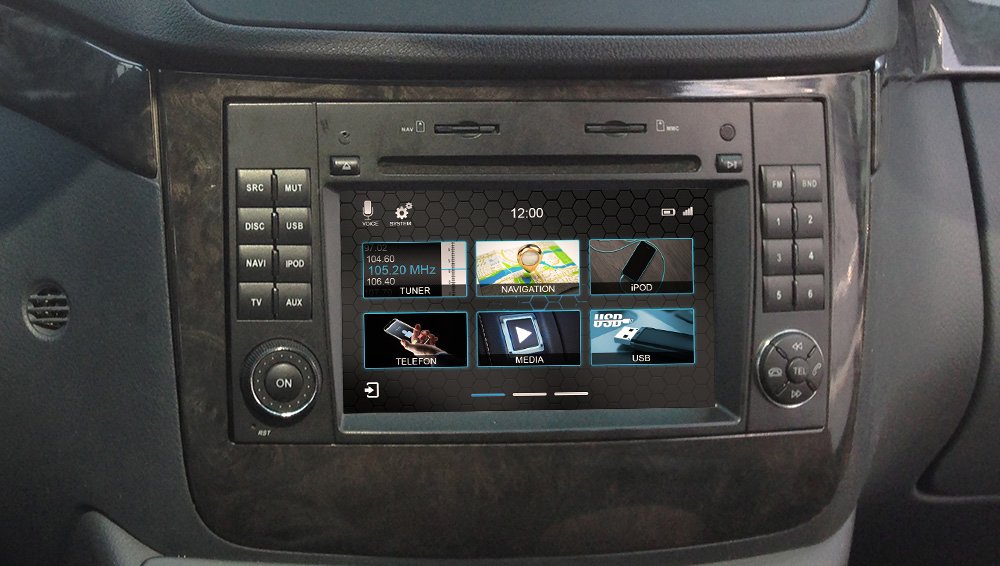
รูปที่ 3.1: Dynavin N7-MBA Front Panel
The Dynavin N7-MBA features a 7-inch capacitive touchscreen display. On the left side, there are buttons for SRC (Source), MUT (Mute), USB, NAVI (Navigation), IPOD, TV, and AUX. A rotary knob labeled 'ON' is located at the bottom left. The right side includes FM/BND buttons and numbered preset buttons (1-6), along with a multi-directional control pad with TEL (Telephone) buttons. The top panel has slots for discs and memory cards.
3.1 คุณสมบัติหลัก
- 7-inch Capacitive Anti-Reflective Touchscreen (1024 x 600 px resolution)
- Android Link for compatible app control
- CANBUS/MOST Solution Integration
- FM RDS TMC Radio with DSP noise cancellation and 15 presets
- DSP Sound Processor with EQ and time correction
- CD & DVD Player
- Parrot Bluetooth connection with external microphone
- USB/SD card connectivity
- หลัง view camera, DAB+ Ready, DVBT Ready
- ซอฟต์แวร์นำทางแบบ 3 มิติ view and premium POIs (Europe maps included)
- Reconfigurable hardware function button
4. การตั้งค่าและการติดตั้ง
Installation of the Dynavin N7-MBA should ideally be performed by a qualified technician due to the complexity of vehicle electronics and CANBUS integration. Incorrect installation can lead to damage to the device or vehicle.
4.1 การตรวจสอบก่อนการติดตั้ง
- ตรวจสอบให้แน่ใจว่ากุญแจรถปิดอยู่และถอดแบตเตอรี่ออกก่อนเริ่มการติดตั้ง
- ตรวจสอบว่ามีส่วนประกอบที่รวมอยู่ทั้งหมด
- Confirm vehicle compatibility with the N7-MBA model.
4.2 การเดินสายและการเชื่อมต่อ
The N7-MBA integrates with your vehicle's CANBUS system. Follow the specific wiring diagram provided with your unit for correct connections, including power, speakers, antenna, and external accessories like the microphone and rear-view กล้อง.
4.3 การเปิดเครื่องครั้งแรก
After installation, reconnect the vehicle battery. Turn the ignition to the ACC or ON position. The device should power on automatically or by pressing the 'ON' knob. Follow any on-screen prompts for initial setup, suchs as language selection and time zone.
5. คู่มือการใช้งาน
5.1 การใช้งานหน้าจอสัมผัส
The 7-inch capacitive touchscreen responds to light touches, similar to a smartphone. It is anti-reflective, improving visibility in bright conditions. Navigate menus and select functions by tapping icons or swiping across the screen.
5.2 ระบบนำทาง
Access the navigation function by pressing the 'NAVI' button or selecting the 'NAVIGATION' icon on the touchscreen. The system includes 3D map views and premium Points of Interest (POIs) for Europe. Refer to the dedicated navigation software manual for detailed instructions on route planning, destination input, and map updates.
5.3 วิทยุ (FM/AM)
Press the 'FM' button or select the 'TUNER' icon. The radio features RDS (Radio Data System) and TMC (Traffic Message Channel) for enhanced information. Use the DSP (Digital Signal Processor) for noise cancellation. You can store up to 15 favorite stations using the numbered preset buttons.
5.4 Media Playback (CD/DVD, USB, SD)
Insert a CD or DVD into the disc slot. For USB or SD card media, connect your device to the designated USB port or insert an SD card into the slot. Select 'MEDIA' or 'USB' from the main menu to access your files. The system supports various audio and video formats.
5.5 Bluetooth Connectivity (Parrot)
The integrated Parrot Bluetooth module allows for hands-free calling and audio streaming. Pair your smartphone with the N7-MBA via Bluetooth settings. An external microphone is included for clear call quality. Use the 'TEL' buttons on the control pad for call management.
5.6 Android Link
Android Link enables you to control compatible applications from your Android smartphone directly through the N7-MBA's touchscreen. Install the necessary Android Link application on your smartphone and connect it to the unit as per the instructions provided with the Android Link software.
5.7 Reconfigurable Hardware Button
The N7-MBA features a reconfigurable hardware button on the front panel (not applicable to N7-6205 models). This button can be assigned to control any desired function. Refer to the system settings menu to customize its function according to your preference.
6. การบำรุงรักษา
6.1 การทำความสะอาดเครื่อง
Use a soft, dry cloth to clean the touchscreen and exterior of the unit. For stubborn marks, slightly dampen the cloth with water. Avoid using abrasive cleaners, solvents, or alcohol, as these can damage the display and finish.
6.2 การอัปเดตซอฟต์แวร์
Periodically check the Dynavin official website for available software updates. Updates can provide new features, performance improvements, and bug fixes. Follow the instructions provided with the update package carefully. Information regarding guaranteed software updates is currently unavailable.
7 การแก้ไขปัญหา
If you encounter issues with your Dynavin N7-MBA, refer to the following common troubleshooting steps:
- ไม่มีไฟฟ้า: ตรวจสอบการเชื่อมต่อสายไฟและฟิวส์รถยนต์ทั้งหมด ตรวจสอบให้แน่ใจว่าสวิตช์กุญแจเปิดอยู่
- ไม่มีเสียง: ตรวจสอบการเชื่อมต่อลำโพง ระดับเสียง และการตั้งค่าปิดเสียง ตรวจสอบการเลือกแหล่งที่มาของเสียง
- หน้าจอสัมผัสไม่ตอบสนอง: Perform a soft reset by pressing the 'RST' button (if available) or disconnecting the vehicle battery for a few minutes.
- ปัญหาการนำทาง: ตรวจสอบให้แน่ใจว่าเสาอากาศ GPS เชื่อมต่ออย่างถูกต้องและมีความชัดเจน view of the sky. Verify map data is loaded correctly.
- ปัญหาการจับคู่บลูทูธ: Ensure Bluetooth is enabled on both the N7-MBA and your smartphone. Delete previous pairings and try again.
For persistent issues, contact Dynavin customer support or a qualified service center.
8. ข้อมูลจำเพาะ
| คุณสมบัติ | รายละเอียด |
|---|---|
| หมายเลขรุ่น | N7-MBA |
| ขนาดหน้าจอ | 7 นิ้ว |
| ปณิธาน | 1024 x 600 พิกเซล |
| ประเภทจอภาพ | Capacitive Touchscreen, Anti-Reflective LCD |
| เทคโนโลยีการเชื่อมต่อ | บลูทูธ, ยูเอสบี |
| อุปกรณ์ที่รองรับ | Smartphone (via Android Link, Bluetooth) |
| วิธีการควบคุม | Application, Touchscreen |
| ประเภทแผนที่ | ยุโรป |
| หน่วยความจำแฟลชที่รองรับ | SD |
| น้ำหนักผลิตภัณฑ์ | 997.9 กรัม (ประมาณ 2.2 ปอนด์) |
| ขนาดแพ็คเกจ | 33.02 x 27.94 x 22.86 ซม. |
9. ข้อมูลการรับประกัน
Dynavin products are covered by a manufacturer's warranty against defects in materials and workmanship. The specific terms and duration of the warranty may vary by region. Please retain your proof of purchase for warranty claims. For detailed warranty information, refer to the documentation included with your product or visit the official Dynavin webเว็บไซต์.
10. การสนับสนุน
For technical assistance, troubleshooting beyond this manual, or service inquiries, please contact Dynavin customer support. You can typically find contact information on the official Dynavin webเว็บไซต์หรือในบรรจุภัณฑ์ของผลิตภัณฑ์
When contacting support, please have your product model number (N7-MBA) and proof of purchase readily available.