
การแนะนำ
Thank you for choosing OMIKA LED Fairy Lights. This manual provides essential information for the safe and efficient use of your 33-foot, 100-LED, multi-color changing string lights. Designed for both indoor and outdoor use, these lights offer versatile decoration options with convenient remote control and dual power capabilities.
เนื้อหาแพ็คเกจ
โปรดตรวจสอบว่ารายการทั้งหมดที่ระบุไว้ด้านล่างมีอยู่ในแพ็คเกจของคุณหรือไม่:
- 1 x LED String Lights with Battery Case
- 1 x รีโมทคอนโทรล
- สาย USB 1 เส้น
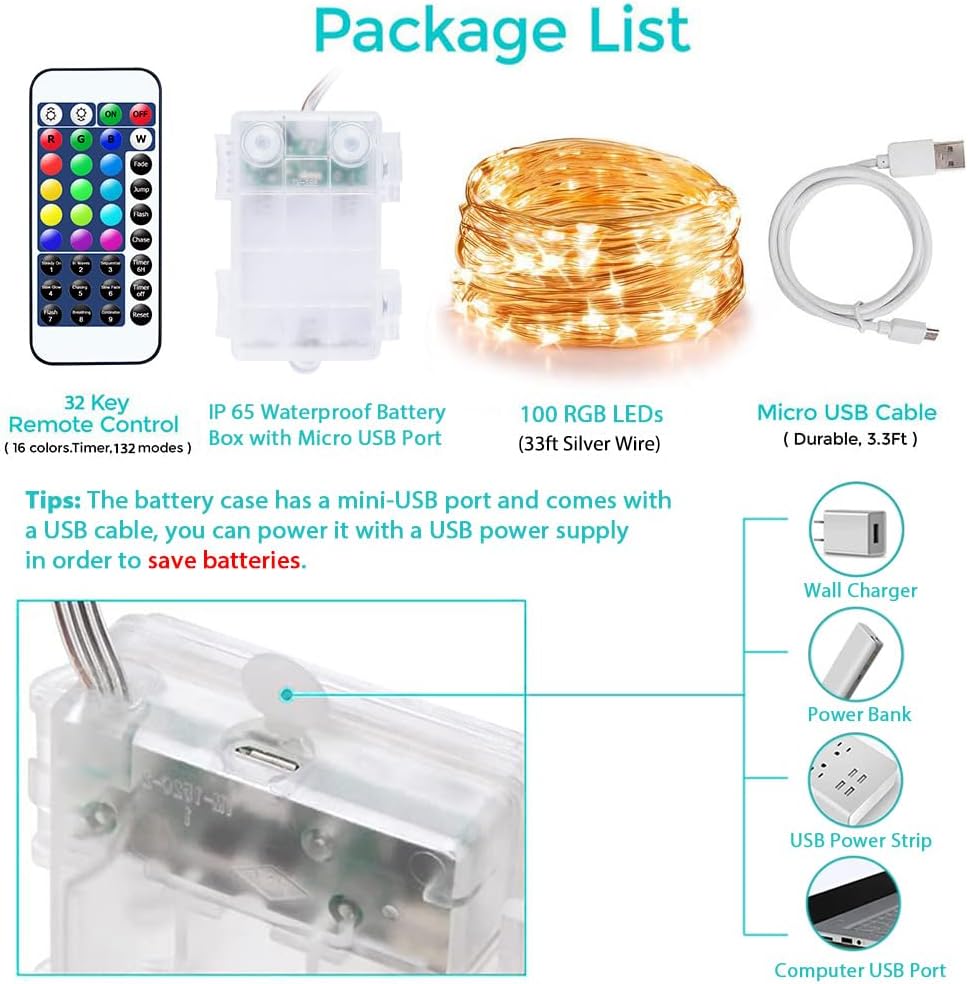
Image: Contents of the OMIKA LED Fairy Lights package, including the remote control, IP65 waterproof battery box with Micro USB port, 100 RGB LEDs (33ft silver wire), and a Micro USB cable.
การตั้งค่า
Your OMIKA LED Fairy Lights offer two power options: battery or USB.
พลังงานแบตเตอรี่
- Open the battery compartment on the battery case.
- Insert 3 new AA batteries (not included), ensuring correct polarity (+/-).
- ปิดช่องใส่แบตเตอรี่ให้แน่น
พลังงาน USB
- Connect the provided USB cable to the Micro USB port on the battery case.
- Plug the other end of the USB cable into a 4.5V USB adapter, power bank, or computer USB port. Ensure the USB power supply output is 5V/1A for optimal performance.

Image: Diagram illustrating the two power supply methods for the OMIKA LED Fairy Lights: 3x AA battery power and USB power via a power adapter or power bank.
คำแนะนำการใช้งาน
The OMIKA LED Fairy Lights are controlled using the included 32-key infrared remote control.
ฟังก์ชั่นการควบคุมระยะไกล
- เปิด/ปิด: กดปุ่ม ON ปุ่มสำหรับเปิดไฟ และ ปิด ปุ่มสำหรับปิดใช้งาน
- การเลือกสี: Choose from 16 individual colors using the colored buttons (R, G, B, W, and other color swatches).
- โหมดแสงสว่าง: Each of the 16 single colors has 8 different flashing modes. Additionally, there are 4 multi-color modes, totaling 132 modes. Select modes using buttons like Flash, Chase, Fade, Jump, Steady On, In Waves, Sequential, Slow Glow, Chasing, Slow Fade, Breathing, and Combination.
- การปรับความสว่าง: Use the brightness +/- buttons to increase or decrease the light intensity.
- ฟังก์ชั่นจับเวลา: กดปุ่ม ตั้งเวลา 6ชม button to activate the 6-hour timer (6 hours on, 18 hours off). Press หมดเวลา เพื่อปิดการใช้งาน
- รีเซ็ต: กดปุ่ม รีเซ็ต button to return to default settings.

Image: The 32-key infrared remote control for OMIKA LED Fairy Lights, showing buttons for ON/OFF, 16 color selections, 8 dynamic modes, 4 multi-color modes, brightness adjustment, and timer settings.
Video: An official OMIKA video demonstrating the various color and mode changes of the 33ft 100 LED Battery Operated String Light, showcasing ความเก่งกาจของมัน
คุณสมบัติ
- Vibrant 16 Color Changing Lights: Enjoy 16 individual colors with 8 different flashing modes per color and 4 multi-color modes, offering a total of 132 lighting effects.
- ตัวเลือกพลังงานคู่: Can be powered by 3 AA batteries (not included) or via a 4.5V USB adapter, power bank, or computer, providing flexibility and environmental friendliness.
- IP65 Waterproof & Durable: Constructed with 4 high-quality, sturdy, waterproof, and insulated copper wires, making them suitable for all weather conditions.
- ขึ้นรูปได้ง่าย: The thin and flexible copper wires can be easily twisted into any desired shape, allowing for creative decoration in various settings.

ภาพ: ระยะใกล้ view of the OMIKA LED Fairy Lights highlighting their IP65 waterproof rating, snowproof, windproof, and sunproof capabilities, along with the durable 4-copper wire construction.

Image: A hand gently holding the OMIKA LED Fairy Lights, demonstrating the thin and flexible nature of the copper wire, which allows for easy shaping and placement.
การซ่อมบำรุง
To ensure the longevity and optimal performance of your OMIKA LED Fairy Lights, follow these simple maintenance guidelines:
- Keep the battery case dry, especially when used outdoors, despite its IP65 rating.
- Avoid excessive bending or sharp creases in the copper wire to prevent damage to the internal wiring.
- Clean the lights gently with a soft, dry cloth if dust accumulates. Do not use harsh chemicals or abrasive materials.
- When not in use for extended periods, remove batteries from the battery case to prevent leakage and corrosion.
การแก้ไขปัญหา
If you encounter issues with your OMIKA LED Fairy Lights, please refer to the following common solutions:
Lights Not Turning On or Some Colors/Modes Not Working
- ตรวจสอบแหล่งพลังงาน: Ensure batteries are correctly installed and not depleted. If using USB power, verify the connection and that the power source is active.
- ปริมาณแบตเตอรี่tage: Different color options may require different voltages. If some options do not work after prolonged use, replace the 3 AA batteries with new ones (4.5V total) or switch to a USB power supply.
- รีโมทคอนโทรล: Ensure the remote control has a working battery and is pointed directly at the battery case's sensor. Remove any obstructions.
- รีเซ็ต: Try pressing the 'Reset' button on the remote control to restore default settings.
ไฟหรี่หรือกะพริบ
- แบตเตอรี่ต่ำ: เปลี่ยนแบตเตอรี่เก่าด้วยแบตเตอรี่ใหม่
- กำลังขับ USB: Ensure your USB power source provides sufficient and stable power (5V/1A recommended).
ข้อมูลจำเพาะ
| คุณสมบัติ | รายละเอียด |
|---|---|
| ยี่ห้อ | โอมิกะ |
| หมายเลขรุ่น | DY-OA08-200 |
| สี | 16 RGB Colors (Battery+USB) |
| ประเภทแหล่งกำเนิดแสง | นำ |
| จำนวนแหล่งกำเนิดแสง | 100 |
| ความยาวสินค้า | 33 ฟุต |
| แหล่งพลังงาน | 3 X AA Battery Operated or 5V USB Powered |
| เล่มที่tage | 4.5 โวลต์ |
| วัดtage | 4.5 วัตต์ |
| การใช้งานภายใน/ภายนอกอาคาร | ในร่ม, กลางแจ้ง |
| คุณสมบัติพิเศษ | การเปลี่ยนสี |
| วัสดุ | Copper Wires |
| ประเภทตัวควบคุม | รีโมทคอนโทรล |
| น้ำหนักสินค้า | 5.3 ออนซ์ |
การรับประกันและการสนับสนุน
OMIKA offers a รับประกันคุณภาพ 1 ปี for these LED Fairy Lights. If you experience any problems with your twinkle lights, please contact us directly. We are committed to responding to your inquiries within 24 hours to provide assistance and resolve any issues.
For support, please refer to the contact information provided with your purchase or visit the official OMIKA store on Amazon: OMIKA Store.