
การแนะนำ
This manual provides detailed instructions for the assembly, operation, and maintenance of your Serta Essential Armless Task Chair (Model 48740). Please read all instructions carefully before assembly and use to ensure proper function and safety. Keep this manual for future reference.
ข้อมูลด้านความปลอดภัย
- ตรวจสอบให้แน่ใจว่าชิ้นส่วนทั้งหมดครบถ้วนและไม่เสียหายก่อนประกอบ ห้ามใช้งานหากชิ้นส่วนใดขาดหายหรือชำรุด
- Assembly should ideally be performed by two people for ease and safety.
- ห้ามยืนบนเก้าอี้
- Do not use the chair for purposes other than its intended use as an office or task chair.
- น้ำหนักสูงสุดที่แนะนำ: 275 ปอนด์
รายการชิ้นส่วน
โปรดตรวจสอบให้แน่ใจว่ามีส่วนประกอบครบถ้วนในบรรจุภัณฑ์ของคุณ:
- Seat Cushion (Faux Leather)
- Backrest (Mesh and Faux Leather)
- กระบอกยกแก๊ส
- Star Base (Chrome)
- ล้อเลื่อน (5 ชิ้น)
- Assembly Hardware (Screws, washers, Allen key)
คำแนะนำในการประกอบ
Follow these steps for quick and easy assembly. Two people are recommended for optimal setup.
- ติดล้อเข้ากับฐาน: Insert each of the five casters into the holes at the end of each leg of the chrome star base. Push firmly until they click into place.

Image: The chrome star base with five casters, highlighting the 360-degree motion capability.
- ใส่แก๊สยก: Place the gas lift cylinder into the center hole of the assembled star base. Ensure it is seated securely.

Image: The sturdy chrome base and gas lift, indicating superior quality and a 275 lb weight capacity.
- Attach Seat to Backrest: Align the seat cushion with the backrest and secure them using the provided hardware. Refer to the included assembly diagram for screw placement.
- วางฝาบนที่ประกอบเสร็จแล้วลงบนแท่นยกแก๊ส: Carefully place the assembled seat and backrest onto the top of the gas lift cylinder. Press down firmly to secure the connection.
Your Serta Essential Armless Task Chair is now assembled and ready for use.
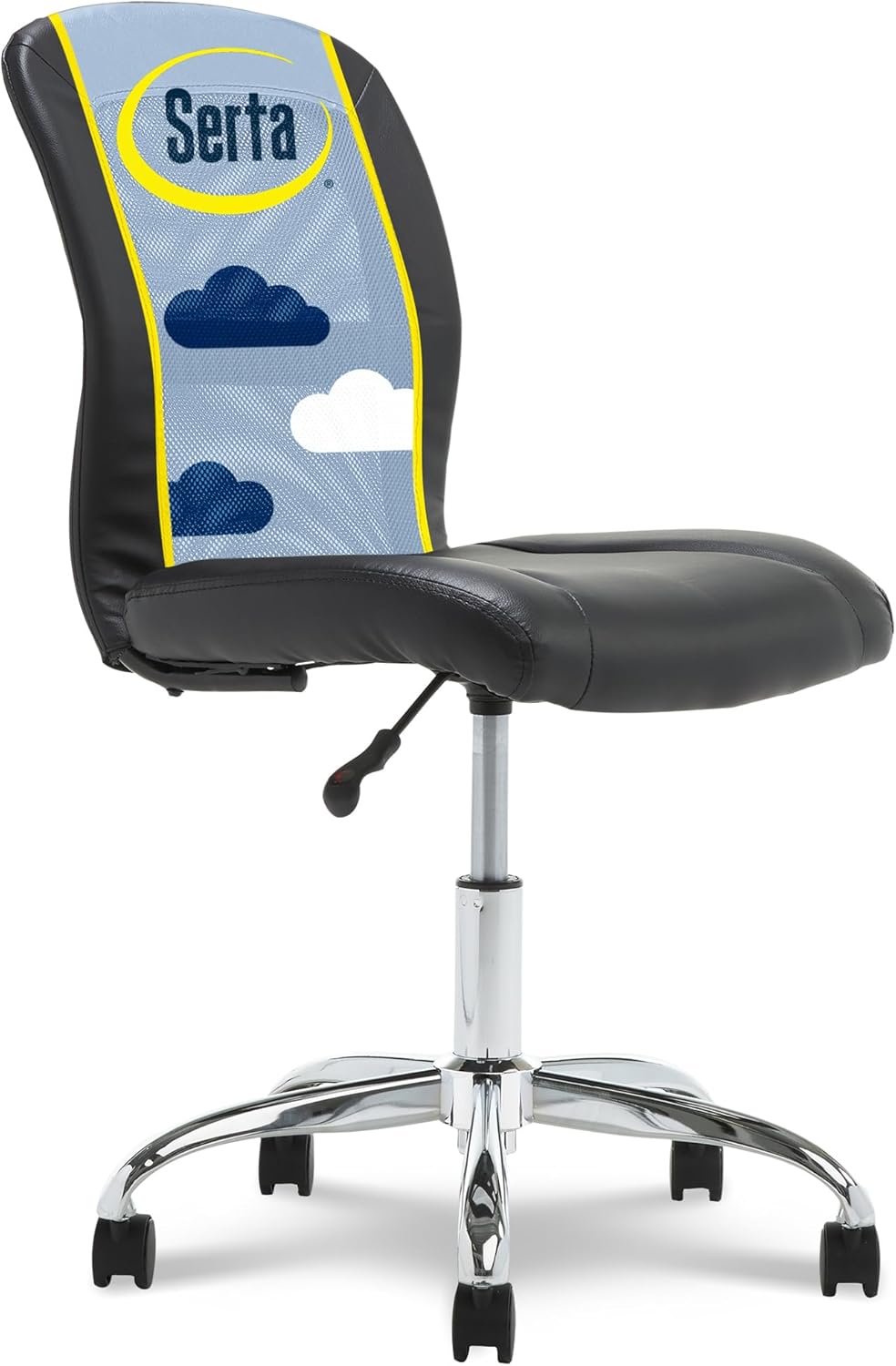
Image: The Serta Essential Armless Task Chair, fully assembled and ready for use in an office setting.
คำแนะนำการใช้งาน
The Serta Essential Armless Task Chair offers simple adjustments for personalized comfort:
- การปรับความสูง: Locate the accessible lever on the side of the chair, beneath the seat. Lift the lever up to adjust the seat height. While seated, lift the lever to lower the chair. To raise the chair, stand up and lift the lever. Release the lever to lock the height in place.

Image: A visual guide demonstrating the height adjustment lever and its function.
- หมุนได้ 360 องศา และมีล้อเลื่อน: The chair features a 360° swivel mechanism and dual-wheel casters, allowing for effortless movement and rotation across various surfaces.
Image: The dual-wheel casters designed for smooth 360-degree movement.
- การออกแบบแบบไม่มีแขน: The armless design allows for unrestricted movement and easy fitting under most desks or tables.
- Breathable Mesh Back: The mesh back promotes air circulation, keeping you cool and comfortable during extended use.

Image: Detail of the breathable mesh back, designed for air circulation and comfort.
การซ่อมบำรุง
To maintain the appearance and longevity of your Serta Essential Armless Task Chair:
- การทำความสะอาด: Spot clean the faux leather and mesh surfaces as needed. Use a mild soap and water solution with a soft cloth. Avoid harsh chemicals or abrasive cleaners.
- การตรวจสอบ: ตรวจสอบสกรูและข้อต่อทั้งหมดเป็นระยะเพื่อให้แน่ใจว่าขันแน่นดี ขันให้แน่นอีกครั้งหากจำเป็น
- การดูแลผู้ฝึกสอน: ควรทำความสะอาดล้อเลื่อนให้ปราศจากสิ่งสกปรก (เส้นผม ฝุ่นละออง ฯลฯ) เพื่อให้ล้อเลื่อนหมุนได้อย่างราบรื่น
การแก้ไขปัญหา
หากคุณพบปัญหาใดๆ เกี่ยวกับเก้าอี้ โปรดดูวิธีแก้ไขปัญหาทั่วไปต่อไปนี้:
- เก้าอี้ปรับความสูงไม่ได้: Ensure the height adjustment lever is fully engaged or disengaged. Check if the gas lift cylinder is properly installed and not damaged.
- เก้าอี้โยกเยก: Verify that all assembly screws are securely tightened. Ensure the casters are fully inserted into the base.
- ล้อเลื่อนไม่หมุนอย่างราบรื่น: Check for any debris (hair, lint) caught in the casters and remove it. Ensure the chair is used on an appropriate surface.
หากปัญหายังคงมีอยู่ โปรดติดต่อฝ่ายสนับสนุนลูกค้า
ข้อมูลจำเพาะ
| คุณสมบัติ | รายละเอียด |
|---|---|
| ยี่ห้อ | เซอร์ต้า |
| ชื่อรุ่น | Essential Armless TaskChair |
| หมายเลขรุ่น | 48740 |
| สี | สีดำ |
| ขนาดสินค้า | ลึก 25 นิ้ว x กว้าง 22 นิ้ว x สูง 36.5 นิ้ว |
| ความลึกของเบาะนั่ง | 16.5 นิ้ว |
| ความสูงของที่นั่ง (ปรับได้) | Min: 17 inches, Max: 21 inches |
| ความสูงด้านหลัง | 17 นิ้ว |
| วัสดุ | หนังสังเคราะห์, ตาข่าย |
| การเคลื่อนไหวฐาน | หมุน |
| คุณสมบัติพิเศษ | ปรับความสูงได้ |
| คำแนะนำน้ำหนักสูงสุด | 275 ปอนด์ |
| น้ำหนักสินค้า | 17.64 ปอนด์ |
| ยูพีซี | 887909059816 |
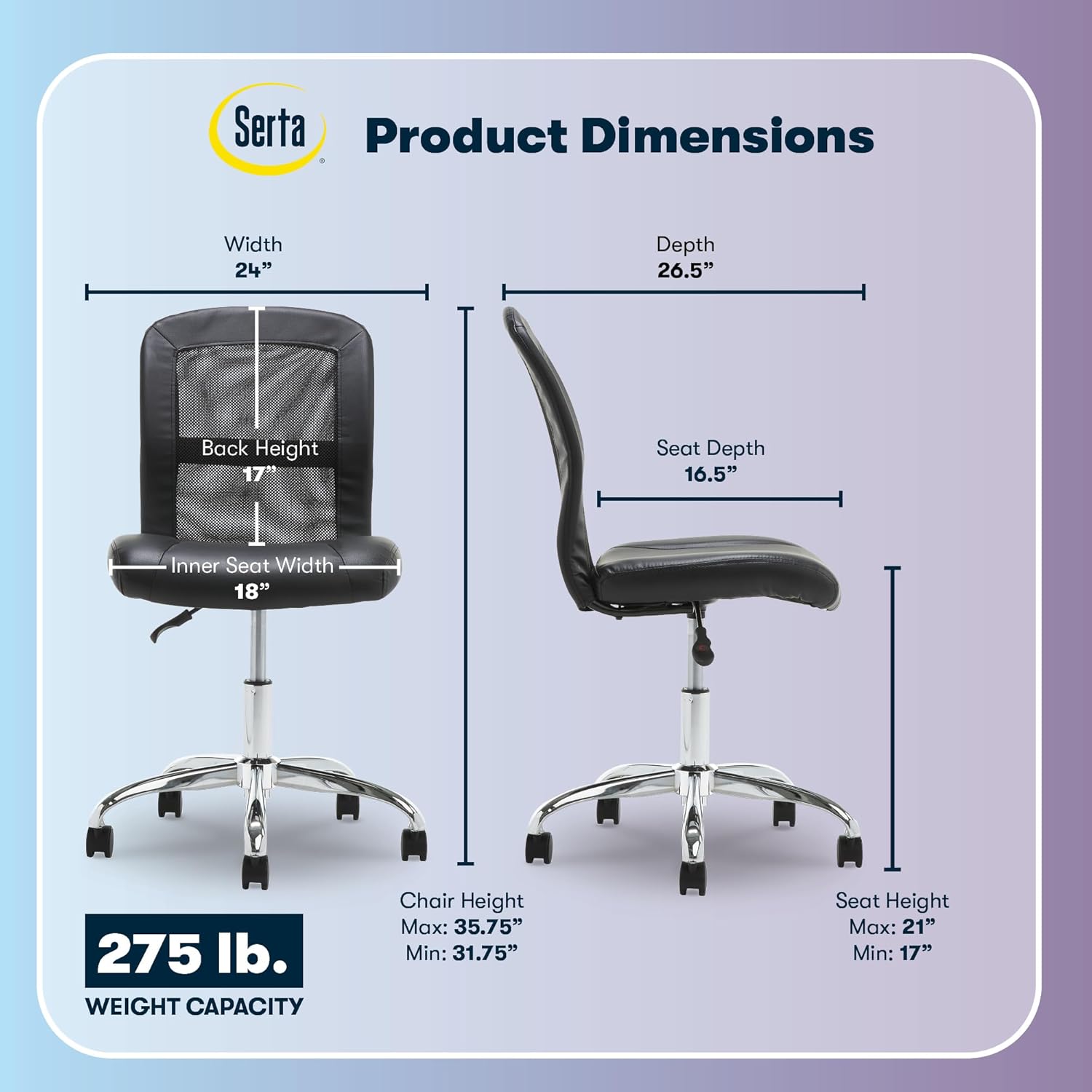
Image: Detailed product dimensions including width, depth, back height, and seat height ranges.
วิดีโอผลิตภัณฑ์อย่างเป็นทางการ
Video: "Serta - We Make Better Chairs" - An official Serta video showcasing the brand's commitment to quality and comfort in their chairs.
การรับประกันและการสนับสนุน
For warranty information, additional support, or to contact our dedicated U.S.-based team for assistance with your Serta chair, please visit our support page:

Image: Serta Customer Support details, including a QR code and webเว็บไซต์เพื่อขอความช่วยเหลือ