
Radioddity Raddy RF23 AM FM Portable Pocket Radio MP3 Player User Manual
รุ่น : RF23
การแนะนำ
This manual provides detailed instructions for the Radioddity Raddy RF23, a compact and versatile portable radio and MP3 player. It features AM/FM radio reception, MP3 playback from Micro TF cards and USB disks, and an integrated flashlight. Please read this manual thoroughly before using the device to ensure proper operation and longevity.
เนื้อหาแพ็คเกจ
- 1 x Radioddity Raddy RF23 AM/FM Radio
- สายชาร์จ USB 1 เส้น
- 1 x Rechargeable Lithium-Ion Battery (BL-5C type)
- สายคล้องข้อมือ 1 x
สินค้าเกินview
Familiarize yourself with the various parts and controls of your Raddy RF23 radio.

รูปที่ 1 : ด้านหน้า View of Raddy RF23 - Displays the speaker grille, digital display, and numeric keypad with function buttons.

รูปที่ 2: ย้อนกลับ View of Raddy RF23 - Shows the battery cover, USB port, DC 5V charging port, and the wrist strap with its stand attachment.
การควบคุมและพอร์ต
- สวิตช์ไฟ: Slide switch on the side to turn the device ON or OFF.
- เสาอากาศ: เสาอากาศแบบยืดหดได้เพื่อเพิ่มประสิทธิภาพการรับสัญญาณวิทยุ
- จอแสดงผลดิจิตอล: แสดงข้อมูลความถี่ โหมด และแทร็ก
- ผู้บรรยาย: ลำโพงในตัวสำหรับส่งสัญญาณเสียงออก
- แผงปุ่มกดตัวเลข (0-9): Used for direct frequency input or track selection.
- ปุ่มโหมด: Switches between AM, FM, and MP3 playback modes.
- ปุ่มเล่น/หยุดชั่วคราว (▶⏸): Plays or pauses MP3 tracks.
- ปุ่มย้อนกลับ/ก่อนหน้า (◀◀): Skips to the previous track or rewinds during MP3 playback. In radio mode, short press for previous station, long press for auto-scan down.
- Next/Fast Forward Button (▶▶): Skips to the next track or fast forwards during MP3 playback. In radio mode, short press for next station, long press for auto-scan up.
- ปุ่ม LED: Activates or deactivates the built-in flashlight.
- อินพุต DC 5V: พอร์ต Micro USB สำหรับชาร์จอุปกรณ์
- พอร์ต USB: สำหรับเชื่อมต่อแฟลชไดรฟ์ USB เพื่อเล่นไฟล์ MP3
- ช่องเสียบการ์ด TF: For inserting a Micro TF (Micro SD) card for MP3 playback.
- แจ็คหูฟัง (3.5 มม.): For connecting headphones for private listening.
การตั้งค่า
1. การติดตั้งแบตเตอรี่
- ค้นหาฝาปิดช่องใส่แบตเตอรี่ที่ด้านหลังวิทยุ
- เลื่อนฝาเปิดออก
- Insert the provided BL-5C Lithium-Ion battery, ensuring the contacts align correctly.
- ปิดฝาช่องใส่แบตเตอรี่ให้แน่น

รูปที่ 3: การติดตั้งแบตเตอรี่ - Open the battery compartment and insert the BL-5C battery.
2. การชาร์จแบตเตอรี่
- Connect the small end of the included USB charging cable to the DC 5V input port on the side of the radio.
- ต่อปลายสาย USB ด้านที่ใหญ่กว่าเข้ากับอะแดปเตอร์แปลงไฟ USB (ไม่ได้รวมอยู่ในชุด) หรือพอร์ต USB ของคอมพิวเตอร์
- The charging indicator light will illuminate. The light typically turns off or changes color when charging is complete.
- การชาร์จเต็มจะใช้เวลาประมาณ 2-3 ชั่วโมง
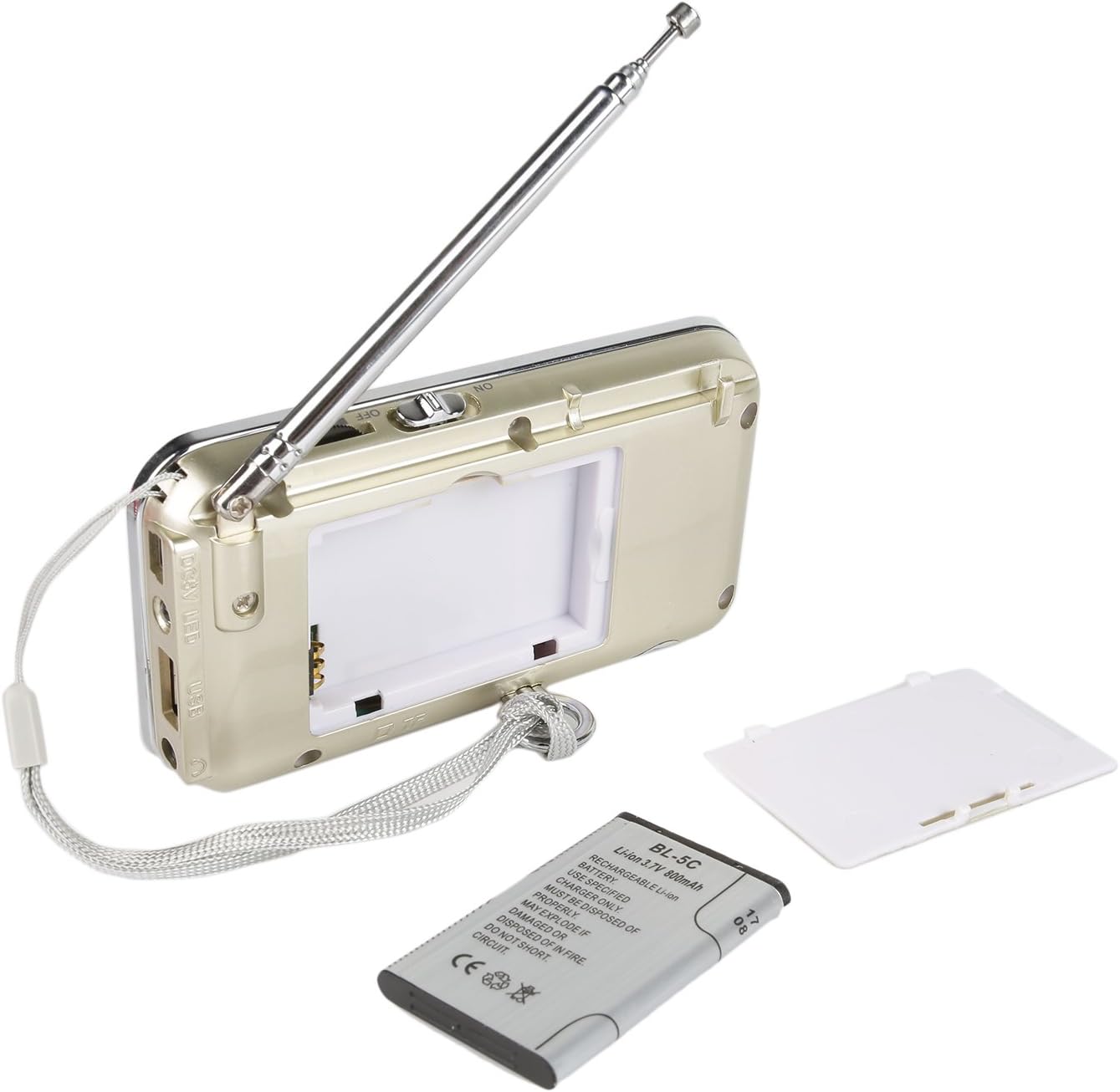
Figure 4: USB Charging - Connect the radio to a USB power source using the provided cable.
3. Inserting a Micro TF Card or USB Disk (for MP3 Playback)
- ตรวจสอบให้แน่ใจว่าวิทยุปิดอยู่
- For a Micro TF card: Gently insert the card into the TF card slot until it clicks into place.
- For a USB disk: Insert the USB disk into the USB port.
- The radio will automatically detect the storage device when powered on and switched to MP3 mode.

รูปที่ 5: การเสียบการ์ด TF - Insert a Micro TF card into the designated slot.
คำแนะนำการใช้งาน
1. เปิด/ปิดเครื่อง
Slide the power switch located on the side of the radio to the "ON" position to power on. Slide it to "OFF" to power off.
2. การเลือกโหมด
กดปุ่ม โหมด button repeatedly to cycle through the available modes: FM Radio, AM Radio, and MP3 Player (if a TF card or USB disk is inserted).
3. การใช้งานวิทยุ FM/AM
- เลือกโหมดวิทยุ: กดปุ่ม โหมด กดปุ่มค้างไว้จนกว่าคำว่า "FM" หรือ "AM" จะปรากฏบนหน้าจอ
- ขยายเสาอากาศ: เพื่อให้รับสัญญาณได้ดีที่สุด โปรดกางเสาอากาศแบบยืดหดได้ออกจนสุด
- การสแกนสถานีอัตโนมัติ: กดค้างไว้ ก่อนหน้า (◀◀) or ถัดไป (▶▶) button to automatically scan for and stop at the next available station.
- การปรับด้วยตนเอง: Use the numeric keypad to directly enter a frequency (e.g., for 106.7 FM, press 1-0-6-7).
- การปรับระดับเสียง: Adjust the volume using the dedicated volume controls, typically located on the side of the device or integrated with other function buttons.
4. MP3 Playback Operation
- เลือกโหมด MP3: กดปุ่ม โหมด button until "MP3" or a track number appears on the display.
- เล่น/หยุดชั่วคราว: กดปุ่ม เล่น/หยุดชั่วคราว (▶⏸) ปุ่มเพื่อเริ่มหรือหยุดการเล่นชั่วคราว
- เพลงถัดไป / ก่อนหน้า: กดปุ่ม ถัดไป (▶▶) ปุ่มเพื่อข้ามไปยังแทร็กถัดไป กด ก่อนหน้า (◀◀) button to go to the beginning of the current track, or press it again to go to the previous track.
- การปรับระดับเสียง: Adjust the volume using the dedicated volume controls, typically located on the side of the device or integrated with other function buttons.
- Direct Track Selection: Use the numeric keypad to enter the track number directly.
5. ฟังก์ชั่นไฟฉาย
กดปุ่ม นำ button to turn the built-in flashlight ON. Press it again to turn the flashlight OFF.
การซ่อมบำรุง
- การทำความสะอาด: Wipe the radio with a soft, dry cloth. Do not use liquid cleaners or solvents.
- พื้นที่จัดเก็บ: เมื่อไม่ได้ใช้งานเป็นเวลานาน ควรเก็บวิทยุไว้ในที่แห้งและเย็น
- การดูแลแบตเตอรี่ If the radio will not be used for a long time, remove the battery to prevent leakage. Recharge the battery periodically to maintain its lifespan.
- การดูแลเสาอากาศ: ควรจับเสาอากาศแบบยืดหดได้ด้วยความระมัดระวัง เพื่อป้องกันการงอหรือแตกหัก
การแก้ไขปัญหา
| ปัญหา | สาเหตุที่เป็นไปได้ | สารละลาย |
|---|---|---|
| วิทยุไม่สามารถเปิดได้ | แบตเตอรี่หมดหรือติดตั้งไม่ถูกต้อง | Charge the battery or ensure it is inserted with correct polarity. |
| การรับสัญญาณวิทยุไม่ดี | เสาอากาศไม่ยืดออก สัญญาณอ่อน หรือมีสัญญาณรบกวน | Fully extend the antenna. Try repositioning the radio. Move away from electronic devices that may cause interference. |
| No sound from MP3 player. | Volume too low, incorrect mode, or no valid media. | Increase volume. Ensure MP3 mode is selected. Verify TF card/USB disk contains MP3 fileและใส่เข้าไปอย่างถูกต้องแล้ว |
| ไฟฉายใช้งานไม่ได้ | Battery low or flashlight not activated. | Charge the battery. Press the LED button to turn on the flashlight. |
| อุปกรณ์ปิดตัวเองโดยไม่คาดคิด | แบตเตอรี่อ่อน | ชาร์จแบตเตอรี่ให้เต็ม |
ข้อมูลจำเพาะ
- ยี่ห้อ: กัมมันตภาพรังสี
- แบบอย่าง: RF23
- ขนาดสินค้า : 4.61 x 0.79 x 2.5 นิ้ว
- น้ำหนักสินค้า: 6.7 ออนซ์
- แหล่งพลังงาน: ใช้พลังงานจากแบตเตอรี่ (ต้องใช้แบตเตอรี่ลิเธียมไอออน 1 ก้อน)
- ประเภทแบตเตอรี่: BL-5C (Rechargeable)
- เทคโนโลยีการเชื่อมต่อ: ยูเอสบี
- เทคโนโลยีจูนเนอร์: เอเอ็ม,เอฟเอ็ม
- รองรับแบนด์วิทยุ: เอเอ็ม,เอฟเอ็ม
- ช่วงความถี่: FM (87.5-108 MHz), AM (520-1710 KHz)
- คุณสมบัติพิเศษ: Built-In Flashlight, Portable
- อุปกรณ์ที่รองรับ: Earphone, Micro TF Card, USB Disk
- ผู้ผลิต: กัมมันตภาพรังสี
การรับประกันและการสนับสนุน
For warranty information or technical support, please refer to the documentation provided with your purchase or visit the official Radioddity webไซต์ โปรดเก็บใบเสร็จรับเงินไว้เป็นหลักฐานการซื้อสำหรับการเรียกร้องการรับประกัน
Radioddity Official Webเว็บไซต์: www.radioddity.com