
การแนะนำ
Thank you for choosing the DROK DC-DC Buck Converter. This device is designed to efficiently convert a higher DC input voltage to a stable 5V DC output, suitable for a wide range of applications. Please read this manual carefully before installation and operation to ensure safe and optimal performance.
ข้อมูลด้านความปลอดภัย
- Ensure correct wiring polarity. Incorrect connections can damage the device and connected equipment.
- The converter features multiple protection functions including การป้องกันการเชื่อมต่อแบบย้อนกลับ, การป้องกันกระแสเกิน, และ การป้องกันอุณหภูมิเกิน. However, always operate within specified voltage และขีดจำกัดปัจจุบัน
- Do not expose the device to extreme temperatures or harsh environments beyond its specified operating conditions.
- This product is designed with special adhesive technology for กันน้ำ, กันกระแทก, กันความชื้น, และ กันฝุ่น properties, enhancing its durability.
- เก็บให้พ้นจากมือเด็ก
สินค้าเกินview
The DROK DC-DC Buck Converter is a compact and efficient power module. It utilizes a synchronous rectification chip for low heat generation and stable performance, achieving a high conversion efficiency of up to 90%.
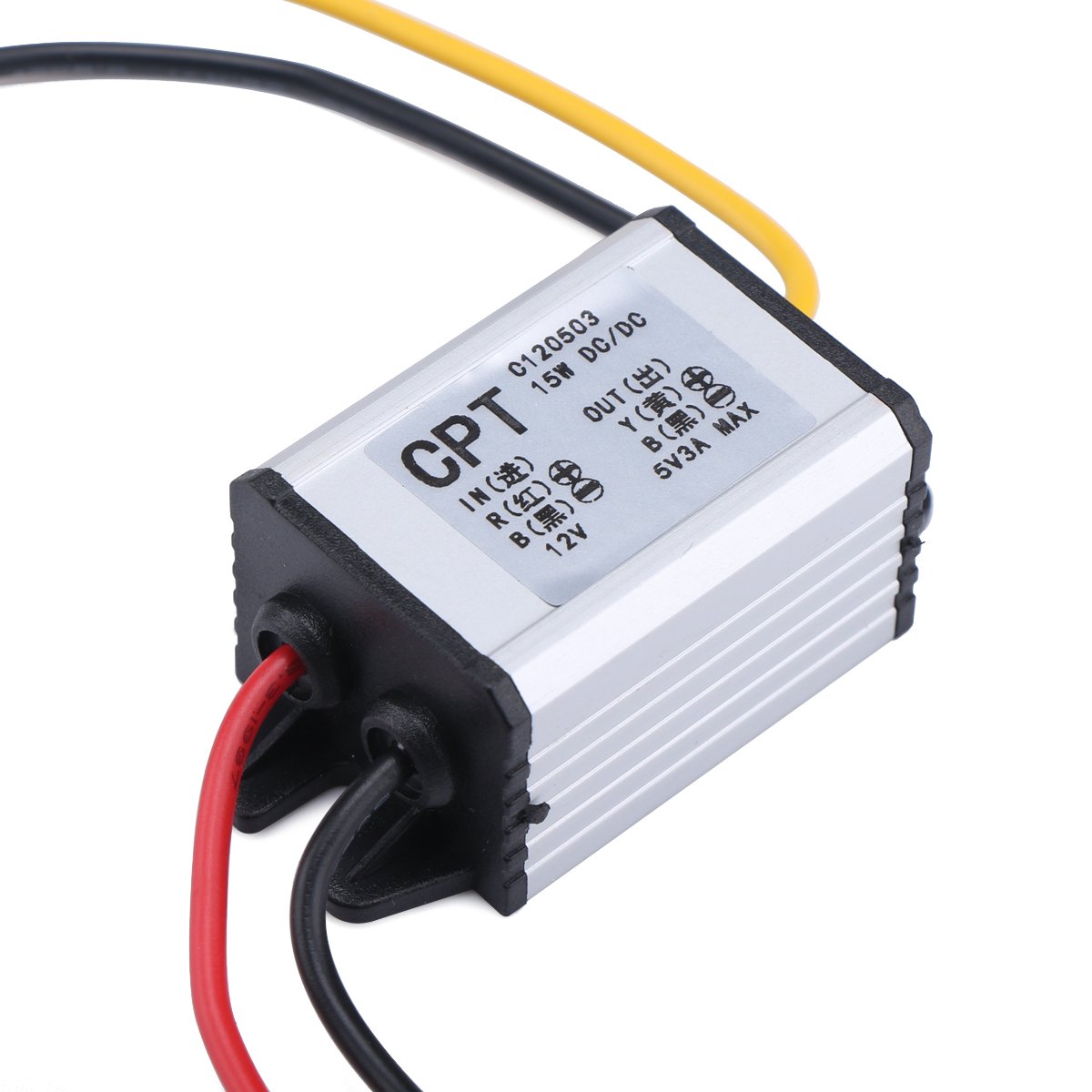
รูปที่ 1 : ด้านหน้า view of the DROK DC-DC Buck Converter.

รูปที่ 2: มุม view showing the input and output wiring connections and labels on the converter.
ข้อมูลจำเพาะ
| พารามิเตอร์ | ค่า |
|---|---|
| ยี่ห้อ | DROK |
| หมายเลขรุ่น | 090600_JPN |
| อินพุต Voltagอี เรนจ์ | แรงดันไฟฟ้ากระแสตรง 6.3V - 22V |
| ปริมาณการส่งออกtage | กระแสตรง 5 โวลต์ |
| กระแสไฟขาออก | 3A (สูงสุด) |
| กำลังขับ | 15W (สูงสุด) |
| ประสิทธิภาพการแปลง | สูงสุดถึง 90% |
| คุณสมบัติการป้องกัน | Reverse Connection, Overcurrent, Overtemperature |
| ความต้านทานต่อสิ่งแวดล้อม | Waterproof, Shockproof, Moisture-proof, Dustproof |
| ขนาด | ขนาดโดยประมาณ 35 มม. x 25 มม. x 20 มม. (ยาว x กว้าง x สูง) |

Figure 3: Dimensions of the DROK DC-DC Buck Converter.
Setup and Wiring
ปฏิบัติตามขั้นตอนเหล่านี้เพื่อการติดตั้งและเดินสายที่ถูกต้อง:
- ระบุสายไฟ: The converter has three wires for input and output.
- Input Positive: สายสีแดง
- Common Negative: สายสีดำ
- Output Positive: สายสีเหลือง
- เชื่อมต่ออินพุต: เชื่อมต่อ สีแดง wire to the positive terminal of your DC power source (6.3V to 22V). Connect the สีดำ wire to the negative terminal of your DC power source.
- เชื่อมต่อเอาท์พุต: เชื่อมต่อ สีเหลือง wire to the positive terminal of your 5V device. Connect the same สีดำ wire (common negative) to the negative terminal of your 5V device.
- การเชื่อมต่อที่ปลอดภัย: ตรวจสอบให้แน่ใจว่าการเชื่อมต่อทั้งหมดมีความปลอดภัยและมีฉนวนป้องกันอย่างเหมาะสมเพื่อป้องกันไฟฟ้าลัดวงจร

รูปที่ 4: รายละเอียด view of the wiring connections for the converter. Red is input positive, Black is common negative, Yellow is output positive.
บันทึก: The black wire serves as the common negative for both input and output. Always double-check polarity before applying power.
คำแนะนำการใช้งาน
Once properly wired, the converter operates automatically. It will step down the input voltage to a stable 5V output. The device is designed for continuous operation within its specified limits.
- Ensure the total current draw of your connected 5V devices does not exceed 3A to prevent overcurrent protection from activating.
- The converter is suitable for various applications such as powering car audio systems, GPS units, solar panel applications, toy cars, speakers, and small motors that require a stable 5V supply.
การซ่อมบำรุง
The DROK DC-DC Buck Converter is designed for durability and requires minimal maintenance due to its robust construction and sealed design.
- ตรวจสอบสายไฟอย่างสม่ำเสมอเพื่อดูว่ามีร่องรอยการสึกหรอหรือความเสียหายหรือไม่
- Keep the device free from excessive dirt or debris, although it is dustproof.
- Do not attempt to open or modify the converter, as this will void any potential warranty and may lead to damage or injury.
การแก้ไขปัญหา
หากคุณพบปัญหาเกี่ยวกับตัวแปลงไฟล์ โปรดพิจารณาสิ่งต่อไปนี้:
- ไม่มีเอาท์พุทVoltage:
- ตรวจสอบอินพุต voltage: Ensure it is within the 6.3V-22V range.
- Verify wiring: Confirm correct polarity for both input and output connections.
- Check for short circuits: Disconnect the load and test the output. If output appears, the load might be shorted or drawing too much current.
- Intermittent Output:
- ตรวจสอบการเชื่อมต่อที่หลวม
- Ensure the load current does not exceed 3A, which could trigger overcurrent protection.
- Allow the device to cool down if it has been operating under heavy load, as overtemperature protection might be active.
- อุปกรณ์ร้อนเกินไป:
- ตรวจสอบให้แน่ใจว่ามีการระบายอากาศที่เพียงพอรอบๆ ตัวแปลงไฟ
- Reduce the load if it consistently operates near the maximum 3A.
วิดีโอที่เกี่ยวข้อง
The following videos provide additional information or demonstrations related to DC-DC converters. Please note that specific product models or features shown in these videos may vary slightly from your purchased item.
DC-DC 12V/24V to 5V 5A Buck Converter Overview
This video demonstrates a DC-DC buck converter, showing its general appearance and potential applications. While the specific model might differ, the principles of operation and connection are similar to your DROK converter. (Duration: 0:27)
USB Power Converter Demonstration
This video illustrates the use of a USB power converter, which often involves a 5V output. It can provide insight into how such converters are used in practical scenarios. (Duration: 0:15)
การรับประกันและการสนับสนุน
For warranty information or technical support, please refer to the seller's policies on the platform where you purchased this product or contact DROK customer service directly. Please have your model number (090600_JPN) and purchase details ready when seeking support.