
1. สินค้าหมดview
The Sachtler Video 18 S2 Fluid Head & ENG 2 CF Tripod System is a robust and versatile solution designed for professional video production. This system combines the high-performance Video 18 S2 fluid head with lightweight yet durable ENG 2 CF carbon fiber tripod legs, a mid-level spreader, and a set of rubber feet, all conveniently packed in a padded bag for transport.
The fluid head is engineered to support a wide range of cameras, from DSLR setups to ENG and digital cinema cameras, with a payload capacity of 4 to 44.1 lb. It features precise sixteen-step counterbalance and seven-step pan and tilt drag, ensuring smooth and controlled camera movements. Additional features include temperature resistance, a Touch & Go quick release camera plate for rapid setup, parking positions for spare camera screws, and an illuminated leveling bubble for accurate horizontal alignment.
คู่-stage tripod legs attach to the fluid head via a 100mm bowl interface, offering a height adjustment range of 26.4 to 66.1 inches and collapsing to a compact 35 inches for portability. The included mid-level spreader and rubber feet enhance stability and rigidity on various terrains.
ส่วนประกอบหลัก:
- Video 18 S2 Fluid Head: Provides smooth pan and tilt movements with adjustable drag and counterbalance.
- CF-100ENG 2CF Carbon Fiber Tripod Legs: Lightweight and durable carbon fiber construction with 22mm (0.87") tube diameter.
- Mid-Level Tripod Spreader: Enhances stability and prevents legs from splaying on uneven surfaces.
- Rubber Feet (Set of 3): Provides grip and protects surfaces.
- Padded Bag: For convenient storage and transportation of the entire system.

Figure 1: The Sachtler Video 18 S2 Fluid Head mounted on the ENG 2 CF Carbon Fiber Tripod System.

รูปที่ 2: ด้านข้าง view of the fluid head, highlighting the counterbalance and drag controls.
2. คำแนะนำในการตั้งค่า
2.1 การแกะกล่องและการตรวจสอบเบื้องต้น
- Carefully remove all components from the padded bag.
- Verify that all listed components are present: fluid head, tripod legs, mid-level spreader, and rubber feet.
- Inspect all parts for any signs of damage from shipping. Contact your dealer immediately if any damage is found.
2.2 Attaching the Fluid Head to the Tripod Legs
- Place the tripod legs on a stable, flat surface.
- Loosen the tripod's bowl clamp.
- Insert the 100mm bowl of the Video 18 S2 Fluid Head into the tripod's bowl receiver.
- Ensure the fluid head is seated correctly and tighten the bowl clamp อย่างปลอดภัย

Figure 3: The fluid head with pan bar, ready for camera mounting.
2.3 Deploying the Tripod Legs and Mid-Level Spreader
- Extend the tripod legs to your desired height by releasing the leg locks.
- Attach the mid-level spreader to the designated points on the tripod legs. Adjust the spreader arms to achieve the desired leg angle and stability.
- If working on soft ground, ensure the rubber feet are removed to allow the integrated spikes to grip the surface. For hard or delicate surfaces, attach the rubber feet.
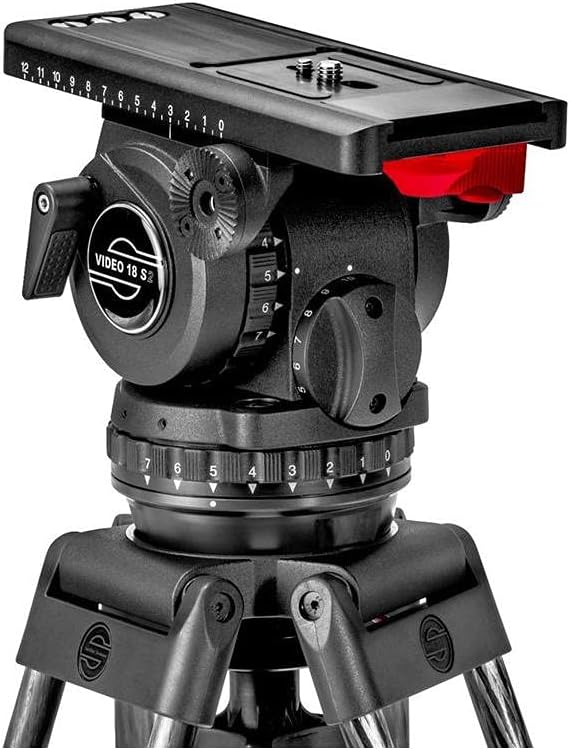
Figure 4: Close-up of the fluid head's quick release plate mechanism.
2.4 การติดตั้งกล้อง
- Ensure the fluid head's pan and tilt locks are engaged.
- Press the release button on the Touch & Go quick release camera plate to remove it from the fluid head.
- Attach the quick release plate to the bottom of your camera using the appropriate camera screws (1/4" or 3/8"). Utilize the parking positions on the head for spare screws.
- Slide the camera with the attached plate back into the fluid head until it clicks securely into place. Verify it is locked by gently attempting to lift the camera.
3. คู่มือการใช้งาน
3.1 Leveling the Fluid Head
- คลายชาม clamp เล็กน้อย.
- Adjust the fluid head until the illuminated leveling bubble indicates a perfectly horizontal position.
- ขันน็อตยึดชามให้แน่นamp อย่างมั่นคง.
3.2 Adjusting Counterbalance
The Video 18 S2 Fluid Head features a sixteen-step counterbalance system to perfectly balance your camera rig, preventing accidental tilting and ensuring smooth vertical movements.
- With the camera mounted and tilt lock disengaged, slowly adjust the counterbalance knob until the camera remains stationary at any tilt angle.
- Start with a lower counterbalance setting and gradually increase it until optimal balance is achieved.
3.3 Adjusting Pan and Tilt Drag
The fluid head offers seven steps of pan and tilt drag, allowing you to customize the resistance for smooth and precise camera movements.
- Use the pan drag control knob to adjust horizontal movement resistance.
- Use the tilt drag control knob to adjust vertical movement resistance.
- Select a drag setting that provides the desired feel and control for your shot.
3.4 Using Pan and Tilt Locks
Engage the pan and tilt locks when the camera needs to remain stationary or during transport to prevent movement and potential damage.
- Rotate the pan lock lever to secure horizontal movement.
- Rotate the tilt lock lever to secure vertical movement.
4. การบำรุงรักษา
4.1 การทำความสะอาด
- Regularly wipe down the tripod and fluid head with a soft, dry cloth to remove dust and dirt.
- สำหรับคราบฝังแน่น ให้ใช้ผ้าที่มีส่วนผสมของสารกันบูดเล็กน้อยamp ผ้าด้วยสบู่ชนิดอ่อนแล้วเช็ดให้แห้งสนิท
- Avoid using harsh chemicals or abrasive materials, as these can damage the finish and components.
4.2 พื้นที่จัดเก็บ
- When not in use, store the tripod system in its padded bag to protect it from dust, moisture, and impacts.
- เก็บไว้ในที่แห้งและเย็น ห่างจากอุณหภูมิที่สูงหรือต่ำมาก
4.3 การหล่อลื่น
The fluid head's internal mechanisms are factory-lubricated and generally do not require user maintenance. If you experience any issues with smoothness, contact Sachtler customer support for professional servicing.
5 การแก้ไขปัญหา
- Issue: Camera not balancing correctly.
- สารละลาย: Adjust the counterbalance setting on the fluid head. Ensure the camera plate is correctly positioned and securely locked.
- ปัญหา: การเคลื่อนไหวแบบแพนหรือเอียงไม่ราบรื่น
- สารละลาย: Check the pan and tilt drag settings. Ensure they are not set too high or too low for your camera's weight. Verify that the locks are fully disengaged.
- ปัญหา: ขาตั้งกล้องดูไม่มั่นคง
- สารละลาย: Ensure all leg locks are fully engaged. Adjust the mid-level spreader to a wider position for increased stability. Verify the rubber feet or spikes are appropriate for the terrain.
- Issue: Illuminated leveling bubble is not working.
- สารละลาย: Check if the battery for the illumination is depleted. Refer to the fluid head's specific manual for battery replacement instructions.
6. ข้อมูลจำเพาะ
| คุณสมบัติ | รายละเอียด |
|---|---|
| ขนาดสินค้า | 24.5 x 15 x 13 นิ้ว |
| น้ำหนักสินค้า | 19.6 ปอนด์ |
| หมายเลขรุ่นสินค้า | 1863S2 |
| ผู้ผลิต | ซัคท์เลอร์ |
| ยี่ห้อ | ซัคท์เลอร์ |
| อุปกรณ์ที่รองรับ | กล้อง |
| ขนาดเมื่อพับ | 35 นิ้ว |
| Payload Capacity (Fluid Head) | 4 ถึง 44.1 ปอนด์ |
| ขั้นบันไดถ่วงดุล | 16 |
| Pan & Tilt Drag Steps | 7 |
| การปรับความสูงของขาตั้งกล้อง | 26.4 ถึง 66.1 นิ้ว |
| Bowl Interface | 100มม. |
| ยูพีซี | 663647919113 |
7. การรับประกันและการสนับสนุน
For warranty information, technical support, or service inquiries, please visit the official Sachtler website or contact your authorized Sachtler dealer. Keep your purchase receipt as proof of purchase for warranty claims.
ผู้ผลิต: ซัคท์เลอร์
วันที่เข้าใช้งานครั้งแรก: 20 กรกฎาคม 2017