1. บทนำ
The ABKO Hacker K600 Hades RGB Mechanical Keyboard is designed to provide a responsive and customizable typing and gaming experience. Featuring durable blue mechanical switches and vibrant RGB backlighting, this keyboard offers both performance and aesthetic appeal. This manual provides essential information for setting up, operating, maintaining, and troubleshooting your K600 Hades keyboard to ensure optimal performance and longevity.
2. เนื้อหาบรรจุภัณฑ์
โปรดตรวจสอบว่าสินค้าทั้งหมดมีอยู่ในแพ็คเกจของคุณ:
- ABKO Hacker K600 Hades RGB Mechanical Keyboard
- คู่มือการใช้งาน
3. สินค้าหมดview
The ABKO Hacker K600 Hades keyboard features a full-size layout with dedicated function keys and a numeric keypad. It utilizes blue mechanical switches known for their tactile feedback and audible click. The keyboard is equipped with customizable RGB backlighting, offering various lighting effects and colors.
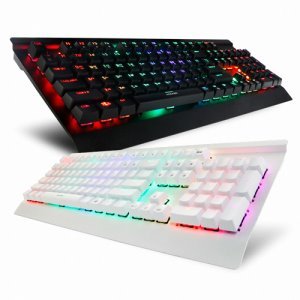
ภาพที่ 1: มุม view of the ABKO Hacker K600 Hades RGB Mechanical Keyboard, showcasing เค้าโครงเต็มรูปแบบและแสงไฟ RGB

ภาพที่ 2: ด้านหน้า view of the ABKO Hacker K600 Hades RGB Mechanical Keyboard, highlighting the vibrant RGB backlighting across all keys.
4. การตั้งค่า
Follow these steps to set up your ABKO Hacker K600 Hades keyboard:
- Unpack the keyboard and ensure all package contents are present.
- ค้นหาพอร์ต USB-A ที่พร้อมใช้งานบนคอมพิวเตอร์ของคุณ
- เสียบหัวต่อ USB-A ของสายคีย์บอร์ดเข้ากับพอร์ต USB-A บนคอมพิวเตอร์ของคุณ
- Your operating system should automatically detect and install the necessary drivers. The keyboard is plug-and-play, requiring no additional software for basic functionality.
- Once installed, the keyboard's default RGB lighting will illuminate, indicating it is ready for use.
5. คู่มือการใช้งาน
5.1 ฟังก์ชันพื้นฐานของแป้นพิมพ์
The ABKO Hacker K600 Hades functions as a standard QWERTY keyboard for typing and general computer use.
5.2 การควบคุมแสง RGB
The keyboard features various RGB lighting modes and customization options. Use the following key combinations to adjust the lighting:
- Fn + Ins/Home/PgUp/Del/End/PgDn: Cycle through different RGB lighting effects and modes.
- Fn + ลูกศรขึ้น/ลง: Adjust the brightness level of the backlighting.
- กด Fn + ลูกศรซ้าย/ขวา: ปรับความเร็วของเอฟเฟกต์แสงแบบไดนามิก
- Fn + PrtSc: Toggle between various static color presets.
5.3 ปุ่มมัลติมีเดียและฟังก์ชัน
รวมเข้าด้วยกัน Fn key with the F1-F12 keys to access multimedia controls and other functions:
- Fn + F1-F12: Specific functions may vary, but commonly include media playback controls (play/pause, stop, previous/next track), volume control (mute, volume up/down), and launching applications. Refer to the keycap legends for exact functions.
6. การบำรุงรักษา
การบำรุงรักษาอย่างเหมาะสมจะช่วยให้คีย์บอร์ดของคุณมีอายุการใช้งานยาวนานและมีประสิทธิภาพ:
- การทำความสะอาด: Use a soft, dry cloth to wipe the surface of the keyboard. For dust and debris between keycaps, use compressed air. For stubborn dirt, a slightly damp cloth with mild soap solution can be used, ensuring no liquid enters the keyboard.
- การถอดคีย์แคป: If necessary, keycaps can be carefully removed using a keycap puller (not included) for deeper cleaning. Exercise caution to avoid damaging the switches.
- พื้นที่จัดเก็บ: เมื่อไม่ได้ใช้งานเป็นเวลานาน ควรเก็บแป้นพิมพ์ไว้ในสภาพแวดล้อมที่สะอาดและแห้ง หลีกเลี่ยงแสงแดดโดยตรงและอุณหภูมิที่สูงหรือต่ำเกินไป
7 การแก้ไขปัญหา
If you encounter issues with your ABKO Hacker K600 Hades keyboard, refer to the following common solutions:
- แป้นพิมพ์ไม่ตอบสนอง:
- ตรวจสอบให้แน่ใจว่าสาย USB เชื่อมต่อกับคีย์บอร์ดและคอมพิวเตอร์อย่างแน่นหนา
- ลองเสียบคีย์บอร์ดเข้ากับพอร์ต USB อื่นบนคอมพิวเตอร์ของคุณ
- รีสตาร์ทเครื่องคอมพิวเตอร์ของคุณ
- ทดสอบแป้นพิมพ์บนคอมพิวเตอร์เครื่องอื่นเพื่อตรวจสอบว่าปัญหาอยู่ที่แป้นพิมพ์หรือพอร์ต/ไดรเวอร์ของคอมพิวเตอร์
- กุญแจไม่ลงทะเบียน:
- ตรวจสอบดูว่ามีเศษฝุ่นหรือสิ่งแปลกปลอมติดอยู่ใต้ปุ่มกดหรือไม่
- If a specific key is not working, it might indicate a faulty switch.
- ปัญหาแสง RGB:
- ตรวจสอบให้แน่ใจว่าแป้นพิมพ์เชื่อมต่ออย่างถูกต้อง
- Cycle through lighting modes and brightness levels using the Fn key combinations (refer to Section 5.2).
- If the lighting is completely off, check if it has been accidentally turned off.
8. ข้อมูลจำเพาะ
| คุณสมบัติ | คำอธิบาย |
|---|---|
| ยี่ห้อ | เอบีเคโอ |
| แบบอย่าง | K600 Hades |
| เทคโนโลยีการเชื่อมต่อ | USB-A (แบบมีสาย) |
| คำอธิบายแป้นพิมพ์ | เกม, เครื่องกล |
| ประเภทสวิตซ์ | สวิทช์สีฟ้า |
| แป้นพิมพ์แบ็คไลท์ | อาร์จีบี |
| สี | สีดำ |
| วัสดุ | อะคริโลไนไตรล์บิวทาไดอีนสไตรีน |
| คุณสมบัติพิเศษ | การยศาสตร์ |
| อุปกรณ์ที่รองรับ | เครื่องเล่นเกมคอนโซล, แล็ปท็อป, พีซี, สมาร์ทโฟน, แท็บเล็ต |
| วันที่พร้อมใช้งานครั้งแรก | วันที่ 11 มิถุนายน 2017 |
9. การรับประกันและการสนับสนุน
This product is covered by a standard manufacturer's warranty. For detailed information regarding warranty terms, conditions, and duration, please refer to the warranty card included with your purchase or visit the official ABKO website. For technical support, troubleshooting assistance, or any product-related inquiries, please contact ABKO customer service through their official channels.