
1. บทนำ
Thank you for choosing the Master Lock 653D Set-Your-Own-Combination Padlock. This manual provides detailed instructions for setting and resetting your personal combination, operating the lock, and maintaining its performance. This padlock features a durable metal body and a hardened steel shackle for enhanced security.

Image 1.1: Master Lock 653D Set-Your-Own-Combination Padlock.
2. สินค้าหมดview
The Master Lock 653D padlock is designed for various security needs, offering a convenient keyless solution. Key features include:
- โครงสร้างทนทาน: 2-inch (50mm) wide metal body for strength.
- Hardened Steel Shackle: 1/4 inch (6mm) diameter, 15/16 inch (24mm) long shackle for cut resistance.
- Set-Your-Own Combination: Allows for personalized security codes.
- Soft Touch Grips: Bottom and side grips provide a no-slip hold.
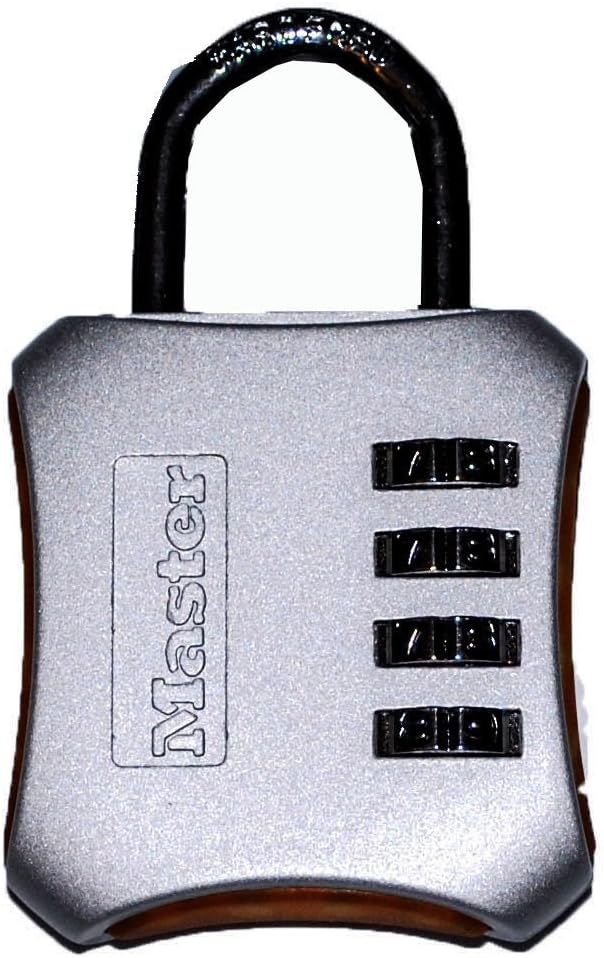
ภาพที่ 2.1: ด้านหน้า view of the Master Lock 653D padlock.
3. การตั้งค่ารหัสผ่าน
Your Master Lock 653D padlock comes preset to 0-0-0-0. Follow these steps to set your personal combination:
- เปิดล็อค: Ensure the padlock is set to the current combination (factory default is 0-0-0-0) and pull up the shackle to open the lock.
- Rotate Shackle: Rotate the shackle 90 degrees counter-clockwise (or 1/4 turn) from the open position.
- Press Down Shackle: With the shackle rotated, press the shackle down firmly into the lock body.
- ตั้งค่าชุดค่าผสมใหม่: While holding the shackle down, turn the dials to your desired new combination. Ensure the numbers are aligned with the indicator marks.
- Release and Return Shackle: Release the shackle and return it to its original open position (90 degrees clockwise).
- ปิดล็อค: Push the shackle down to close the lock. Scramble the dials to lock it.
ชุดค่าผสมใหม่ของคุณได้รับการตั้งค่าแล้ว It is crucial to remember your combination as there is no master key or override.
4. การใช้งานแม่กุญแจ
4.1. การเปิดล็อค
- ปรับแป้นหมุนให้ตรงกับรหัส 4 หลักส่วนตัวของคุณ
- Pull up on the shackle to release it from the lock body.
4.2. Closing the Lock
- Insert the shackle back into the lock body.
- หมุนแป้นหมุนไปที่ชุดตัวเลขแบบสุ่มเพื่อล็อคให้แน่นหนา
5. การบำรุงรักษา
The Master Lock 653D padlock is designed for durability and requires minimal maintenance. To ensure optimal performance:
- การทำความสะอาด: Wipe the lock body and shackle with a clean, dry cloth periodically to remove dirt and grime.
- การหล่อลื่น: If the dials become stiff or difficult to turn, apply a small amount of graphite lubricant or a silicone-based spray lubricant to the moving parts. Avoid oil-based lubricants as they can attract dust.
- พื้นที่จัดเก็บ: Store the padlock in a dry environment when not in use to prevent corrosion, especially if exposed to harsh weather conditions.
6 การแก้ไขปัญหา
6.1. Lock Will Not Open
- การใส่รหัสไม่ถูกต้อง: Double-check that you have entered the correct 4-digit combination. Ensure each number is precisely aligned with the indicator marks.
- Dials Stiff: หากปุ่มหมุนฝืด ให้ลองใช้สารหล่อลื่นตามที่อธิบายไว้ในส่วนการบำรุงรักษา
- Forgotten Combination: Unfortunately, if you have forgotten your combination, there is no way to reset it without knowing the current code. The lock will need to be replaced.
6.2. Shackle Does Not Press Down During Combination Setting
- Ensure the shackle is rotated exactly 90 degrees from the open position. It must be fully rotated and aligned with the notch inside the lock body to allow it to be pressed down.
- Verify the lock is currently set to the correct combination (or factory default 0-0-0-0) before attempting to rotate and press the shackle.
7. ข้อมูลจำเพาะ
| คุณสมบัติ | รายละเอียด |
|---|---|
| หมายเลขรุ่น | 653ดี |
| ความกว้างของตัว | 2 นิ้ว (50 มม.) |
| เส้นผ่านศูนย์กลางของห่วง | 1/4 นิ้ว (6 มม.) |
| Shackle Length (Vertical Clearance) | 15/16 นิ้ว (24 มม.) |
| Shackle Width (Horizontal Clearance) | 3/4 นิ้ว (19 มม.) |
| วัสดุ | โลหะผสมเหล็ก, โลหะ |
| ประเภทล็อค | กุญแจรหัส |
| ขนาดรายการ (ยาว x กว้าง x สูง) | 5.56 x 3.5 x 0.9 นิ้ว |
| น้ำหนักสินค้า | 6.88 ออนซ์ |

Image 7.1: Master Lock 653D Padlock Dimensions.
8. การรับประกันและการสนับสนุน
Master Lock products are manufactured to stringent quality standards. The Master Lock 653D padlock comes with a รับประกันตลอดอายุการใช้งาน, providing peace of mind against defects in material and workmanship.
For warranty claims, technical support, or further assistance, please visit the official Master Lock webหรือติดต่อฝ่ายบริการลูกค้า เก็บใบเสร็จรับเงินไว้เป็นหลักฐานการซื้อ


