
VIGORWORK AF1313
VIGORWORK 1 Din Car Stereo Bluetooth Car Audio MP3 Recorder User Manual
แบบ: AF1313
การแนะนำ
Welcome to your new VIGORWORK 1 Din Car Stereo. This manual provides detailed instructions for the installation, operation, and maintenance of your car audio system. Please read it thoroughly before use to ensure proper functionality and safety.
ข้อมูลด้านความปลอดภัย
- Ensure proper installation by a qualified professional to prevent electrical damage or injury.
- อย่าใช้งานอุปกรณ์ในลักษณะที่จะทำให้คุณเสียสมาธิในการขับขี่
- ควรหลีกเลี่ยงการวางเครื่องไว้ในที่ที่มีอุณหภูมิสูงหรือต่ำเกินไป แสงแดดโดยตรง หรือความชื้น
- Disconnect the car battery before installation or maintenance.
- ใช้เฉพาะเล่มที่ระบุเท่านั้นtage (12V DC) for operation.
เนื้อหาแพ็คเกจ
บรรจุภัณฑ์ควรมีรายการต่อไปนี้:
- 1x VIGORWORK 1 Din Car Stereo Unit (Model AF1313)
- 1x รีโมทคอนโทรล
- 1x Power Cable (ISO Connector)
- 1x คู่มือผู้ใช้ (ภาษาอังกฤษ)
- 2x Fixed Iron Pieces (Installation Keys)

Image: Display of product accessories, including the car stereo unit, remote control, power cables, and installation keys.
การติดตั้งและการตั้งค่า
This section outlines the general steps for installing your car stereo. Professional installation is recommended to ensure correct wiring and prevent damage.
แผนผังการเดินสายไฟ
Refer to the wiring diagram located on the top of the unit or in the included manual for correct connections. Ensure all wires are connected to their corresponding terminals (power, ground, speakers, antenna).

ภาพ: ด้านหลัง view of the car stereo unit with the wiring diagram label visible.
การติดตั้งทางกายภาพ
- ตรวจสอบให้แน่ใจว่าได้ปิดสวิตช์กุญแจรถแล้ว และถอดขั้วลบของแบตเตอรี่รถยนต์ออก
- ถอดวิทยุติดรถยนต์เดิมออกจากแผงหน้าปัด
- Connect the wiring harness from the new stereo to the vehicle's wiring. Ensure all connections are secure and correctly matched (power, ground, speakers, antenna).
- Slide the new stereo unit into the dashboard opening until it clicks into place. Use the provided fixed iron pieces if necessary to secure it.
- ต่อแบตเตอรี่รถยนต์อีกครั้ง
- Turn on the ignition and test the stereo's functions.
คำแนะนำการใช้งาน
การควบคุมพื้นฐาน
The front panel features a rotary electronic volume control, mode button, band button, and various playback controls for easy access to functions.

Image: Front panel of the car stereo, showing the main controls and display.
เปิด/ปิดเครื่อง
- Press the power button (often integrated with the volume knob) to turn the unit on or off.
- The clock display will be shown when the unit is powered off.
การควบคุมระดับเสียง
- Rotate the volume knob clockwise to increase volume, and counter-clockwise to decrease.
การเลือกโหมด
- Press the "MODE" button to cycle through available audio sources: FM Radio, Bluetooth, USB, SD, and AUX.
การทำงานของวิทยุ FM
- Press the "BAND" button to select between FM1, FM2, or FM3 bands.
- Press the "AMS" button for automatic station search and storage.
- Use the seek buttons (e.g., >>| or |<<) to manually tune or scan for stations.
- The unit supports storing up to 18 preset stations.
Image: The car stereo displaying an FM radio frequency.
การเชื่อมต่อบลูทูธ
This unit supports Bluetooth for hands-free calling and audio streaming from compatible devices.
- ตรวจสอบให้แน่ใจว่าได้เปิดใช้งาน Bluetooth บนอุปกรณ์มือถือของคุณ
- Select "BT" mode on the car stereo. The display will show "BT PAIRING" or a similar indicator.
- ค้นหา available devices on your phone and select "CAR BT" or "VIGORWORK" (or similar name).
- Once successfully paired, you can make/receive calls and stream music wirelessly.

Image: Visual representation of Bluetooth connectivity for hands-free calls and music playback.
การเล่นการ์ด USB/SD
Insert a USB drive or SD card into the respective slot. The unit will automatically switch to USB/SD mode and begin playback of compatible audio files (MP3, WMA, WAV).
- Supports pause, preview, repeat, random play, and 10 tracks up/down selections.
- Supports folder playback function.

Image: Illustration of the SD card function for playing music files.
อินพุต AUX
Connect external audio devices (e.g., smartphone, MP3 player) to the front AUX input using a 3.5mm audio cable. Select "AUX" mode on the stereo to play audio from the connected device.

Image: Visual guide for using the AUX input to connect external audio devices.
ฟังก์ชั่นการชาร์จ
The USB port can provide 5V charging for mobile devices. Please note that this is not a professional charger and may not support all devices or fast charging capabilities.

Image: Illustration of the USB charging function for mobile phones.
ฟังก์ชั่นอีควอไลเซอร์ (EQ)
Press the "EQ" button to cycle through preset equalizer modes such as Jazz, Rock, Pop, and Classical. You can also adjust bass, treble, left/right balance, and front/back fade settings to customize your audio experience.
รีโมทคอนโทรล
The included remote control allows for convenient operation of various functions from a distance, including power, volume, mode selection, and track control.
Image: The car stereo unit displayed alongside its remote control.
การซ่อมบำรุง
- Clean the front panel with a soft, dry cloth. Do not use abrasive cleaners, solvents, or harsh chemicals, as these can damage the surface.
- Keep USB and SD card slots free of dust and debris to ensure proper connection and functionality.
- ตรวจสอบให้แน่ใจว่ามีการระบายอากาศที่เหมาะสมรอบๆ ตัวเครื่องเพื่อป้องกันความร้อนสูงเกินไป
การแก้ไขปัญหา
If you encounter any issues with your car stereo, please refer to the following table for common problems and their solutions.
| ปัญหา | สาเหตุที่เป็นไปได้ | สารละลาย |
|---|---|---|
| ไม่มีไฟฟ้า | การเดินสายไฟไม่ถูกต้อง; ฟิวส์ขาด; แบตเตอรี่รถยนต์อ่อน | Check wiring connections; Replace fuse; Charge/check car battery |
| ไม่มีเสียง | Volume too low; Mute activated; Speaker wiring incorrect | Increase volume; Deactivate mute; Check speaker connections |
| การรับสัญญาณวิทยุ FM ไม่ดี | ไม่ได้เชื่อมต่อเสาอากาศ; พื้นที่สัญญาณอ่อน | Ensure antenna is connected; Try a different location; Consider an external antenna booster |
| ไม่ได้เชื่อมต่อบลูทูธ | Bluetooth not enabled on device; Incorrect pairing mode; Device too far | Enable Bluetooth on phone; Ensure stereo is in BT pairing mode; Move device closer |
| USB/SD เล่นไม่ได้ | ไม่ได้รับการสนับสนุน file รูปแบบ; เสียหาย files; USB/SD card faulty | ทำให้มั่นใจ files are MP3/WMA/WAV; Reformat/replace USB/SD card; Try a different card |
| รีโมตคอนโทรลไม่ทำงาน | Battery depleted; Obstruction; Remote not pointed at sensor | Replace battery; Remove obstructions; Point remote directly at unit |
ข้อมูลจำเพาะ
| ยี่ห้อ | VIGORWORK |
| แบบอย่าง | เอเอฟ1313 |
| เทคโนโลยีจูนเนอร์ | FM |
| อุปกรณ์ที่รองรับ | ลำโพง |
| คุณสมบัติพิเศษ | Equalizer, Hands-Free Calling |
| โหมดเอาต์พุตเสียง | สเตอริโอ |
| การกำหนดค่าช่องเสียงรอบทิศทางของลำโพง | 2 |
| เอาท์พุต วัดtage | 25 วัตต์ |
| ประเภทขั้วต่อ | บลูทูธ, แจ็ค 3.5 มม. |
| รูปแบบสื่อ | WAV, WMA |
| ขนาดสินค้า | 12.5 x 17.8 x 5 ซม.; 400 กรัม |
| ASIN | B07193ZG75 |
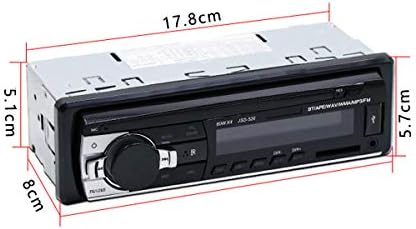
Image: Diagram showing the physical dimensions of the car stereo unit.
การรับประกันและการสนับสนุน
This VIGORWORK product is covered by a standard manufacturer's warranty. For specific warranty details, please refer to the documentation included with your purchase or contact VIGORWORK customer support.
For technical assistance, troubleshooting, or further inquiries, please visit the VIGORWORK official webหรือติดต่อฝ่ายบริการลูกค้าผ่านข้อมูลติดต่อที่ให้มาพร้อมกับผลิตภัณฑ์ของคุณ
Ask a question about this manual
Ask about setup, troubleshooting, compatibility, parts, safety, or missing instructions. Manuals+ will review the question and use this page’s manual context to help answer it.