
1. บทนำ
The COUGAR GX-S 750W is an 80-PLUS Gold certified power supply unit (PSU) designed for reliable and efficient power delivery to your personal computer. Its compact design ensures compatibility with various PC cases, while advanced features like fan curve tuning and DC-DC power conversion technology contribute to stable voltage outputs and reduced noise levels. This manual provides essential information for the safe installation, operation, and maintenance of your GX-S 750W PSU.
2. ข้อมูลด้านความปลอดภัย
Please read and understand all safety instructions before installing or operating the power supply unit. Failure to comply with these instructions may result in electric shock, fire, or damage to the product and connected components.
- ควรตัดการเชื่อมต่อสายไฟ AC ออกจากเต้ารับที่ผนังทุกครั้งก่อนทำการติดตั้ง ถอด หรือทำความสะอาด PSU
- ห้ามเปิด PSUasinก. ปริมาตรสูงtage components inside pose a risk of electric shock, even when the unit is unplugged.
- Ensure the PSU is properly grounded.
- This product is intended for indoor use only. Do not expose the PSU to water, moisture, or high humidity.
- ติดตั้งแหล่งจ่ายไฟ (PSU) ในบริเวณที่มีอากาศถ่ายเทสะดวก ห่างจากแหล่งความร้อนและแสงแดดโดยตรง
- ใช้เฉพาะสายเคเบิลที่ให้มาพร้อมกับแหล่งจ่ายไฟเท่านั้น
- Do not force connectors. Ensure correct orientation before plugging in cables.
3. เนื้อหาบรรจุภัณฑ์
ตรวจสอบว่ามีรายการทั้งหมดอยู่ในแพ็คเกจ:
- COUGAR GX-S 750W Power Supply Unit
- สายไฟ AC
- Modular and Fixed Cables (24-pin ATX, 4+4-pin CPU, 6+2-pin PCIe, SATA, Molex)
- สกรูยึด
- คู่มือการใช้งาน
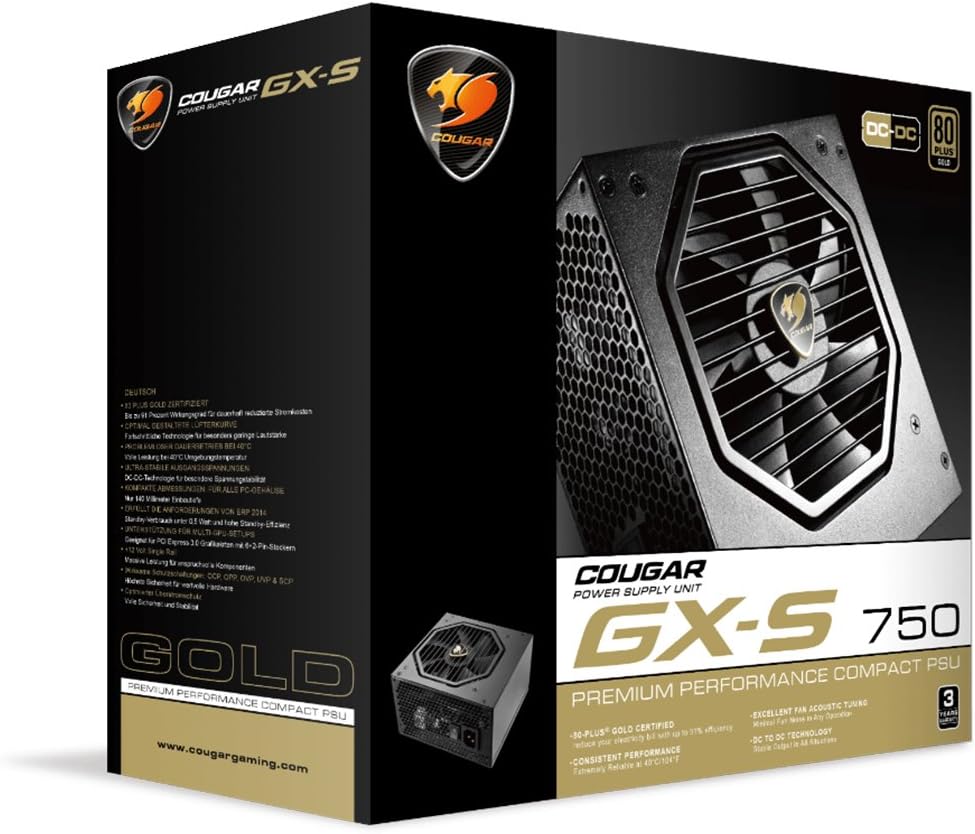
Image 3.1: COUGAR GX-S 750W Power Supply packaging. The image shows the retail box for the COUGAR GX-S 750W PSU, highlighting its 80 PLUS Gold certification and compact design.
4. การตั้งค่าและการติดตั้ง
Follow these steps to install your COUGAR GX-S 750W Power Supply:
- การตระเตรียม: ตรวจสอบให้แน่ใจว่าคอมพิวเตอร์ของคุณปิดเครื่องและถอดปลั๊กออกจากเต้ารับที่ผนังอย่างสมบูรณ์ เปิดเคสพีซีของคุณเพื่อเข้าถึงพื้นที่ติดตั้ง PSU
- การติดตั้ง PSU: Carefully place the GX-S 750W PSU into the designated PSU bay in your PC case. Align the screw holes on the PSU with those on the case. Secure the PSU using the provided mounting screws. Ensure the PSU fan is oriented correctly for optimal airflow (typically facing downwards if there's a vent, or upwards if not).
- Connecting Motherboard Power: Connect the 24-pin ATX power cable from the PSU to the corresponding 24-pin connector on your motherboard. Ensure it clicks securely into place.
- การเชื่อมต่อแหล่งจ่ายไฟ CPU: Connect the 4+4-pin EPS (CPU) power cable to the CPU power connector on your motherboard. This is usually located near the CPU socket. If your motherboard requires an 8-pin connector, combine the two 4-pin halves.
- Connecting PCIe Power (Graphics Cards): If you have a dedicated graphics card, connect the 6+2-pin PCIe power cables from the PSU to your graphics card(s). Some high-end graphics cards may require multiple PCIe power connectors.
- Connecting SATA/Molex Power: Connect SATA power cables to your storage drives (HDDs, SSDs) and optical drives. Use Molex connectors for any other peripherals that require them (e.g., case fans, fan controllers).
- การจัดการสายเคเบิล: Route all cables neatly to improve airflow and aesthetics within your PC case. Use cable ties or straps if necessary.
- การตรวจสอบขั้นสุดท้าย: Double-check all connections to ensure they are secure and correctly seated. Close your PC case.
- เปิดเครื่อง: Connect the AC power cord to the PSU and then to a wall outlet. Flip the power switch on the back of the PSU to the 'ON' position. You can now power on your computer.

Image 4.1: COUGAR GX-S 750W Power Supply. This image displays the top-down view of the COUGAR GX-S 750W PSU, showing the fan grille, power input, and power switch, along with various cable connections.

Image 4.2: COUGAR GX-S 750W Power Supply side view. This image shows a side view of the COUGAR GX-S 750W PSU, illustrating the compact form factor and the exit point for fixed cables.
5. คู่มือการใช้งาน
The COUGAR GX-S 750W PSU is designed for continuous operation within its specified limits. Once installed, its operation is largely automatic, managing power delivery to your system components.
- ประสิทธิภาพ: The 80-PLUS Gold certification ensures high power efficiency (up to 91%), reducing electricity consumption and heat generation.
- การระบายความร้อน: The PSU features an optimized fan curve tuning designed to minimize noise levels while maintaining effective cooling for internal components. The fan will adjust its speed based on the PSU's temperature and load.
- พลังงานที่มั่นคง: DC-DC power conversion technology provides stable and reliable voltage outputs to all connected components, crucial for system stability and longevity.
- สภาพแวดล้อม : The PSU is designed to operate reliably even at ambient temperatures up to 40°C (104°F). Ensure adequate ventilation around your PC to prevent overheating.
6. การบำรุงรักษา
Proper maintenance helps ensure the longevity and optimal performance of your COUGAR GX-S 750W PSU.
- การกำจัดฝุ่น: Periodically clean the exterior of the PSU and its fan grille to prevent dust buildup, which can impede airflow and reduce cooling efficiency. Use compressed air or a soft brush. Always disconnect the PSU from power before cleaning.
- หลีกเลี่ยงของเหลว: Never spray cleaning liquids directly onto the PSU. Use a slightly damp cloth for external cleaning only.
- การเชื่อมต่อสายเคเบิล: Occasionally check that all power cables are securely connected to the PSU and your components. Loose connections can lead to instability or damage.
7 การแก้ไขปัญหา
If you encounter issues with your COUGAR GX-S 750W PSU, refer to the following troubleshooting steps:
- ระบบไม่เปิดใช้งาน:
- ตรวจสอบให้แน่ใจว่าสายไฟ AC เสียบเข้ากับทั้งแหล่งจ่ายไฟและเต้ารับที่ผนังอย่างแน่นหนาแล้ว
- ตรวจสอบให้แน่ใจว่าสวิตช์เปิด/ปิดด้านหลังของแหล่งจ่ายไฟ (PSU) อยู่ในตำแหน่ง 'เปิด' (ON)
- Verify that the 24-pin ATX and 4+4-pin CPU power cables are correctly connected to the motherboard.
- ทดสอบเต้ารับไฟที่ผนังด้วยอุปกรณ์อื่นเพื่อยืนยันว่ามีไฟอยู่
- System Powers On but Shuts Down Immediately:
- This could indicate a short circuit or an overloaded component. Disconnect all non-essential components (e.g., extra drives, graphics card) and try powering on. Reconnect one by one to identify the problematic component.
- Ensure all components are compatible with the PSU's wattage.
- เสียงพัดลมดังเกินไป:
- Check for dust buildup on the fan grille and clean if necessary (after disconnecting power).
- ตรวจสอบให้แน่ใจว่า PSU ติดตั้งแน่นหนาและไม่สั่นสะเทือนกับเคส
- High fan speed can be normal under heavy system load. Monitor system temperatures.
- ความไม่เสถียรของระบบ/การขัดข้อง:
- Ensure all power connectors are firmly seated.
- ตรวจสอบให้แน่ใจว่าความต้องการพลังงานของระบบของคุณไม่เกินความจุ 750 วัตต์ของพาวเวอร์ซัพพลาย (PSU)
- This could also be related to other components (RAM, CPU, GPU). Test components individually if possible.
If these steps do not resolve the issue, please contact COUGAR customer support for further assistance.
8. ข้อมูลจำเพาะ
| คุณสมบัติ | ข้อมูลจำเพาะ |
|---|---|
| ยี่ห้อ | เสือภูเขา |
| หมายเลขรุ่น | GXS750 |
| เอาท์พุต วัดtage | 750 วัตต์ |
| ใบรับรอง 80 PLUS | ทอง |
| วิธีการทำความเย็น | อากาศ |
| ขนาดรายการ (ยาว x กว้าง x สูง) | 5.9 x 3.4 x 5.5 นิ้ว (150 x 86 x 140 มม.) |
| น้ำหนักสินค้า | 88.15 ออนซ์ (ประมาณ 2.5 กิโลกรัม) |
| อุปกรณ์ที่รองรับ | เครื่องคอมพิวเตอร์ส่วนบุคคล |
| ประเภทขั้วต่อ | พีซีไอ เอ็กซ์เพรส |
| ยูพีซี | 871520007974 |
9. การรับประกันและการสนับสนุน
The COUGAR GX-S 750W Power Supply Unit comes with a รับประกัน 5 ปี นับจากวันที่ซื้อ ครอบคลุมถึงข้อบกพร่องในวัสดุและฝีมือการผลิตภายใต้การใช้งานปกติ
For technical support, warranty claims, or further inquiries, please visit the official COUGAR webหรือติดต่อฝ่ายบริการลูกค้า โปรดเก็บหลักฐานการซื้อไว้เพื่อใช้ยืนยันการรับประกัน
COUGAR Official Webเว็บไซต์: www.cougargaming.com