
1. บทนำ
The AVerMedia AM310 is a plug-and-play USB microphone designed for high-quality audio recording. It is suitable for various applications including podcasting, streaming, gaming, and vocal performances. This manual provides detailed instructions for setting up, operating, and maintaining your AM310 microphone to ensure optimal performance.

Figure 1: AVerMedia AM310 USB Microphone
2. สินค้าหมดview
2.1 คุณสมบัติหลัก
- Driver-Free and Plug-and-Play: Easy setup on PC or Mac without additional driver installation.
- Cardioid Condenser Microphone: Records sound sources directly in front of the microphone, providing detailed and clear audio.
- แจ็คหูฟัง 3.5 มม.: Allows real-time audio monitoring or playback of computer audio.
- การควบคุมแบบบูรณาการ: Features a volume knob and mute button for convenient audio management.
2.2 ส่วนประกอบ
Familiarize yourself with the main components of your AM310 microphone:

Figure 2: Labeled components of the AM310 USB Microphone
- ไฟแสดงสถานะ LED: Displays microphone status (Blue: Powered on, Red: Muted).
- ปุ่มปรับระดับเสียงหูฟัง: Adjusts the volume for the connected headphones.
- ภูเขา: Connects the microphone to the base or other compatible stands.
- Base and Shaft: Provides stable support for the microphone.
- Headphone Mode Switch: Toggles between PC Audio Playback and Microphone Monitoring.
- แจ็คหูฟัง 3.5 มม.: Output for connecting headphones.
3. การตั้งค่า
The AVerMedia AM310 is designed for quick and easy setup. Follow these steps to get started:
- ประกอบไมโครโฟน: Attach the microphone unit to the provided base and shaft. Ensure it is securely fastened.
- เชื่อมต่อกับคอมพิวเตอร์: Plug the USB cable from the AM310 microphone into an available USB port on your PC or Mac. The microphone is driver-free and will be automatically recognized by your operating system.
- เชื่อมต่อหูฟัง (ทางเลือก): If you wish to monitor your audio, plug your 3.5mm headphones into the headphone jack on the microphone.
- เลือกเป็นอุปกรณ์อินพุต: In your computer's sound settings, select the AVerMedia AM310 as your default audio input device.

Figure 3: Connection diagram for AM310 USB Microphone

Figure 4: AM310 compatibility with Mac and Windows operating systems
3.1 วิดีโอแนะนำการตั้งค่า
For a visual guide on setting up and using your AVerMedia AM310 microphone, please watch the official product video below.
Video 1: AVerMedia AM310 USB Microphone Overview และการตั้งค่า
4. คู่มือการใช้งาน
4.1 Adjusting Volume and Muting
The AM310 features an integrated volume knob and mute button for easy control:
- ปุ่มปรับระดับเสียง: Rotate the knob to adjust the headphone output volume.
- ปุ่มปิดเสียง: Press the knob to mute or unmute the microphone. The LED indicator will change from blue (powered on) to red (muted) when activated.

Figure 5: Volume knob and LED indicator
4.2 การตรวจสอบเสียงผ่านหูฟัง
The 3.5mm headphone jack allows you to monitor your audio in two modes:
- PC Audio Playback: Slide the switch to the 'PC' position to hear audio playing from your computer through your headphones.
- การตรวจสอบไมโครโฟน: Slide the switch to the 'MONITOR' position to hear your own voice in real-time through your headphones, which is useful for adjusting your speaking volume and clarity.

Figure 6: Headphone mode switch (PC/Monitor)

Figure 7: User utilizing the AM310 for streaming with headphones
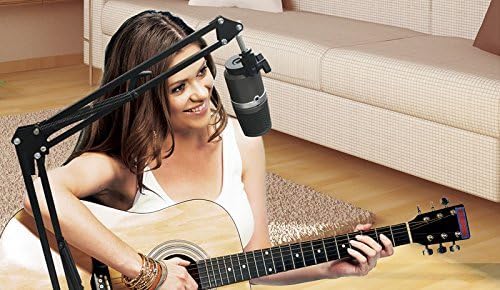
Figure 8: User recording music with the AM310 microphone
5. ข้อมูลจำเพาะ
Below are the technical specifications for the AVerMedia AM310 USB Microphone:
| คุณสมบัติ | ข้อมูลจำเพาะ |
|---|---|
| พิมพ์ | Uni-directional Condenser Microphone |
| รูปแบบขั้ว | cardioid |
| Sampเลอ อัตรา | 48กิโลเฮิรตซ์ |
| อัตราบิต | 16 บิต |
| พลังงานที่ต้องการ | ยูเอสบี (5V DC) |
| ความไวต่อความรู้สึก | -60 ± 5 dB (at 1 kHz) |
| การตอบสนองความถี่ | 20–20,000 เฮิรตซ์ |
| ความไวเสียง | 60 เดซิเบล |
| อิมพีแดนซ์ | 600 โอห์ม |
| อัตราส่วนสัญญาณต่อเสียงรบกวน | 80 เดซิเบล |
| แพลตฟอร์มฮาร์ดแวร์ | PC |
| จำนวนช่องสัญญาณ | 1 |
| เทคโนโลยีการเชื่อมต่อ | ยูเอสบี |
| ประเภทขั้วต่อ | ยูเอสบี |
| น้ำหนักสินค้า | 1.03 ปอนด์ |
| ขนาดสินค้า | 10 x 4 x 6 นิ้ว |
| วัสดุ | อลูมิเนียม |
6 การแก้ไขปัญหา
If you encounter issues with your AVerMedia AM310 microphone, please refer to the following common troubleshooting steps:
- No Sound Input:
- Ensure the microphone is securely plugged into a USB port.
- Verify that the AM310 is selected as the default input device in your computer's sound settings.
- Check if the microphone is muted (red LED indicator). Press the volume knob to unmute.
- ลองใช้พอร์ต USB อื่น หรือลองใช้กับคอมพิวเตอร์เครื่องอื่นเพื่อแยกแ1ยะปัญหา
- ปริมาณต่ำ:
- Adjust the input gain for the microphone in your computer's sound settings or recording software.
- Ensure you are speaking directly into the front of the microphone, as it has a cardioid polar pattern.
- เสียงรบกวนหรือสัญญาณรบกวนคงที่:
- Ensure the USB cable is not damaged and is properly connected.
- Avoid placing the microphone near sources of electromagnetic interference (e.g., power cables, unshielded electronics).
- Consider using a pop filter to reduce plosive sounds and a shock mount to minimize vibrations.
- ปัญหาการตรวจสอบหูฟัง:
- Check the headphone volume knob on the microphone.
- Verify the Headphone Mode Switch is set to the desired position (PC or MONITOR).
- ตรวจสอบให้แน่ใจว่าหูฟังเสียบเข้ากับแจ็ค 3.5 มม. อย่างแน่นหนาแล้ว
7. การบำรุงรักษา
To ensure the longevity and optimal performance of your AVerMedia AM310 USB Microphone, follow these maintenance guidelines:
- การทำความสะอาด: ใช้ผ้านุ่มและแห้งเช็ดทำความสะอาดภายนอกไมโครโฟน หลีกเลี่ยงการใช้น้ำยาทำความสะอาดหรือตัวทำละลาย เพราะอาจทำให้พื้นผิวหรือส่วนประกอบภายในเสียหายได้
- พื้นที่จัดเก็บ: เมื่อไม่ใช้งาน ให้เก็บไมโครโฟนไว้ในที่แห้งและเย็น ห่างจากแสงแดดโดยตรงและอุณหภูมิที่สูงเกินไป
- การจัดการ: Handle the microphone with care. Avoid dropping it or subjecting it to strong impacts, which can damage the sensitive internal components.
- การดูแลสายเคเบิล: อย่าดัดหรือจีบสาย USB มากเกินไป ขณะถอดสาย ให้จับที่ปลั๊ก ไม่ใช่ที่สายเสมอ
8. การรับประกันและการสนับสนุน
For warranty information, technical support, or further assistance with your AVerMedia AM310 USB Microphone, please visit the official AVerMedia webไซต์หรือติดต่อฝ่ายสนับสนุนลูกค้าของพวกเขา
คุณสามารถค้นหาข้อมูลเพิ่มเติมและทรัพยากรสนับสนุนได้ที่ AVerMedia Store.