
DOOGEE F7
DOOGEE F7 Smartphone User Manual
รุ่น : F7
1. บทนำ
This user manual provides essential information for the safe and efficient operation of your DOOGEE F7 smartphone. Please read this manual thoroughly before using your device to ensure proper functionality and to prevent damage. Keep this manual for future reference.
2. ข้อมูลด้านความปลอดภัย
- Do not attempt to disassemble or modify the device. Unauthorized modifications can void your warranty and may result in damage or injury.
- Use only original or certified accessories (charger, USB cable, etc.) to avoid damage to the device and ensure safety.
- หลีกเลี่ยงการวางอุปกรณ์ไว้ในอุณหภูมิที่สูงเกินไป แสงแดดโดยตรง หรือมีความชื้นสูง
- Keep the device away from water and other liquids. If the device gets wet, power it off immediately and do not attempt to use it until it is completely dry.
- Do not use the device while driving or operating heavy machinery. Always prioritize safety.
- กำจัดอุปกรณ์และแบตเตอรี่อย่างมีความรับผิดชอบตามข้อบังคับในท้องถิ่น ห้ามทิ้งรวมกับขยะในครัวเรือน
3. เนื้อหาบรรจุภัณฑ์
เมื่อเปิดบรรจุภัณฑ์ โปรดตรวจสอบว่าสินค้าทั้งหมดที่ระบุไว้ด้านล่างมีอยู่และอยู่ในสภาพดี:
- 1 x DOOGEE F7 Smartphone
- อะแดปเตอร์ไฟฟ้า 1 ตัว
- สาย USB 1 เส้น
If any item is missing or damaged, please contact your retailer or DOOGEE customer support.
4. อุปกรณ์โอเวอร์view
Familiarize yourself with the physical components of your DOOGEE F7 smartphone.

รูปที่ 4.1: ด้านหน้า ด้านหลัง และด้านข้าง view of the DOOGEE F7 smartphone. This image provides a comprehensive look at the device's design, including the display, rear camera, fingerprint sensor, and side buttons.

รูปที่ 4.2: ด้านหน้า view of the DOOGEE F7 smartphone, highlighting the 5.5-inch display and front-facing camera.
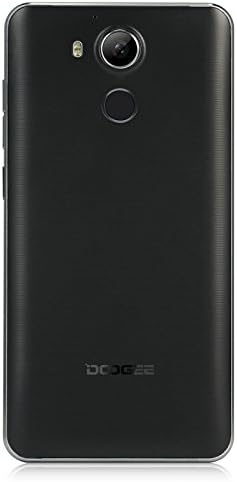
รูปที่ 4.3: กลับ view of the DOOGEE F7 smartphone, showing the rear camera, LED flash, and fingerprint sensor placement.
The DOOGEE F7 features a sleek design with a 5.5-inch display on the front. The rear panel houses the main camera and a circular fingerprint sensor for secure unlocking. Volume and power buttons are located on the side for easy access.
5. การตั้งค่า
5.1. Installing SIM Cards and SD Card
The DOOGEE F7 supports dual Micro SIM cards for flexible network usage and a microSD card for expandable storage.
- หาช่องใส่ซิมการ์ด/การ์ด SD ที่ด้านข้างของอุปกรณ์
- Insert the SIM ejector tool (if provided) into the small hole next to the tray to pop it open.
- ดึงถาดออกอย่างระมัดระวัง
- Place your Micro SIM cards and/or microSD card into the designated slots on the tray, ensuring correct orientation as indicated on the tray.
- ค่อยๆ ดันถาดกลับเข้าไปในอุปกรณ์จนกระทั่งคลิกเข้าที่
5.2. เปิดเครื่องครั้งแรก
To power on your DOOGEE F7 for the first time:
- Press and hold the Power button (located on the side) until the DOOGEE logo appears on the screen.
- ปฏิบัติตามคำแนะนำบนหน้าจอเพื่อทำการตั้งค่าเบื้องต้นให้เสร็จสมบูรณ์ รวมถึงการเลือกภาษา การเชื่อมต่อ Wi-Fi และการตั้งค่าบัญชี Google
5.3. การชาร์จแบตเตอรี่
ก่อนใช้งานครั้งแรกขอแนะนำให้ชาร์จแบตเตอรี่อุปกรณ์จนเต็ม
- เชื่อมต่อสาย USB เข้ากับพอร์ตชาร์จบนโทรศัพท์ของคุณ
- เชื่อมต่อปลายอีกด้านหนึ่งของสาย USB เข้ากับอะแดปเตอร์ไฟฟ้า
- เสียบอะแดปเตอร์ไฟฟ้าเข้ากับเต้ารับไฟฟ้าที่ผนัง
- ไฟแสดงสถานะการชาร์จจะปรากฏบนหน้าจอ เมื่อชาร์จเต็มแล้ว ให้ถอดสายชาร์จออก
The DOOGEE F7 is equipped with a 3400mAh Li-polymer battery.
6. การใช้งานอุปกรณ์ของคุณ
6.1. ฟังก์ชั่นพื้นฐาน
- เปิด/ปิดเครื่อง: กดปุ่มเปิด/ปิดค้างไว้ เลือก "ปิดเครื่อง" หรือ "รีสตาร์ท" จากตัวเลือก
- ล็อค/ปลดล็อคหน้าจอ: กดปุ่มเปิด/ปิดสั้นๆ เพื่อล็อคหรือปลดล็อคหน้าจอ
- การควบคุมระดับเสียง: Use the Volume Up and Volume Down buttons on the side to adjust media, call, and alarm volumes.
6.2. การโทรและการส่งข้อความ
Utilize the Phone and Messaging applications for communication. The device supports dual SIM functionality, allowing you to manage two numbers simultaneously.
6.3. การเชื่อมต่ออินเทอร์เน็ต
Connect to the internet via Wi-Fi or mobile data (4G FDD-LTE, 3G WCDMA, 2G GSM). Navigate to การตั้งค่า > Wi-Fi or การตั้งค่า > การใช้ข้อมูล to manage your connections.
6.4. ฟังก์ชันของกล้อง
The DOOGEE F7 is equipped with a 13.0MP rear camera with PDAF (Phase Detection Auto Focus) and a 5.0MP front camera.

รูปที่ 6.1: The DOOGEE F7 camera in action, demonstrating its ability to capture dynamic scenes with its 13.0MP PDAF rear camera for faster and more stable focusing.
Open the Camera application to capture photos and videos. The PDAF technology ensures quick and accurate focusing, even in challenging lighting conditions.
6.5. เครื่องสแกนลายนิ้วมือ
The integrated fingerprint scanner provides a secure and convenient way to unlock your device and authorize purchases. It supports 360-degree identification for rapid and accurate recognition.

รูปที่ 6.2: Close-up of the DOOGEE F7's rear fingerprint sensor, illustrating its position relative to the camera. The image also shows the Android 6.0 software interface with various application icons.
To set up your fingerprint, navigate to ตั้งค่า > ความปลอดภัย > ลายนิ้วมือ และทำตามคำแนะนำบนหน้าจอ
6.6. การควบคุมด้วยท่าทาง
The DOOGEE F7 incorporates several gesture controls for enhanced usability:
- แตะสองครั้ง: Double-tap the screen to quickly light it up.
- Gesture Start APP: Configure specific gestures to launch applications directly from the locked screen.
- Contactless Control: Utilize air gestures for certain functions without touching the screen.
- การโทรตรง: Initiate calls by bringing the phone to your ear when viewing a contact.
- Contactless Hands-Free Mode: Answer calls or control media with specific hand movements.
6.7. ระบบปฏิบัติการ Android 6.0
Your DOOGEE F7 runs on Android 6.0, offering a user-friendly interface and access to a wide range of applications via the Google Play Store.
7. การบำรุงรักษา
- การทำความสะอาด: ใช้ผ้าแห้งนุ่มๆ ที่ไม่มีขนเช็ดทำความสะอาดอุปกรณ์ หลีกเลี่ยงการใช้สารเคมีรุนแรงหรือวัสดุที่มีฤทธิ์กัดกร่อน
- พื้นที่จัดเก็บ: เก็บอุปกรณ์ไว้ในที่แห้งและเย็น หลีกเลี่ยงแสงแดดโดยตรงและอุณหภูมิที่สูงหรือต่ำมากเมื่อไม่ได้ใช้งานเป็นเวลานาน
- การอัปเดตซอฟต์แวร์: ตรวจสอบและติดตั้งการอัปเดตซอฟต์แวร์เป็นประจำเพื่อให้มั่นใจถึงประสิทธิภาพและความปลอดภัยที่เหมาะสมที่สุด
8 การแก้ไขปัญหา
If you encounter issues with your DOOGEE F7, try the following basic troubleshooting steps:
- อุปกรณ์ไม่เปิด: ตรวจสอบให้แน่ใจว่าแบตเตอรี่ชาร์จเต็มแล้ว เสียบที่ชาร์จและรอสักครู่ก่อนลองเปิดเครื่องอีกครั้ง
- แอปขัดข้องหรือค้าง: ปิดแอปที่มีปัญหาแล้วเปิดใหม่อีกครั้ง หากปัญหายังคงอยู่ ให้รีสตาร์ทอุปกรณ์
- สัญญาณเครือข่ายไม่ดี: ตรวจสอบการใส่ซิมการ์ดของคุณ ย้ายไปยังพื้นที่ที่มีสัญญาณครอบคลุมดีกว่า
- แบตเตอรี่หมดเร็ว: Reduce screen brightness, close unused apps, or disable features like Wi-Fi/Bluetooth when not needed.
- ปัญหาเกี่ยวกับการจดจำลายนิ้วมือ: ตรวจสอบให้แน่ใจว่านิ้วของคุณสะอาดและแห้ง ลงทะเบียนลายนิ้วมือใหม่หากจำเป็น
For more complex issues, refer to online resources or contact DOOGEE customer support.
9. ข้อมูลจำเพาะ
| คุณสมบัติ | คำอธิบาย |
|---|---|
| แบบอย่าง | F7 |
| ซีพียู | Helio X20 (MTK6797) Deca Core |
| ระบบปฏิบัติการ | แอนดรอยด์ 6.0 |
| แรม | 3GB |
| รอม | 32GB |
| แสดง | 5.5 inch IPS, 1920 x 1080 pixels |
| กล้องหน้า | 5.0MP |
| กล้องหลัง | 13.0MP (with PDAF) |
| ความจุของแบตเตอรี่ | 3400mAh LI-Polymer |
| SIM Quantity | Dual SIM (Micro SIM) |
| แบนด์เครือข่าย | 2G: GSM 850/900/1800/1900MHz 3G: WCDMA850/1900/2100MHz 4G: FDD-LTE 800/1800/2100/2600MHz |
| เซ็นเซอร์ | G-sensor, Light sensor, Proximity sensor, Gesture Sensor, Hall sensor |
| ขนาด | 153 x 77 x 9.0มม. |
| สี | สีดำ |
10. การรับประกันและการสนับสนุน
Your DOOGEE F7 smartphone is covered by a standard manufacturer's warranty. Please refer to the warranty card included in your package for specific terms and conditions. In general, the product is subject to a return policy of 30 days for refund or replacement, as offered by Amazon.
For technical support, troubleshooting assistance, or warranty claims, please contact DOOGEE customer service or your point of purchase. Keep your purchase receipt as proof of purchase.
Ask a question about this manual
Ask about setup, troubleshooting, compatibility, parts, safety, or missing instructions. Manuals+ will review the question and use this page’s manual context to help answer it.