
การแนะนำ
ขอบคุณสำหรับการซื้อasing the EtoBesy Mini Portable Wireless Cube Speaker. This device combines Bluetooth audio streaming, TF card playback, AUX input, FM radio, and hands-free calling in a compact design with colorful LED lighting. Please read this manual carefully to ensure proper use and optimal performance.
มีอะไรอยู่ในกล่อง
- 1 x Wireless Bluetooth 4.0 Radio Speaker
- สายสัญญาณเสียง 1 เส้น
- สายชาร์จ USB 1 เส้น
- 1 x คู่มือผู้ใช้ (เอกสารนี้)
สินค้าเกินview
The EtoBesy Mini Portable Wireless Cube Speaker features a unique cube design with integrated controls and ports. Understanding these components is essential for operation.
พอร์ตและการเชื่อมต่อ
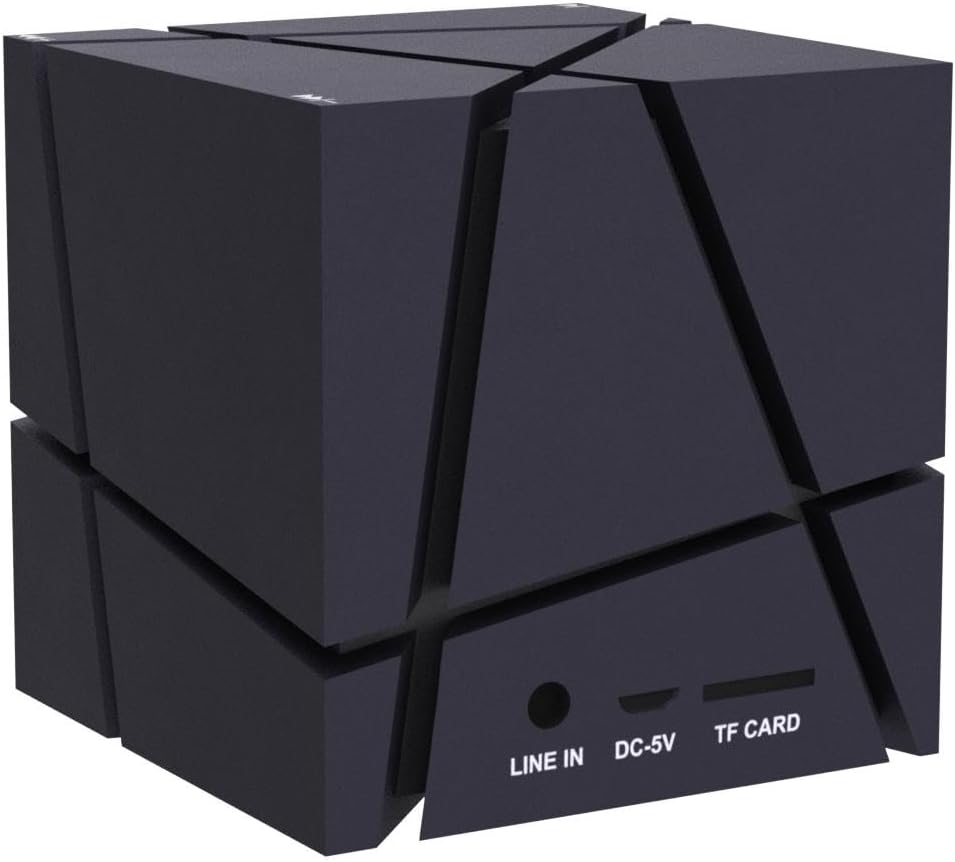
The speaker includes several ports for various connectivity options:
- เข้าแถว: 3.5mm audio input for connecting external devices via AUX cable.
- กระแสตรง-5V: พอร์ต Micro USB สำหรับชาร์จลำโพง
- บัตร TF: Slot for inserting a TF (Micro SD) memory card to play MP3 fileโดยตรงเลย
ปุ่มควบคุม
The speaker's control buttons are integrated into its design, specifically located on the feet of the device. These are pressure-sensitive buttons.
- ปุ่มลบ (-): Used to decrease volume or navigate tracks. Double-pressing this button turns off the LED lights.
- ปุ่มบวก (+): Used to increase volume or navigate tracks.
- ปุ่มเล่น/หยุดชั่วคราว: Controls media playback and answers/ends calls.

การตั้งค่า
การชาร์จเบื้องต้น
Before first use, fully charge the speaker. Connect the supplied USB charging cable to the DC-5V port on the speaker and the other end to a USB power source (e.g., computer USB port, USB wall adapter). The charging indicator light will show the charging status.
การเปิด/ปิดเครื่อง
Locate the power switch on the underside of the speaker (refer to the "Control Buttons" image). Slide the switch to the "ON" position to power on the speaker. Slide it to the "OFF" position to power off.
คำแนะนำการใช้งาน
จับคู่บลูทู ธ
- Ensure the speaker is powered on and in Bluetooth mode (it usually defaults to this mode upon power-on). A voice prompt or indicator light will confirm.
- บนอุปกรณ์ของคุณ (สมาร์ทโฟน แท็บเล็ต แล็ปท็อป) เปิดใช้งาน Bluetooth และค้นหาอุปกรณ์ที่มีอยู่
- Select "EtoBesy Speaker" or a similar name from the list of devices.
- เมื่อจับคู่สำเร็จแล้ว ลำโพงจะแสดงข้อความว่าเชื่อมต่อสำเร็จ และคุณสามารถเริ่มเล่นเสียงแบบไร้สายได้
The speaker supports Bluetooth 4.0 technology with a transmission distance of up to 10 meters (32.8 feet).

TF Micro SD Card Playback
วิธีเล่นเพลงโดยตรงจากเมมโมรี่การ์ด:
- Insert a TF (Micro SD) card containing MP3 audio files into the TF CARD slot.
- The speaker will automatically detect the card and begin playing the audio files.
- Use the Plus (+) and Minus (-) buttons to skip tracks and the Play/Pause button to control playback.
อินพุต AUX
สำหรับการเชื่อมต่อเสียงแบบใช้สาย:
- Connect one end of the supplied audio cable to the LINE IN port on the speaker.
- Connect the other end of the audio cable to the 3.5mm audio output jack of your external device.
- ลำโพงจะเปลี่ยนเป็นโหมด AUX โดยอัตโนมัติ
วิทยุเอฟเอ็ม
To use the built-in FM radio function:
- ตรวจสอบให้แน่ใจว่าลำโพงเปิดอยู่
- Press the Mode button (if available, or cycle through modes using the Play/Pause button if it has multiple functions) until you hear the FM radio.
- Use the Plus (+) and Minus (-) buttons to scan for radio stations.
ไฟ LED หลากสีสัน
The speaker features dynamic colorful LED lights. To turn off the lights, press the Minus (-) button twice in quick succession.

การโทรแบบแฮนด์ฟรี
When connected via Bluetooth to your smartphone, the built-in microphone allows for hands-free phone calls. Press the Play/Pause button to answer or end a call.
การชาร์จไฟ
To charge the speaker, connect the provided USB charging cable to the DC-5V port on the speaker and to a standard USB power source. The charging indicator will illuminate during charging and turn off or change color when fully charged. A full charge typically takes a few hours.
การซ่อมบำรุง
- ควรเก็บลำโพงให้ห่างจากน้ำและความชื้นสูง ผลิตภัณฑ์นี้ไม่กันน้ำ
- ทำความสะอาดลำโพงด้วยผ้านุ่มและแห้ง ห้ามใช้น้ำยาทำความสะอาดหรือสารละลายที่มีฤทธิ์กัดกร่อน
- หลีกเลี่ยงการให้ลำโพงสัมผัสกับอุณหภูมิที่สูงเกินไป
- เมื่อไม่ได้ใช้งานเป็นเวลานาน ควรเก็บลำโพงไว้ในที่แห้งและเย็น และชาร์จแบตเตอรี่เป็นระยะเพื่อรักษาอายุการใช้งานของแบตเตอรี่
การแก้ไขปัญหา
| ปัญหา | สารละลาย |
|---|---|
| ลำโพงไม่เปิดเครื่อง | Ensure the battery is charged. Connect the speaker to a power source using the USB charging cable. Verify the power switch is in the "ON" position. |
| ไม่สามารถจับคู่ผ่านบลูทูธได้ | Make sure the speaker is in Bluetooth pairing mode. Ensure Bluetooth is enabled on your device and it is within 10 meters of the speaker. Try restarting both the speaker and your device. |
| ไม่มีเสียงหรือเสียงเบา | Check the volume levels on both the speaker and your connected device. Ensure the correct input mode (Bluetooth, TF, AUX) is selected. |
| ไฟ LED ไม่ทำงานหรือค้างอยู่ | Double-press the Minus (-) button to cycle the lights or turn them off and on again. |
| Speaker "jumps" due to bass. | Remove any plastic film from the feet of the speaker to ensure stable placement. |
ข้อมูลจำเพาะ
| ยี่ห้อ | เอโตเบซี |
| ชื่อรุ่น | Mini Portable Wireless Cube Speaker |
| หมายเลขรุ่น | B06XY917BF |
| เทคโนโลยีการเชื่อมต่อ | อุปกรณ์เสริม, บลูทูธ, USB |
| เทคโนโลยีการสื่อสารไร้สาย | บลูทูธ 4.0 |
| ช่วงบลูทูธ | สูงถึง 10 เมตร (32.8 ฟุต) |
| ประเภทลำโพง | สเตอริโอ 3 มิติ |
| คุณสมบัติพิเศษ | Colorful LED Light, Hands-free Calling, FM Radio, TF Card Playback |
| แหล่งพลังงาน | ใช้พลังงานจากแบตเตอรี่ (แบตเตอรี่ลิเธียมในตัว) |
| ความจุของแบตเตอรี่ | 500 มิลลิวินาทีamp ชั่วโมง |
| อินพุต Voltage | 5 โวลต์ |
| กำลังขับสูงสุดของลำโพง | 3 วัตต์ |
| การตอบสนองความถี่ | ความถี่ 150 กิโลเฮิรตซ์ |
| ขนาดสินค้า | ลึก 2.75 นิ้ว x กว้าง 2.75 นิ้ว x สูง 2.75 นิ้ว |
| น้ำหนักสินค้า | 8.5 ออนซ์ |
| กันน้ำได้ | เลขที่ |

การรับประกันและการสนับสนุน
This product comes with a limited warranty. For warranty claims or technical support, please refer to the contact information provided at the point of purchase or visit the official EtoBesy webเว็บไซต์.