
การแนะนำ
The American Lifetime 8-inch Digital Day Clock is designed to provide clear and easy-to-read time, day, and date information. Its large display and customizable features make it a valuable tool for maintaining daily routines and orientation. This manual will guide you through the setup, operation, and maintenance of your new clock.
คุณสมบัติหลัก:
- โครงสร้างทนทาน: Built with robust materials for long-lasting use.
- จอแสดงผลที่อ่านง่าย: Features a large, clear, high-contrast 8-inch display for optimal visibility, even in low light.
- การตั้งค่าแบบง่ายๆ: User-friendly interface with an easy-to-follow manual for quick operation.
- สัญญาณเตือนที่ปรับแต่งได้: Set up to 5 daily alarms for reminders such as medication times or appointments.
- ลดแสงอัตโนมัติ: Adjusts display brightness automatically based on ambient room light.
- รองรับหลายภาษา: Offers various language and time format options.
- แบตเตอรี่สำรอง: Internal battery ensures time and date are maintained during power outages, automatically resetting when power returns.
- จอแสดงผลที่ชัดเจน: Spells out the time, period of the day, full day of the week, month, and date without confusing abbreviations.
การตั้งค่า
Setting up your American Lifetime Digital Day Clock is straightforward. Follow these steps to get started:
- แกะกล่องนาฬิกา: ถอดนาฬิกาและอุปกรณ์เสริมทั้งหมดออกจากบรรจุภัณฑ์อย่างระมัดระวัง
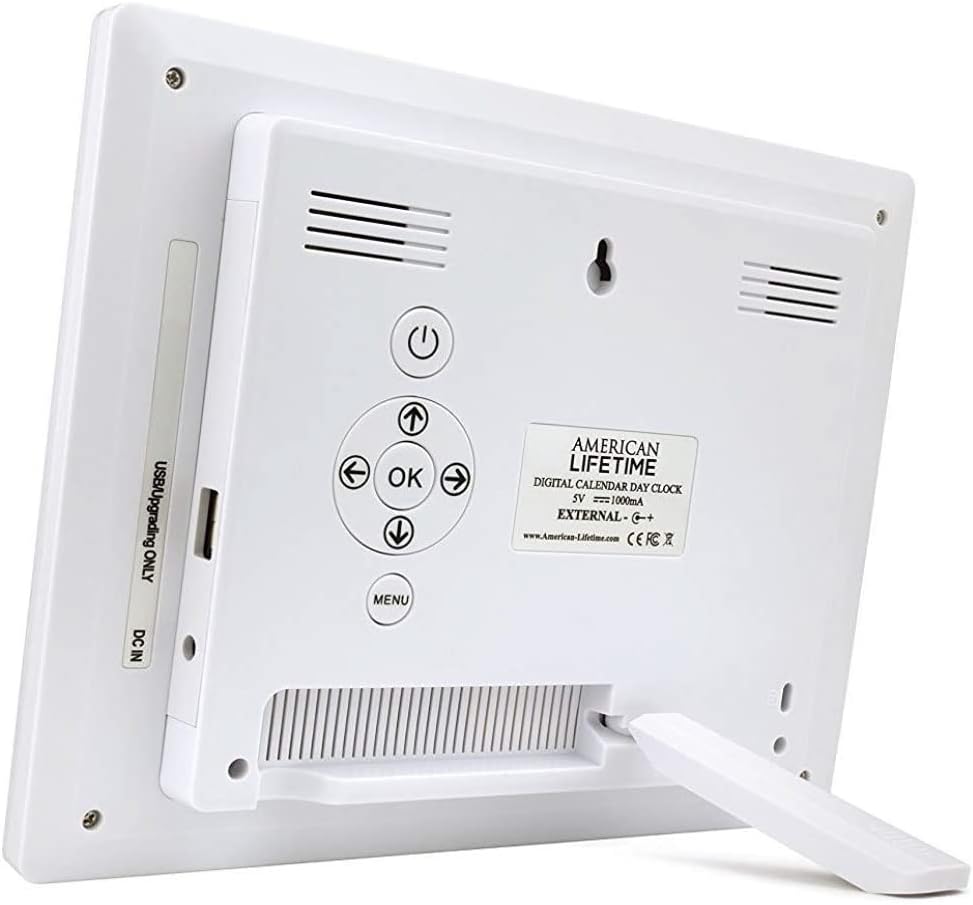
- ติดขาตั้ง: The clock includes a removable stand that can be inserted into the back for tabletop display. It supports both horizontal and vertical orientations.
- เชื่อมต่อพลังงาน: Plug the provided power adapter into the DC IN port on the back of the clock and then into a standard electrical outlet. The clock will automatically power on and display the current time and date.
- การตั้งค่าเริ่มต้น: Use the control buttons on the back of the clock to navigate the menu and set the correct time, date, time mode (12/24 hour), date mode (Month-Day-Year, Day-Month-Year), and language.

คำแนะนำการใช้งาน
Your Digital Day Clock offers several customizable settings to enhance its utility. All adjustments are made using the buttons located on the back of the unit.
ปุ่มควบคุม:
- ปุ่มเปิด/ปิด: เปิดหรือปิดจอแสดงผล
- ปุ่มตกลง: ยืนยันการเลือกในเมนู
- ปุ่มลูกศร (ขึ้น/ลง/ซ้าย/ขวา): เลือกตัวเลือกในเมนูและปรับค่าต่างๆ
- ปุ่มเมนู: เข้าถึงเมนูการตั้งค่าหลัก
การตั้งเวลาและวันที่:
- กดปุ่ม เมนู ปุ่มเพื่อเข้าสู่การตั้งค่า
- ใช้ ขึ้น/ลง arrows to select "Set Time" or "Set Date".
- กด OK to enter the setting. Use ซ้าย/ขวา arrows to move between digits/fields and ขึ้น/ลง arrows to change values.
- กด OK to confirm each change.
การปรับแต่งสัญญาณเตือน:
The clock supports up to 5 customizable alarms with messages.
- From the main menu, navigate to "Alarm Time 1" through "Alarm Time 5".
- กด OK เพื่อเลือกนาฬิกาปลุก
- Set the alarm time and frequency (e.g., daily, weekdays).
- Choose a pre-set message (e.g., "Time to take medication", "Appointment Reminder") or set a custom message if available.
- Ensure the alarm is set to "On" and press OK เพื่อบันทึก
การตั้งค่าอื่นๆ:
- โหมดเวลา: Switch between 12-hour and 24-hour formats.
- โหมดวันที่: Select your preferred date display format (e.g., Month-Day-Year).
- ภาษา: Choose from multiple language options.
- Show Period Of The Day: Enable or disable the display of "Morning," "Afternoon," "Evening," or "Night."
- ลดแสงอัตโนมัติ: Turn this feature on to allow the clock to automatically adjust its brightness.
การซ่อมบำรุง
To ensure the longevity and optimal performance of your Digital Day Clock, follow these simple maintenance guidelines:
- การทำความสะอาด: Use a soft, dry cloth to gently wipe the screen and frame. Avoid abrasive cleaners or sprays that could damage the display or finish.
- การจัดวาง: Place the clock on a stable, flat surface or mount it securely on a wall. Avoid direct sunlight or extreme temperatures, which can affect performance and display life.
- พลัง: Always use the original power adapter provided with the clock.
การแก้ไขปัญหา
If you encounter any issues with your American Lifetime Digital Day Clock, refer to the following common problems and solutions:
| ปัญหา | สารละลาย |
|---|---|
| นาฬิกาไม่เปิดเครื่อง | Ensure the power adapter is securely plugged into both the clock and a working electrical outlet. Try a different outlet. |
| จอภาพมืดหรือสว่างเกินไป | Check the "Auto Dimming" setting in the menu. You can turn it off to manually adjust brightness if needed. |
| เวลาหรือวันที่ไม่ถูกต้อง | Access the "Set Time" and "Set Date" options in the menu to manually correct the settings. |
| สัญญาณเตือนภัยไม่ดัง | Verify that the alarm time is correctly set, the alarm is enabled ("On"), and the volume is not muted. |
ข้อมูลจำเพาะ
- ยี่ห้อ: อายุการใช้งานของชาวอเมริกัน
- หมายเลขรุ่น: H1-HO1A--JB6HDWLAO4
- สี: สีน้ำตาล
- ประเภทจอภาพ: ดิจิตอล
- ขนาดสินค้า : กว้าง 8.5 นิ้ว x สูง 6.75 นิ้ว
- แหล่งพลังงาน: สายไฟ
- วัสดุ: พลาสติก
- ประเภทการติดตั้ง: ติดผนัง, โต๊ะ
- คุณสมบัติพิเศษ: Alarm, Calendar Display, Auto-Dimming, Multi-Language Support, Battery Backup
- น้ำหนักสินค้า: 15.8 ออนซ์
- ยูพีซี: 728044490976
การรับประกันและการสนับสนุน
American Lifetime stands behind its products. Your Digital Day Clock comes with a การรับประกันแบบจำกัดของผู้ผลิต 1 ปี. Additionally, you can return the product for free within the first 30 days of purchase, no questions asked.
For any questions, troubleshooting assistance, or warranty claims, please contact American Lifetime customer service. Our team is dedicated to providing support and ensuring your satisfaction.
เยี่ยมชม American Lifetime Store สำหรับข้อมูลเพิ่มเติมและทรัพยากรสนับสนุน