
การแนะนำ
This manual provides essential information for the installation, operation, and maintenance of your Cisco SG550X-24-K9-NA 24-Port Stackable Managed Ethernet Switch. This device is designed to support demanding network environments with advanced capabilities and superior performance.

Figure 1: Cisco SG550X-24-K9-NA 24-Port Stackable Managed Ethernet Switch.
การตั้งค่า
Follow these steps to set up your Cisco SG550X-24-K9-NA switch.
1. การแกะกล่องและการตรวจสอบเบื้องต้น
Carefully unpack the switch and all included components. Inspect for any signs of damage during shipping. If any components are missing or damaged, contact your vendor immediately.
ส่วนประกอบที่รวมอยู่:
- Cisco SG550X-24 Switch
- สายไฟ
- Rack-Mount kit
- ขาเป็นยาง
- DB-9 to RJ45 Serial Cable
- การ์ดตัวชี้ที่มี RoHS ของจีน
- Technical support contacts
- คู่มือเริ่มต้นอย่างรวดเร็ว
2. การติดตั้งทางกายภาพ
The switch can be installed on a desktop or mounted in a standard equipment rack using the provided rack-mount kit. Ensure adequate ventilation around the device.
3. การเชื่อมต่อเครือข่าย
Connect your network devices to the 24 Gigabit Ethernet ports. The switch also features 4 x 10G SFP+ uplinks for high-speed connections.
4. เปิดเครื่อง
Connect the power cord to the switch and a suitable power outlet. The switch will power on automatically.
5. การกำหนดค่าเริ่มต้น
For simplified setup, utilize the Cisco Business App. This application facilitates plug-and-play (PnP), auto-discovery, and zero-touch deployment, allowing for quick network integration. Alternatively, you can use the on-box WebUI or CLI for configuration.
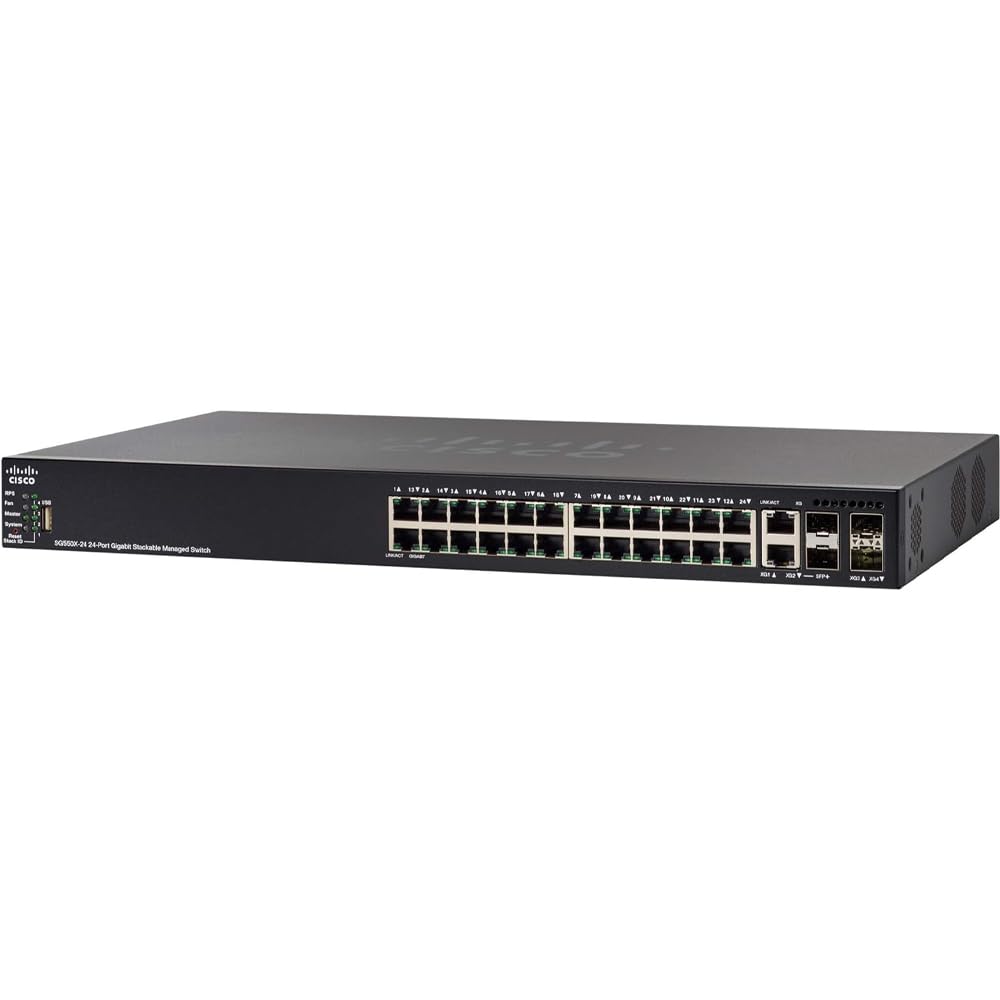
Figure 2: Front panel of the Cisco SG550X-24-K9-NA switch showing ports and indicators.
คำแนะนำการใช้งาน
The Cisco SG550X-24-K9-NA is a managed switch offering extensive features for network control and optimization.
Network Port Configuration
- พอร์ตอีเธอร์เน็ต: 24 ports supporting 10/100/1000 Mbps speeds.
- พอร์ตอัปลิงค์: 4 x 10G SFP+ uplinks for high-bandwidth connections.
การจัดการและการควบคุม
The switch can be managed through various interfaces:
- Web หน้าจอผู้ใช้ (WebUI): เข้าถึงการใช้งานที่ใช้งานง่าย web-based interface for graphical configuration and monitoring.
- อินเทอร์เฟซบรรทัดคำสั่ง (CLI): สำหรับผู้ใช้ขั้นสูง CLI ช่วยให้สามารถควบคุมการตั้งค่าสวิตช์ได้อย่างละเอียดมากขึ้น
- ส เอ็น เอ็ม พี: Simple Network Management Protocol support for integration with network management systems.
- ผู้จัดการเครือข่าย Cisco FindIT: A tool for simplified network management and troubleshooting.
- สมาร์ทพอร์ตอัตโนมัติ: Automatically configures port settings based on the connected device type.
Advanced Layer 2+/Layer 3 Features
The SG550X-24-K9-NA supports a comprehensive set of features to enhance network performance and security:
- การกำหนดเส้นทางแบบคงที่: Manual configuration of network routes.
- คุณภาพการบริการ (QoS): กำหนดลำดับความสำคัญของการรับส่งข้อมูลเครือข่ายสำหรับแอปพลิเคชันที่สำคัญ
- Voice/Guest VLAN: Separate voice and guest traffic for improved security and performance.
- GVRP (GARP VLAN Registration Protocol): Automates VLAN registration and propagation.
- MSTP (Multiple Spanning Tree Protocol): Prevents network loops and provides path redundancy.
- การสอดแนม IGMP: Optimizes multicast traffic delivery.
- Time-based Access Control Lists (ACLs): Control network access based on time schedules.
- Dynamic Routing (RIP, VRRP): Automatically adjusts routing paths for network resilience.
- Policy-based Routing: Routes traffic based on defined policies.
- ผู้สอบถาม IGMP: Manages multicast groups.
- 802.1x and Web-based Authentication: Robust user authentication for network access.
- IPv6 First-Hop Security: Protects against IPv6 network attacks.
- การตรวจสอบ ARP แบบไดนามิก: Defends against ARP spoofing attacks.
วิดีโอ 1: จบแล้วview of Cisco small business product solutions, demonstrating ease of setup and management for network devices like the SG550X-24-K9-NA switch.
การซ่อมบำรุง
Regular maintenance ensures optimal performance and longevity of your Cisco SG550X-24-K9-NA switch.
อัพเดตเฟิร์มแวร์
Keep the switch firmware updated to benefit from the latest features, performance enhancements, and security patches. Firmware updates are typically available through the Cisco support portal.
การตรวจร่างกาย
Periodically inspect the switch for dust accumulation, especially around ventilation areas. Ensure all cable connections are secure. The switch incorporates a fan and power hardware redundancy for increased availability.
ความปลอดภัยเครือข่าย
Leverage Cisco's cloud security platforms, such as Umbrella, to provide always up-to-date protection against cyber threats, safeguarding your network and connected devices.
การแก้ไขซอฟต์แวร์
Free software fixes are provided for the term of the product's warranty, ensuring your device remains secure and functional.
การแก้ไขปัญหา
This section provides general guidance for common issues. For detailed troubleshooting, refer to the comprehensive documentation available on the Cisco support webเว็บไซต์หรือติดต่อฝ่ายสนับสนุนด้านเทคนิค
ไม่มีไฟฟ้า
- ตรวจสอบให้แน่ใจว่าสายไฟเชื่อมต่อกับสวิตช์และเต้ารับไฟฟ้าที่ใช้งานได้แน่นหนาแล้ว
- ตรวจสอบแหล่งพลังงานเพื่อดูการทำงาน
ปัญหาการเชื่อมต่อเครือข่าย
- Ensure Ethernet cables are properly connected to the correct ports on both the switch and the connected device.
- Check the link/activity LEDs on the switch ports for status.
- Verify IP address configurations on connected devices.
- If using VLANs, ensure devices are assigned to the correct VLANs.
ประสิทธิภาพเครือข่ายช้า
- Check for network congestion using the switch's monitoring tools (WebUI/CLI).
- ตรวจสอบให้แน่ใจว่าการตั้งค่าดูเพล็กซ์ตรงกันระหว่างพอร์ตสวิตช์และอุปกรณ์ที่เชื่อมต่อ
- Verify that QoS policies are correctly configured to prioritize critical traffic.
Accessing Management Interface
- Confirm your management station is on the same network segment or has a route to the switch's management IP address.
- Verify the switch's management IP address.
- Clear your browser's cache if experiencing issues with the WebUI
ข้อมูลจำเพาะ
| คุณสมบัติ | รายละเอียด |
|---|---|
| ยี่ห้อ | ซิสโก้ |
| หมายเลขรุ่น | SG550X-24-K9-NA |
| จำนวนพอร์ต | 24 |
| การกำหนดค่าพอร์ตอีเธอร์เน็ต | 24 พอร์ต 10/100/1000 |
| อัพลิงค์ | 4 x 10G SFP+ |
| ประเภทสวิตซ์ | การบริหารจัดการ |
| ความสามารถในการวางซ้อนกัน | สูงสุด 8 หน่วย |
| อัตราการถ่ายโอนข้อมูล | 1 กิกะบิตต่อวินาที (ต่อพอร์ต) |
| เล่มที่tage | 48 โวลต์ (กระแสตรง) |
| คะแนนปัจจุบัน | 4 Amps |
| ประเภทวัสดุตัวเรือน | โลหะ |
| น้ำหนักสินค้า | 8 ปอนด์ |
| สี | สีดำ |
| GTIN / UPC | 882658808739 |
การรับประกันและการสนับสนุน
ข้อมูลการรับประกัน
The Cisco SG550X-24-K9-NA switch comes with a การรับประกันแบบจำกัดตลอดอายุการใช้งาน. This warranty includes next-business-day replacement for eligible hardware failures and free software fixes for the term of the warranty.
การสนับสนุนด้านเทคนิค
One year of technical support is included with your purchase. For assistance, refer to the technical support contacts provided in the product packaging or visit the official Cisco support website. The Cisco FindIT Network Manager can also assist with diagnostics and support.
For the most up-to-date support resources and documentation, please visit การสนับสนุนธุรกิจขนาดเล็กของ Cisco.