
1. บทนำ
This manual provides instructions for the installation, operation, and maintenance of the Isoled ISO One SYS LED Universal 4-Channel Wireless Sequence Controller. This device is designed to manage LED lighting systems with 4 channels, offering wireless control capabilities for various LED types including Single Color, RGB, and RGB+W/Dynamic White.
2. คำแนะนำด้านความปลอดภัย
- ควรตัดกระแสไฟก่อนการติดตั้งหรือบำรุงรักษาทุกครั้งเพื่อป้องกันไฟฟ้าช็อต
- การติดตั้งควรดำเนินการโดยช่างไฟฟ้าที่มีคุณสมบัติตามมาตรฐานไฟฟ้าท้องถิ่น
- ตรวจสอบให้แน่ใจปริมาณอินพุตtage (12-36V DC) matches the power supply specifications.
- Do not exceed the maximum load capacity of 4 x 5A per channel. Overloading can damage the device and connected LEDs.
- Avoid exposing the controller to moisture, water, or extreme temperatures. Operate within specified environmental conditions.
- Do not attempt to open or modify the controller. This will void the warranty and may cause damage or injury.
3. คุณสมบัติของผลิตภัณฑ์
- Universal 4-channel wireless sequence controller for LED systems.
- Supports Single Color, RGB, and RGB+W/Dynamic White LED configurations.
- Operating frequency: 434 MHz / 868 MHz for reliable wireless communication.
- อินพุตกว้าง voltagช่วงแรงดันไฟฟ้า: 12-36V DC
- High output capacity: Maximum load of 4 x 5A per channel.
- Memory function: Programming settings are retained even after power disconnection.
- Multi-controller compatibility: Can be controlled by up to 5 different SYS/Sequence controllers per zone.
4. เนื้อหาบรรจุภัณฑ์
Please check the package contents upon receipt. It should include:
- 1x ISO One SYS LED Universal 4-Channel Wireless Sequence Controller (Model 112477)
- 1x คู่มือผู้ใช้ (เอกสารฉบับนี้)
Note: Power supply, LED strips, and wireless remote/wall panel are sold separately.
5. การตั้งค่า
5.1. แผนภาพการเดินสายไฟ
Connect the power supply (12-36V DC) to the controller's input terminals (V+ and V-). Connect the LED strips to the corresponding output channels (CH1, CH2, CH3, CH4) and the common positive terminal (V+). Ensure correct polarity for all connections.
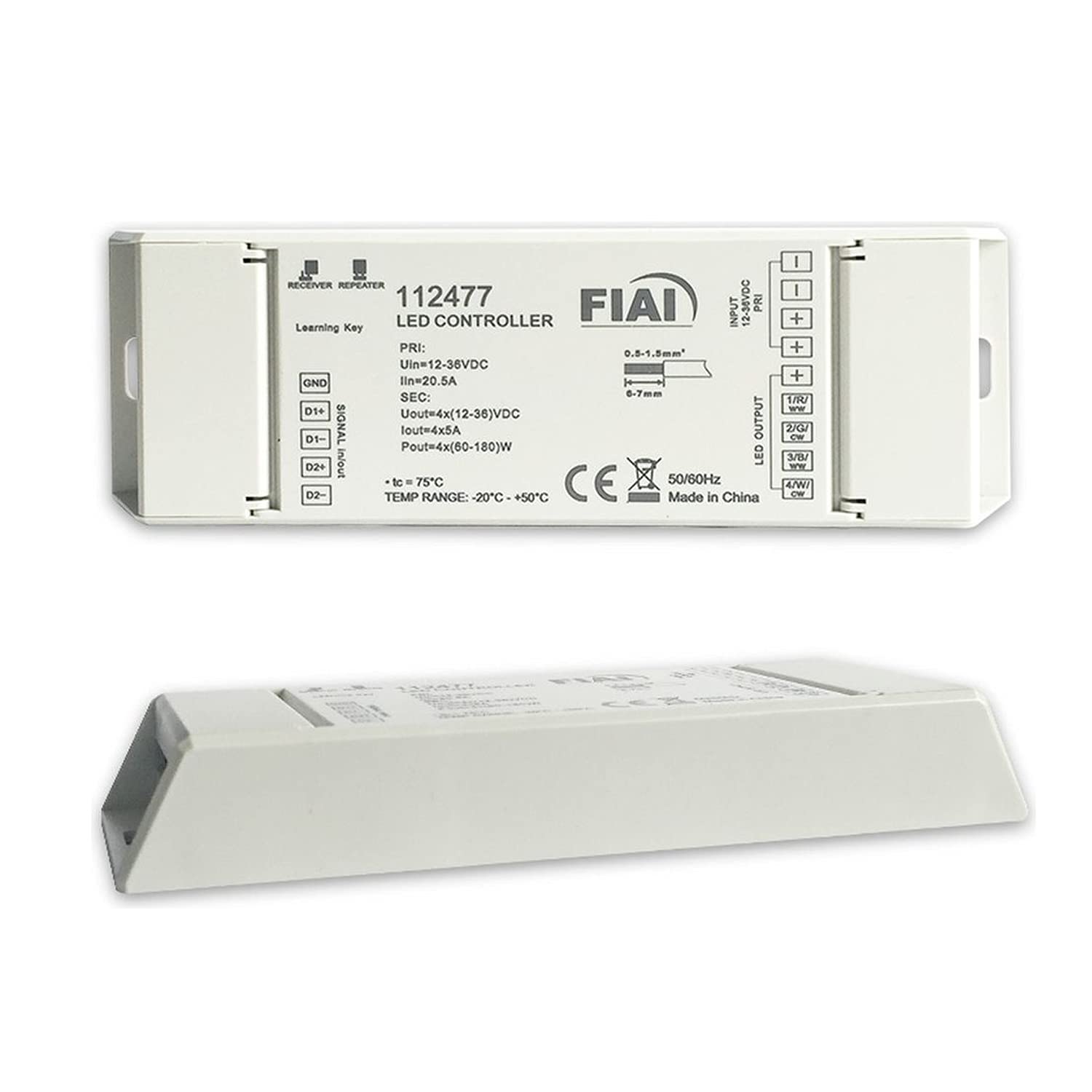
Image Description: A diagram illustrating the connection points on the ISO One SYS LED controller. It shows input terminals for 12-36V DC power (V+ and V-) and four output channels (CH1, CH2, CH3, CH4) with a shared V+ terminal for connecting LED strips. The diagram emphasizes correct polarity for all connections.
5.2. Pairing with a Wireless Controller
To pair the SYS LED controller with a compatible wireless remote or wall panel (sold separately), follow these steps:
- Ensure the SYS LED controller is powered on and connected to LED lights.
- On your wireless remote or wall panel, initiate the pairing mode. This usually involves pressing a specific button (e.g., 'Match' or 'Learn') or a combination of buttons. Refer to your remote's specific instructions.
- Within 5 seconds of initiating pairing mode on the remote, briefly press the small 'Match' button located on the SYS LED controller.
- The connected LED lights will flash several times to confirm successful pairing.
Note: Up to 5 different SYS/Sequence controllers can be paired to one zone on a single remote.
6. คู่มือการใช้งาน
Once successfully paired, the SYS LED controller can be operated using the linked wireless remote or wall panel. The specific functions will depend on the capabilities of your chosen remote.
- เปิด/ปิดเครื่อง: Use the designated power button on your remote to turn the connected LEDs on or off.
- การปรับความสว่าง: Use the brightness up/down buttons or a dimmer wheel to adjust the light intensity.
- Color Selection (for RGB/RGB+W): Select desired colors using a color wheel, preset color buttons, or color temperature controls (for Dynamic White).
- การเลือกโหมด: Cycle through various dynamic lighting modes, such as fading, jumping, or sequencing patterns.
- การปรับความเร็ว: Adjust the speed of dynamic modes to your preference.
Refer to your specific wireless remote or wall panel manual for detailed operation instructions and advanced features.
7. การบำรุงรักษา
The ISO One SYS LED controller is designed for long-term reliability and requires minimal maintenance.
- การทำความสะอาด: Gently wipe the device with a dry, soft cloth. Do not use abrasive cleaners, solvents, or harsh chemicals, as these can damage the housing.
- การตรวจสอบ: ตรวจสอบการเชื่อมต่อสายไฟทั้งหมดเป็นระยะ เพื่อให้แน่ใจว่ายังคงแน่นหนาและปราศจากสนิม
- สิ่งแวดล้อม: Ensure the controller is kept in a dry environment, away from direct sunlight, high humidity, and extreme temperatures to prolong its lifespan.
8 การแก้ไขปัญหา
If you encounter issues with your ISO One SYS LED controller, please refer to the table below for common problems and solutions.
| ปัญหา | สาเหตุที่เป็นไปได้ | สารละลาย |
|---|---|---|
| ไฟ LED ไม่ติด | ไม่มีอำนาจควบคุม | Check power supply connection and ensure it is active. |
| เดินสายไฟไม่ถูกต้อง | Verify LED strip and power supply polarity. Ensure all wires are securely connected. | |
| ตัวควบคุมไม่จับคู่ | ปฏิบัติตามคำแนะนำในการจับคู่ในหัวข้อ 5.2 | |
| LEDs flicker or behave erratically | การเชื่อมต่อหลวม | Secure all wiring connections, especially at the controller and LED strip. |
| โอเวอร์โหลด | Ensure total load does not exceed 4x5A per channel. Reduce connected LED length if necessary. | |
| รีโมทไร้สายไม่ตอบสนอง | แบตเตอรี่รีโมตเหลือน้อยหรือหมด | เปลี่ยนแบตเตอรี่รีโมทคอนโทรล |
| ห่างไกลออกไปนอกขอบเขต | Move closer to the controller. Ensure no major obstructions are blocking the signal. |
If problems persist after attempting these solutions, please contact customer support for further assistance.
9. ข้อมูลจำเพาะ
Technical specifications for the ISO One SYS LED Universal 4-Channel Wireless Sequence Controller:
| คุณสมบัติ | รายละเอียด |
|---|---|
| หมายเลขรุ่น | 112477 |
| ยี่ห้อ | Isoled |
| อินพุต Voltage | 12-36V ซี |
| ช่องสัญญาณขาออก | 4 |
| แม็กซ์กระแสไฟขาออก | 4 x 5A per channel |
| Max Output Power (at 12V) | 24W ต่อช่อง |
| Max Output Power (at 24V) | 48W ต่อช่อง |
| ความถี่ไร้สาย | 434เมกะเฮิรตซ์ / 868เมกะเฮิรตซ์ |
| วัสดุ | พลาสติก |
| ฟังก์ชั่นหน่วยความจำ | Yes (retains settings after power loss) |
หมายเหตุ: ข้อมูลจำเพาะอาจมีการเปลี่ยนแปลงได้โดยไม่ต้องแจ้งให้ทราบล่วงหน้า
10. การรับประกันและการสนับสนุน
This Isoled product comes with a standard manufacturer's warranty. For detailed warranty terms and conditions, please refer to the warranty card included with your purchase or visit the official Isoled webเว็บไซต์.
For technical support, troubleshooting assistance, or inquiries regarding spare parts, please contact your authorized retailer or Isoled customer service. Please have your model number (112477) and purchase information ready when contacting support.