
ZACO V5sPro
ZACO V5sPro Robot Vacuum Cleaner User Manual
Model: V5sPro
การแนะนำ
Thank you for choosing the ZACO V5sPro Robot Vacuum Cleaner. This 2-in-1 device is designed to provide efficient cleaning for your hard floors, offering both vacuuming and mopping functionalities. Its intelligent features, such as automatic charging, fall protection, and anti-collision sensors, ensure a thorough and safe cleaning experience. Please read this manual carefully before using the product to ensure proper operation and maintenance.

The ZACO V5sPro robot vacuum cleaner, showcasing its sleek gold and white design with the 'CLEAN' button visible on top.
คำแนะนำเพื่อความปลอดภัย
- Always ensure the power adapter is compatible with your local power supply.
- ห้ามใช้หุ่นยนต์ในสภาพแวดล้อมที่เปียกชื้นหรือใกล้น้ำ
- เก็บหุ่นยนต์ให้ห่างจากเปลวไฟและแหล่งความร้อน
- ห้ามให้เด็กหรือสัตว์เลี้ยงเล่นกับหุ่นยนต์
- ก่อนทำความสะอาด ให้เก็บสายไฟที่วางระเกะระกะ วัตถุขนาดเล็ก และสิ่งของที่แตกหักง่ายออกจากพื้น
- Do not use the robot to clean sharp objects, burning materials, or liquids.
- Regularly clean the dustbin and filters to maintain optimal performance.
- If the robot is not in use for a long period, turn it off and store it in a cool, dry place.
มีอะไรอยู่ในกล่อง
The ZACO V5sPro package includes the following components:
- ZACO V5sPro Robot Vacuum Cleaner
- Charging Station with Adapter Cable
- แบตเตอรี่ลิเธียมไอออน (2600 mAh)
- รีโมทคอนโทรล (รวมแบตเตอรี่)
- 300ml Dustbin (pre-installed in the unit)
- 300ml Water Tank Module
- Microfiber Mopping Cloth (1 pre-installed, 1 additional)
- Side Brushes (1 pair pre-installed, 1 additional pair)
- Additional Fine Dust Filter (HEPA filter)
- เครื่องมือทำความสะอาด
- User Manual (German, but this is the English version)
สินค้าเกินview
Familiarize yourself with the main components of your ZACO V5sPro robot vacuum cleaner.

The ZACO V5sPro is designed to be ultra-flat (81mm), allowing it to clean effectively under furniture.
สูงสุด View
- ปุ่มทำความสะอาด: เริ่มหรือหยุดการทำความสะอาดชั่วคราว
- Dustbin/Water Tank Cover: Access point for dustbin or water tank.
- ไฟแสดงสถานะ: Display status (charging, error, cleaning mode).
ด้านล่าง View
- แปรงด้านข้าง: แปรงหมุน 2 อันเพื่อกวาดเศษขยะเข้าไปในเส้นทางดูด
- ล้อขับเคลื่อน: Large wheels for navigating various floor types.
- ล้อสากล: สามารถหมุนได้ 360 องศา
- ช่องดูดเข้า: Where dirt and dust are vacuumed.
- หน้าสัมผัสการชาร์จ: เชื่อมต่อกับสถานีชาร์จไฟ
- เซ็นเซอร์หน้าผา: Detects drops and prevents falling down stairs.
- Mopping Cloth Attachment: Area for attaching the microfiber mopping cloth.
การตั้งค่า
1. การชาร์จหุ่นยนต์
- วางแท่นชาร์จชิดผนังในพื้นที่โล่ง โดยตรวจสอบให้แน่ใจว่าไม่มีสิ่งกีดขวางในระยะ 1 เมตรจากด้านข้างและ 2 เมตรจากด้านหน้า
- เชื่อมต่ออะแดปเตอร์แปลงไฟเข้ากับแท่นชาร์จ แล้วเสียบเข้ากับเต้ารับไฟฟ้า
- Place the robot on the charging station, ensuring the charging contacts align. The indicator light will show charging status.
- Allow the robot to fully charge before first use (approximately 4 hours). A full charge provides up to 120 minutes of operating time.

The ZACO V5sPro features automatic charging, returning to its station when the battery is low.
2. การติดตั้งแปรงด้านข้าง
Gently push the side brushes onto the square posts at the bottom of the robot until they click into place. Ensure they are securely fastened.
3. การเตรียมพื้นที่ทำความสะอาด
- Remove any loose cables, small rugs, or fragile items that could obstruct the robot's path or get tangled in its brushes.
- For mopping, ensure the water tank is filled and the microfiber cloth is attached.
การใช้งานหุ่นยนต์
The ZACO V5sPro offers various cleaning modes to suit your needs.

The ZACO V5sPro is a versatile 2-in-1 robot, capable of both vacuuming and mopping.
โหมดการทำความสะอาด
- ทำความสะอาดอัตโนมัติ: Press the "Clean" button on the robot or remote control. The robot will automatically clean the area using a random path until the battery is low, then return to the charging station.
- การทำความสะอาดเฉพาะจุด: Place the robot near a specific dirty area and press the "Spot" button on the remote control. The robot will clean in a spiral pattern, covering an area of approximately 1.2 meters in diameter.
- การทำความสะอาดขอบ: Press the "Edge" button on the remote control. The robot will clean along walls and furniture edges.
- Max-Power Cleaning: While in Auto, Spot, or Edge mode, press the "Max" button on the remote control to increase suction power for deeper cleaning.
การใช้รีโมทคอนโทรล
The remote control allows you to manage the robot's functions from a distance.

The remote control for the ZACO V5sPro, featuring buttons for various cleaning modes and scheduling.
- ปุ่มทิศทาง: ควบคุมการเคลื่อนไหวของหุ่นยนต์ด้วยตนเอง
- ปุ่มเล่น/หยุดชั่วคราว: เริ่มหรือหยุดการทำความสะอาดชั่วคราว
- ปุ่มโฮม: Send the robot back to the charging station.
- Schedule Button: Set a cleaning schedule for automatic operation. Refer to the detailed instructions in the full manual for setting schedules.
Switching Between Vacuuming and Mopping
The ZACO V5sPro is designed for either vacuuming or mopping, not simultaneously.
- สำหรับการดูดฝุ่น: Ensure the dustbin is installed. The robot will use its suction and side brushes to collect debris.
- For Mopping: Remove the dustbin and insert the water tank module with a damp microfiber cloth attached. The robot will then perform a wet wipe. Ensure the floor type is suitable for wet cleaning.
การซ่อมบำรุง
Regular maintenance ensures optimal performance and extends the lifespan of your ZACO V5sPro.
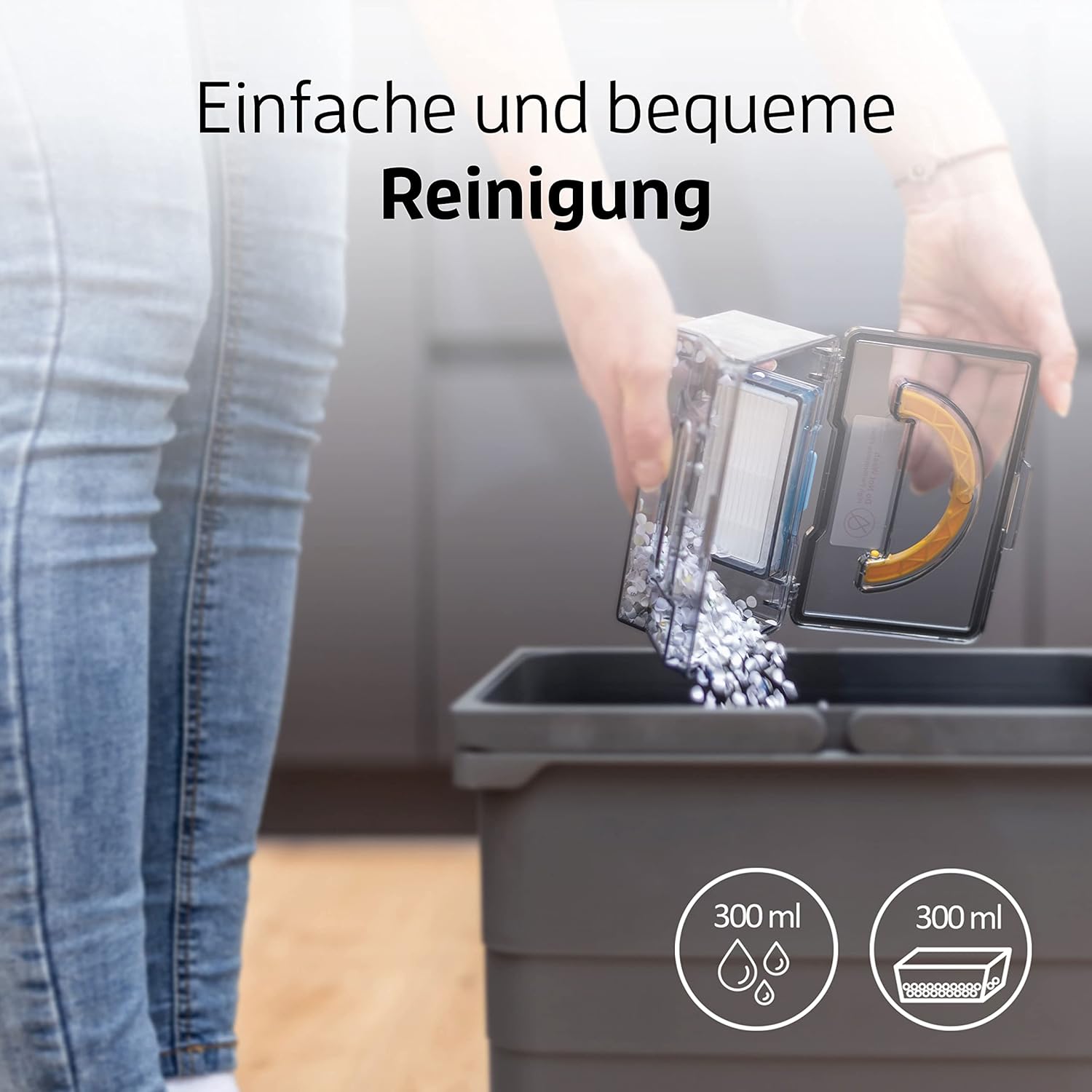
Emptying the dustbin of the ZACO V5sPro is a simple and convenient process.
1. Emptying the Dustbin and Cleaning Filters
- Press the "PUSH" button on the top cover to open it and remove the dustbin.
- เปิดฝาถังขยะและเทสิ่งของภายในลงในถังขยะ
- Remove the primary filter and HEPA filter. Tap them gently to remove dust. The primary filter can be rinsed with water, but ensure it is completely dry before re-installing. The HEPA filter should not be washed.
- Clean the dustbin with water if necessary and let it air dry completely.
- Reassemble the filters and dustbin, then place it back into the robot.
- ขอแนะนำให้เปลี่ยนตัวกรอง HEPA ทุกๆ 3-6 เดือน ขึ้นอยู่กับการใช้งาน
2. ทำความสะอาดแปรงข้าง
Check the side brushes regularly for tangled hair or debris. Pull them off their posts and remove any obstructions. If brushes are worn, replace them with new ones.
3. Cleaning the Water Tank and Mopping Cloth
- หลังจากถูพื้นเสร็จแล้ว ให้ถอดถังเก็บน้ำออกและเทน้ำที่เหลือทิ้ง
- Detach the microfiber mopping cloth and rinse it thoroughly with water. It can also be machine washed. Allow it to air dry completely.
- Clean the water tank with water and let it air dry.
4. การทำความสะอาดเซ็นเซอร์และหน้าสัมผัสการชาร์จ
Wipe the cliff sensors (located on the bottom of the robot) and the charging contacts (on both the robot and charging station) with a clean, dry cloth to ensure proper function.
การแก้ไขปัญหา
| ปัญหา | สาเหตุที่เป็นไปได้ | สารละลาย |
|---|---|---|
| หุ่นยนต์ไม่เปิด | แบตเตอรี่ต่ำ สวิตช์ไฟปิด | Charge the robot; Ensure the main power switch (usually on the side) is ON. |
| หุ่นยนต์ไม่ชาร์จเงิน | Charging contacts dirty; Charging station not powered. | Clean charging contacts on robot and station; Ensure charging station is plugged in and has power. |
| หุ่นยนต์ติดขัดบ่อยครั้ง | Obstacles (cables, small rugs); Robot stuck under furniture. | Clear the cleaning area; Use boundary strips if available or block off problematic areas. |
| ประสิทธิภาพการทำความสะอาดไม่ดี | ถังเก็บฝุ่นเต็ม; ตัวกรองอุดตัน; แปรงด้านข้างสึกหรอ | Empty dustbin; Clean/replace filters; Clean/replace side brushes. |
| หุ่นยนต์ตกบันได | Cliff sensors dirty. | Clean the cliff sensors on the bottom of the robot. |
| ฟังก์ชันการถูพื้นไม่ได้ผล | Water tank empty; Mopping cloth dry or dirty. | Fill water tank; Dampen and clean mopping cloth. |
ข้อมูลจำเพาะ
| คุณสมบัติ | รายละเอียด |
|---|---|
| ยี่ห้อ | ซาโก้ |
| หมายเลขรุ่น | V5sPro |
| สี | ทอง |
| ขนาดสินค้า | 30 x 30 x 8.1 ซม. |
| น้ำหนัก | 2.5 กิโลกรัม |
| ความจุของถังขยะ | 300 มิลลิลิตร |
| ความจุถังน้ำ | 300 มิลลิลิตร |
| พลัง | 22 วัตต์ |
| เล่มที่tage | 14โวลต์ |
| วัสดุ | พลาสติก |
| รันไทม์ | ไม่เกิน 2 ชั่วโมง (120 นาที) |
| ระดับเสียง | 60 เดซิเบล |
| คุณสมบัติพิเศษ | Automatic Cleaning, Edge Cleaning, Spot Cleaning, Max-Mode, Timer Control, Obstacle Detection, Anti-Drop Sensors, Automatic Return to Charging Station, Quiet Operation, Suitable for Pet Owners and Allergy Sufferers, Cordless, Bagless. |
การรับประกันและการสนับสนุน
For warranty information and technical support, please refer to the official ZACO webหรือติดต่อฝ่ายบริการลูกค้าโดยตรง โปรดเก็บใบเสร็จรับเงินไว้เป็นหลักฐานการซื้อสำหรับการเรียกร้องการรับประกัน
This product is from a small or medium-sized company from Germany, Austria, or Switzerland, which is registered with its brand on Amazon.
Ask a question about this manual
Ask about setup, troubleshooting, compatibility, parts, safety, or missing instructions. Manuals+ will review the question and use this page’s manual context to help answer it.