
1. ข้อมูลด้านความปลอดภัยที่สำคัญ
Please read all safety instructions before installing or using this product. Failure to follow these instructions may result in electric shock, fire, or other hazards.
- คำเตือน: ปิดเบรกเกอร์หรือกล่องฟิวส์ก่อนการติดตั้งหรือซ่อมบำรุง
- Do not use with dimmers not specifically designed for LED bulbs, unless specified.
- Ensure the bulb is suitable for the fixture's voltagอี (120 โวลต์)
- ห้ามถอดประกอบหรือดัดแปลงหลอดไฟ
- Avoid direct exposure to water or excessive moisture unless the fixture is rated for wet locations.
- หลอดไฟนี้ได้รับการออกแบบมาเพื่อใช้ภายในอาคารเท่านั้น
2. สินค้าหมดview
The Utilitech PRO G8 2W LED bulb is an energy-efficient replacement for traditional G8 halogen bulbs. It provides warm white light and is designed for 120-volt applications. Its compact size makes it suitable for various fixtures, including under-cabinet lighting and decorative luminaires.
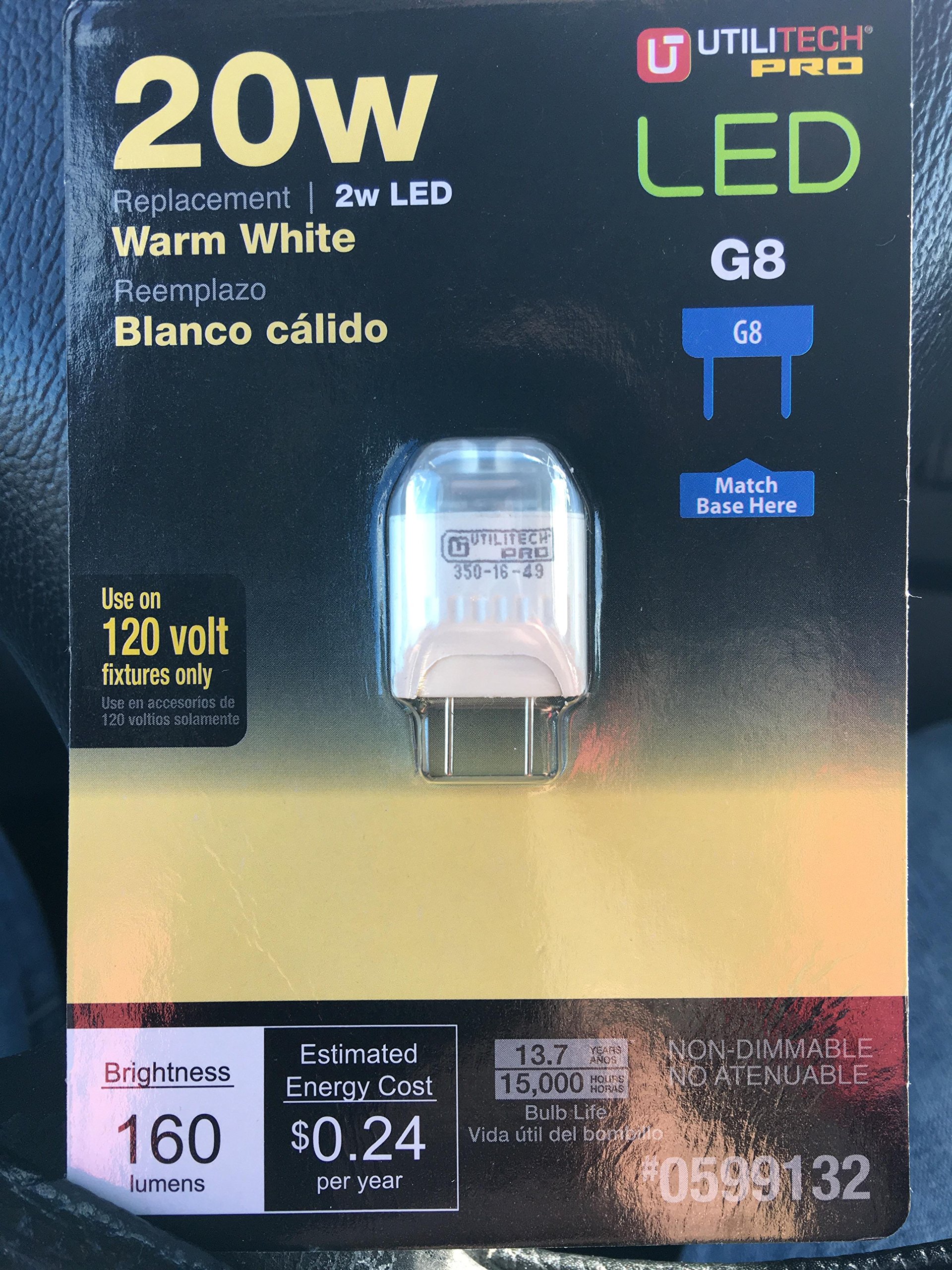
An image showing the Utilitech PRO G8 2W LED 120 Volt bulb, highlighting its compact G8 base and LED components.
3. การตั้งค่าและการติดตั้ง
Follow these steps to safely install your Utilitech PRO G8 LED bulb:
- Ensure Power is OFF: Before beginning installation, turn off the power to the light fixture at the circuit breaker or fuse box. Confirm the power is off by attempting to turn on the light switch.
- ถอดหลอดไฟเก่าออก: Carefully remove the existing G8 bulb from the fixture. Allow it to cool if it was recently in use.
- ใส่หลอดไฟ LED ใหม่: Align the two pins of the Utilitech PRO G8 LED bulb with the sockets in the fixture. Gently push the bulb into place until it is securely seated. Do not force the bulb.
- คืนค่าพลัง: Once the bulb is securely installed, restore power at the circuit breaker or fuse box.
- ทดสอบ: เปิดสวิตช์ไฟเพื่อตรวจสอบว่าหลอดไฟทำงานถูกต้องหรือไม่
Note: If the bulb does not light up, ensure it is properly seated and that power has been restored.
4. คู่มือการใช้งาน
The Utilitech PRO G8 LED bulb operates like a standard light bulb once installed.
- การเปิด/ปิด: ใช้สวิตช์ติดผนังหรือสวิตช์ที่ติดตั้งบนโคมไฟเพื่อเปิดหรือปิดไฟ
- คุณสมบัติหรี่แสงได้: This bulb is dimmable. For optimal performance and to avoid flickering, use with LED-compatible dimmers. Consult your dimmer's instructions for compatibility.
5. การบำรุงรักษา
The Utilitech PRO G8 LED bulb requires minimal maintenance.
- การทำความสะอาด: ตรวจสอบให้แน่ใจว่าได้ปิดไฟแล้วก่อนทำความสะอาด ใช้ผ้าแห้งนุ่มๆ เช็ดหลอดไฟหากจำเป็น ห้ามใช้น้ำยาทำความสะอาดหรือวัสดุที่มีฤทธิ์กัดกร่อน
- การทดแทน: LED bulbs have a long lifespan. When replacement is eventually needed, follow the installation steps outlined in Section 3. Dispose of old bulbs according to local regulations.
6 การแก้ไขปัญหา
If you encounter issues with your Utilitech PRO G8 LED bulb, refer to the following common solutions:
| ปัญหา | สาเหตุที่เป็นไปได้ | สารละลาย |
|---|---|---|
| หลอดไฟไม่ติด | No power to the fixture, bulb not seated correctly, or bulb is faulty. | Check circuit breaker. Ensure bulb is fully inserted. Test with another known working bulb. |
| หลอดไฟกะพริบ | Incompatible dimmer switch, loose connection, or power fluctuations. | Ensure dimmer is LED-compatible. Check bulb seating. Consult an electrician if power fluctuations are suspected. |
| ปริมาณแสงที่ส่งออกต่ำหรือสูงเกินไป | Dimmer setting, or incorrect bulb wattage เพื่อความสว่างที่ต้องการ | Adjust dimmer. Verify the bulb's wattage (2W) meets your brightness requirements. |
7. ข้อมูลจำเพาะ
| คุณสมบัติ | รายละเอียด |
|---|---|
| ยี่ห้อ | ยูทิลิเทค |
| หมายเลขรุ่น | 0599132 |
| ประเภทไฟ | นำ |
| ฐานหลอดไฟ | G8 |
| วัดtage | 2 วัตต์ |
| เทียบเท่าหลอดไส้ | 15 วัตต์ |
| เล่มที่tage | 120 โวลต์ |
| สีอ่อน | สีขาวอุ่น |
| คุณสมบัติพิเศษ | หรี่แสงได้ |
| ดัชนีความถูกต้องของสี (CRI) | 80 |
| การใช้งานภายใน/ภายนอกอาคาร | ในร่ม |
| วัสดุ | ทองแดง |
| น้ำหนักสินค้า | 0.64 ออนซ์ |
| ยูพีซี | 017801992854 |
8. การรับประกันและการสนับสนุน
For warranty information and customer support, please refer to the documentation provided at the point of purchase or contact Utilitech directly. Keep your purchase receipt as proof of purchase.
For further assistance, you may visit the Utilitech website or contact their customer service department. Specific contact details are typically found on the product packaging or the manufacturer's official webเว็บไซต์.