
1. บทนำ
The ACOPOWER Midas 30A MPPT Solar Charge Controller is designed to efficiently manage power flow from your solar panels to your battery bank. Utilizing advanced Maximum Power Point Tracking (MPPT) technology, it optimizes energy harvest and ensures safe, reliable charging for various battery types, including Sealed, Gel, Flooded, and Lithium (LiFePO4) batteries. This manual provides essential information for the proper installation, operation, and maintenance of your solar charge controller.
2. ข้อมูลด้านความปลอดภัย
- อ่านคำแนะนำทั้งหมดอย่างละเอียดก่อนการติดตั้งและใช้งาน
- ตรวจสอบให้แน่ใจว่าการเดินสายไฟทั้งหมดดำเนินการโดยบุคลากรที่มีคุณสมบัติเหมาะสมและเป็นไปตามข้อกำหนดด้านไฟฟ้าของท้องถิ่น
- ควรตัดการเชื่อมต่อแผงโซลาร์เซลล์และแบตเตอรี่ทุกครั้งก่อนติดตั้งหรือปรับแต่งตัวควบคุม
- Use appropriate circuit breakers or fuses for each line to protect against overcurrent.
- หลีกเลี่ยงการลัดวงจรขั้วแบตเตอรี่หรือขั้วแผงโซลาร์เซลล์
- ติดตั้งตัวควบคุมในบริเวณที่มีอากาศถ่ายเทสะดวก ห่างจากวัสดุไวไฟและแสงแดดโดยตรง
- สวมอุปกรณ์ป้องกันส่วนบุคคล (PPE) ที่เหมาะสม เช่น ถุงมือและอุปกรณ์ป้องกันดวงตาในระหว่างการติดตั้ง
- ตรวจสอบให้แน่ใจว่าระบบต่อสายดินอย่างถูกต้อง
3. สินค้าหมดview
The ACOPOWER Midas 30A MPPT Solar Charge Controller features a robust design and user-friendly interface for efficient solar power management.
คุณสมบัติหลัก:
- Advanced MPPT technology with 99.5% tracking efficiency and 98% peak conversion efficiency.
- Automatic temperature compensation for optimized battery charging.
- Automatically detects 12V/24V DC system voltage.
- Compatible with Sealed, Gel, Flooded, and Lithium-ion (LiFePO4) batteries.
- Supports multiple load control methods.
- Backlit LCD screen and die-cast aluminum design for durability.
- 4 วินาทีtage battery charging (bulk, boost, float, and equalization).
- Comprehensive protection against reverse polarity, overcharging, over-discharging, overload, short-circuiting, and reverse current.
Physical Dimensions and Components:

Figure 3.1: ACOPOWER Midas 30A MPPT Solar Charge Controller with dimensions.

Figure 3.2: Component diagram of the controller, highlighting ports and buttons.

รูปที่ 3.3 : ด้านหน้า view of the ACOPOWER Midas Y Series MPPT Solar Charge Controller.

Figure 3.4: High tracking efficiency of the MPPT controller.

Figure 3.5: The controller features an IP33 waterproof enclosure.
4. การตั้งค่า
สถานที่ติดตั้ง:
Mount the controller vertically on a wall or sturdy surface. Ensure there is ample space around the controller for proper heat dissipation. Avoid direct sunlight, high temperatures, and humid environments.
แผนผังสายไฟ:
Follow the wiring diagram carefully. Incorrect wiring can damage the controller and other components.
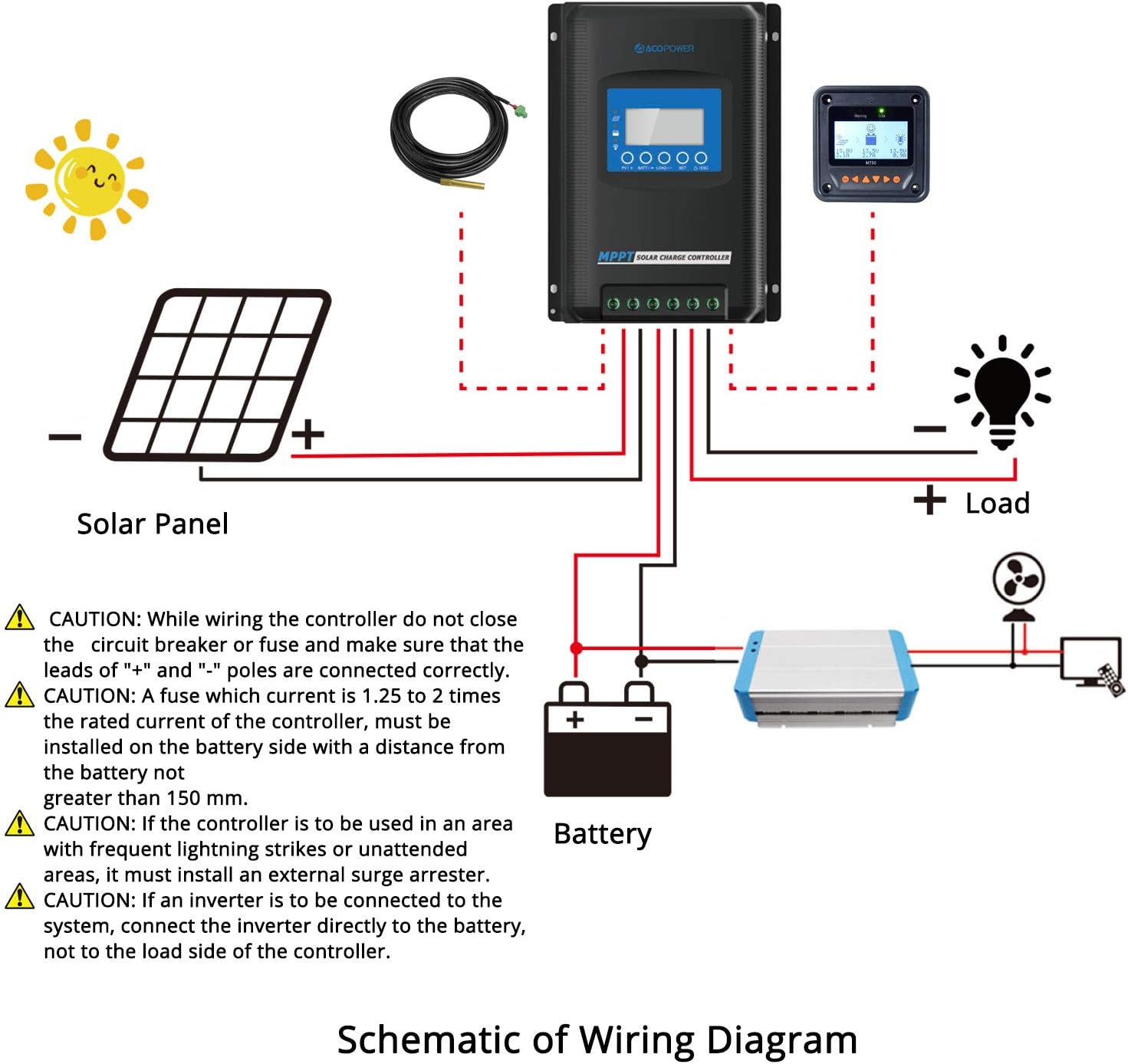
Figure 4.1: Schematic of Wiring Diagram.
ขั้นตอนการเดินสายไฟ:
- ติดตั้งคอนโทรลเลอร์: Securely mount the controller to a wall using screws. Ensure controllers are at the same horizontal level with ample space for heat dissipation between devices.
- Remove Port Cover: Carefully remove the terminal cover from the bottom of the controller.
- เชื่อมต่อสายแบตเตอรี่: Connect the positive (+) and negative (-) battery cables to the corresponding terminals on the controller. Ensure the battery circuit breaker is open before connecting.
- Connect Solar Panel Cables: Connect the positive (+) and negative (-) solar panel cables to the corresponding PV input terminals. Ensure the solar circuit breaker is open before connecting.
- Connect Load Cables (Optional): If using the load output, connect the positive (+) and negative (-) load cables to the load terminals.
- Install Port Cover: เปลี่ยนฝาปิดขั้วต่อ
- เปิดเครื่อง: ขั้นแรก ให้ปิดเบรกเกอร์วงจรแบตเตอรี่ จากนั้น ให้ปิดเบรกเกอร์วงจรโซลาร์เซลล์ หน้าจอแสดงผลของตัวควบคุมควรจะเปิดขึ้นมา
CAUTION: While wiring, ensure the circuit breaker or fuse is closed and that the leads of "+" and "-" poles are connected correctly. A fuse with a current 1.25 to 2 times the rated current of the controller must be installed on the battery side with a distance from the battery not greater than 150 mm. If the controller is to be used in an area with frequent lightning strikes or unattended areas, an external surge arrester must be installed. If an inverter is to be connected to the system, connect the inverter directly to the battery, not to the load side of the controller.
Parallel Communication Setup (for multiple controllers):
If using multiple controllers in parallel, they can communicate to synchronize settings. Assemble the parallel communication cable by connecting red and black wires to the green terminal blocks as shown in the diagram. Connect these cables to the RS485 communication ports on each controller.

Video: Assembling the parallel communication cable. (Note: This video is for a different model series (POW-M80/M100-PRO) and is not directly applicable to the Midas 30A. No relevant videos for this specific model were provided by the seller.)

Video: Installation and wiring guide. (Note: This video is for a different model series (POW-M80/M100-PRO) and is not directly applicable to the Midas 30A. No relevant videos for this specific model were provided by the seller.)
After connecting the parallel communication cable, power on the controllers by closing the battery circuit breaker first. Set a unique parallel code for each controller. The device with the smallest code becomes the main controller, and other controllers will automatically synchronize their configurations with the main controller.
5. คู่มือการใช้งาน
จอแสดงผล LCD และปุ่มกด:
The controller features an LCD display and multiple buttons for navigation and settings adjustment.

รูปที่ 5.1: อดีตamples of various display settings.
การตั้งค่าประเภทแบตเตอรี่:
The controller is compatible with Sealed, Gel, Flooded, and User-defined (LiFePO4) battery types. To set the battery type:
- Press and hold the 'PV/SET' button to enter the setup program.
- Navigate through the settings using the 'BAT+' and 'BAT-' buttons.
- Select the desired battery type (SEL for Sealed, GEL for Gel, FLD for Flooded, USE for User-defined).
- For LiFePO4 batteries, select 'USE' and manually enter the specific parameters as per your battery manufacturer's recommendations.
- Press and hold 'PV/SET' again to save the settings and exit.
พารามิเตอร์การตรวจสอบ:
The LCD display shows various parameters such as PV voltage, ปริมาณแบตเตอรี่tage, charging current, load current, and temperature. Use the navigation buttons to cycle through these displays.
การควบคุมโหลด:
The controller supports multiple load control methods. Refer to the detailed operating manual for specific programming of load timers and modes.
6. การบำรุงรักษา
- การตรวจสอบปกติ: ตรวจสอบการเชื่อมต่อสายไฟทั้งหมดเป็นระยะๆ เพื่อดูความแน่นหนาและการกัดกร่อน
- การทำความสะอาด: รักษาตัวควบคุมให้สะอาด ปราศจากฝุ่นและเศษขยะ ใช้ผ้าแห้งเช็ดทำความสะอาด
- การระบายอากาศ : ตรวจสอบให้แน่ใจว่าช่องระบายอากาศไม่ถูกปิดกั้น เพื่อให้ความร้อนระบายออกได้อย่างเหมาะสม
- สุขภาพแบตเตอรี่: ตรวจสอบปริมาณแบตเตอรี่tage and health regularly.
- อัพเดตเฟิร์มแวร์: ตรวจสอบของผู้ผลิต webเข้าชมเว็บไซต์เพื่อตรวจสอบการอัปเดตเฟิร์มแวร์ที่มีให้ใช้งาน
7 การแก้ไขปัญหา
If you encounter issues with your ACOPOWER Midas 30A MPPT Solar Charge Controller, refer to the following common troubleshooting steps:
- ไม่มีจอแสดงผล/ไม่มีพลังงาน: Check battery connections and ensure the battery circuit breaker is closed. Verify battery voltage อยู่ในช่วงการทำงาน
- ไม่มีการชาร์จ: Check solar panel connections and ensure the solar circuit breaker is closed. Verify solar panel voltage is sufficient for charging. Check for shading on solar panels.
- ปริมาณแบตเตอรี่ไม่ถูกต้องtagอี การอ่าน: Ensure the battery type setting is correct for your battery.
- ความร้อนสูงเกินไป: Ensure the controller is installed in a well-ventilated area and that its heat sinks are not obstructed. Reduce load if necessary.
- รหัสข้อผิดพลาด: If an error code appears on the display, consult the full product manual or contact customer support for specific interpretations and solutions.
If problems persist after attempting these steps, contact ACOPOWER customer support.
8. ข้อมูลจำเพาะ
| คุณสมบัติ | ข้อมูลจำเพาะ |
|---|---|
| ยี่ห้อ | อโคพาวเวอร์ |
| แบบอย่าง | Midas 30A MPPT Solar Charge Controller |
| สี | สีดำ |
| วัสดุ | อลูมิเนียม |
| น้ำหนักสินค้า | 1.5 กิโลกรัม |
| ประเภทจอภาพ | จอแอลซีดี |
| ประสิทธิภาพการติดตาม | 99.5% |
| ประสิทธิภาพการแปลงสูงสุด | 98% |
| เล่มระบบtage | 12V/24V DC Auto Detect |
| ความเข้ากันได้ของแบตเตอรี่ | Sealed, Gel, Flooded, Lithium-ion (LiFePO4) |
| การชาร์จ Stages | 4 วินาทีtage (bulk, boost, float, equalization) |
| คุณสมบัติการป้องกัน | Reverse polarity, overcharging, over-discharging, overload, short-circuiting, reverse current |
9. การรับประกันและการสนับสนุน
The ACOPOWER Midas 30A MPPT Solar Charge Controller comes with an 18-month warranty. ACOPOWER is a US-based company offering local support for its products. For technical assistance, warranty claims, or further inquiries, please contact ACOPOWER customer service through their official channels.
10. การสมัคร
The ACOPOWER Midas 30A MPPT Solar Charge Controller is suitable for a variety of off-grid solar applications, providing reliable power management for:
- รถบ้าน (RV)
- Campเออาร์เอส
- Boats and Yachts
- Remote Cabins
- Other off-grid power systems

รูปที่ 10.1: อดีตamples of controller applications.