
การแนะนำ
Thank you for choosing the SPT SF-16T07 Touch Stop Stand Fan. This 16-inch stand fan is designed to provide efficient air circulation with advanced features for comfort and safety. Key features include a unique touch-stop sensor, 6 fan speeds, 4 distinct wind modes (Normal, Natural, Sleep, and Smart), oscillation, and a convenient timer-off function. This manual provides detailed instructions for assembly, operation, maintenance, and troubleshooting to ensure safe and optimal use of your fan.
คำแนะนำด้านความปลอดภัยที่สำคัญ
โปรดอ่านคำแนะนำทั้งหมดอย่างละเอียดก่อนใช้งานเครื่องใช้ไฟฟ้านี้ และเก็บไว้เพื่อใช้อ้างอิงในอนาคต การไม่ปฏิบัติตามคำแนะนำเหล่านี้อาจทำให้เกิดไฟฟ้าช็อต ไฟไหม้ หรือการบาดเจ็บร้ายแรงได้
- ควรถอดปลั๊กพัดลมออกจากเต้ารับไฟฟ้าทุกครั้งก่อนทำความสะอาด ซ่อมบำรุง หรือเคลื่อนย้าย
- ห้ามใช้งานพัดลมหากสายไฟหรือปลั๊กชำรุด หากสายไฟหรือปลั๊กชำรุด โปรดติดต่อช่างผู้ชำนาญการเพื่อซ่อมแซมหรือเปลี่ยนใหม่
- เก็บพัดลมให้ห่างจากน้ำหรือของเหลวอื่นๆ ห้ามจุ่มพัดลมลงในน้ำ
- ตรวจสอบให้แน่ใจว่าได้วางพัดลมบนพื้นผิวที่มั่นคงและเรียบเสมอกัน เพื่อป้องกันไม่ให้พัดลมล้มลง
- ห้ามสอดนิ้วหรือวัตถุใดๆ เข้าไปในตะแกรงขณะที่พัดลมกำลังทำงาน
- The fan features a Touch-Stop Sensor: If the fan guard is touched while the fan is operating, the fan will automatically stop. This is a safety feature designed to protect users, especially children. The fan will resume operation once the touch is removed and the fan is restarted.
- Close supervision is necessary when the fan is used by or near children or individuals with reduced physical, sensory, or mental capabilities.
- พัดลมนี้มีไว้สำหรับใช้ภายในอาคารเท่านั้น ห้ามใช้ภายนอกอาคาร
เนื้อหาแพ็คเกจ
กรุณาตรวจสอบเนื้อหาในแพ็คเกจเพื่อให้แน่ใจว่ามีสินค้าทั้งหมดอยู่ครบถ้วนและไม่ได้รับความเสียหาย:
- Fan Unit (Motor Housing, Fan Blades, Front and Rear Grilles)
- Stand Pole and Base
- รีโมทคอนโทรล
- คู่มือการใช้งาน (เอกสารนี้)
คำแนะนำในการประกอบ
The SPT SF-16T07 fan requires some assembly before use. Follow these steps carefully:
- ประกอบฐาน: Connect the two halves of the base together, if applicable, and secure them with the provided screws.
- Attach the Stand Pole: Insert the stand pole into the assembled base and tighten the locking nut or screw from underneath the base to secure it.
- ติดตั้งตัวเรือนมอเตอร์: Place the fan's motor housing onto the top of the stand pole. Ensure it is firmly seated and secure it with the provided screw or locking mechanism.
- Install the Rear Grille: Position the rear grille onto the motor housing, aligning the notches. Secure it with the grille nut.
- ติดตั้งใบพัดพัดลม: Slide the fan blade onto the motor shaft, ensuring it clicks into place or is secured with a cap.
- Install the Front Grille: Place the front grille over the fan blade and align it with the rear grille. Secure the grilles together using the clips or screws provided around the perimeter.
ตรวจสอบให้แน่ใจว่าทุกส่วนประกอบยึดแน่นดีแล้วก่อนเสียบปลั๊กพัดลม
คำแนะนำการใช้งาน
Your SPT SF-16T07 fan can be operated using the control panel on the fan unit or the included remote control. Ensure the fan is plugged into a standard electrical outlet.
แผงควบคุมโอเวอร์view
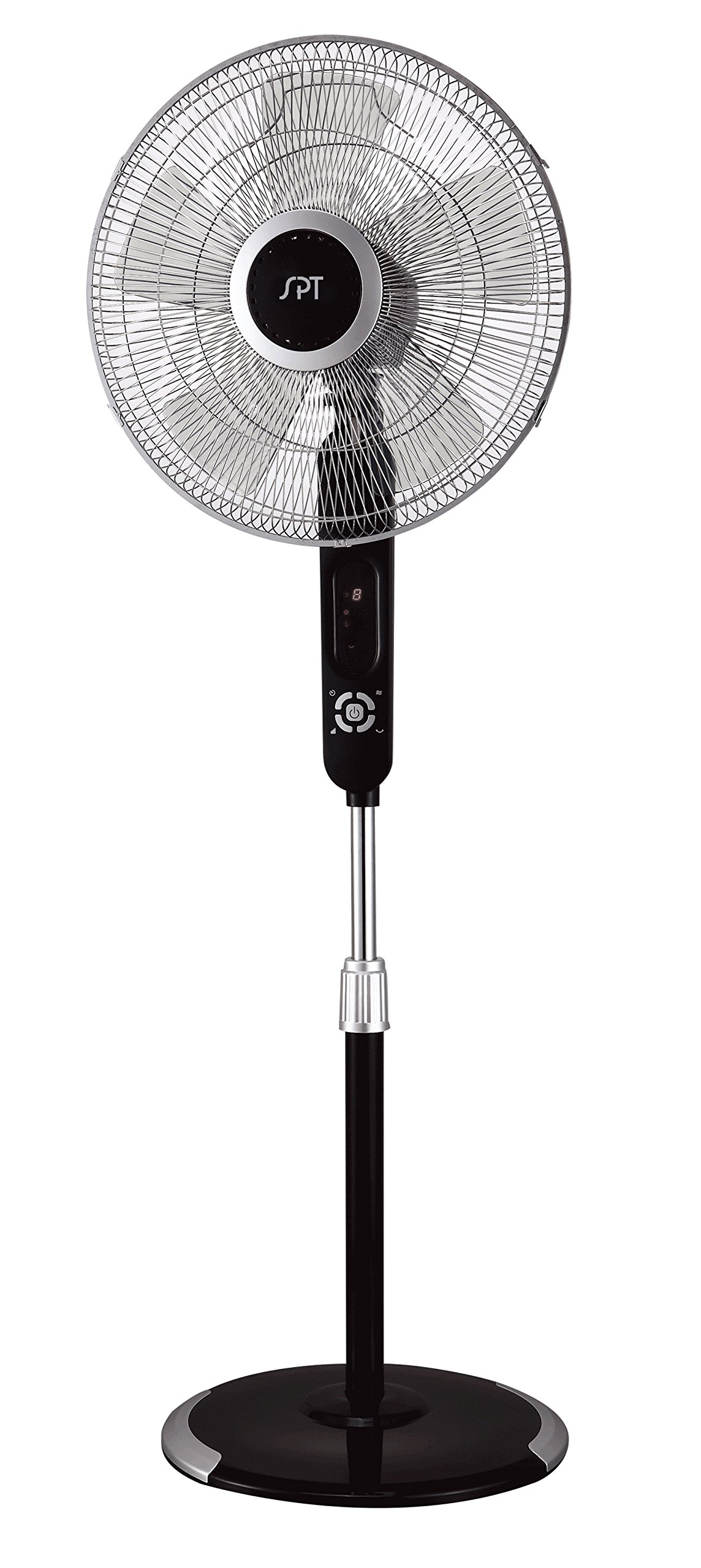
Image: The control panel of the SPT SF-16T07 Stand Fan. It features a digital display at the top showing numbers (e.g., '8') and icons for timer, fan speed, and mode. Below the display are several white buttons arranged in a circular pattern around a central power button. Other buttons include timer, fan speed, oscillation, and mode selection.
- Power Button ( ⏻ ): กดเพื่อเปิดหรือปิดพัดลม
- Speed Button ( ✴ ): Press repeatedly to cycle through 6 fan speeds. The current speed will be indicated on the digital display.
- Mode Button ( ☻ ): Press to select one of the 4 wind modes: Normal, Natural, Sleep, or Smart.
- Oscillation Button ( 🌀 ): Press to start or stop the fan head oscillation (side-to-side movement).
- Timer Button ( ⏱ ): Press to set the auto-off timer. Each press increases the timer by 1 hour, up to a maximum of 8 hours. The set time will be displayed.
Wind Modes Explained
- โหมดปกติ: ให้การไหลเวียนของอากาศคงที่ตามความเร็วที่เลือก
- โหมดธรรมชาติ: Simulates natural breezes by varying the fan speed intermittently.
- โหมดสลีป: Gradually decreases the fan speed over time to provide a quieter and more comfortable environment for sleeping.
- โหมดอัจฉริยะ: Adjusts the fan speed automatically based on the ambient room temperature.
รีโมทคอนโทรล
The included remote control allows you to operate all fan functions from a distance. The buttons on the remote correspond to the functions on the main control panel. Ensure batteries are correctly installed in the remote control.
การซ่อมบำรุง
Regular cleaning and proper maintenance will ensure the longevity and efficient operation of your fan.
- การทำความสะอาด: ควรดึงปลั๊กพัดลมออกทุกครั้งก่อนทำความสะอาด ใช้ผ้าเนื้อนุ่มและแห้งเช็ดทำความสะอาดamp cloth to wipe the exterior surfaces. For stubborn dirt, a mild soap solution can be used. Do not use abrasive cleaners or solvents.
- การทำความสะอาดกระจังหน้า: Periodically remove the front grille (refer to assembly instructions in reverse) to clean the fan blades and inside of the grilles. Use a soft brush or vacuum cleaner to remove dust and debris. Ensure all parts are dry before reassembling.
- พื้นที่จัดเก็บ: เมื่อไม่ได้ใช้งานเป็นเวลานาน ควรเก็บพัดลมไว้ในที่แห้งและเย็น โดยควรอยู่ในบรรจุภัณฑ์เดิม เพื่อป้องกันฝุ่นละอองและความเสียหาย
การแก้ไขปัญหา
หากคุณพบปัญหาเกี่ยวกับพัดลม โปรดดูปัญหาทั่วไปและวิธีแก้ไขต่อไปนี้:
| ปัญหา | สาเหตุที่เป็นไปได้ | สารละลาย |
|---|---|---|
| พัดลมไม่เปิด | No power supply; fan unplugged; power button not pressed. | Ensure the fan is securely plugged into a working electrical outlet. Press the power button. Check household circuit breaker. |
| Fan stops unexpectedly during operation. | Touch-stop sensor activated; power interruption; internal fault. | Check if the fan guard was touched, activating the safety sensor. Remove any contact and restart the fan. Verify stable power supply. If the issue persists, contact customer support. |
| พัดลมมีเสียงผิดปกติ | Loose parts; obstruction in fan blades/grille; fan not on a level surface. | ถอดปลั๊กพัดลมและตรวจสอบว่ามีชิ้นส่วนหลวมหรือสิ่งกีดขวางหรือไม่ ตรวจสอบให้แน่ใจว่าวางพัดลมบนพื้นผิวเรียบและมั่นคง |
| รีโมทคอนโทรลไม่ทำงาน | Dead batteries; remote out of range; obstruction between remote and fan. | Replace batteries in the remote control. Ensure there are no obstructions and operate within effective range. |
ข้อมูลจำเพาะ
| คุณสมบัติ | รายละเอียด |
|---|---|
| ยี่ห้อ | SPT |
| ชื่อรุ่น | SF-16T07 (Touch-stop) |
| การออกแบบพัดลมไฟฟ้า | พัดลมตั้งพื้น / พัดลมตั้งพื้น |
| สี | Black (Matte Black finish) |
| ขนาดสินค้า | ลึก 16 นิ้ว x กว้าง 16 นิ้ว x สูง 57.09 นิ้ว |
| น้ำหนักสินค้า | 17 ปอนด์ |
| แหล่งพลังงาน | สายไฟ |
| จำนวนใบมีด | 3 |
| ความจุการไหลของอากาศ | 1659.8 ลูกบาศก์ฟุตต่อนาที |
| จำนวนระดับพลังงาน | ความเร็วพัดลม 6 ระดับ |
| โหมดลม | 4 (Normal, Natural, Sleep, Smart) |
| ฟังก์ชั่นจับเวลา | นานถึง 8 ชั่วโมง |
| คุณสมบัติพิเศษ | 16" fan blade, Touch-stop sensor, Remote control, Head oscillation, Manual tilting, Adjustable height, ETL certified |
| วิธีการควบคุม | Touch (Control Panel) / Button Control (Remote) |
| การใช้งานภายใน/ภายนอกอาคาร | ในร่ม |
ข้อมูลการรับประกัน
The SPT SF-16T07 Touch Stop Stand Fan comes with a รับประกัน 1 ปี covering both labor and parts from the date of purchase. This warranty covers defects in materials and workmanship under normal use. Please retain your proof of purchase for warranty claims. The warranty does not cover damage resulting from misuse, accident, alteration, or unauthorized repair.
การสนับสนุนลูกค้า
For further assistance, technical support, or warranty inquiries, please contact SPT customer service. Refer to the product packaging or the official SPT webเว็บไซต์สำหรับข้อมูลการติดต่อล่าสุด