
OSD Audio ACE870
คู่มือการใช้งานลำโพงติดเพดานแบบไร้ขอบ OSD ขนาด 8 นิ้ว
รุ่น: ACE870 | ยี่ห้อ: OSD Audio
1. บทนำ
คู่มือนี้ให้คำแนะนำอย่างละเอียดเกี่ยวกับการติดตั้ง การใช้งาน และการบำรุงรักษาลำโพงติดเพดานไร้ขอบ OSD Audio ACE870 ขนาด 8 นิ้ว ออกแบบมาสำหรับระบบเสียงเซอร์ราวด์โฮมเธียเตอร์แบบ LCR (ซ้าย กลาง ขวา) ลำโพงนี้มีตะแกรงไร้ขอบเพื่อรูปลักษณ์ที่กลมกลืน และส่วนประกอบเสียงขั้นสูงเพื่อประสบการณ์การฟังที่สมจริง โปรดอ่านคู่มือนี้อย่างละเอียดก่อนการติดตั้งและการใช้งานเพื่อให้แน่ใจว่าการตั้งค่าถูกต้องและได้ประสิทธิภาพสูงสุด

รูปที่ 1.1: ลำโพงติดเพดานแบบไร้ขอบ OSD ACE870 ที่ถอดตะแกรงออกแล้วasinเช่น ส่วนประกอบภายในและการออกแบบที่ไร้ขอบ
2. ข้อมูลด้านความปลอดภัย
โปรดปฏิบัติตามคำแนะนำด้านความปลอดภัยต่อไปนี้เสมอ เพื่อป้องกันความเสียหายต่อลำโพง ทรัพย์สิน หรือการบาดเจ็บส่วนบุคคล:
- ตรวจสอบให้แน่ใจว่าได้ตัดกระแสไฟทั้งหมดในบริเวณที่จะติดตั้งก่อนเริ่มงานเดินสายไฟหรือติดตั้งใดๆ
- หากไม่แน่ใจเกี่ยวกับการเดินสายไฟ ควรปรึกษาช่างไฟฟ้าที่มีคุณสมบัติเหมาะสม
- อย่าให้ลำโพงโดนความชื้นสูงหรืออุณหภูมิที่สูงเกินไป ผลิตภัณฑ์นี้ไม่กันน้ำ
- ใช้เครื่องมือและอุปกรณ์ความปลอดภัยที่เหมาะสมระหว่างการติดตั้ง
- ตรวจสอบให้แน่ใจว่าพื้นผิวที่จะติดตั้ง (เพดาน) สามารถรองรับน้ำหนักของลำโพงได้อย่างเหมาะสม
- อย่าพยายามดัดแปลงหรือซ่อมแซมลำโพงด้วยตนเอง โปรดส่งซ่อมโดยช่างผู้ชำนาญการเท่านั้น
3. เนื้อหาบรรจุภัณฑ์
ตรวจสอบว่ามีรายการทั้งหมดอยู่ในแพ็คเกจ:
- ลำโพงติดเพดานแบบไร้ขอบ OSD Audio ACE870 จำนวน 1 ตัว
หากมีสินค้าใดสูญหายหรือเสียหาย โปรดติดต่อฝ่ายบริการลูกค้าของ OSD Audio
4. การตั้งค่าและการติดตั้ง
4.1 การวางแผนการจัดวางตำแหน่งวิทยากร
ลำโพง ACE870 ออกแบบมาสำหรับการติดตั้งบนเพดาน มีวูฟเฟอร์ทำมุม 15 องศาและทวีตเตอร์แบบหมุนได้ ทำให้เหมาะสำหรับระบบเสียง LCR และระบบเสียงรอบทิศทาง รวมถึงระบบ Dolby Atmos เพื่อให้ได้เสียงที่ดีที่สุด โปรดพิจารณาสิ่งต่อไปนี้:
- สำหรับช่องสัญญาณ LCR ให้ติดตั้งลำโพงไว้ที่เพดานด้านหน้า โดยเอียงไปทางบริเวณรับฟังหลัก
- สำหรับลำโพงเซอร์ราวด์หรือลำโพงความสูง ให้จัดวางลำโพงอย่างมีกลยุทธ์เพื่อสร้างสนามเสียงที่สมจริง โดยคำนึงถึงความต้องการด้านเสียงของคุณ ampคำแนะนำของเครื่องขยายเสียงสำหรับ Dolby Atmos หรือรูปแบบเสียงเซอร์ราวด์อื่นๆ
- ตรวจสอบให้แน่ใจว่าไม่มีสิ่งกีดขวาง (เช่น คาน ท่อ สายไฟ) ในช่องว่างใต้ฝ้าเพดานที่คุณวางแผนจะติดตั้งลำโพง

รูปที่ 4.1: อดีตampภาพประกอบแสดงการจัดวางลำโพงโฮมเธียเตอร์ Dolby Atmos พร้อมตัวอย่างตำแหน่งการติดตั้งลำโพงติดเพดาน
4.2 ขั้นตอนการติดตั้ง
- เตรียมการเปิดงาน: ใช้แม่แบบที่ให้มา (ถ้ามี มิฉะนั้นให้วัดอย่างระมัดระวัง) ทำเครื่องหมายบริเวณที่จะตัดบนเพดาน ตรวจสอบให้แน่ใจว่าบริเวณที่ทำเครื่องหมายไว้นั้นไม่มีสิ่งกีดขวางใดๆ ตัดช่องเปิดอย่างระมัดระวังโดยใช้เลื่อยตัดแผ่นยิปซัมหรือเครื่องมือที่เหมาะสม
- เดินสายลำโพง: เดินสายลำโพงคุณภาพสูง (เช่น สายขนาด 12/2 เกจ) จาก... ampต่อสายจากเครื่องขยายเสียงหรือเครื่องรับสัญญาณไปยังช่องลำโพง เว้นระยะห่างให้เพียงพอเพื่อให้เชื่อมต่อได้ง่าย
- เชื่อมต่อสายลำโพง: เชื่อมต่อสายลำโพงเข้ากับขั้วต่อบนลำโพง ตรวจสอบให้แน่ใจว่าขั้วถูกต้อง (+ ต่อกับ + และ - ต่อกับ -) ampเชื่อมต่อสายลำโพงจากแอมป์ไปยังลำโพง ACE870 ใช้การเชื่อมต่อสายลำโพงแบบมาตรฐาน
- ใส่ลำโพง: ค่อยๆ สอดลำโพงเข้าไปในช่องที่เจาะไว้ ตัวยึดampตัวล็อกลำโพงจะหมุนออกมาและล็อกลำโพงโดยอัตโนมัติเมื่อคุณขันสกรูที่แผ่นกั้นด้านหน้าให้แน่น
- ติดตั้งตะแกรง: ตะแกรงปิดลำโพงแบบไร้ขอบนี้ติดเข้ากับแผงลำโพงด้วยแม่เหล็ก จัดวางตะแกรงให้ตรงแล้วค่อยๆ วางลงบนลำโพงจนกระทั่งล็อคเข้าที่

รูปที่ 4.2: อดีตampสายลำโพงที่ใช้เชื่อมต่อลำโพงกับ... ampชีวิต.

รูปที่ 4.3: แผนภาพแสดงขั้นตอนการติดตั้งลำโพงติดเพดานลงในช่องที่เตรียมไว้
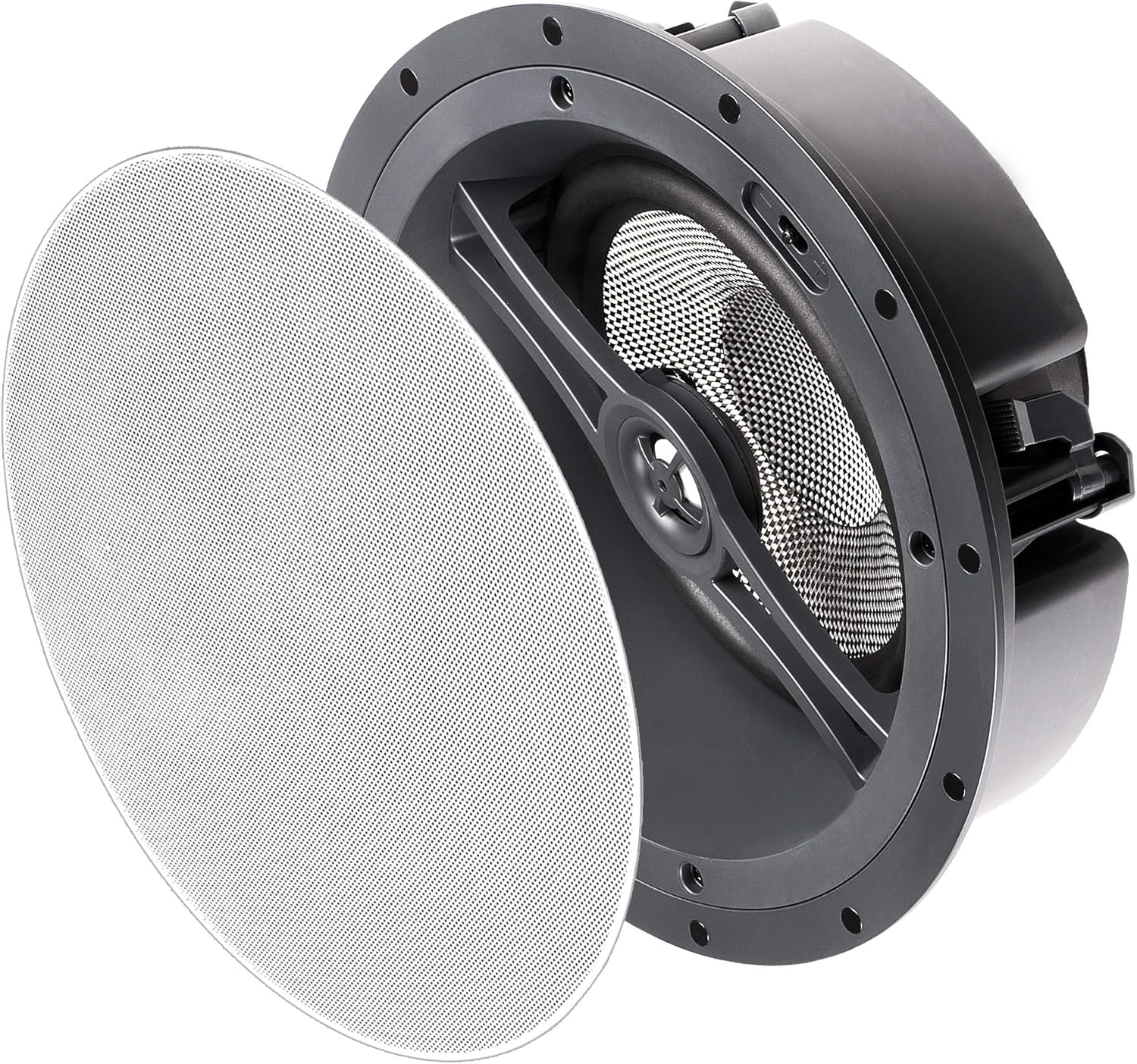
รูปที่ 4.4: ลำโพง OSD ACE870 ที่ถอดตะแกรงปิดลำโพงแบบแม่เหล็กออกแล้ว พร้อมสำหรับการติดตั้งหรือถอดออก
5. การใช้งานลำโพง
5.1 การปรับแต่งเสียง
ลำโพง ACE870 มีสวิตช์ปรับแต่งเสียงที่ช่วยให้คุณปรับการตอบสนองเสียงเบสและเสียงแหลมให้เหมาะสมกับความชอบในการฟังและสภาพอะคูสติกของห้อง สวิตช์เหล่านี้มักจะอยู่ใกล้กับวูฟเฟอร์หรือทวีตเตอร์บนแผงลำโพง สามารถเข้าถึงได้ก่อนที่จะติดตั้งตะแกรงป้องกัน
- สวิตช์ปรับเสียงเบส: ปรับระดับเสียงความถี่ต่ำ ใช้เพื่อชดเชยสภาพอะคูสติกของห้องหรือตามความชอบส่วนตัว
- สวิตช์ปรับเสียงแหลม: ปรับระดับเสียงความถี่สูง ใช้เพื่อเพิ่มหรือลดระดับเสียง
ลองปรับการตั้งค่าเหล่านี้ดูเพื่อให้ได้เสียงที่ต้องการfile สำหรับระบบโฮมเธียเตอร์ของคุณ

รูปที่ 5.1: ภาพระยะใกล้ view บริเวณวูฟเฟอร์และทวีตเตอร์แบบหมุนได้ของลำโพง ซึ่งโดยทั่วไปจะเป็นที่ตั้งของสวิตช์ปรับรูปทรงเสียง
5.2 การรวมระบบ
เชื่อมต่อลำโพง ACE870 เข้ากับเครื่องรับสัญญาณโฮมเธียเตอร์ที่ใช้งานร่วมกันได้ หรือ ampเครื่องฟอก รับรองว่า ampกำลังขับของแอมพลิฟายเออร์ไม่เกินกำลังรับสูงสุดของลำโพงที่ 175 วัตต์ ลำโพงนี้ออกแบบมาเพื่อใช้งานกับระบบที่มีความต้านทาน 8 โอห์ม
แม้ว่าลำโพงตัวนี้จะไม่มีระบบควบคุมด้วยเสียงโดยตรง แต่ก็สามารถเชื่อมต่อเข้ากับระบบโฮมเธียเตอร์ที่ควบคุมด้วยเสียงได้ผ่านเครื่องรับสัญญาณหรือฮับสมาร์ทโฮมที่ใช้งานร่วมกันได้
6. การบำรุงรักษา
ลำโพง OSD ACE870 ต้องการการบำรุงรักษาเพียงเล็กน้อย:
- การทำความสะอาด: ค่อยๆ เช็ดตะแกรงที่ไม่มีขอบด้วยผ้าแห้งเนื้อนุ่มเพื่อขจัดฝุ่น ห้ามใช้สารทำความสะอาดที่มีฤทธิ์กัดกร่อนหรือตัวทำละลาย
- การตรวจสอบ: ตรวจสอบตะแกรงลำโพงเป็นระยะเพื่อดูว่ามีร่องรอยความเสียหายหรือการเปลี่ยนสีหรือไม่
- สิ่งแวดล้อม: โปรดตรวจสอบให้แน่ใจว่าลำโพงไม่ได้โดนแสงแดดโดยตรง ความร้อนสูง หรือความชื้นมากเกินไป เนื่องจากสิ่งเหล่านี้อาจส่งผลต่อประสิทธิภาพและอายุการใช้งานของลำโพงได้
7 การแก้ไขปัญหา
หากคุณพบปัญหาเกี่ยวกับลำโพง OSD ACE870 โปรดดูปัญหาและวิธีแก้ไขทั่วไปต่อไปนี้:
| ปัญหา | สาเหตุที่เป็นไปได้ | สารละลาย |
|---|---|---|
| ไม่มีเสียงออกจากลำโพง | สายไฟหลวมหรือไม่ถูกต้อง; Ampเครื่องขยายเสียงปิดอยู่หรือไม่ได้เลือกอินพุต; ลำโพงเสียหาย | ตรวจสอบการเชื่อมต่อสายลำโพงทั้งหมดทั้งที่ลำโพงและ ampตรวจสอบให้แน่ใจว่าได้ต่อสายถูกต้องแล้ว ตรวจสอบอีกครั้ง ampเครื่องขยายเสียงเปิดอยู่และเลือกอินพุตถูกต้องแล้ว ลองทดสอบกับลำโพงตัวอื่นดูหากเป็นไปได้ |
| เสียงผิดเพี้ยนหรือไม่ชัดเจน | เกินกำลัง ampเครื่องขยายเสียง; การตั้งค่าสวิตช์ปรับเสียงไม่ถูกต้อง; ตะแกรงลำโพงหลวม | ลด ampปรับระดับเสียงของเครื่องขยายเสียง ปรับสวิตช์ปรับเสียงเบส/เสียงแหลม ตรวจสอบให้แน่ใจว่าตะแกรงปิดลำโพงแน่นสนิท ตรวจสอบดูว่ามีรอยเสียหายใดๆ บนกรวยลำโพงหรือไม่ |
| ลำโพงมีเสียงขาดๆ หายๆ | สายไฟหลวม; Ampเครื่องขยายเสียงร้อนเกินไป; วงจรไฟฟ้าลัดวงจร | ตรวจสอบสายไฟทั้งหมดว่ามีจุดเชื่อมต่อหลวมหรือสายไฟชำรุดหรือไม่ ตรวจสอบให้แน่ใจว่า... ampเครื่องขยายเสียงมีการระบายอากาศที่เพียงพอ หากปัญหายังคงอยู่ โปรดปรึกษาผู้เชี่ยวชาญ |
หากปัญหายังคงอยู่หลังจากลองวิธีแก้ปัญหาเหล่านี้แล้ว โปรดติดต่อฝ่ายบริการลูกค้าของ OSD Audio
8. ข้อมูลจำเพาะ
| คุณสมบัติ | รายละเอียด |
|---|---|
| ชื่อรุ่น | เอซ870 |
| ประเภทลำโพง | บรรยากาศ, LCR, ติดตั้งบนเพดาน |
| คุณสมบัติพิเศษ | รองรับระบบเสียง Dolby, ระบบเสียงความละเอียดสูง, ตะแกรงลำโพงแบบไร้ขอบ, สวิตช์ปรับทิศทางเสียง |
| การใช้ที่แนะนำ | สำหรับระบบเสียงรอบทิศทางและโฮมเธียเตอร์ |
| อุปกรณ์ที่รองรับ | เครื่องรับสัญญาณโฮมเธียเตอร์/Ampไลเออร์ |
| เส้นผ่านศูนย์กลางวูฟเฟอร์ | 8 นิ้ว (ทรงกรวยทำจากวัสดุคอมโพสิตคาร์บอนไฟเบอร์ มุมเอียง 15 องศา) |
| ทวีตเตอร์ | โดมอลูมิเนียมขนาด 1 นิ้ว (หมุนได้) |
| กำลังขับสูงสุดของลำโพง | 175 วัตต์ |
| อิมพีแดนซ์ | 8 โอห์ม |
| เทคโนโลยีการเชื่อมต่อ | สายลำโพง |
| โหมดเอาต์พุตเสียง | ล้อมรอบ |
| ประเภทการติดตั้ง | การติดตั้งบนเพดาน |
| สี | ไม่มีขอบตกแต่ง (กระจังหน้าสีขาว สามารถทาสีได้) |
| ขนาดสินค้า | ลึก 5.37 นิ้ว x กว้าง 11.5 นิ้ว x สูง 11.5 นิ้ว |
| น้ำหนักสินค้า | 0.01 ออนซ์ (หมายเหตุ: น้ำหนักนี้ดูเหมือนจะไม่ถูกต้อง อาจเกิดจากข้อผิดพลาดในการป้อนข้อมูล น้ำหนักจริงน่าจะสูงกว่านี้) |
| ส่วนประกอบที่รวมอยู่ | ลำโพง 1 ตัว |
| กันน้ำได้ | เท็จ (ไม่กันน้ำ) |
| วิธีการควบคุม | เสียง (ผ่านระบบที่รองรับ) |
| ผู้ผลิต | OSD ออดิโอ |
| ยูพีซี | 819603012279 |
9. การรับประกันและการสนับสนุน
9.1 ข้อมูลการรับประกัน
ลำโพงติดเพดานแบบไร้ขอบ OSD Audio ACE870 มาพร้อมกับ... การรับประกันแบบจำกัดสำหรับรายละเอียดเฉพาะเกี่ยวกับการรับประกัน ระยะเวลาการรับประกัน ความคุ้มครอง และเงื่อนไขต่างๆ โปรดดูบัตรรับประกันที่แนบมากับผลิตภัณฑ์ของคุณ หรือเยี่ยมชมเว็บไซต์อย่างเป็นทางการของ OSD Audio webเว็บไซต์.
9.2 การสนับสนุนลูกค้า
หากต้องการความช่วยเหลือด้านเทคนิค การแก้ไขปัญหา หรือการเรียกร้องการรับประกัน โปรดติดต่อฝ่ายบริการลูกค้าของ OSD Audio คุณสามารถค้นหาข้อมูลการติดต่อได้ที่เว็บไซต์อย่างเป็นทางการของ OSD Audio webเว็บไซต์หรือผ่านผู้ค้าปลีกของคุณ
เยี่ยมชม ร้าน OSD Audio บน Amazon สำหรับข้อมูลเพิ่มเติมและทรัพยากรผลิตภัณฑ์
Ask a question about this manual
Ask about setup, troubleshooting, compatibility, parts, safety, or missing instructions. Manuals+ will review the question and use this page’s manual context to help answer it.