
SOMFY V250
Somfy V250 Video Intercom System User Manual
รุ่น : V250
1. บทนำ
Thank you for choosing the Somfy V250 Video Intercom System. This system allows you to communicate with visitors at your gate or door, view them on a 7-inch color display, and remotely control access. Additionally, the indoor monitor includes an integrated wireless control point for up to five Somfy RTS (Radio Technology Somfy) products, such as roller shutters, lighting, or garage doors.
Please read this manual carefully before installation and operation to ensure correct usage and to maximize the benefits of your V250 system.
2. คำแนะนำด้านความปลอดภัย
- ตรวจสอบให้แน่ใจว่าการเชื่อมต่อทางไฟฟ้าทั้งหมดดำเนินการโดยช่างไฟฟ้าที่มีคุณสมบัติเหมาะสมและเป็นไปตามข้อกำหนดของท้องถิ่น
- โปรดตัดกระแสไฟก่อนทำการติดตั้ง บำรุงรักษา หรือซ่อมแซมใดๆ
- Do not expose the outdoor station to direct water jets or immerse it in water.
- อย่าเปิดอุปกรณ์casings. There are no user-serviceable parts inside.
- Keep the system away from strong electromagnetic fields.
- Use only original Somfy accessories and spare parts.
- This product is designed for residential use. Do not modify the system for other applications.
3. เนื้อหาบรรจุภัณฑ์
ตรวจสอบว่ามีส่วนประกอบทั้งหมดอยู่ในแพ็คเกจ:
- 1x Somfy V250 Indoor Monitor (7-inch color display)
- 1x Somfy V250 Outdoor Station (with camera and call button)
- อุปกรณ์ติดตั้ง (สกรู, ปลั๊กผนัง)
- Power adapter for indoor monitor
- คู่มือการใช้งาน
4. ส่วนประกอบของระบบview
4.1. Outdoor Station
The outdoor station is designed for external installation and includes:
- กล้อง: Captures video of visitors. Features night vision with white LEDs for clear visibility in low light.
- ไมโครโฟน: สำหรับการสื่อสารด้วยเสียงสองทาง
- ผู้บรรยาย: For audio output to visitors.
- ปุ่มโทรออก: Initiates a call to the indoor monitor.
- ป้ายชื่อ : For displaying resident's name.
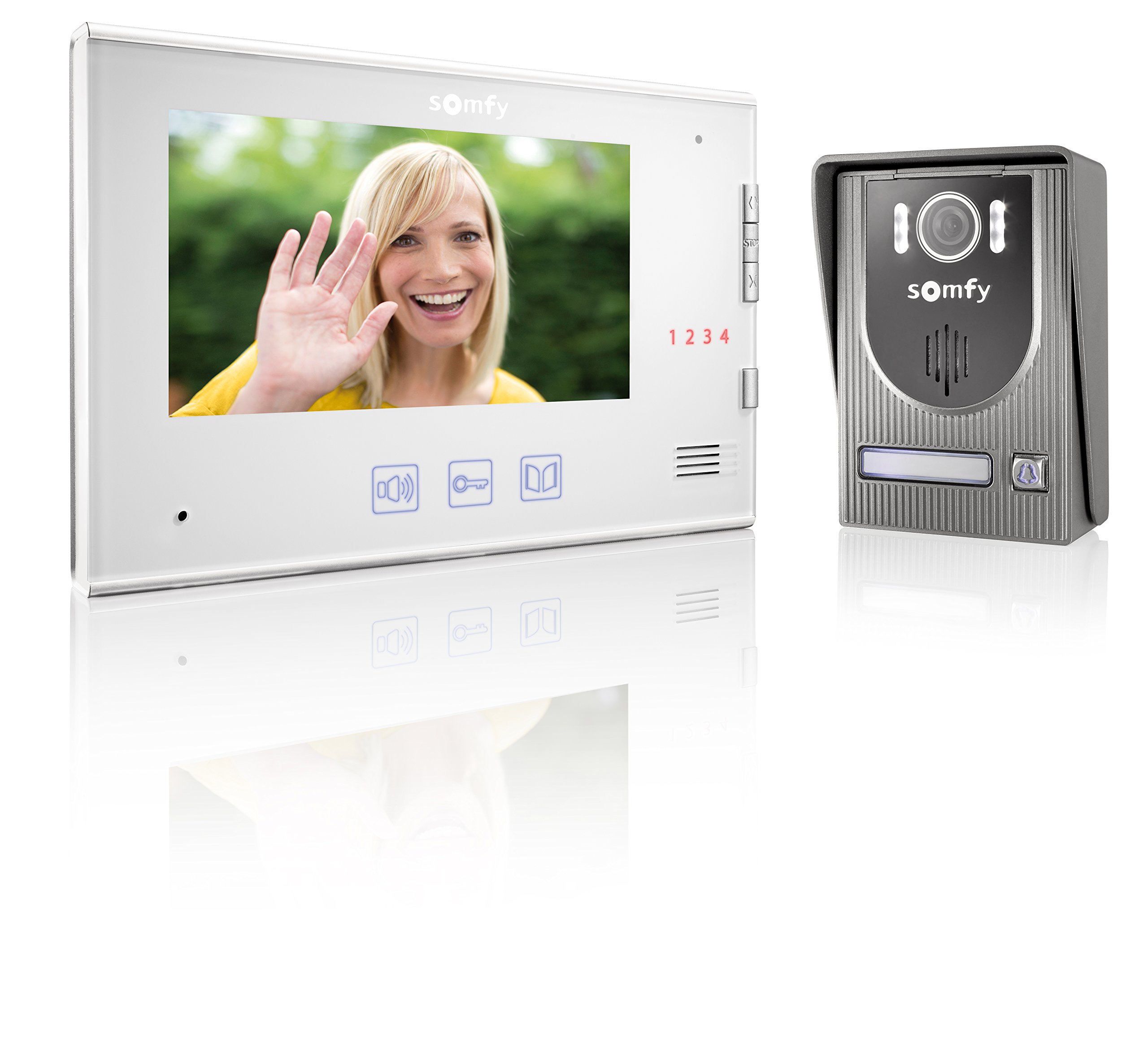
Image: Somfy V250 Outdoor Station with camera, LEDs, speaker, and call button.
4.2. จอภาพภายในอาคาร
The indoor monitor is the central control unit inside your home and features:
- จอแสดงผลสีขนาด 7 นิ้ว: Shows live video from the outdoor station.
- ปุ่มควบคุม: For answering calls, opening gates/doors, and controlling RTS devices.
- ไมโครโฟนและลำโพง: สำหรับการสื่อสารด้วยเสียงสองทาง
- RTS Control Point: Integrated module to manage up to 5 Somfy RTS products.

Image: Somfy V250 Indoor Monitor with 7-inch display and control buttons.
5. การติดตั้งและการตั้งค่า
The Somfy V250 system uses a simple 2-wire connection between the indoor monitor and the outdoor station.
5.1. การเตรียมสถานที่
- Choose a suitable location for the outdoor station, typically near your gate or main entrance, at a height of approximately 1.5 to 1.6 meters from the ground. Avoid direct sunlight or strong backlighting if possible.
- Select a convenient indoor location for the monitor, away from direct heat sources or moisture.
- Ensure the maximum distance between the monitor and the outdoor station does not exceed 100 meters.
5.2. Mounting the Outdoor Station
- ใช้ขายึดเป็นแบบในการทำเครื่องหมายจุดที่จะเจาะบนผนัง
- เจาะรูและใส่ปลั๊กผนัง
- ยึดโครงยึดเข้ากับผนัง
- Connect the 2-wire cable from the indoor monitor to the designated terminals on the outdoor station. Ensure correct polarity if specified.
- Attach the outdoor station to the mounting bracket.
5.3. Mounting the Indoor Monitor
- Mark the drilling points for the indoor monitor's mounting bracket.
- เจาะรูและใส่ปลั๊กผนัง
- ยึดโครงยึดเข้ากับผนัง
- Connect the 2-wire cable from the outdoor station to the designated terminals on the indoor monitor.
- เชื่อมต่ออะแดปเตอร์แปลงไฟเข้ากับจอภาพภายในอาคาร แล้วเสียบเข้ากับเต้ารับไฟฟ้า
- ติดตั้งจอภาพภายในอาคารเข้ากับขาตั้งยึด
5.4. Initial Power-Up and RTS Pairing
- Once all connections are secure, power on the indoor monitor.
- The monitor should display the live feed from the outdoor station or a standby screen.
- To pair Somfy RTS products: Refer to the specific instructions for your RTS device. Generally, you will need to put the RTS device into programming mode and then activate the pairing function on the V250 indoor monitor (usually by pressing a dedicated RTS button or navigating through a menu).
- Test the RTS control functionality after pairing.
6. Operating the Somfy V250 Intercom
6.1. การรับสาย
When a visitor presses the call button on the outdoor station:
- The indoor monitor will ring and display the live video feed from the outdoor camera.
- กดปุ่ม คำตอบ button (often represented by a phone icon) on the monitor to establish two-way audio communication.
- หากต้องการวางสาย ให้กดปุ่ม วางสาย button. The call will automatically end after a set duration if not answered or manually ended.

Image: A person pressing the call button on an outdoor intercom station.
6.2. Viewing Visitors (Monitoring)
คุณสามารถดำเนินการด้วยตนเองได้ view the outdoor station's camera feed at any time without a call:
- กดปุ่ม เฝ้าสังเกต button (often represented by an eye or camera icon) on the indoor monitor.
- The display will show the live video feed. You can initiate two-way communication if desired.
6.3. Opening Gate/Door
During a call or while monitoring, you can open an electric gate or door connected to the system:
- กดปุ่ม ปลดล็อค or ประตูเปิด button (often represented by a key or gate icon) on the indoor monitor.
- The connected gate or door will activate.
6.4. Controlling Somfy RTS Products
The V250 monitor allows control of up to 5 paired Somfy RTS devices:
- Use the dedicated RTS control buttons or navigate through the monitor's menu to select and operate your paired RTS devices (e.g., open/close roller shutters, turn lights on/off).
- Refer to the monitor's on-screen interface for specific RTS control options.

Image: A modern house equipped with Somfy roller shutters, illustrating RTS product integration.
7. การบำรุงรักษา
- การทำความสะอาด: ใช้แบบนุ่มๆamp cloth to clean the surfaces of the indoor monitor and outdoor station. Do not use abrasive cleaners, solvents, or chemical sprays.
- สถานีกลางแจ้ง: Periodically check the camera lens and microphone/speaker grilles for dirt or obstructions and gently clean them.
- การเดินสายไฟ: ตรวจสอบให้แน่ใจว่าการเชื่อมต่อสายไฟทั้งหมดแน่นหนาและไม่มีความเสียหาย
- การอัปเดตซอฟต์แวร์: Check the Somfy website for any available firmware updates for your V250 system.
8 การแก้ไขปัญหา
| ปัญหา | สาเหตุที่เป็นไปได้ | สารละลาย |
|---|---|---|
| ไม่มีภาพบนจอภาพภายในอาคาร | Power issue, loose wiring, camera malfunction. | Check power connection. Verify 2-wire connection between monitor and outdoor station. Restart the system. |
| No sound during communication. | Volume too low, microphone/speaker obstruction, wiring issue. | Adjust volume on indoor monitor. Check for obstructions on outdoor station's speaker/mic. Verify wiring. |
| Gate/door not opening. | Incorrect wiring to gate/door opener, opener malfunction, system not receiving command. | Check wiring to the gate/door opener. Ensure the opener is functional independently. Consult an electrician. |
| RTS product not responding. | RTS product not paired, out of range, battery low (for battery-powered RTS devices). | Re-attempt RTS pairing. Ensure RTS product is within range of the monitor. Check battery if applicable. |
| การดำเนินการเป็นระยะ | Loose connections, electrical interference. | Check all wiring connections. Ensure no strong electrical interference sources are nearby. |
9. ข้อมูลจำเพาะทางเทคนิค
| คุณสมบัติ | รายละเอียด |
|---|---|
| แบบอย่าง | Somfy V250 |
| Indoor Monitor Display | 7-inch (17.8 cm) Color Display |
| Outdoor Station Camera | Integrated with Night Vision (White LEDs) |
| การเดินสายไฟ | 2-wire connection between monitor and outdoor station |
| Max. Distance (Monitor to Outdoor Station) | 100 เมตร |
| RTS Control | Integrated wireless control for up to 5 Somfy RTS products |
| สี | White (Indoor Monitor), Grey (Outdoor Station) |
| วัสดุ | พลาสติก |
| น้ำหนักสินค้า | 1.16 กิโลกรัม |
| ขนาดรายการ (ยาว x กว้าง x สูง) | 39 x 29 x 8.5 เซนติเมตร |
| ผู้ผลิต | ซอมฟี |
10. การรับประกันและการสนับสนุน
Somfy products are designed for reliability and durability. For detailed warranty information, please refer to the warranty card included with your product or visit the official Somfy webเว็บไซต์.
If you encounter any issues that cannot be resolved using the troubleshooting guide, or if you require technical assistance, please contact Somfy customer support:
- การสนับสนุนทางออนไลน์: เยี่ยม www.somfy.com for FAQs, product documentation, and support contact details.
- บริการลูกค้า: Contact information for your region can be found on the Somfy webเว็บไซต์.
Please have your product model (V250) and purchase date ready when contacting support.
Ask a question about this manual
Ask about setup, troubleshooting, compatibility, parts, safety, or missing instructions. Manuals+ will review the question and use this page’s manual context to help answer it.