
1. ข้อมูลด้านความปลอดภัยที่สำคัญ
Please read this entire instruction manual before installation and use. Failure to do so may result in property damage, serious injury, or death. If you do not understand these instructions, or have doubts about the safety of the installation, please contact a qualified installer.
- ความจุน้ำหนัก: Do not exceed the maximum weight capacity of 45 kg (99 lbs). This mount is designed for flat screens between 23 and 55 inches.
- ประเภทผนัง: Ensure the mounting surface can safely support the combined weight of the equipment and all attached hardware. This mount is suitable for solid concrete walls, brick walls, and wood stud walls. Do not install on drywall alone.
- เครื่องมือ: ใช้เครื่องมือที่เหมาะสมสำหรับการติดตั้ง
- การประกอบ: Do not use this product for any purpose not explicitly specified by Vivanco. Do not use damaged components.
2. เนื้อหาบรรจุภัณฑ์
Verify that all components are present and undamaged before beginning installation. If any parts are missing or defective, do not proceed with installation.
- ชุดแผ่นผนัง
- ขาตั้งทีวีแบบแขน (2 ชิ้น)
- ชุดอุปกรณ์ติดตั้ง (สกรู, พุก, แหวนรอง, ตัวเว้นระยะ)
- คู่มือการใช้งาน
3. เครื่องมือที่จำเป็น (ไม่รวมอยู่ด้วย)
- ดินสอ
- เครื่องตรวจหาโครงไม้ (สำหรับการติดตั้งโครงไม้)
- ใช้สว่านเจาะไม้หรือสว่านเจาะปูนที่เหมาะสม
- ระดับ
- ประแจซ็อกเก็ต หรือ ประแจปรับได้
- ไขควงหัวแฉก
- สายวัด
4. การตั้งค่าและการติดตั้ง
Follow these steps carefully to ensure a secure installation of your Vivanco WAP 410 wall mount.
- กำหนดตำแหน่งการติดตั้ง: เลือกตำแหน่งที่เหมาะสมบนผนังของคุณ โดยคำนึงถึงปัจจัยต่างๆ viewing angles, height, and proximity to power outlets. Use a stud finder to locate wood studs if applicable.
- ทำเครื่องหมายรูเจาะ: Hold the wall plate assembly against the wall at the desired height and use a level to ensure it is straight. Mark the drill hole locations with a pencil.
- เจาะรูนำ: Drill pilot holes at the marked locations. The size of the drill bit will depend on your wall type and the anchors/screws provided.
- ติดแผ่นผนัง: Secure the wall plate assembly to the wall using the appropriate screws and anchors. Ensure all screws are tightened firmly.
- ติดตั้งขาตั้งทีวีเข้ากับทีวี: Carefully place your TV face down on a soft, clean surface. Attach the two TV bracket arms to the back of your TV using the screws and spacers that fit your TV's VESA mounting pattern (100x100mm to 400x400mm). Ensure the brackets are centered and securely fastened.
- ติดตั้งทีวีบนแผ่นยึดติดผนัง: With assistance, carefully lift the TV and hook the TV bracket arms onto the wall plate assembly. Ensure the TV is securely seated on the mount.
- ยึดทีวีเข้ากับขาตั้งให้แน่น: Use the safety screws or locking mechanisms on the TV bracket arms to secure the TV to the wall plate, preventing accidental dislodgement.
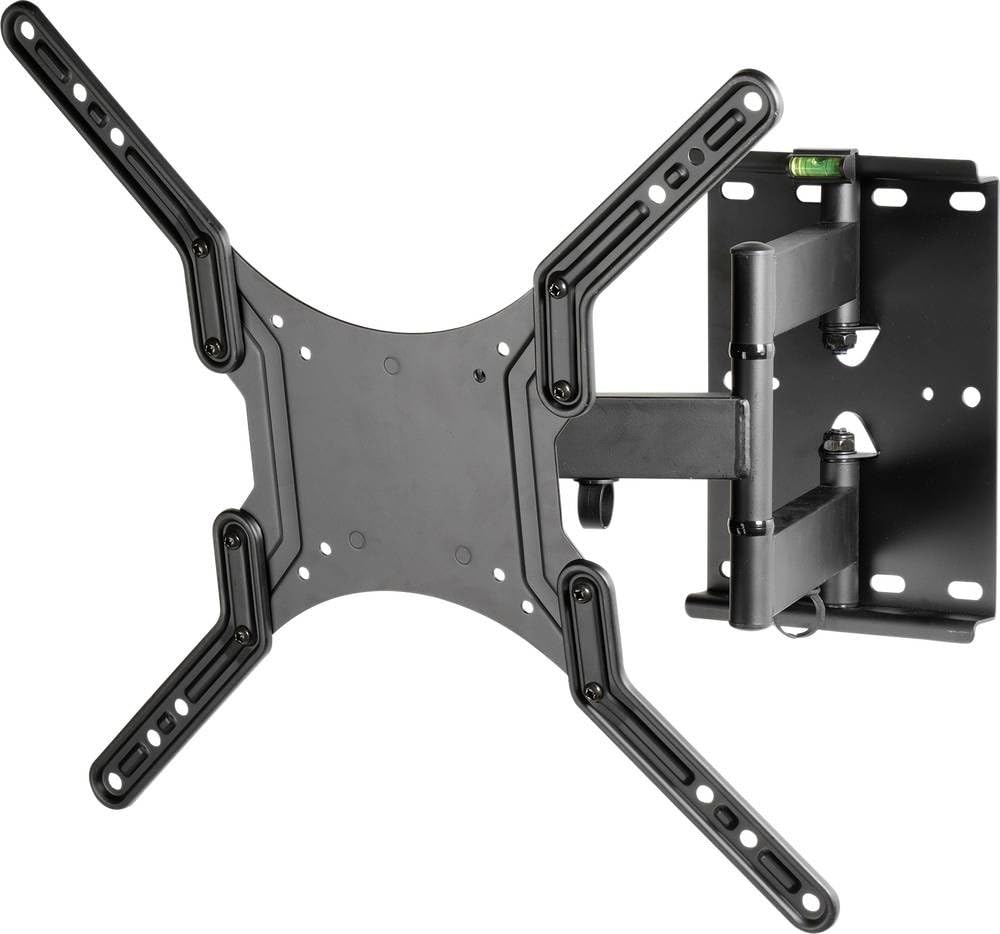
This image illustrates the Vivanco WAP 410 flat screen wall mount, highlighting its adjustable features. The green arrows indicate the range of motion for both swivel and tilt, allowing for optimal viewing angles. The mount is designed for flat screens and features a robust metal construction.
5. คู่มือการใช้งาน
The Vivanco WAP 410 wall mount offers flexibility for optimal viewการไอเอ็นจี
- การปรับระดับการเอียง: To adjust the vertical tilt angle of your TV, loosen the tilt adjustment knobs or bolts on the side of the TV bracket arms. Adjust the TV to the desired angle, then securely tighten the knobs/bolts to lock the position.
- การปรับหมุน: The articulated arm allows you to swivel the TV horizontally. Gently push or pull the TV to the left or right to achieve your preferred viewing angle. Ensure the movement is smooth and does not strain the mount or wall.
- การยืด/หด: The mount can be extended away from the wall or pushed back closer to the wall. Carefully pull or push the TV to adjust the distance.
Always ensure that cables are not pinched or strained during adjustments.
6. การบำรุงรักษา
การบำรุงรักษาตามปกติจะช่วยให้ตัวยึดติดผนังของคุณมีอายุการใช้งานยาวนานและปลอดภัย
- การทำความสะอาด: เช็ดทำความสะอาดฐานยึดด้วยผ้าแห้งเนื้อนุ่ม ห้ามใช้สารทำความสะอาดที่มีฤทธิ์กัดกร่อนหรือตัวทำละลาย เพราะอาจทำให้พื้นผิวเสียหายได้
- การตรวจสอบตามระยะเวลา: ตรวจสอบสกรูและโบลต์ทั้งหมดเป็นระยะเพื่อให้แน่ใจว่าขันแน่นดี ขันให้แน่นอีกครั้งหากจำเป็น
- ตรวจสอบความเสียหาย: Regularly inspect the mount for any signs of wear, damage, or corrosion. If any damage is observed, discontinue use and contact Vivanco support.
7 การแก้ไขปัญหา
If you encounter issues with your Vivanco WAP 410 wall mount, refer to the following common problems and solutions.
- ทีวีไม่ตั้งตรง: Ensure the wall plate is level during installation. If the TV is slightly off-level, some mounts allow for minor post-installation leveling adjustments. Check the level bubble on the mount if present.
- ความยากลำบากในการปรับมุมเอียง/การหมุน: Ensure all adjustment knobs or bolts are sufficiently loosened before attempting to move the TV. If movement is still stiff, check for any obstructions or overtightened components. Do not force movement.
- ฐานยึดดูไม่มั่นคง: Immediately remove the TV from the mount. Re-check all wall mounting screws and TV bracket screws for proper tightness. Ensure the wall type is appropriate and anchors are correctly installed. Consult a professional if uncertainty persists.
8. ข้อมูลจำเพาะ
| หมายเลขรุ่น | 37598 |
| ยี่ห้อ | Vivanco |
| วัสดุ | โลหะ |
| สี | สีดำ |
| ความจุน้ำหนักสูงสุด | 45 กก. (99 ปอนด์) |
| ขนาดหน้าจอที่เข้ากันได้ | 23 - 55 นิ้ว |
| ความเข้ากันได้ของ VESA | 100x100มม. ถึง 400x400มม. |
| ประเภทการเคลื่อนไหว | Tiltable, Swivel, Extendable |
| น้ำหนักสินค้า | 3700 กรัม |
9. การรับประกันและการสนับสนุน
For warranty information or technical support, please refer to the documentation included with your purchase or visit the official Vivanco webไซต์นี้ โปรดเก็บหลักฐานการซื้อไว้เพื่อใช้ยืนยันการรับประกัน