
การแนะนำ
The SteelSeries Apex 100 Gaming Keyboard is designed for optimal gaming performance, featuring Quick Tension Switches for fast reaction times, tactile feedback, and quiet operation. It includes blue LED backlighting, advanced anti-ghosting, and is built with splash resistance for durability.
การตั้งค่า
1. การเชื่อมต่อคีย์บอร์ด
Connect the keyboard's USB-A cable to an available USB port on your computer. The keyboard is plug-and-play, and your operating system should automatically detect and install the necessary drivers.

ภาพ: ด้านบน view of the SteelSeries Apex 100 Gaming Keyboard, showing the full QWERTY layout with blue LED backlighting and the attached USB cable.
2. การติดตั้งซอฟต์แวร์ (ทางเลือก)
For advanced customization, including macro programming and backlighting adjustments, download and install the SteelSeries Engine 3 software from the official SteelSeries webงาน (steelseries.com/engine) ปฏิบัติตามคำแนะนำบนหน้าจอเพื่อการติดตั้ง
การใช้งานแป้นพิมพ์
คุณสมบัติหลัก
- Quick Tension Switches: Designed to mimic mechanical switches, providing a tactile feel and fast actuation.
- ไฟแบ็คไลท์ LED สีฟ้า: Offers brilliant ground effects backlighting. Intensity can be adjusted via SteelSeries Engine 3.
- Advanced Anti-Ghosting: Ensures all key presses are registered accurately during intense gaming sessions.
- การควบคุมสื่อ: Integrated media control functions are accessible via function keys (F7-F12) in combination with the Fn key.
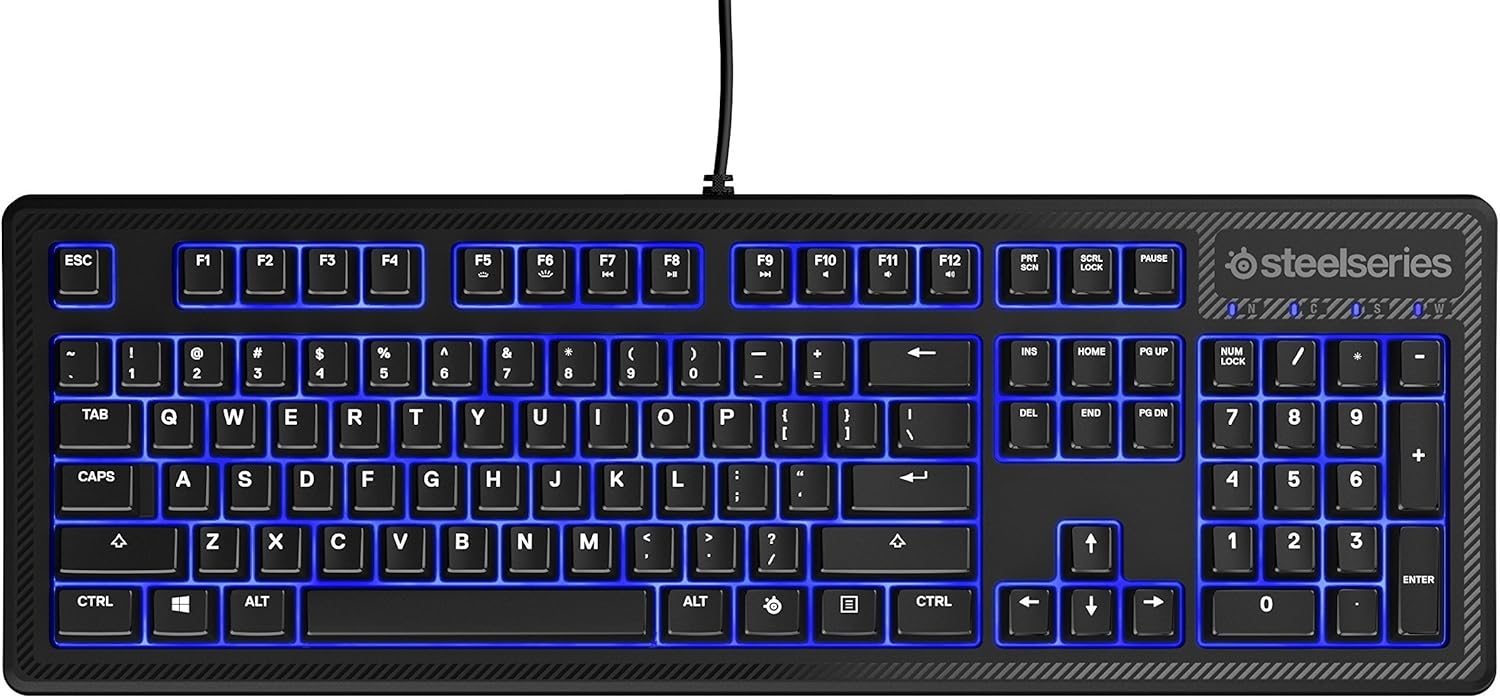
ภาพ: ด้านข้าง view of the SteelSeries Apex 100 Gaming Keyboard, highlighting its ergonomic design and keycap profile.
Customization with SteelSeries Engine 3
The SteelSeries Engine 3 software allows you to:
- Create and assign macros to any key.
- Adjust the intensity of the blue LED backlighting.
- Configure polling rates and other performance settings.
การซ่อมบำรุง
การทำความสะอาด
To clean your keyboard, disconnect it from your computer. Use a soft, dry cloth to wipe down the keys and chassis. For stubborn dirt, a slightly damp cloth with mild soap can be used, ensuring no liquid enters the key switches or internal components. The keyboard is splash resistant, but not waterproof; avoid submerging it or exposing it to excessive liquids.
ความทนทาน
The Apex 100 keyboard features a guaranteed 20-million click lifespan for its switches, ensuring long-term reliability under heavy use.

ภาพ: ด้านล่าง view of the SteelSeries Apex 100 Gaming Keyboard, showing the drainage channels and adjustable feet.
การแก้ไขปัญหา
แป้นพิมพ์ไม่ตอบสนอง
- ตรวจสอบให้แน่ใจว่าสาย USB เชื่อมต่อกับคีย์บอร์ดและคอมพิวเตอร์อย่างแน่นหนา
- ลองเชื่อมต่อคีย์บอร์ดกับพอร์ต USB อื่น
- รีสตาร์ทเครื่องคอมพิวเตอร์ของคุณ
- หากใช้ฮับ USB ให้ลองเชื่อมต่อโดยตรงกับคอมพิวเตอร์
Backlighting Issues
- Check the backlighting settings within the SteelSeries Engine 3 software.
- Ensure the keyboard's brightness level is not set to minimum.
กุญแจไม่สามารถลงทะเบียนได้
- ทำความสะอาดรอบๆ คีย์ที่ได้รับผลกระทบเพื่อกำจัดเศษสิ่งสกปรกออก
- If the issue persists, consider reinstalling the SteelSeries Engine 3 software or updating your USB drivers.
For further assistance, please refer to the SteelSeries support webเว็บไซต์.
ข้อมูลจำเพาะ
| คุณสมบัติ | รายละเอียด |
|---|---|
| ยี่ห้อ | สตีลซีรีส์ |
| ชื่อรุ่น | เอเพ็กซ์ 100 |
| หมายเลขรุ่น | 64435 |
| เทคโนโลยีการเชื่อมต่อ | ยูเอสบี-เอ |
| คำอธิบายแป้นพิมพ์ | การเล่นเกม |
| การใช้ที่แนะนำ | การเล่นเกม |
| คุณสมบัติพิเศษ | มีไฟแบ็คไลท์ |
| สี | สีฟ้า |
| รองรับสีแบ็คไลท์ของคีย์บอร์ด | Single Color (Blue) |
| สไตล์ | Whisper Quiet – Tactile & Silent |
| ขนาดสินค้า | ยาว 18.21 นิ้ว x กว้าง 6.13 นิ้ว x สูง 1.58 นิ้ว |
| แหล่งพลังงาน | ยูเอสบี |
| ประเภทสวิตซ์ | Tactile (Quick Tension Switches) |
| เค้าโครงแป้นพิมพ์ | คีย์บอร์ด QWERTY |
| จำนวนปุ่ม | 104 |
| ตระกูลระบบปฏิบัติการที่เข้ากันได้ | หน้าต่าง |
| จำนวนคีย์ | 100 |
| วัสดุของตู้หุ้ม | พลาสติก |
| น้ำหนักสินค้า | 2.42 ปอนด์ |
| ยูพีซี | 813682020101 |
ข้อมูลการรับประกัน
According to product information, this item comes with ไม่รับประกัน. Please check with your retailer for their return or exchange policies.
สนับสนุน
For additional support, driver downloads, or frequently asked questions, please visit the official SteelSeries support webเว็บไซต์:
