
1. บทนำ
The Amkette Trubeats S50 is a versatile smart wireless Bluetooth speaker designed to enhance your audio experience. It features multiple connectivity options including Bluetooth, USB, Micro SD card, and AUX input, along with an integrated FM radio. The speaker also includes a digital clock with alarm functions and can be controlled via a dedicated smartphone application. Additionally, it can function as a power bank to charge your mobile devices.
2. เนื้อหาบรรจุภัณฑ์
กรุณาทำเครื่องหมายในช่องสำหรับรายการต่อไปนี้:
- Amkette Trubeats S50 Smart Wireless Bluetooth Speaker
- สายชาร์จ USB
- สาย AUX
- คู่มือการใช้งาน (เอกสารนี้)
3. สินค้าหมดview
Familiarize yourself with the various parts and controls of your Amkette Trubeats S50 speaker.
3.1 ด้านหน้า View

รูปที่ 1 : ด้านหน้า view of the Amkette Trubeats S50 speaker, showing the speaker grille and LED display.
3.2 แผงควบคุมด้านบน

Figure 2: Labeled diagram of the Amkette Trubeats S50 speaker's top control buttons: Mode, Volume Down/Previous, Play/Pause/Answer Call, Volume Up/Next, Clock, and Microphone.
- ปุ่มโหมด: Press to switch between Bluetooth, FM, AUX, USB, and Micro SD modes.
- K-/ Button: Press to decrease volume; long press for previous track/station.
- Play/Pause/Answer Call Button: Press to play/pause audio; press to answer/end calls.
- +/N Button: Press to increase volume; long press for next track/station.
- ปุ่มนาฬิกา: Press to set time and alarms.
- ไมโครโฟน: สำหรับการโทรแบบแฮนด์ฟรี
3.3 Rear Ports and Switch

Figure 3: Labeled diagram of the Amkette Trubeats S50 speaker's rear ports: AUX, Micro SD, USB Host, USB DC, and On/Off switch.
- อินพุต AUX: เชื่อมต่ออุปกรณ์เสียงภายนอกโดยใช้สาย AUX ขนาด 3.5 มม.
- ช่องเสียบการ์ด Micro SD: ใส่การ์ด Micro SD เพื่อเล่นไฟล์เสียง
- พอร์ตโฮสต์ USB: Insert a USB drive for audio playback or use as a power bank.
- USB DC Input: Connect the USB charging cable to power the speaker.
- สวิตช์เปิด/ปิด: เปิดหรือปิดลำโพง
4. การตั้งค่า
4.1 การชาร์จลำโพง
- ต่อปลายเล็กของสายชาร์จ USB เข้ากับ... USB DC Input ช่องต่อด้านหลังลำโพง
- ต่อปลายด้านใหญ่ของสายชาร์จ USB เข้ากับอะแดปเตอร์แปลงไฟ USB (ไม่ได้รวมอยู่ในชุด) หรือพอร์ต USB ของคอมพิวเตอร์
- ไฟ LED จะแสดงสถานะการชาร์จ โดยทั่วไปการชาร์จเต็มจะใช้เวลาประมาณ 4 ชั่วโมง
บันทึก: The speaker does not have a visible battery level indicator. It is recommended to charge fully before first use and when the battery is low.
4.2 การเปิด/ปิดเครื่อง
- ในการเปิดเครื่อง ให้เลื่อน... สวิตซ์เปิด/ปิด on the rear of the speaker to the 'ON' position.
- หากต้องการปิดเครื่อง ให้เลื่อน... สวิตซ์เปิด/ปิด ไปที่ตำแหน่ง 'ปิด'
5. คู่มือการใช้งาน
5.1 การจับคู่บลูทูธ

Figure 4: Speaker in Bluetooth pairing mode, indicated by 'BT' on the display.
- Power on the speaker. It will automatically enter Bluetooth pairing mode, indicated by 'BT' flashing on the LED display.
- เปิดใช้งาน Bluetooth บนสมาร์ทโฟนหรืออุปกรณ์อื่นของคุณ
- ค้นหา available devices and select "Amkette S50" from the list.
- Once paired, the speaker will emit a confirmation tone, and 'BT' will stop flashing.
- ตอนนี้คุณสามารถเล่นเสียงจากอุปกรณ์ของคุณผ่านลำโพงได้
5.2 การใช้อินพุต AUX

Figure 5: Speaker connected to a smartphone via AUX cable for wired audio playback.
- เชื่อมต่อปลายด้านหนึ่งของสาย AUX ขนาด 3.5 มม. เข้ากับ... อินพุต AUX ช่องต่อด้านหลังลำโพง
- Connect the other end of the AUX cable to the audio output jack of your external device (e.g., smartphone, MP3 player, laptop).
- กดปุ่ม ปุ่มโหมด repeatedly until the speaker enters AUX mode.
- เล่นไฟล์เสียงจากอุปกรณ์ที่เชื่อมต่อของคุณ
5.3 Using USB/Micro SD Card
- เสียบไดรฟ์ USB เข้าไป พอร์ตโฮสต์ USB หรือเสียบการ์ด Micro SD เข้าไป ช่องเสียบการ์ด Micro SD ที่ด้านหลังของลำโพง
- มั่นใจในเสียงของคุณ files (MP3 format recommended) are stored on the drive/card.
- กดปุ่ม ปุ่มโหมด repeatedly until the speaker enters USB or Micro SD mode. Playback will begin automatically.
- ใช้ K-/ และ +/N ปุ่มสำหรับเลื่อนดูเพลงและควบคุมระดับเสียง
การใช้งานวิทยุ FM 5.4

Figure 6: Speaker displaying FM frequency, with app control for station selection.
- กดปุ่ม ปุ่มโหมด repeatedly until the speaker enters FM radio mode.
- สแกนอัตโนมัติ: ในโหมด FM ให้กดปุ่มค้างไว้ เล่น/หยุดชั่วคราว button to initiate an automatic scan for available FM stations. The speaker will save detected stations.
- การปรับด้วยตนเอง: ใช้ K-/ และ +/N ปุ่มเพื่อนำทางผ่านสถานีที่บันทึกไว้
- For precise tuning and station management, use the Amkette Trubeats Smart Speaker App (see section 5.7).
5.5 Digital Clock and Alarm Setup

Figure 7: Speaker displaying the current time on its LED screen.
- การตั้งเวลา: กดปุ่มค้างไว้ ปุ่มนาฬิกา. The hour display will flash. Use the K-/ และ +/N ปุ่มสำหรับปรับเวลา กดปุ่ม ปุ่มนาฬิกา again to set minutes, and adjust with K-/ และ +/N. กด ปุ่มนาฬิกา อีกครั้งเพื่อยืนยัน
- การตั้งค่าการเตือน: กดปุ่มสั้นๆ ปุ่มนาฬิกา to cycle through Alarm 1 and Alarm 2 settings. When an alarm time is displayed, long press the ปุ่มนาฬิกา to enter alarm setting mode. Adjust hour and minute using K-/ และ +/N, confirming each with a short press of the ปุ่มนาฬิกา. You can also set the alarm source (FM/SD Card/USB) via the app.
5.6 ใช้เป็นพาวเวอร์แบงค์
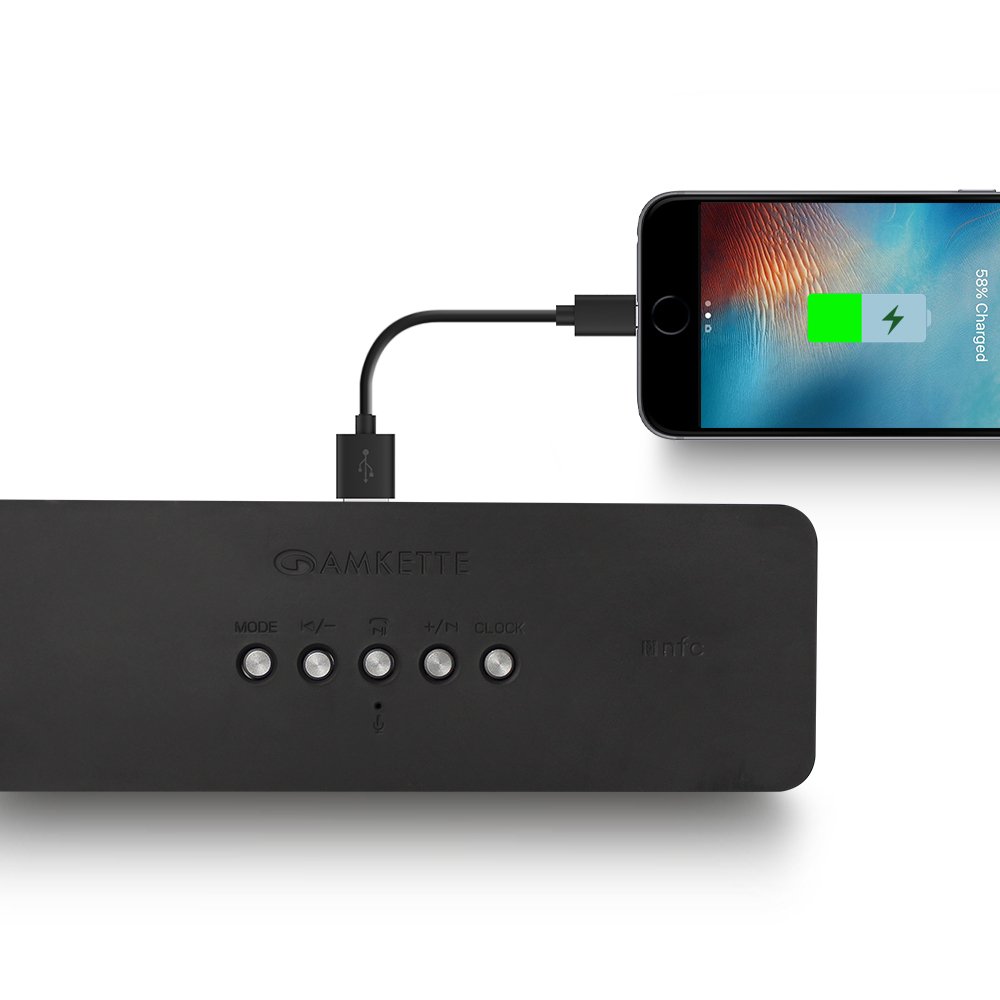
Figure 8: Speaker providing power to a smartphone through its USB Host port.
The Amkette Trubeats S50 can charge your smartphone or other USB-powered devices. Connect your device's charging cable to the พอร์ตโฮสต์ USB on the rear of the speaker. The speaker's internal battery will then supply power to your device.
5.7 App Control (Android Only)

Figure 9: Smartphone displaying the Amkette Trubeats Smart Speaker App interface.
For enhanced control, download the Amkette Trubeats Smart Speaker App from the Google Play Store (for Android phones). The app allows you to:
- สลับระหว่างโหมดเสียงที่แตกต่างกัน
- Control volume and track playback.
- Manage FM radio stations and perform precise tuning.
- Set and customize alarms, including alarm source.
Ensure your speaker is connected via Bluetooth to your smartphone for app functionality.
5.8 การจัดการการโทร
เมื่อเชื่อมต่อกับสมาร์ทโฟนผ่านบลูทูธ ลำโพงสามารถใช้สำหรับการโทรแบบแฮนด์ฟรีได้:
- รับสาย: กดปุ่ม Play/Pause/Answer Call Button ครั้งหนึ่ง.
- วางสาย: กดปุ่ม Play/Pause/Answer Call Button ครั้งหนึ่งระหว่างการโทร
- ปฏิเสธสาย: กดค้างไว้ Play/Pause/Answer Call Button.
6. การบำรุงรักษา
- ควรเก็บลำโพงให้ห่างจากอุณหภูมิที่สูงจัด แสงแดดโดยตรง และความชื้น
- ทำความสะอาดลำโพงด้วยผ้านุ่มและแห้ง ห้ามใช้น้ำยาทำความสะอาดหรือสารละลายที่มีฤทธิ์กัดกร่อน
- ควรหลีกเลี่ยงการทำลำโพงตกหรือการกระแทกอย่างแรง
- เมื่อไม่ได้ใช้งานเป็นเวลานาน ควรเก็บลำโพงไว้ในที่แห้งและเย็น และชาร์จแบตเตอรี่เป็นระยะเพื่อรักษาอายุการใช้งานของแบตเตอรี่
7 การแก้ไขปัญหา
| ปัญหา | สาเหตุที่เป็นไปได้ | สารละลาย |
|---|---|---|
| ลำโพงไม่เปิดเครื่อง | แบตเตอรี่หมด | ชาร์จลำโพงให้เต็ม |
| ไม่มีเสียงจากลำโพง | ระดับเสียงเบาเกินไป; เลือกโหมดไม่ถูกต้อง; อุปกรณ์ไม่ได้เชื่อมต่ออย่างถูกต้อง | Increase speaker and source device volume. Ensure correct mode (Bluetooth, AUX, etc.) is selected. Reconnect the device. |
| การจับคู่บลูทูธล้มเหลว | ลำโพงไม่ได้อยู่ในโหมดจับคู่ อุปกรณ์อยู่ไกลเกินไป มีสัญญาณรบกวน | Ensure speaker is in pairing mode ('BT' flashing). Move device closer to speaker. Turn off other Bluetooth devices. |
| การรับสัญญาณวิทยุ FM ไม่ดี | สัญญาณอ่อน; มีสัญญาณรบกวนจากสภาพแวดล้อม | Relocate the speaker to an area with better reception. Perform an auto-scan again. |
| แอปไม่เชื่อมต่อกับลำโพง | Bluetooth not connected; app issue. | Ensure speaker is paired via Bluetooth to your phone. Restart the app and try again. |
8. ข้อมูลจำเพาะ
- แบบอย่าง: S50
- ยี่ห้อ: แอมเก็ต
- ประเภทลำโพง: Portable Bluetooth Speaker (Outdoor)
- การเชื่อมต่อ: บลูทูธ, USB, ไมโคร SD, AUX, วิทยุ FM
- เทคโนโลยีการสื่อสารไร้สาย: บลูทูธ
- วิธีการควบคุม: Buttons, App (Android)
- โหมดเอาต์พุตเสียง: สเตอริโอ
- เครื่องเสียง วัตtage: 10 วัตต์
- แหล่งพลังงาน: ใช้พลังงานจากแบตเตอรี่
- อายุการใช้งานแบตเตอรี่: สูงสุด 12 ชั่วโมง (โดยเฉลี่ย)
- เวลาในการชาร์จ: ประมาณ 4 ชั่วโมง
- อุปกรณ์ที่รองรับ: Laptop, Mobile, Tablet
- ขนาด (กxยxส) : 26.7 x 10.9 x 7.9 ซม.
- น้ำหนักสินค้า: 703 กรัม
- กันน้ำ: ใช่
- ประเภทการติดตั้ง: ที่วางบนโต๊ะ
9. การรับประกันและการสนับสนุน
The Amkette Trubeats S50 Smart Wireless Bluetooth Speaker comes with a รับประกัน 1 ปี นับจากวันที่ซื้อ การรับประกันนี้ครอบคลุมถึงข้อบกพร่องจากการผลิตภายใต้การใช้งานปกติ
For warranty claims, technical assistance, or any other support inquiries, please contact Amkette customer support through their official webไซต์หรือข้อมูลการติดต่อที่ให้มาพร้อมกับเอกสารการซื้อของคุณ
โปรดเก็บใบเสร็จรับเงินไว้เป็นหลักฐานการซื้อเพื่อวัตถุประสงค์การรับประกัน