
1. บทนำ
This manual provides essential information for the safe and efficient operation of your Argox OX-330 Barcode Monochrome Printer. Please read this manual thoroughly before using the printer and retain it for future reference. The Argox OX-330 is designed for direct thermal and thermal transfer printing, offering a resolution of 203 dpi for clear and precise label output.
2. ข้อมูลด้านความปลอดภัย
- แหล่งจ่ายไฟ: Use only the power adapter supplied with the printer. Ensure the power outlet matches the voltagข้อกำหนดอี
- การจัดวาง: Place the printer on a stable, level surface. Avoid locations with excessive dust, humidity, or direct sunlight.
- การระบายอากาศ : อย่าปิดกั้นช่องระบายอากาศ ตรวจสอบให้แน่ใจว่ามีอากาศถ่ายเทเพียงพอรอบๆ เครื่องพิมพ์
- การจัดการ: หลีกเลี่ยงการสัมผัสหัวพิมพ์ทันทีหลังจากพิมพ์เสร็จ เนื่องจากอาจร้อนได้
- การทำความสะอาด: Disconnect the power cord before cleaning the printer. Use a soft, dry cloth. Do not use liquid or aerosol cleaners.
- การซ่อมแซม: Do not attempt to repair the printer yourself. Refer all servicing to qualified service personnel.
3. สินค้าหมดview
The Argox OX-330 is a compact desktop thermal label printer capable of both direct thermal and thermal transfer printing. It features 8MB DRAM (5MB user available) and 4MB Flash ROM (2MB user available) for efficient data processing and storage.
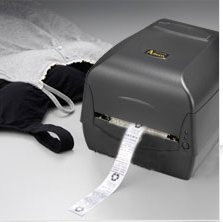
รูปที่ 3.1: Argox OX-330 Barcode Monochrome Printer. This image shows the printer actively producing a label, demonstrating its primary function.
ส่วนประกอบหลัก:
- หัวพิมพ์: Responsible for transferring the image onto the label.
- Media Guides: Ensure proper alignment of labels.
- แผงควบคุม: Includes buttons and indicator lights for printer status and basic operations.
- พอร์ตไฟ: สำหรับการเชื่อมต่ออะแดปเตอร์ไฟฟ้า
- พอร์ตข้อมูล: For connecting to a computer (e.g., USB, Wi-Fi).
- Media Compartment: Where label rolls and ribbons (for thermal transfer) are loaded.
4. การตั้งค่า
4.1 การแกะกล่อง
- นำเครื่องพิมพ์และอุปกรณ์เสริมทั้งหมดออกจากบรรจุภัณฑ์อย่างระมัดระวัง
- Verify that all components listed in the package contents are present.
- นำฟิล์มป้องกันหรือวัสดุบรรจุภัณฑ์ใดๆ ออกจากเครื่องพิมพ์
4.2 การต่อสายไฟ
- ต่ออะแดปเตอร์แปลงไฟเข้ากับพอร์ตจ่ายไฟของเครื่องพิมพ์
- เสียบสายไฟเข้ากับเต้ารับไฟฟ้าที่เหมาะสม
- Do not power on the printer until all other connections are made.
4.3 การเชื่อมต่อกับคอมพิวเตอร์
The Argox OX-330 supports Wi-Fi connectivity for seamless integration with your PC.
- การเชื่อมต่อ Wi-Fi: Refer to the separate Wi-Fi setup guide for detailed instructions on connecting your printer to a wireless network. This typically involves installing the printer driver and utility software on your PC.
- USB Connection (if applicable): If using a USB cable, connect one end to the printer and the other to an available USB port on your PC.
4.4 การโหลดฉลากและริบบิ้น
The OX-330 supports both Direct Thermal and Thermal Transfer printing methods. The loading procedure varies slightly depending on the method.
- เปิดฝาครอบด้านบนของเครื่องพิมพ์
- Adjust the media guides to the width of your label roll.
- Place the label roll onto the media spindle, ensuring the labels feed correctly.
- สำหรับ ถ่ายโอนความร้อน printing, also load the ribbon according to the diagrams inside the printer's media compartment. Ensure the ribbon is taut and correctly threaded.
- ปิดฝาครอบด้านบน
5. คู่มือการใช้งาน
5.1 การเปิด/ปิดเครื่อง
- การเปิดเครื่อง: กดปุ่มเปิด/ปิดที่อยู่บนเครื่องพิมพ์ ไฟแสดงสถานะจะสว่างขึ้น
- วิธีปิดเครื่อง: กดปุ่มเปิด/ปิดค้างไว้จนกว่าเครื่องพิมพ์จะปิดลง
5.2 การติดตั้งไดรเวอร์และซอฟต์แวร์
Before printing, install the appropriate printer drivers and label design software on your PC. These are typically provided on a CD with the printer or available for download from the Argox official webไซต์ ทำตามคำแนะนำบนหน้าจอเพื่อการติดตั้ง
5.3 การพิมพ์ฉลาก
- Ensure the printer is powered on and connected to your PC (via Wi-Fi or USB).
- Open your label design software or application from which you wish to print.
- Create or open your label design.
- Go to the 'Print' option in your software.
- Select the Argox OX-330 as your printer.
- Configure print settings such as label size, print quantity, and printing method (Direct Thermal or Thermal Transfer) if applicable. The printer supports a resolution of 203 dpi.
- Click 'Print'. The printer will begin printing your labels.
6. การบำรุงรักษา
Regular maintenance ensures optimal performance and extends the life of your Argox OX-330 printer.
6.1 การทำความสะอาดหัวพิมพ์
The print head is a critical component and should be cleaned regularly, especially if print quality degrades.
- ปิดเครื่องพิมพ์และถอดสายไฟออก
- เปิดฝาด้านบนเพื่อเข้าถึงหัวพิมพ์
- Using a lint-free cloth moistened with isopropyl alcohol (99% pure), gently wipe the print head surface.
- ปล่อยให้หัวพิมพ์แห้งสนิทก่อนปิดฝาครอบและต่อสายไฟอีกครั้ง
6.2 การทำความสะอาดทั่วไป
- เช็ดทำความสะอาดภายนอกเครื่องพิมพ์ด้วยผ้าแห้งเนื้อนุ่ม
- Use a soft brush or compressed air to remove dust and debris from inside the media compartment.
7 การแก้ไขปัญหา
This section addresses common issues you might encounter with your Argox OX-330 printer.
7.1 ไม่มีไฟฟ้า
- Ensure the power cord is securely connected to both the printer and the electrical outlet.
- ตรวจสอบว่าเต้ารับไฟฟ้าใช้งานได้โดยเสียบอุปกรณ์อื่น
7.2 คุณภาพการพิมพ์ไม่ดี
- ทำความสะอาดหัวพิมพ์ตามวิธีที่อธิบายไว้ในหัวข้อ 6.1
- Ensure you are using the correct type of labels for your printing method (Direct Thermal or Thermal Transfer).
- Check if the ribbon (for thermal transfer) is correctly loaded and not depleted.
- Adjust print darkness settings in your printer driver.
7.3 เครื่องพิมพ์ไม่ตอบสนอง
- Check the connection between the printer and your PC (Wi-Fi or USB).
- โปรดรีสตาร์ททั้งเครื่องพิมพ์และคอมพิวเตอร์ของคุณ
- Ensure the correct printer driver is installed and updated.
- Check the printer's status indicator lights for error messages.
7.4 การป้อนฉลากไม่ถูกต้อง
- Ensure labels are loaded correctly and the media guides are adjusted to the label width.
- Check for any obstructions in the media path.
- Calibrate the printer for the label size if necessary (refer to printer utility software).
8. ข้อมูลจำเพาะ
| คุณสมบัติ | ข้อมูลจำเพาะ |
|---|---|
| ยี่ห้อ | อาร์โกซ์ |
| ชื่อรุ่น | อ็อกซ์-330 |
| เทคโนโลยีการพิมพ์ | Thermal (Direct Thermal & Thermal Transfer) |
| ความละเอียดในการพิมพ์ | 203 จุดต่อนิ้ว |
| เอาท์พุตเครื่องพิมพ์ | เอกรงค์ |
| เทคโนโลยีการเชื่อมต่อ | ไวไฟ |
| หน่วยความจำ | 8MB DRAM (5MB user available), 4MB Flash ROM (2MB user available) |
| อุปกรณ์ที่รองรับ | PC |
| Printing Media Type | ฉลาก |
| น้ำหนักสินค้า | 1800 กรัม |
| ขนาดสินค้า (ลึก x กว้าง x สูง) | 16D x 6W x 10H เซนติเมตร |
| คุณสมบัติพิเศษ | ขนาดกะทัดรัด |
| การพิมพ์สองด้าน | ใช่ |
| ดูเพล็กซ์ | อัตโนมัติ |
9. การรับประกันและการสนับสนุน
9.1 ข้อมูลการรับประกัน
The Argox OX-330 Barcode Monochrome Printer comes with a รับประกัน 1 ปี from the date of purchase. This warranty covers manufacturing defects under normal use. It does not cover damage caused by misuse, accidents, unauthorized repairs, or consumables.
9.2 การสนับสนุนด้านเทคนิค
For technical assistance, troubleshooting beyond this manual, or warranty claims, please contact Argox customer support. Refer to the Argox official website or your purchase documentation for contact details and support resources.