
1. สินค้าหมดview
The Tenergy 11W Dimmable LED Desk Lamp (Model FY-0001) is designed to provide versatile lighting for various tasks, featuring adjustable brightness, multiple color temperatures, and a convenient USB charging port. Its sleek design and flexible arm make it suitable for home and office environments.

Image: The Tenergy 11W LED Desk Lamp, แสดงasing its modern design and adjustable features.
2. อะไรอยู่ในกล่อง
- Tenergy 11W Dimmable LED Desk Lamp
- สายชาร์จ USB
- อะแดปเตอร์แปลงไฟ
- คู่มือการใช้งาน (เอกสารนี้)

Image: The Tenergy 11W LED Desk Lamp and its included accessories laid out on a surface.
3. การตั้งค่า
- นำส่วนประกอบทั้งหมดออกจากบรรจุภัณฑ์อย่างระมัดระวัง
- วางลamp ฐานบนพื้นผิวที่มั่นคงและเรียบ
- ต่ออะแดปเตอร์แปลงไฟเข้ากับ lamp's power input port, typically located at the rear of the base.
- Plug the power adapter into a standard electrical outlet. The lamp's indicator light should illuminate, indicating it is ready for use.
4. คู่มือการใช้งาน
4.1 เปิด/ปิดเครื่อง
การหมุนลamp on or off, gently touch the เปิด/ปิด button located on the touch control panel on the lampฐานของ
4.2 การปรับความสว่าง
ลamp offers 5 levels of brightness. Use the + และ - buttons on the touch control panel to increase or decrease the light intensity.
4.3 Changing Light Modes (Color Temperature)
ลamp features 4 distinct light modes, each with a different color temperature, optimized for various activities:
- โหมดการอ่าน: Provides a bright, neutral white light ideal for reading.
- โหมดการเรียนรู้: Offers a cooler, more focused light to enhance concentration.
- โหมดผ่อนคลาย: Emits a warm, soft light for a comfortable and calming atmosphere.
- โหมดสลีป: Delivers a very warm, dim light suitable for winding down before sleep.
To switch between these modes, repeatedly touch the corresponding icon on the control panel.

Image: Visual representation of the four adjustable light color temperatures available on the lamp.
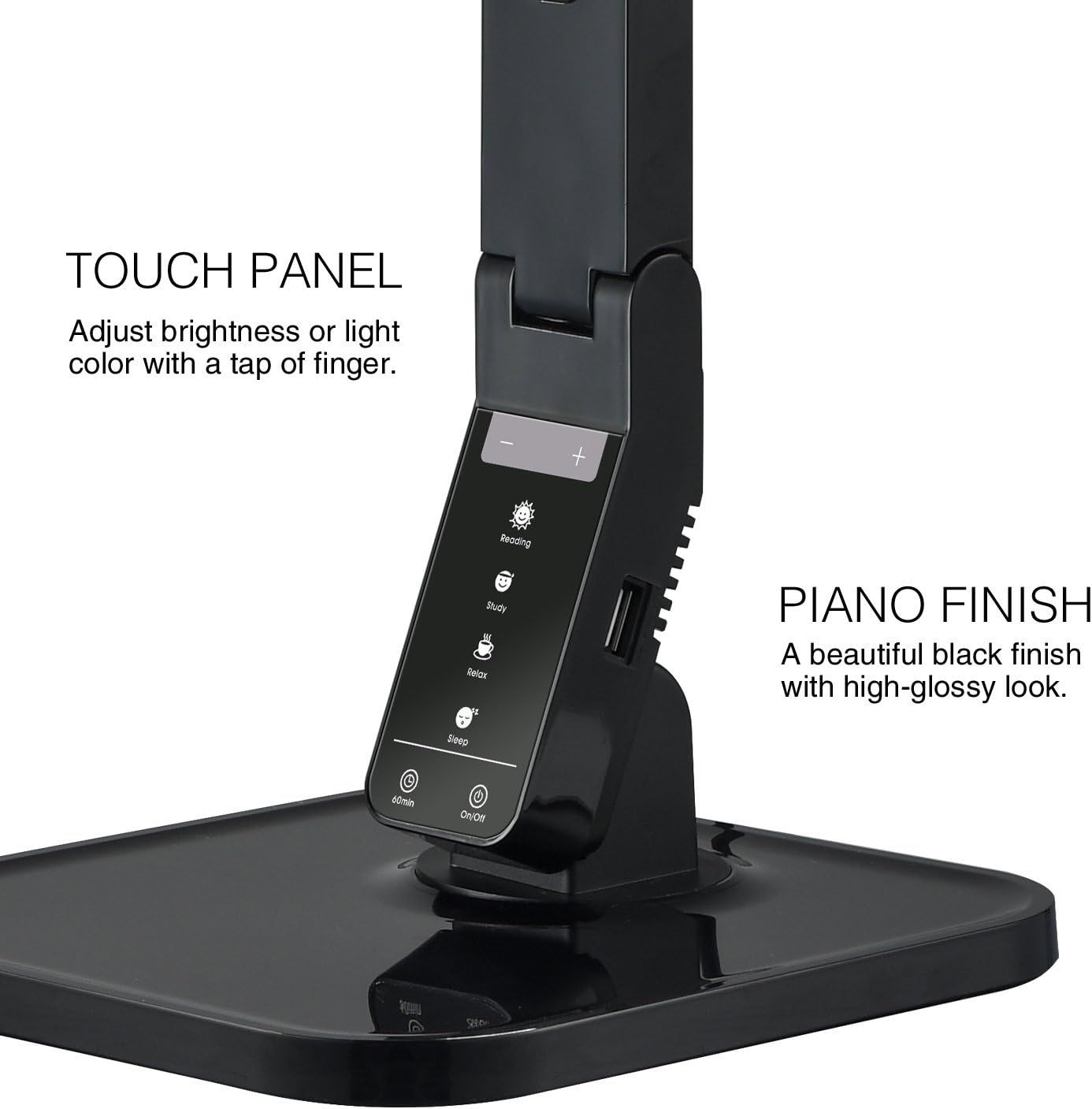
Image: The touch control panel with various light mode and brightness adjustment icons.
4.4 การใช้พอร์ตชาร์จ USB
A USB charging port is integrated into the lamp's base, allowing you to charge compatible devices such as smartphones or tablets. Simply connect your device's USB charging cable to the port.

Image: A smartphone being charged via the integrated USB port on the lampฐานของ
4.5 Adjusting the Lamp แขน
ลamp features an adjustable arm that allows you to direct the light precisely where needed. The arm can be folded, extended, and swiveled to achieve optimal positioning.

Image: Illustrations demonstrating the flexibility and adjustability of the lamp's arm.
4.6 ฟังก์ชั่นจับเวลา
ลamp includes a 60-minute timer function. To activate, press the 60นาที button on the control panel. The lamp จะปิดโดยอัตโนมัติหลังจาก 60 นาที
4.7 วิดีโอผลิตภัณฑ์อย่างเป็นทางการ
Video: An official product video from Tenergy Corporation demonstrating the features and benefits of the 11W LED Desk Lamp, including its adjustable lighting, USB charging, and sleek design.
5. การบำรุงรักษา
- การทำความสะอาด: เพื่อทำความสะอาดลamp, especially its glossy finish, use a soft, dry microfiber cloth. Avoid abrasive cleaners or harsh chemicals that may damage the surface.
- พื้นที่จัดเก็บ: เมื่อไม่ได้ใช้งานเป็นเวลานาน ให้เก็บamp ในสถานที่แห้งและเย็น
6 การแก้ไขปัญหา
- Lamp ไม่เปิด: ตรวจสอบให้แน่ใจว่าอะแดปเตอร์ไฟฟ้าเสียบเข้ากับทั้งสองเครื่องอย่างแน่นหนาamp and a working electrical outlet. Check if the outlet is receiving power.
- พอร์ต USB ไม่ชาร์จไฟ: ตรวจสอบ lamp is powered on and the USB cable is properly connected to both the lamp and your device. Ensure your device is compatible with USB charging.
- ไฟกระพริบ: If the light flickers, try unplugging the lamp for a few minutes and then plugging it back in. If the issue persists, contact customer support.
7. ข้อมูลจำเพาะ
| หมายเลขรุ่น | ปีงบประมาณ 0001 |
| ยี่ห้อ | เทเนอร์จี |
| วัดtage | 11 วัตต์ |
| ประเภทแหล่งกำเนิดแสง | นำ |
| ระดับความสว่าง | 5 |
| Light Colors / Modes | 4 (Reading, Study, Relax, Sleep) |
| วิธีการควบคุม | สัมผัส |
| เทคโนโลยีการเชื่อมต่อ | ยูเอสบี |
| แหล่งพลังงาน | สายไฟ |
| ขนาดสินค้า | ลึก 7 นิ้ว x กว้าง 6.75 นิ้ว x สูง 16.7 นิ้ว |
| ประเภทวัสดุ | พลาสติก |
| ประเภทการเสร็จสิ้น | มันเงา |
8. การรับประกันและการสนับสนุน
For warranty information or technical support, please visit the official Tenergy webหรือติดต่อฝ่ายบริการลูกค้า เก็บใบเสร็จรับเงินไว้เพื่อใช้ในกรณีที่ต้องการเคลมประกัน
Tenergy Store: https://www.amazon.com/stores/Tenergy/page/5AE2FFA8-E197-4708-9169-C4D8CB488E9E