
การแนะนำ
The JAM Voice is a versatile portable speaker designed for audio playback via Wi-Fi and Bluetooth connectivity. It integrates with Amazon Alexa Voice Service, allowing for voice commands and interaction. The speaker is rechargeable and can be paired with other JAM Wi-Fi speakers for a multi-room audio experience. Control is managed through the free JAM app.
เนื้อหาแพ็คเกจ
- JAM Voice Alexa Voice Service Enabled Speaker
- สายชาร์จ USB
ลำโพงโอเวอร์view

รูปที่ 1: ด้านหน้าทำมุม view of the JAM Voice speaker. This image shows the speaker from a slight angle, highlighting the top grille with the 'jam' logo and the accessible control buttons on the front for volume and playback.

รูปที่ 2: ด้านหน้าโดยตรง view of the JAM Voice speaker. This image provides a straight-on perspective of the speaker, clearly showing the top grille and the control panel with its buttons.
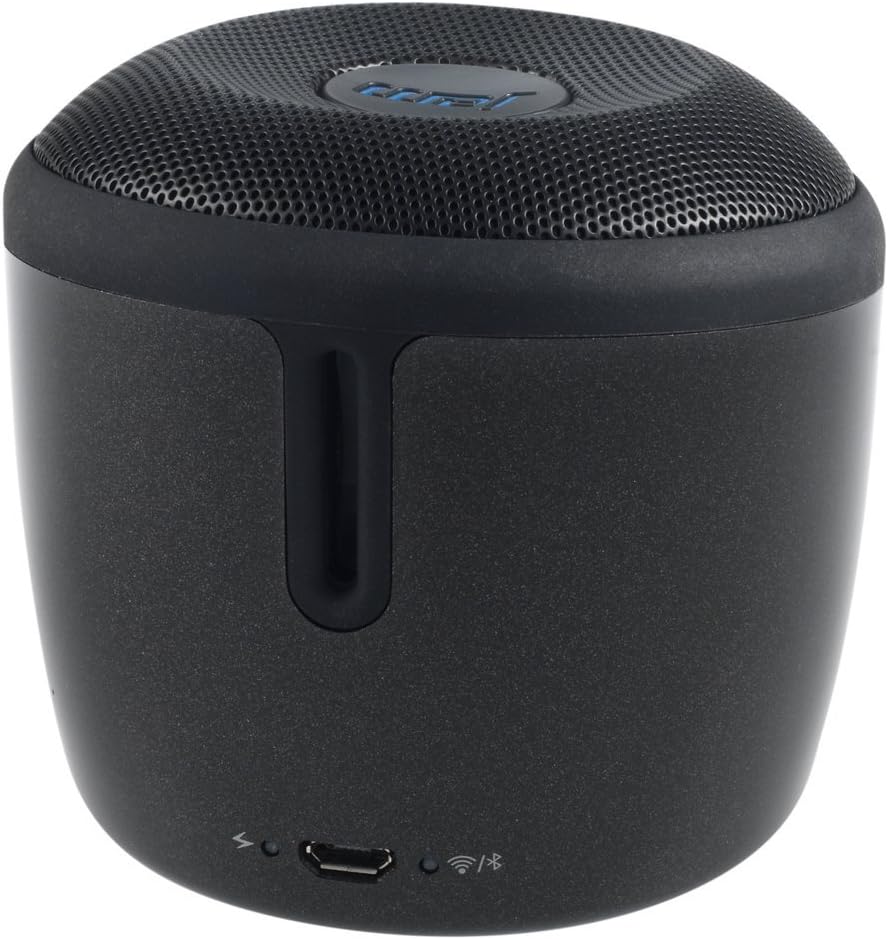
รูปที่ 3: หลัง view of the JAM Voice speaker. This image highlights the back of the speaker, including the micro USB charging port, a power indicator light, a Wi-Fi status indicator, and a Bluetooth status indicator.
การตั้งค่า
1. ชาร์จลำโพง
Before initial use, fully charge the JAM Voice speaker. Connect the supplied USB charging cord to the micro USB port on the back of the speaker and to a USB power source (e.g., computer USB port or USB wall adapter). The charging indicator light will show the charging status. A full charge provides up to 4 hours of playtime.
2. Installing the JAM App
The JAM app is required for Wi-Fi setup and advanced control features. Download the free JAM app from your device's app store (e.g., Apple App Store for iOS or Google Play Store for Android).
3. การเชื่อมต่อเครือข่าย Wi-Fi
- Ensure your JAM Voice speaker is powered on.
- Open the JAM app on your smartphone or tablet.
- Follow the in-app instructions to connect your speaker to your home Wi-Fi network. This process typically involves selecting your Wi-Fi network and entering the password.
- Once connected, the Wi-Fi indicator light on the speaker will illuminate steadily.
4. การจับคู่บลูทู ธ
To use the speaker via Bluetooth:
- Press and hold the Bluetooth button on the speaker until the Bluetooth indicator light begins to flash, indicating pairing mode.
- On your device (smartphone, tablet, etc.), go to the Bluetooth settings and select "JAM Voice" from the list of available devices.
- Once paired, the Bluetooth indicator light on the speaker will illuminate steadily.
คำแนะนำการใช้งาน
1. เปิด/ปิดเครื่อง
Press and hold the power button (location not specified in data, assuming standard placement) for a few seconds to turn the speaker on or off.
2. Amazon Alexa Voice Service
To activate Alexa, tap the designated Alexa button on the speaker. Once activated, you can ask questions or issue commands, such as "What's the weather?" or "Play music." Ensure the speaker is connected to Wi-Fi for Alexa functionality.
3. การสตรีมเพลง
- ผ่าน Wi-Fi: Use the JAM app to connect to streaming services like TuneIn, iHeartRadio, Spotify, and Tidal. You can also ask Alexa to stream music from supported services.
- ผ่านบลูทูธ: Once paired with a device, play audio directly from your device's music library or streaming apps.
4. การจับคู่ลำโพงหลายตัว
The JAM Voice speaker can be paired with other JAM Voice speakers or any speaker in the JAM Wi-Fi lineup for a synchronized audio experience. Use the JAM app to group speakers, adjust individual volumes, or set up stereo sound (left/right channels).
Note: When grouped for multi-room or stereo playback, Alexa voice service may only be active on the designated master speaker.
5. การควบคุม
- ปริมาณ: Use the volume buttons on the speaker or control via the JAM app/connected device.
- การเล่นซ้ำ: Use the play/pause and skip track buttons on the speaker or control via the JAM app/connected device.
การซ่อมบำรุง
1. การทำความสะอาด
Wipe the speaker with a soft, dry cloth. Do not use liquid cleaners or abrasive materials, as they may damage the finish or internal components. Ensure no moisture enters the ports.
2. การดูแลแบตเตอรี่
To prolong battery life, avoid fully discharging the speaker frequently. Recharge the speaker when the battery is low. If storing the speaker for an extended period, charge it to approximately 50% every few months.
การแก้ไขปัญหา
| ปัญหา | สารละลาย |
|---|---|
| ลำโพงไม่เปิดเครื่อง | Ensure the speaker is charged. Connect it to a power source using the USB charging cord. |
| ไม่สามารถเชื่อมต่อ Wi-Fi ได้ |
|
| ไม่สามารถจับคู่ผ่านบลูทูธได้ |
|
| Alexa ไม่ตอบสนอง |
|
| Speaker turns off unexpectedly. | The speaker may have an auto-off feature to conserve battery. Ensure it is sufficiently charged. If connected to power, check the power source. |
ข้อมูลจำเพาะ
| หมายเลขรุ่น | HX-P590BK |
| เทคโนโลยีการเชื่อมต่อ | บลูทู ธ Wi-Fi |
| โหมดเอาต์พุตเสียง | สเตอริโอ |
| แหล่งพลังงาน | ใช้พลังงานจากแบตเตอรี่ |
| เวลาเล่น | นานถึง 4 ชั่วโมง |
| วิธีการควบคุม | เสียง, แอป |
| ขนาด | 3 x 3 x 3 นิ้ว |
| น้ำหนักสินค้า | 9.8 ออนซ์ (0.61 ปอนด์) |
| ส่วนประกอบที่รวมอยู่ | Jam Voice Alexa Voice Service Enabled Speaker, USB Charging Cord |
| อุปกรณ์ที่รองรับ | แล็ปท็อป, สมาร์ทโฟน, แท็บเล็ต, โทรทัศน์ |
| ประเภทลำโพง | พกพาได้ |
ข้อมูลการรับประกัน
ผลิตภัณฑ์นี้มาพร้อมกับ การรับประกันแบบจำกัด. For detailed information regarding the terms, conditions, and duration of your warranty, please refer to the documentation included with your purchase or visit the official Jam Audio webไซต์นี้ โปรดเก็บหลักฐานการซื้อไว้เพื่อใช้ยืนยันการรับประกัน
สนับสนุน
For further assistance, technical support, or frequently asked questions, please visit the official Jam Audio support website. You may also find helpful resources within the JAM app.
Jam Audio Official Webเว็บไซต์: www.jamaaudio.com