
1. สินค้าหมดview
The Canon EF 24-105mm f/4L IS II USM is a versatile standard zoom lens designed for Canon EOS cameras. It features a constant f/4L aperture and a broad focal range from wide-angle to mid-telephoto, making it suitable for various photographic situations. The integrated Image Stabilizer (IS) provides up to 4 stops of shake correction, enhancing sharpness in handheld shooting. Its optical design includes Air Sphere Coating (ASC) to minimize flare and ghosting, and a 10-blade circular aperture for smooth background blur.
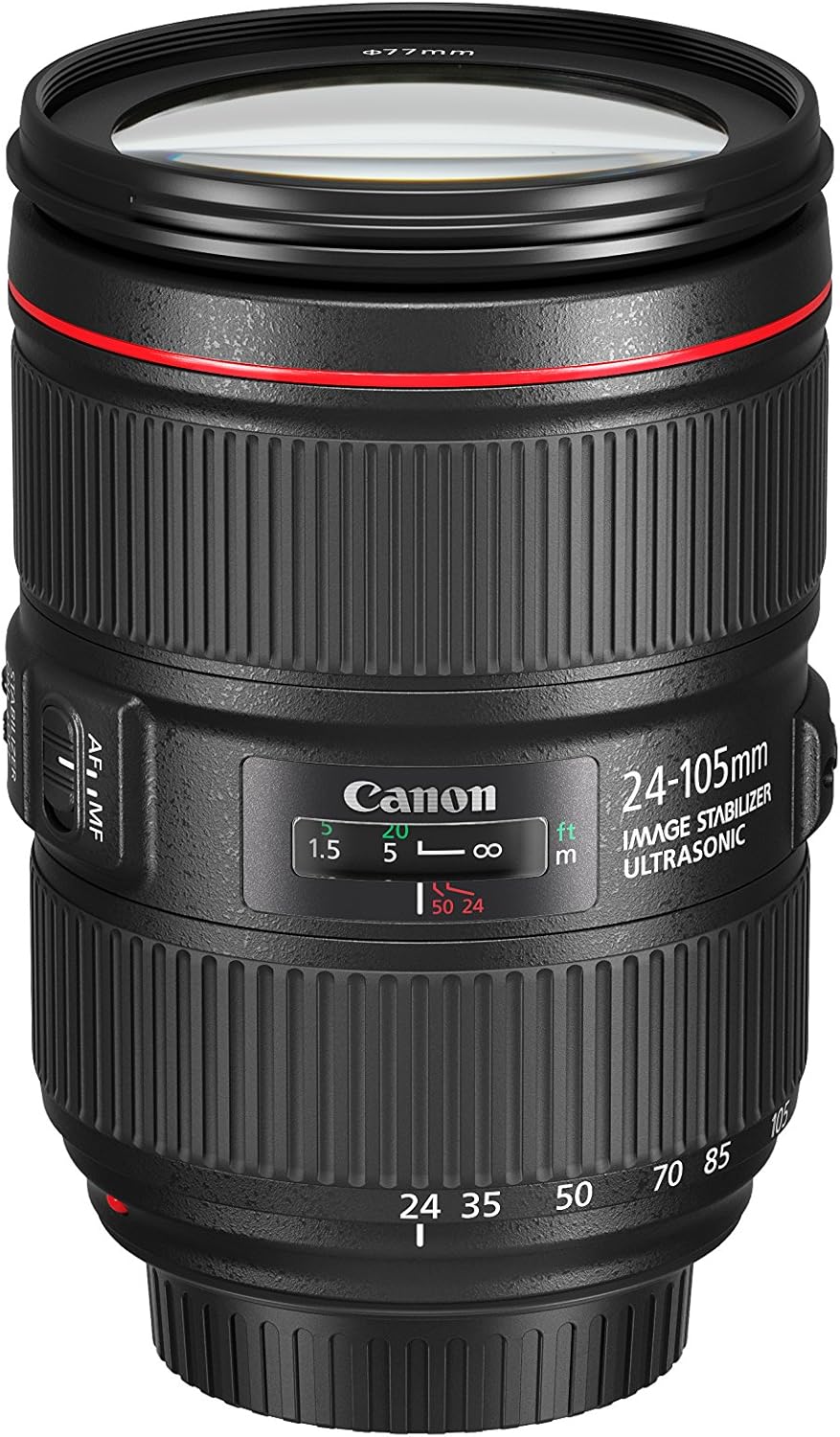
Image 1.1: The Canon EF 24-105mm f/4L IS II USM Lens, showcasing การออกแบบที่กะทัดรัด
คุณสมบัติหลัก:
- All-new optical design: Significant improvements in peripheral brightness.
- High-performance standard zoom lens: Constant f/4L aperture with a broad angle of view (wide angle to mid-telephoto).
- Air Sphere Coating (ASC): Helps to significantly reduce flare and ghosting.
- ระบบป้องกันภาพสั่นไหว: Up to 4 stops of shake correction for sharp images.
- Circular Aperture (10 blades): Delivers beautiful, soft backgrounds.
2. อะไรอยู่ในกล่อง
Verify that all the following items are included with your Canon EF 24-105mm f/4L IS II USM Lens:
- EF 24-105mm f/4 L IS II USM Lens
- ฝาครอบเลนส์ E-77II
- ฝาปิดเลนส์เลนส์ E
- Lens Case LP1219
- Lens Hood EW-83M
- คู่มือการใช้งาน
- บัตรรับประกัน
3. การตั้งค่า
3.1 การติดเลนส์
- ถอดฝาปิดเลนส์ด้านหลังและฝาปิดตัวกล้อง
- จัดตำแหน่งเครื่องหมายสีแดงบนเลนส์ให้ตรงกับเครื่องหมายสีแดงบนตัวกล้อง
- หมุนเลนส์ตามเข็มนาฬิกาจนกระทั่งเข้าที่และมีเสียงคลิก
3.2 การถอดเลนส์
- While pressing the lens release button on the camera, turn the lens counter-clockwise until it stops.
- ถอดเลนส์ออก
- Attach the rear lens cap to the lens and the body cap to the camera.
3.3 Attaching the Lens Hood (EW-83M)
Align the red dot on the lens hood with the red dot on the front of the lens. Turn the hood clockwise until it clicks into place. The lens hood helps to prevent flare and ghosting by blocking unwanted light.
4. การใช้งานเลนส์

ภาพที่ 4.1: ด้านข้าง view of the lens showing the AF/MF and Stabilizer switches.
4.1 สวิตช์โหมดโฟกัส (AF/MF)
- AF (ระบบโฟกัสอัตโนมัติ): Set the switch to AF for automatic focusing.
- MF (โฟกัสแบบแมนนวล): Set the switch to MF to manually adjust focus using the focus ring.
4.2 Image Stabilizer Switch (ON/OFF)
- บน: Turn the Image Stabilizer ON to reduce camera shake when shooting handheld.
- ปิด: Turn the Image Stabilizer OFF when using a tripod or when shooting at very high shutter speeds.
4.3 Zoom Ring
Rotate the zoom ring to change the focal length from 24mm (wide-angle) to 105mm (telephoto). The lens maintains a constant f/4 aperture throughout the zoom range.

ภาพที่ 4.2: ด้านหน้า view of the lens, showing the zoom ring and filter thread.
4.4 วงแหวนโฟกัส
When the focus mode switch is set to MF, rotate this ring to adjust the focus manually.
4.5 Zoom Lock Switch
This switch is located on the side of the lens. When engaged, it locks the lens at the 24mm position to prevent zoom creep during transport or when the camera is pointed downwards.
5. การบำรุงรักษา
5.1 การทำความสะอาดเลนส์
- ใช้เครื่องเป่าลมเลนส์เพื่อกำจัดฝุ่นออกจากพื้นผิวเลนส์
- For smudges or fingerprints, use a soft, clean lens cloth and a small amount of lens cleaning solution. Wipe gently in a circular motion.
- ห้ามใช้วัสดุที่มีฤทธิ์กัดกร่อนหรือสารเคมีรุนแรงเด็ดขาด
5.2 Storing the Lens
- ควรปิดฝาครอบเลนส์ด้านหน้าและด้านหลังทุกครั้งเมื่อไม่ได้ใช้งาน
- เก็บเลนส์ไว้ในที่แห้งและเย็น หลีกเลี่ยงแสงแดดโดยตรงและอุณหภูมิที่สูงหรือต่ำเกินไป
- If storing for an extended period, place it in a lens case with a desiccant to prevent mold and mildew.
6 การแก้ไขปัญหา
หากคุณพบปัญหาเกี่ยวกับเลนส์ โปรดพิจารณาวิธีแก้ไขทั่วไปต่อไปนี้:
- เลนส์ไม่สามารถโฟกัสได้: Ensure the AF/MF switch is set to AF for autofocus, or adjust manually in MF mode. Check that the lens is securely attached to the camera body.
- ภาพเบลอ: Verify the Image Stabilizer is ON if shooting handheld. Check your camera's shutter speed and ISO settings.
- กล้องไม่รู้จักเลนส์: Remove and reattach the lens. Clean the electrical contacts on both the lens and camera body with a clean, dry cloth.
For more detailed troubleshooting or persistent issues, refer to your camera's instruction manual or contact Canon customer support.
7. วิดีโอผลิตภัณฑ์อย่างเป็นทางการ
วิดีโอ 7.1: การประชุมอย่างเป็นทางการview of the Canon EF 24-105mm f/4L IS II USM lens, highlighting its features and design.
8. ข้อมูลจำเพาะ
| คุณสมบัติ | รายละเอียด |
|---|---|
| ยี่ห้อ | แคนนอน |
| หมายเลขรุ่น | 1380C002 |
| ระยะโฟกัส | 24-105มม. |
| ประเภทเลนส์ | ซูม |
| การติดตั้งที่เข้ากันได้ | แคนนอน อีเอฟ |
| รูรับแสงสูงสุด | เอฟ/4 |
| รูรับแสงต่ำสุด | เอฟ/22 |
| ระบบป้องกันภาพสั่นไหว | ออฟติคอล |
| ประเภทโฟกัส | โฟกัสอัตโนมัติ |
| จำนวนไดอะแฟรมใบมีด | 10 |
| ขนาดฟิลเตอร์ภาพถ่าย | 77มม. |
| การเคลือบเลนส์ | Air Sphere Coating |
| สี | สีดำ |
9. การรับประกันและการสนับสนุน
This Canon EF 24-105mm f/4L IS II USM Lens comes with a การรับประกันจากผู้ผลิต 1 ปี. For warranty claims, technical support, or service inquiries, please visit the official Canon website or contact your local authorized Canon service center. Keep your purchase receipt and warranty card as proof of purchase.
การสนับสนุนทางออนไลน์: ฝ่ายสนับสนุนของแคนนอน Webเว็บไซต์