
1. บทนำ
ขอบคุณสำหรับการซื้อasing the Sony Signature Series Audio Component Amplifier TA-ZH1ES. This high-resolution headphone amplifier is designed to deliver exceptional audio quality, featuring advanced technologies such as Sony's enhanced S-Master HX digital amplifier and DSD Remastering Engine. This manual provides essential information for the proper setup, operation, and maintenance of your device.
2. ข้อมูลด้านความปลอดภัย
Please read all safety instructions carefully before using the ampไลเออร์ เก็บคู่มือนี้ไว้ใช้อ้างอิงในอนาคต
- แหล่งพลังงาน: Connect the unit only to the AC power outlet specified in the specifications.
- การระบายอากาศ : ตรวจสอบให้แน่ใจว่ามีการระบายอากาศรอบ ๆ เครื่องอย่างเพียงพอเพื่อป้องกันความร้อนสูงเกินไป อย่าปิดกั้นช่องระบายอากาศ
- ความชื้น: อย่าให้เครื่องโดนฝนหรือความชื้นเพื่อลดความเสี่ยงจากไฟไหม้หรือไฟฟ้าช็อต
- วัตถุจากต่างประเทศ: ห้ามสอดสิ่งของใดๆ เข้าไปในช่องเปิดของอุปกรณ์
- การบริการ: แนะนำให้ติดต่อช่างผู้ชำนาญเพื่อขอรับบริการทั้งหมด อย่าพยายามเปิดหรือซ่อมแซมเครื่องด้วยตัวเอง
- การจัดวาง: วางเครื่องบนพื้นผิวที่มั่นคงและเรียบเสมอกัน หลีกเลี่ยงแสงแดดโดยตรง แหล่งความร้อน และฝุ่นละอองหรือการสั่นสะเทือนมากเกินไป
3. สินค้าหมดview
3.1 แผงด้านหน้า
The front panel provides various headphone output connections and essential controls for operation.

รูปที่ 3.1: เค้าโครงแผงด้านหน้า
This image displays the front panel of the TA-ZH1ES amplifier, highlighting the various headphone output jacks and the volume control knob. From left to right, you can see the XLR4 balanced output, multiple 4.4mm and 3.5mm balanced outputs, and 6.3mm and 3.5mm unbalanced outputs. The large rotary knob on the right is for volume control, and a Walkman/Xperia USB input is also visible.
- ปุ่มเปิด/ปิด: เปิดหรือปิดเครื่อง
- ตัวเลือกอินพุต: วนรอบแหล่งข้อมูลขาเข้าที่มีอยู่
- Output Selector: Selects the desired output mode.
- แสดง: แสดงการตั้งค่าและสถานะปัจจุบัน
- เมนู/ปุ่มย้อนกลับ: Navigates menu options or returns to the previous screen.
- ปุ่มป้อน: ยืนยันการเลือก
- Gain Button: Adjusts the output gain for different headphone impedances.
- ปุ่มปรับระดับเสียง: ควบคุมระดับเสียงเอาต์พุต
- เอาท์พุตหูฟัง:
- Balanced Connections: 4.4mm, 3.5mm x 2, XLR4
- Unbalanced Connections: 6.3mm, 3.5mm
- Walkman/Xperia USB Input: For connecting compatible portable devices.
3.2 แผงด้านหลัง
The rear panel houses various input and output terminals for connecting to other audio components and the power supply.
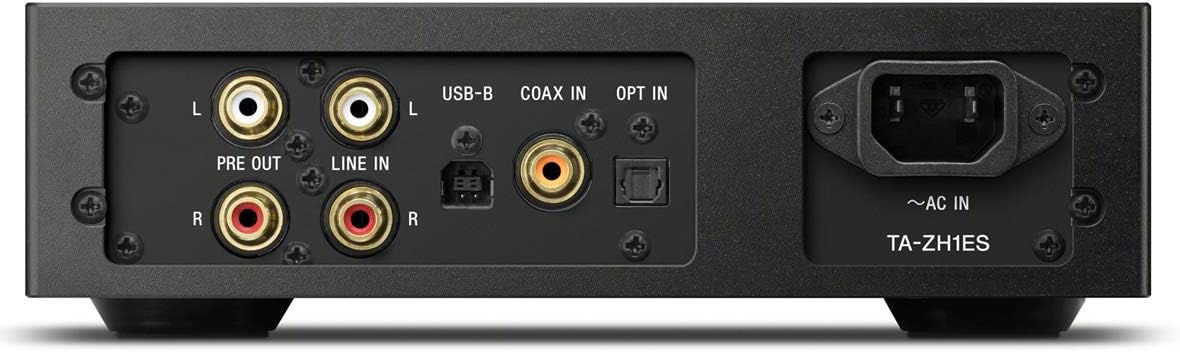
รูปที่ 3.2: เค้าโครงแผงด้านหลัง
This image illustrates the rear panel of the TA-ZH1ES amplifier, detailing the various connectivity options. Visible ports include RCA Line In (L/R), RCA Pre Out (L/R), USB-B input, Coaxial input, Optical input, and the AC power inlet. Each port is clearly labeled for easy identification.
- LINE IN (RCA L/R): Analog audio input for connecting external devices.
- PRE OUT (RCA L/R): Analog audio output for connecting to a power ampลำโพงขยายหรือลำโพงแอคทีฟ
- ช่องเสียบ USB-B: For connecting to a computer or other digital audio sources.
- COAX IN: ช่องรับสัญญาณเสียงดิจิทัลแบบโคแอกเซียล
- เลือกใช้: อินพุตเสียงดิจิทัลแบบออปติคอล
- ~AC IN: Power input for the AC power cord.
4. การตั้งค่า
Follow these steps to set up your TA-ZH1ES ampชีวิต.
4.1 การจัดวาง
วาง amplifier on a flat, stable surface with adequate space for ventilation. Avoid placing it near heat sources or in direct sunlight.

รูปที่ 4.1: Ampตำแหน่งลิไฟเออร์
This image shows the Sony TA-ZH1ES amplifier positioned on a flat surface, demonstrating a typical setup environment. Ensure the unit has sufficient space around it for proper airflow.
4.2 การเชื่อมต่อแหล่งเสียง
Connect your audio sources to the appropriate input terminals on the rear panel.
- Digital Sources (Computer, CD Player, etc.):
- For a computer, connect a USB-B cable from your computer to the อินพุต USB-B.
- For a CD player or other digital audio device, use a coaxial cable for the COAX ใน or an optical cable for the เลือกเข้า.
- Analog Sources (Turntable with pre-amp, etc.): Connect RCA cables from your analog source to the LINE IN (RCA L/R) ขั้วต่อ
- Portable Devices (Walkman/Xperia): Connect compatible portable devices to the Walkman/Xperia USB Input on the front panel. This input also supports charging for Walkman devices.
4.3 การเชื่อมต่อหูฟังหรืออุปกรณ์ภายนอก Ampชีวิต
- หูฟัง: Connect your headphones to the appropriate balanced (4.4mm, 3.5mm x 2, XLR4) or unbalanced (6.3mm, 3.5mm) output jacks on the front panel.
- แหล่งจ่ายไฟภายนอก Ampเครื่องขยายเสียง/ลำโพงแอคทีฟ: If using the TA-ZH1ES as a DAC or pre-amplifier, connect RCA cables from the PRE OUT (RCA L/R) terminals on the rear panel to your power ampลำโพงขยายหรือลำโพงแอคทีฟ
4.4 การเชื่อมต่อสายไฟ
เชื่อมต่อสายไฟ AC ที่ให้มาเข้ากับ ~แอร์อิน terminal on the rear panel, then plug the other end into a wall outlet.
5. คู่มือการใช้งาน
5.1 การทำงานพื้นฐาน
- เปิดเครื่อง: Press the Power button on the front panel.
- เลือกอินพุต: Use the Input Selector button to choose the desired audio source (e.g., USB-B, COAX, OPT, LINE IN).
- เชื่อมต่อหูฟัง: Plug your headphones into the appropriate jack.
- ปรับระดับเสียง: Slowly turn the Volume knob clockwise to increase the volume to a comfortable listening level.

รูปที่ 5.1: แผงควบคุมด้านบน
ภาพนี้แสดงมุมมองจากบนลงล่าง view of the TA-ZH1ES amplifier, clearly showing the power button, input/output selectors, display screen, menu navigation buttons (Menu/Back, Enter), and the Gain button. These controls are used for basic operation and feature adjustments.
5.2 DSD Remastering Engine
The DSD Remastering Engine converts all PCM audio sources to DSD 11.2MHz, aiming to provide a more natural and analog-like sound experience. This feature can be enabled or disabled through the unit's menu settings.
5.3 DSEE HX
DSEE HX (Digital Sound Enhancement Engine HX) upscales compressed audio files to near high-resolution quality. This feature is particularly effective for improving the sound of lower-resolution files, such as those from streaming services or older recordings. Access DSEE HX settings via the unit's menu.
5.4 การตั้งค่าเกน
การ amplifier features adjustable gain settings to optimize performance with various headphone impedances. Press the ได้รับ button on the front panel to cycle through available gain levels (e.g., Low, Mid, High). Select the setting that provides sufficient volume without distortion for your specific headphones.
6. การบำรุงรักษา
การดูแลรักษาอย่างถูกวิธีจะช่วยให้ผลิตภัณฑ์ของคุณมีอายุการใช้งานยาวนานและทำงานได้อย่างมีประสิทธิภาพสูงสุด ampชีวิต.
- การทำความสะอาด: Wipe the unit with a soft, dry cloth. Do not use abrasive pads, scouring powder, or solvents such as alcohol or benzene.
- การระบายอากาศ : Periodically check that the ventilation openings are free from dust and obstructions.
- พื้นที่จัดเก็บ: If storing the unit for an extended period, disconnect it from the power outlet and store it in a clean, dry place.
7 การแก้ไขปัญหา
หากคุณประสบปัญหาเกี่ยวกับ ampสำหรับเครื่องขยายเสียง โปรดดูปัญหาและวิธีแก้ไขที่พบบ่อยต่อไปนี้
| ปัญหา | สาเหตุที่เป็นไปได้ / วิธีแก้ไข |
|---|---|
| ไม่มีไฟฟ้า | Ensure the AC power cord is securely connected to both the unit and the wall outlet. Check if the power outlet is functional. |
| ไม่มีเสียง |
|
| เสียงเพี้ยน |
|
| Unit becomes hot | Ensure adequate ventilation around the unit. Do not block the ventilation openings. If overheating persists, discontinue use and contact service. |
หากปัญหายังคงอยู่หลังจากลองวิธีแก้ปัญหาเหล่านี้แล้ว โปรดติดต่อฝ่ายบริการลูกค้าของโซนี่
8. ข้อมูลจำเพาะ
| คุณสมบัติ | รายละเอียด |
|---|---|
| หมายเลขรุ่น | TA-ZH1ES |
| ขนาดผลิตภัณฑ์ (กว้าง x สูง x ลึก) | 2.56 x 12.36 x 8.27 นิ้ว (ประมาณ 65 x 314 x 210 มม.) |
| น้ำหนักสินค้า | 1 ปอนด์ (ประมาณ 0.45 กก.) |
| ความต้านทานของหูฟัง | 12-600 โอห์ม |
| เอาท์พุตหูฟัง | Balanced: 4.4mm, 3.5mm x 2, XLR4 Unbalanced: 6.3mm, 3.5mm |
| อินพุตดิจิตอล | USB-B, Coaxial, Optical, Walkman/Xperia USB |
| อินพุตแบบอะนาล็อก | RCA Line In (L/R) |
| เอาท์พุตแบบอะนาล็อก | RCA Pre Out (L/R) |
| ผู้ผลิต | โซนี่ |
| วันที่พร้อมใช้งานครั้งแรก | วันที่ 1 กันยายน 2016 |
หมายเหตุ: ข้อมูลจำเพาะอาจเปลี่ยนแปลงได้โดยไม่ต้องแจ้งให้ทราบล่วงหน้า
9. การรับประกันและการสนับสนุน
สำหรับข้อมูลการรับประกันโดยละเอียด โปรดดูบัตรรับประกันที่รวมอยู่ในผลิตภัณฑ์ของคุณหรือเยี่ยมชมฝ่ายสนับสนุนอย่างเป็นทางการของ Sony website for your region. For technical assistance, product registration, or service inquiries, please contact Sony customer support.
ฝ่ายสนับสนุนโซนี่ Webเว็บไซต์: https://www.sony.com/electronics/support


