
1. สินค้าหมดview
The KERUI G18 is a wireless GSM home alarm system designed to provide comprehensive security for your property. It features GSM transmission for remote alerts, support for numerous wireless sensors, and can be controlled via a mobile application. The system includes a main control panel, various sensors, remote controls, and an outdoor solar-powered siren.
คุณสมบัติหลัก:
- GSM Transmission: Automatically calls and sends SMS to up to 6 designated phone numbers upon security breach.
- การเชื่อมต่อไร้สาย: Supports up to 99 wireless sensors and 150 remote controls.
- Zone Attributes: 8 selectable zone attributes including Normal, Home Armed, Intelligent, Emergency, Closed, Chime, Welcome, and Senior Help.
- กำหนดเวลาการเปิด/ปิดระบบอาวุธ: Program up to 4 groups of scheduled arming/disarming times.
- การควบคุมแอพมือถือ: Control the system remotely via the "Système d'alarme G18" app (requires GSM SIM card).
- อินเตอร์คอมแบบสองทาง: Remote monitoring and two-way intercom via phone.
- Tampเอ้อสวิตช์: แบบบูรณาการ tamper switch on the main panel.
- แบตเตอรี่สำรอง: Main panel includes a rechargeable lithium battery providing 6-8 hours of backup power.
- Outdoor Solar Siren: 110 dB siren with flashing strobe, solar-powered, water and UV resistant.
2 ส่วนประกอบ
The KERUI G18 system typically includes the following components:
- 1 x Main Control Panel (G18)
- 6 x Door/Window Sensors (powered by 12V 23A battery)
- 6 x Motion Detectors (powered by 3 AAA batteries)
- รีโมทคอนโทรล 4 อัน
- 1 x RFID Keypad
- การ์ด RFID 4 ใบ
- 1 x Outdoor Solar Siren
- 1 x EU Power Adapter for Alarm Panel
- 1 x Internal Alarm (if 'Alarme F' refers to an internal siren)
3. คำแนะนำในการตั้งค่า
3.1 การตั้งค่าแผงควบคุมหลัก
- Identify Panel Components: Familiarize yourself with the main control panel's layout. The image below highlights key features.

Image: Diagram of the KERUI G18 main control panel, showing the keypad, display, ON/OFF switch, power port, wired siren jack, SIM card slot, microphone, and tamper switch location on the back.
- ใส่ซิมการ์ด: Locate the SIM card slot on the side of the main panel. Insert a standard 2G GSM SIM card with credit. This is essential for remote call and SMS notifications. The system supports GSM 850/900/1800/1900MHz frequency bands. Without a SIM card, the system functions as a local alarm only.
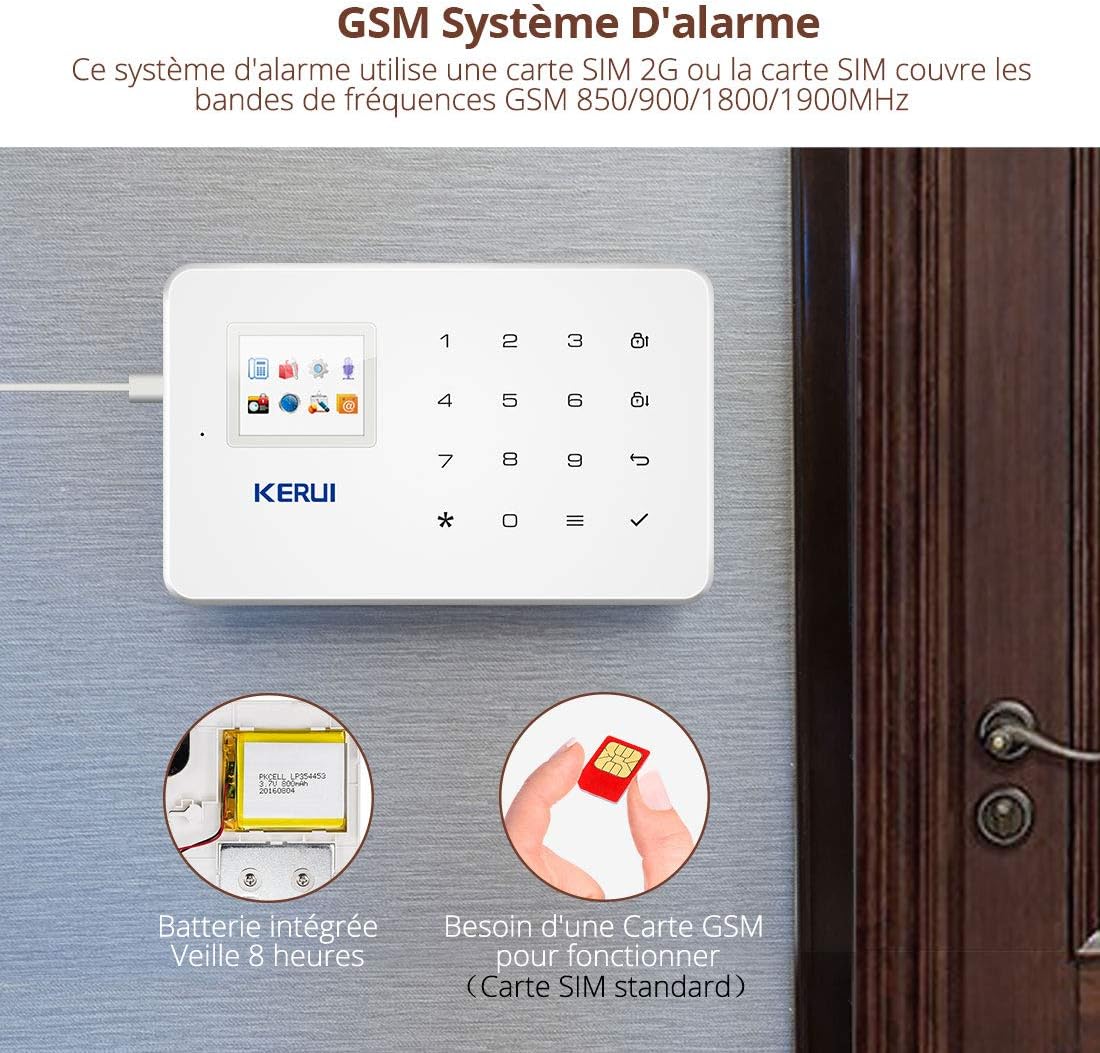
Image: The KERUI G18 main panel with an illustration of a SIM card being inserted and the internal battery, indicating 8 hours of standby time.
- เชื่อมต่อพลังงาน: Connect the provided EU power adapter to the 'Port d'alimentation' (Power Port) on the main panel and plug it into a wall outlet.
- เปิดเครื่อง: Locate the ON/OFF switch on the side of the panel and switch it to the 'ON' position. The panel has an integrated rechargeable lithium battery for backup power during outagใช่
3.2 การติดตั้งเซนเซอร์
The system is designed for DIY installation and comes pre-programmed. All batteries are pre-installed in the sensors.
- เซ็นเซอร์ประตู/หน้าต่าง: Install these sensors on doors and windows. Ensure the two parts of the sensor are aligned and within 1 cm of each other when the door/window is closed. สำคัญ: Do not install door sensors on metal doors, as this may interfere with signal transmission.
- เครื่องตรวจจับความเคลื่อนไหว: Mount motion detectors in areas where intruders are likely to pass. Position them to cover entry points and high-traffic areas. Ensure they are not obstructed by furniture or curtains.
- Remote Controls & RFID Keypad/Cards: These are typically pre-paired. Test their functionality after setting up the main panel.
3.3 Outdoor Solar Siren Installation
The outdoor solar siren is designed for external use and is powered by solar energy.
- การจัดวาง: Install the siren in an open location that receives ample daylight to ensure its solar panel can charge the internal battery effectively. It should be visible from outside your property to act as a deterrent.
- การติดตั้ง: Securely mount the siren using appropriate hardware. The casing is water and UV resistant.
- Wired Siren (Optional): If using a wired siren, connect it to the 'Sirène Filaire Jack' (Wired Siren Jack) on the main panel.
3.4 การขยายระบบ
The KERUI G18 system is expandable. It can learn accessories from the 1527 series and supports up to 99 detectors and remote controls. The main panel can be programmed with a maximum of 150 sensors.

Image: Diagram illustrating the extensibility of the KERUI G18 system, showing various sensors (door, motion), an outdoor siren, and integration with a security camera, all controlled by the main panel and mobile app.
4. คู่มือการใช้งาน
4.1 การเปิดใช้งานและปิดใช้งานระบบ
The system can be armed or disarmed using the keypad, remote controls, or the mobile application.
- ปุ่มกด: Use the dedicated buttons on the main panel for 'Bras/Bras de Maison' (Arm/Home Arm) and 'Désarmer' (Disarm). Enter your personalized access code when prompted.
- รีโมทคอนโทรล: Press the arm or disarm buttons on your remote control.
- แอปมือถือ: Use the "Système d'alarme G18" app to arm, disarm, or set to home arm mode remotely.
4.2 การเปิด/ปิดระบบรักษาความปลอดภัยตามกำหนดเวลา
You can program up to 4 groups of scheduled times for the system to arm or disarm automatically.
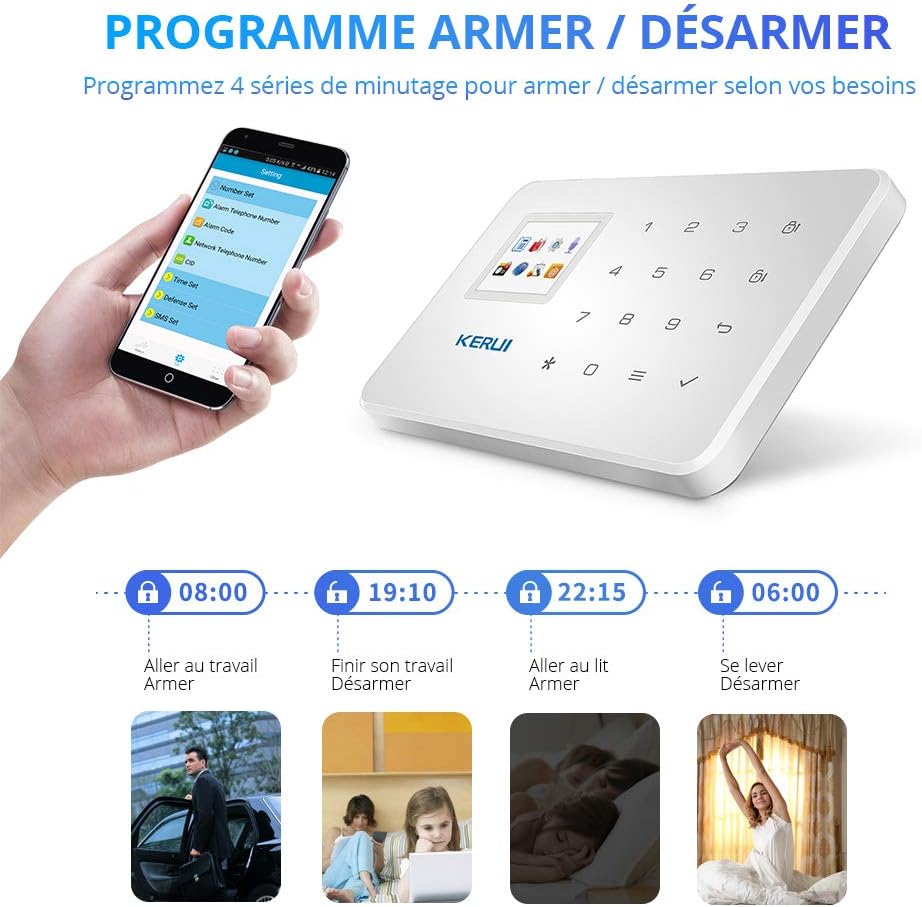
Image: Illustration of the scheduled arm/disarm feature, showing examples of setting times for daily routines like going to work, finishing work, going to bed, and waking up.
4.3 Zone Attributes
The system offers 8 zone attributes for customization:
- ปกติ: Standard alarm zone.
- Home Armed: Sensors in this zone are active when the system is in home arm mode (e.g., perimeter sensors).
- ฉลาด: Requires a sensor to be triggered twice within 30 seconds to activate the alarm. Useful for homes with pets to prevent false alarms.
- ภาวะฉุกเฉิน: Triggers an immediate alarm regardless of arming status.
- ปิด: Zone is always active.
- ระฆัง: Triggers a chime sound when activated, without an alarm.
- ยินดีต้อนรับ: Triggers a welcome sound when activated.
- Senior Help: Designed for elderly assistance, specific trigger actions can be configured.
4.4 Alarm Notifications and Intercom
เมื่อสัญญาณเตือนดังขึ้น ระบบจะดำเนินการดังต่อไปนี้:
- Auto-Dial & SMS: Call and send SMS messages to the 6 pre-programmed phone numbers, indicating the triggered zone.
- การเปิดใช้งานไซเรน: The internal and external sirens will sound at 110 dB, and the outdoor siren's strobe light will flash.
- การตรวจสอบระยะไกล: You can use the intercom function to listen to the location of your main panel via phone.
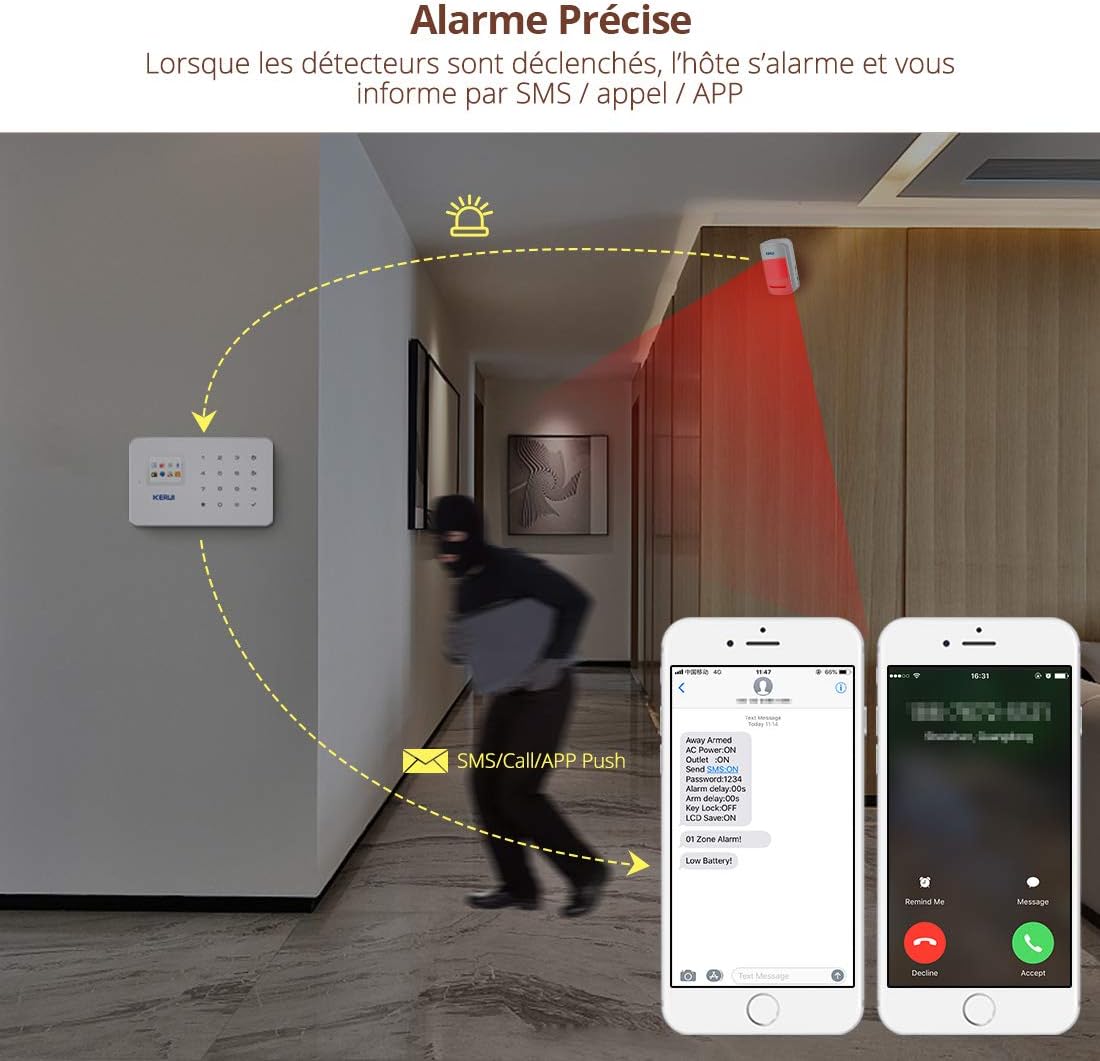
Image: Illustration showing the KERUI G18 system detecting an intruder and sending SMS/call notifications to a smartphone.
4.5 การควบคุมแอปพลิเคชันมือถือ
The "Système d'alarme G18" mobile app allows for remote control of your alarm system.
- ดาวน์โหลดแอพ: ค้นหา "Système d'alarme G18" in your smartphone's app store.
- ข้อกำหนดเกี่ยวกับซิมการ์ด: Ensure a standard 2G GSM SIM card with credit is inserted in the main panel. Recommended providers in France include Orange (GSM), Free, and SFR (GSM).
- ฟังก์ชั่นระยะไกล: Use the app to arm, disarm, home arm, adjust zone attributes, and manage other settings from anywhere.

Image: Screenshot of the KERUI G18 mobile application interface, showing options for settings, disarming, arming, and home arming.
5. การบำรุงรักษา
Regular maintenance ensures the optimal performance and longevity of your KERUI G18 alarm system.
- การตรวจสอบแบตเตอรี่: Periodically check the batteries in your wireless sensors (door/window sensors use 12V 23A, motion detectors use AAA batteries). Replace them when the low battery indicator appears or when performance degrades.
- แบตเตอรี่แผงหลัก: The main panel's internal lithium battery provides backup power. Ensure the panel is regularly connected to the power adapter to keep this battery charged.
- ไซเรนพลังงานแสงอาทิตย์: Keep the solar panel on the outdoor siren clean and free from obstructions (dirt, leaves, snow) to ensure efficient charging. While designed to be water-resistant, ensure proper sealing during installation to prevent water ingress.
- การทดสอบระบบ: Test your alarm system regularly (e.g., monthly) by triggering a sensor to ensure sirens activate and notifications are sent.
- การอัปเดตซอฟต์แวร์: Check for any available firmware or app updates to ensure your system has the latest features and security enhancements.
6 การแก้ไขปัญหา
If you encounter issues with your KERUI G18 system, refer to the following common troubleshooting steps:
- No SMS/Call Notifications:
- Ensure a 2G GSM SIM card is correctly inserted into the main panel.
- Verify the SIM card has sufficient credit and is active.
- Check if the pre-programmed phone numbers are correct in the system settings.
- Confirm your mobile network supports 2G GSM services.
- เซ็นเซอร์ไม่ส่งสัญญาณเตือน:
- ตรวจสอบระดับแบตเตอรี่ของเซ็นเซอร์และเปลี่ยนหากจำเป็น
- Ensure sensors are within the wireless transmission range (Motion Sensor: 150m open space; Door Sensor: 100m open space; Remote Control: 100m open space).
- Verify that the sensor is correctly paired with the main panel.
- For door/window sensors, ensure the two parts are properly aligned and not installed on metal surfaces.
- สัญญาณเตือนที่ผิดพลาด:
- Adjust motion detector sensitivity or placement to avoid triggering by pets or environmental factors (e.g., curtains moving).
- Consider using the 'Intelligent' zone attribute for areas with pets.
- Check for loose wiring or faulty sensors.
- Outdoor Solar Siren Issues:
- Ensure the solar panel is clean and receiving direct sunlight for adequate charging.
- Check for any physical damage or water ingress into the siren unit.
- Verify the siren is properly paired with the main panel.
- การควบคุมแอปใช้งานไม่ได้:
- Confirm the main panel has an active 2G GSM SIM card.
- Ensure your smartphone has an internet connection.
- ตรวจสอบว่าแอปได้รับการอัปเดตเป็นเวอร์ชันล่าสุดแล้ว
7. ข้อมูลจำเพาะ
| คุณสมบัติ | ข้อมูลจำเพาะ |
|---|---|
| ยี่ห้อ | เคอรุย |
| หมายเลขรุ่น | จี18 |
| สี | สีขาว |
| เทคโนโลยีการเชื่อมต่อ | Wireless (GSM 2G) |
| วิธีการควบคุม | Application, Keypad, Remote Control |
| Power Source (Main Panel) | AC Adapter, Lithium-ion Battery Backup |
| Power Source (Outdoor Siren) | พลังงานแสงอาทิตย์ |
| เล่มที่tage | 12 โวลต์ |
| อุปกรณ์ที่รองรับ | สมาร์ทโฟน, แท็บเล็ต |
| ประเภทการติดตั้ง | DIY ไร้สาย |
| ประเภทการแจ้งเตือน | Audio and Movement |
| Max Wireless Sensors | 99 (up to 150 total sensors) |
| Max Remote Controls | 150 |
| ช่วงเซนเซอร์จับความเคลื่อนไหว | 150m (พื้นที่เปิดโล่ง) |
| Door Sensor Range | 100m (พื้นที่เปิดโล่ง) |
| ระยะควบคุมด้วยรีโมทคอนโทรล | 100m (พื้นที่เปิดโล่ง) |
| ความเข้ากันได้ของสมาร์ทโฮม | Compatible with smart home systems |
| การใช้ที่แนะนำ | บ้าน, ธุรกิจ |
8. การรับประกันและการสนับสนุน
KERUI provides comprehensive support for its products.
- การสนับสนุนด้านเทคนิค: Lifetime free technical support is available for the KERUI G18 alarm system.
- บริการลูกค้า: Friendly customer service is provided to assist with any inquiries or issues.
For assistance, please refer to the contact information provided with your product packaging or visit the official KERUI support webเว็บไซต์.