
การแนะนำ
The Actiontec SBWD100A is a Wireless HD Video Receiver designed to receive high-definition video and audio signals wirelessly from a compatible transmitter (sold separately) and output them to a display device. This device allows for flexible placement of your display without the need for long HDMI cables.
1. การตั้งค่า
1.1 เนื้อหาบรรจุภัณฑ์
- Actiontec SBWD100A Wireless HD Video Receiver
- อะแดปเตอร์แปลงไฟ
- สาย HDMI
- คู่มือการใช้งาน (เอกสารนี้)
1.2 การเชื่อมต่อเครื่องรับ
- เชื่อมต่อกับจอแสดงผล: Use the provided HDMI cable to connect the HDMI OUT port on the SBWD100A receiver to an available HDMI input port on your television or monitor.
- เชื่อมต่อพลังงาน: Plug the power adapter into the DC IN port on the SBWD100A receiver, then plug the other end into a standard electrical outlet. The receiver will power on automatically.
- เปิดใช้งานการแสดงผล: Turn on your television or monitor and select the correct HDMI input source that the receiver is connected to.
- การจับคู่ (อัตโนมัติ): The SBWD100A receiver is designed to automatically detect and pair with a compatible Actiontec wireless HD video transmitter (sold separately) when both devices are powered on and within range. Look for a 'Waiting for Connection' or similar message on your display.
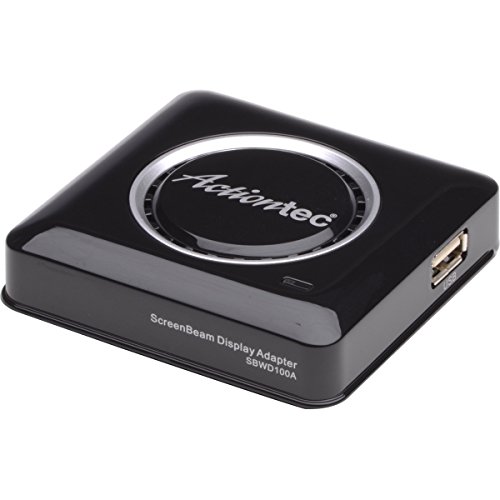
รูปที่ 1 : ด้านหน้า view of the Actiontec SBWD100A Wireless HD Video Receiver, showing its compact design and connection ports.
2. คู่มือการใช้งาน
2.1 การเปิด/ปิดเครื่อง
- เปิดเครื่อง: The receiver powers on automatically when connected to a power source.
- หมดแรง: Disconnect the power adapter from the electrical outlet to power off the receiver.
2.2 Receiving Video Signal
Once the receiver is powered on and connected to your display, and a compatible Actiontec wireless HD video transmitter (sold separately) is also powered on and transmitting, the receiver will automatically detect and display the video signal. The LED indicator on the receiver will typically change to a solid color (e.g., blue or green) to indicate a successful connection and active signal reception.
Ensure your display is set to the correct HDMI input where the SBWD100A is connected.
3. การบำรุงรักษา
3.1 การทำความสะอาด
To clean the receiver, gently wipe the exterior with a soft, dry cloth. Do not use liquid cleaners, aerosols, or solvents, as these may damage the device. Ensure the device is powered off and unplugged before cleaning.
3.2 พื้นที่จัดเก็บ
When not in use for extended periods, store the receiver in a cool, dry place away from direct sunlight and extreme temperatures. Disconnect all cables before storing.
4 การแก้ไขปัญหา
| ปัญหา | สาเหตุที่เป็นไปได้ | สารละลาย |
|---|---|---|
| No picture on display |
|
|
| Poor picture quality or flickering |
|
|
| ไม่มีเสียง |
|
|
5. ข้อมูลจำเพาะ
| คุณสมบัติ | รายละเอียด |
|---|---|
| หมายเลขรุ่น | SBWD100A |
| ASIN | B01KLQVZJC |
| น้ำหนักสินค้า | 7.3 ออนซ์ |
| ขนาดแพ็คเกจ | 6.1 x 6.1 x 2.36 นิ้ว |
| ผู้ผลิต | ACTIONTEC |
| วันที่พร้อมใช้งานครั้งแรก | 6 ตุลาคม 2013 |
6. ข้อมูลการรับประกัน
Actiontec products are covered by a limited warranty. For specific warranty terms and conditions, please refer to the warranty card included with your product or visit the official Actiontec webไซต์ โปรดเก็บใบเสร็จรับเงินไว้เป็นหลักฐานการซื้อสำหรับการเรียกร้องการรับประกัน
7. การสนับสนุนลูกค้า
If you encounter any issues not covered in this manual or require further assistance, please contact Actiontec customer support. Visit the official Actiontec webเว็บไซต์นี้มีข้อมูลการติดต่อ คำถามที่พบบ่อย และแหล่งข้อมูลเพิ่มเติม


