
การแนะนำ
The Cooler Master Hyper 212 LED is a high-performance CPU cooler designed to efficiently dissipate heat from your processor. It features a PWM (Pulse Width Modulation) Red LED fan, four direct contact heat pipes, and funnel-shaped aluminum fins for optimized cooling. The universal bracket design ensures compatibility with various CPU platforms, providing a straightforward installation process.
เนื้อหาแพ็คเกจ
ก่อนเริ่มการติดตั้ง ให้แน่ใจว่ามีส่วนประกอบทั้งหมดครบถ้วน:
- Hyper 212 LED CPU Cooler (Heatsink and Fan Assembly)
- Universal Mounting Brackets (for Intel and AMD sockets)
- Mounting Hardware (screws, standoffs, backplate)
- น้ำยาหล่อเย็น
- Additional fan clips (for optional second fan)
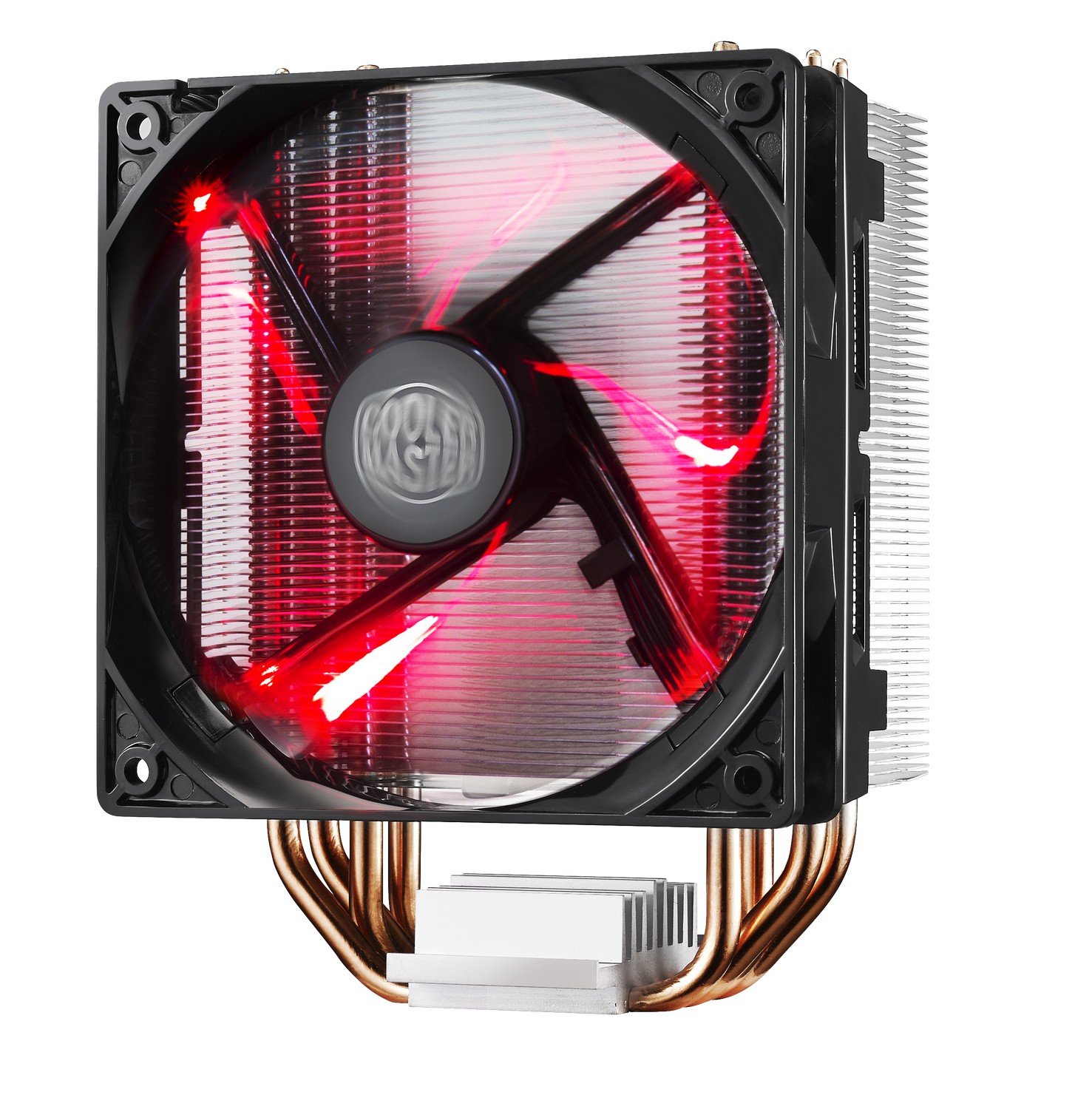
Image: The Cooler Master Hyper 212 LED CPU Cooler, showing the heatsink, fan, and copper heat pipes.
การติดตั้งและการตั้งค่า
Proper installation is crucial for optimal performance. Please follow these steps carefully. Refer to the official installation video for visual guidance.
- เตรียมเมนบอร์ด: Depending on your CPU socket (Intel or AMD), select the appropriate backplate and mounting studs. Secure the backplate to the rear of your motherboard.
- ใช้วางความร้อน: Clean the surface of your CPU and the cooler's base. Apply a small, pea-sized amount of the included thermal paste to the center of your CPU's integrated heat spreader (IHS). Do not spread it manually; the pressure from the cooler will distribute it evenly.
- ติดตั้งเครื่องทำความเย็น: Carefully align the cooler with the mounting studs on the motherboard. Place the cooler onto the CPU, ensuring the heat pipes make direct contact. Secure the cooler using the provided screws, tightening them in a diagonal pattern until snug. Avoid over-tightening.
- เชื่อมต่อสายพัดลม: เชื่อมต่อสายพัดลม PWM แบบ 4 พินเข้ากับหัวต่อ CPU_FAN บนเมนบอร์ดของคุณ
- Check RAM Clearance: Due to the cooler's size, verify that it does not obstruct your RAM modules. If necessary, adjust RAM placement or consider low-profile แรม.
Video: Official Cooler Master installation guide for the Hyper 212 LED CPU Cooler. This video demonstrates the step-by-step process of mounting the cooler onto a motherboard, including backplate installation, thermal paste application, and securing the heatsink.

ภาพ: ทางเลือก view of the Cooler Master Hyper 212 LED CPU Cooler, highlighting its dimensions and fan design.
คำแนะนำการใช้งาน
The Hyper 212 LED operates automatically once installed and connected to the CPU_FAN header. The PWM function allows the motherboard to control the fan speed based on CPU temperature, ensuring efficient cooling and reduced noise levels during lighter loads.
- การควบคุมพัดลมแบบ PWM: The fan speed adjusts dynamically to maintain optimal CPU temperatures.
- Red LED Illumination: The fan features integrated red LEDs that illuminate when the fan is operational. These LEDs are always on when the fan is running and cannot be independently controlled or disabled without modification.
- ทิศทางการไหลของอากาศ: Ensure the fan is oriented to draw cool air through the heatsink and exhaust warm air towards your case's rear or top exhaust fans for effective system cooling.
การซ่อมบำรุง
การบำรุงรักษาตามปกติจะช่วยให้มั่นใจได้ถึงอายุการใช้งานที่ยาวนานและประสิทธิภาพการทำงานของตัวระบายความร้อน CPU ของคุณอย่างเหมาะสมที่สุด
- การทำความสะอาดฝุ่น: Periodically inspect the heatsink fins and fan blades for dust accumulation. Use compressed air or a soft brush to gently remove dust. Ensure the fan is not spinning during cleaning to prevent damage.
- น้ำยาระบายความร้อน: If you remove the cooler for any reason, it is recommended to clean off the old thermal paste from both the CPU and the cooler base and apply fresh thermal paste before reinstallation.
การแก้ไขปัญหา
If you encounter issues with your Hyper 212 LED CPU Cooler, consider the following:
- อุณหภูมิ CPU สูง:
- Verify that the cooler is securely mounted and making proper contact with the CPU.
- ตรวจสอบให้แน่ใจว่าได้ทาซิลิโคนระบายความร้อนอย่างถูกต้องและสม่ำเสมอ
- Check that the fan cable is securely connected to the CPU_FAN header on the motherboard.
- Confirm fan is spinning. If not, check connections or consider fan replacement.
- ให้แน่ใจว่ามีการไหลเวียนของอากาศที่เหมาะสมภายในเคสพีซีของคุณ
- เสียงพัดลม:
- ตรวจสอบว่ามีสายเคเบิลหรือสิ่งกีดขวางที่กระทบกับใบพัดลมหรือไม่
- ตรวจสอบให้แน่ใจว่าพัดลมติดแน่นกับแผ่นระบายความร้อนแล้ว
- Dust accumulation can cause increased noise; clean the fan and heatsink.
- ปัญหาในการติดตั้ง:
- Refer to the detailed installation video and diagrams. Pay close attention to backplate orientation and screw placement.
- Ensure correct mounting hardware is used for your specific CPU socket.
ข้อมูลจำเพาะ
| หมายเลขรุ่น | RR-212L-16PR-R1 |
| ขนาดสินค้า (กว้าง x ยาว x สูง) | ยาว 0.9 นิ้ว x กว้าง 4.7 นิ้ว x สูง 4.7 นิ้ว |
| วัสดุ | Aluminum (Heatsink), Copper (Heat Pipes) |
| วิธีการทำความเย็น | Fan, Heat Pipes |
| ประเภทพัดลม | PWM Red LED Fan |
| ความเร็วการหมุนสูงสุด | 1800 รอบต่อนาที |
| ความจุการไหลของอากาศ | 66.3 ลูกบาศก์ฟุตต่อนาที (CFM) |
| ระดับเสียง | 31 เดซิเบล (dB) |
| ประเภทตัวเชื่อมต่อกระแสไฟ | 4 พิน |
| เล่มที่tage | 12 โวลต์ |
| วัดtage | 2.28 วัตต์ |
| อุปกรณ์ที่รองรับ | Desktop CPUs (Universal Socket Support) |
| น้ำหนักสินค้า | 1.7 ปอนด์ |
ข้อมูลการรับประกัน
This Cooler Master Hyper 212 LED CPU Cooler comes with a รับประกัน 1 ปี. For warranty claims or detailed terms and conditions, please refer to the official Cooler Master webไซต์หรือติดต่อฝ่ายสนับสนุนลูกค้าของพวกเขา
สนับสนุน
For further assistance, technical support, or to download the latest drivers and manuals, please visit the official Cooler Master webเว็บไซต์:
You may also contact Cooler Master customer service directly for product-specific inquiries.