
1. บทนำ
Thank you for choosing the sainlogic Wireless Weather Station. This device provides comprehensive weather data, including indoor and outdoor temperature, humidity, and weather forecasts, all displayed on a vibrant color screen. With its Wi-Fi connectivity, you can access and analyze your weather data through the Wunderground app from anywhere. Please read this manual carefully to ensure proper setup and operation.
2. เนื้อหาบรรจุภัณฑ์
กรุณาตรวจสอบเนื้อหาในแพ็คเกจเพื่อให้แน่ใจว่ามีสินค้าครบทั้งหมด:
- 1 x sainlogic Weather Station Main Unit
- เซ็นเซอร์ไร้สายสำหรับใช้งานภายนอกอาคาร 3 ตัว
- 1 x Power Adapter (for main unit)
- 1 x คู่มือผู้ใช้ (เอกสารนี้)
บันทึก: 2 x AAA 1.5V batteries for the main unit and batteries for the outdoor sensors are ไม่รวมอยู่ และต้องซื้อแยกต่างหาก
3. คุณสมบัติของผลิตภัณฑ์

Figure 3.1: sainlogic Wireless Weather Station Main Unit.
- จอแสดงผล LCD สี: Provides clear and vibrant visibility of all weather data.
- การเชื่อมต่อ Wi-Fi: Connects to the global weather network (Wunderground) for data retrieval and evaluation via smartphone or computer.
- Three Wireless Outdoor Sensors: Delivers accurate temperature and humidity measurements from up to three different outdoor locations, with a maximum range of 60 meters.
- การซิงโครไนซ์อัตโนมัติ: Ensures the current date and time are always displayed accurately.
- Integrated Alarm Function: Includes an alarm with snooze capability.
- การแสดงข้อมูลอย่างครบถ้วน: Shows indoor/outdoor temperature (°C/°F) and humidity.
- พยากรณ์แนวโน้มสภาพอากาศ: Provides a forecast for the next four days, indicated by intuitive icons.
- Max/Min Logging: Records maximum and minimum temperature and humidity values.
- ตำแหน่งที่หลากหลาย: Designed for both tabletop placement and wall-mounting.
4. การตั้งค่า
4.1 การตั้งค่าตัวเครื่องหลัก
1. Insert 2 x AAA 1.5V batteries (not included) into the main unit's battery compartment, observing polarity. Alternatively, connect the provided power adapter to the DC 5.0V port on the back of the unit. The display will light up.
2. Place the main unit on a stable, flat surface or mount it on a wall using the integrated hanging holes on the back.
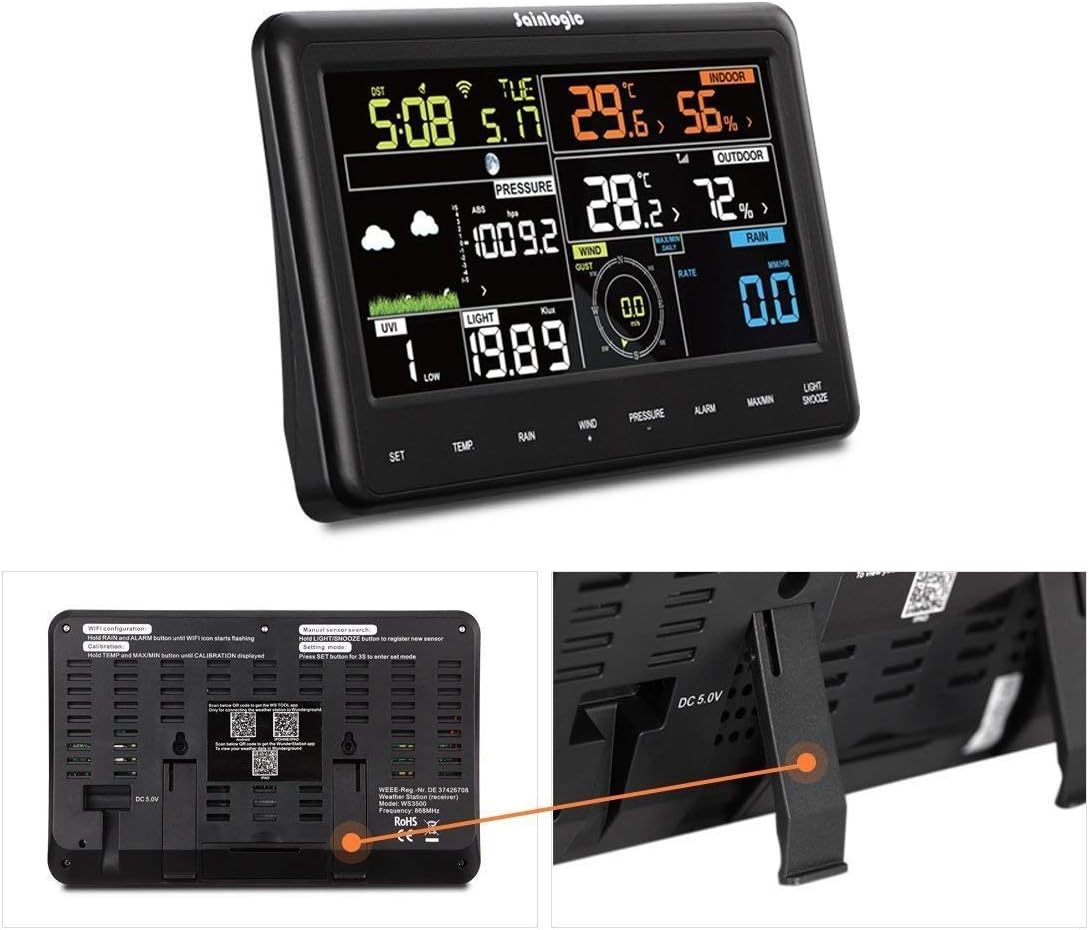
รูปที่ 4.1: ย้อนกลับ view of the main unit with power input and mounting options.
4.2 การติดตั้งเซนเซอร์
1. Insert batteries into each of the three wireless outdoor sensors, ensuring correct polarity.
2. Place the sensors in desired outdoor locations within a 60-meter range of the main unit. For accurate readings, ensure sensors are protected from direct sunlight, heavy rain, and extreme temperatures.
3. The main unit will automatically detect and display data from the sensors. Allow a few minutes for the sensors to transmit data to the main unit.

Figure 4.2: Three wireless outdoor sensors.
4.3 Wi-Fi and App Connection (Wunderground)
1. ดาวน์โหลด วันเดอร์กราวด์ app from Google Play (for Android) or the App Store (for iOS) on your smartphone or tablet.
2. Follow the on-screen instructions within the Wunderground app to create an account and connect your weather station to your home Wi-Fi network.
3. Once connected, you can view and analyze your weather data remotely through the app.

Figure 4.3: Data transfer and access via Weather Underground.
5. คู่มือการใช้งาน
5.1 แสดงผลเกินview
The color display provides a comprehensive overview of current weather conditions and settings. It typically shows indoor and outdoor temperature, humidity, time, date, and weather forecast icons. Refer to the specific icons and layout on your device.

รูปที่ 5.1: รายละเอียด view of the color display.
5.2 การตั้งค่าเวลาและวันที่
The station features automatic synchronization for time and date. If manual adjustment is needed, use the 'SET' button (usually located on the side or back) to enter the settings mode. Follow the on-screen prompts to adjust time, date, and 12/24-hour format.
5.3 การแสดงอุณหภูมิและความชื้น
The display shows current indoor and outdoor temperature and humidity levels. Use the '°C/°F' button to toggle between Celsius and Fahrenheit temperature units.
5.4 พยากรณ์อากาศ
The station provides a weather trend forecast for the next four days, represented by graphical icons (e.g., sunny, cloudy, rainy). This forecast is based on atmospheric pressure changes.
5.5 ฟังก์ชั่นปลุก
To set an alarm, press the 'ALARM' button. Use the 'SET' or arrow buttons to adjust the alarm time. Press 'ALARM' again to activate or deactivate the alarm. A snooze function is also available.

Figure 5.2: Display showing the alarm function and control buttons.
6. การบำรุงรักษา
- การทำความสะอาด: Clean the main unit and sensors with a soft, dry cloth. Avoid using abrasive cleaners, solvents, or harsh chemicals, as these can damage the surfaces.
- การเปลี่ยนแบตเตอรี่: Replace batteries in the main unit and sensors when the low battery indicator appears on the display to ensure continuous and accurate operation.
- ตำแหน่งเซนเซอร์: Periodically check outdoor sensors to ensure they are free from debris, dust, and excessive moisture buildup. Ensure they remain in locations protected from direct weather elements.
7 การแก้ไขปัญหา
| ปัญหา | สาเหตุที่เป็นไปได้ | สารละลาย |
|---|---|---|
| ไม่มีหน้าจอแสดงผลบนตัวเครื่องหลัก | Low or no batteries; power adapter not connected. | Check battery installation and replace with fresh batteries. Ensure power adapter is securely connected. |
| No outdoor sensor data | Sensor batteries low/dead; sensor out of range; interference. | Replace sensor batteries. Move sensor closer to the main unit (within 60m). Ensure no major obstructions (thick walls, metal) between sensor and main unit. Re-pair sensors if necessary (refer to full manual for pairing steps). |
| การวัดอุณหภูมิ/ความชื้นที่ไม่ถูกต้อง | Sensor exposed to direct sunlight, heat sources, or excessive moisture. | Relocate sensors to a shaded, well-ventilated area protected from direct weather elements. |
| ปัญหาการเชื่อมต่อ Wi-Fi | Incorrect Wi-Fi password; station out of router range; network issues. | Verify Wi-Fi password. Ensure the station is within range of your Wi-Fi router. Restart your router. Re-enter Wi-Fi credentials via the Wunderground app. |
8. ข้อมูลจำเพาะ
| คุณสมบัติ | ข้อมูลจำเพาะ |
|---|---|
| ยี่ห้อ | เซนโลจิก |
| แบบอย่าง | เอฟที0850 |
| แหล่งพลังงาน (ตัวเครื่องหลัก) | 2 x AAA 1.5V batteries (not included) or DC 5.0V Power Adapter |
| วัสดุ | พลาสติก |
| การเชื่อมต่อ | Wi-Fi (for main unit), Wireless (433.9MHz for sensors) |
| ความแม่นยำของอุณหภูมิ | ±2 องศาเซลเซียส |
| ช่วงอุณหภูมิในร่ม | 0 - 50 องศาเซลเซียส (32 - 122 องศาฟาเรนไฮต์) |
| ช่วงความชื้น | ความชื้นสัมพัทธ์ 20% ถึง 99% |
| ช่วงเซ็นเซอร์กลางแจ้ง | สูงสุด 60 เมตร (197 ฟุต) ในที่โล่ง |
| ประเภทจอภาพ | LED สี |
| ขนาด (ยูนิตหลัก) | ประมาณ 140 x 80 x 20 มม. (5.5 x 3.1 x 0.8 นิ้ว) |
| Item Weight (Main Unit) | 100 กรัม (0.22 ปอนด์) |
| ยูพีซี | 603338622595 |
9. การรับประกันและการสนับสนุน
For detailed warranty information, technical support, or service inquiries, please refer to the documentation included with your purchase or visit the official sainlogic website. It is recommended to keep your purchase receipt as proof of purchase for warranty claims.


