
1. บทนำ
ขอบคุณสำหรับการซื้อasing the Silverlit Xion FPV Camera Drone 84765. This drone is designed for outdoor use and offers an exciting First-Person View (FPV) flying experience with its integrated camera. Please read this manual thoroughly before operating the drone to ensure safe and optimal performance. Keep this manual for future reference.

Image 1.1: The Silverlit Xion FPV Camera Drone 84765.
2. ข้อมูลด้านความปลอดภัย
คำเตือน: การไม่ปฏิบัติตามคำแนะนำเหล่านี้อาจส่งผลให้เกิดการบาดเจ็บหรือความเสียหายต่อผลิตภัณฑ์ได้
- ควรใช้งานโดรนในพื้นที่โล่งกว้างเสมอ ห่างจากผู้คน สัตว์ อาคาร และสายไฟ
- ห้ามบินในช่วงที่มีลมแรงหรือสภาพอากาศเลวร้าย
- ให้มือ ใบหน้า และเสื้อผ้าหลวมๆ ออกห่างจากใบพัดที่กำลังหมุน
- ตรวจสอบให้แน่ใจว่าแบตเตอรี่โดรนและแบตเตอรี่รีโมทคอนโทรลชาร์จเต็มแล้วก่อนทำการบินทุกครั้ง
- อย่าปล่อยให้แบตเตอรี่ชาร์จอยู่โดยไม่มีใครดูแล
- This product is intended for children. Adult supervision is recommended.
- ห้ามดัดแปลงหรือถอดชิ้นส่วนโดรนหรือส่วนประกอบใดๆ ของโดรน
- ควรปิดโดรนและรีโมทคอนโทรลทุกครั้งเมื่อไม่ได้ใช้งาน
3. เนื้อหาบรรจุภัณฑ์
ตรวจสอบว่ามีรายการทั้งหมดอยู่ในแพ็คเกจ:
- Silverlit Xion FPV Camera Drone 84765
- รีโมทคอนโทรล
- แว่นตา FPV
- แบตเตอรี่โดรนแบบชาร์จได้
- USB Charging Cable (for drone battery)
- ใบพัดสำรอง
- คู่มือการใช้งาน

Image 3.1: The Silverlit Xion FPV Drone product box, showing the drone and FPV goggles.
4. การตั้งค่า
4.1. การติดตั้งแบตเตอรี่รีโมทคอนโทรล
- เปิดช่องใส่แบตเตอรี่ที่ด้านหลังของรีโมทคอนโทรล
- Insert the required batteries (not included) according to the polarity indicators.
- ปิดช่องใส่แบตเตอรี่ให้แน่น
4.2. Drone Battery Installation
- ตรวจสอบให้แน่ใจว่าโดรนปิดอยู่
- ค้นหาช่องใส่แบตเตอรี่บนโดรน
- Carefully insert the charged drone battery, ensuring it is properly seated and connected.
- ปิดฝาช่องใส่แบตเตอรี่
4.3. การติดตั้งใบพัด (ถ้าจำเป็น)
If propellers are not pre-installed, attach them according to the markings (e.g., A and B) on the propellers and motor shafts. Ensure they are securely fastened.
4.4. Remote Control and Drone Pairing
- วางโดรนไว้บนพื้นผิวเรียบ
- เปิดใช้งานโดรน ไฟแสดงสถานะจะกะพริบ
- เปิดรีโมทคอนโทรล
- Move the left joystick (throttle) fully up, then fully down. The drone's indicator lights will become solid, indicating successful pairing.
4.5. FPV Goggle Setup
Connect the FPV goggles to your smartphone (if applicable) or power them on as per their specific instructions. Ensure a stable connection for live video feed.

Image 4.1: The remote control and FPV goggles for the Silverlit Xion Drone.
5 การชาร์จแบตเตอรี่โดรน
The drone's battery requires charging before use. A USB charging cable is included, but a compatible USB power adapter (not included) is required.
- เชื่อมต่อสายชาร์จ USB เข้ากับแบตเตอรี่โดรน
- Plug the other end of the USB cable into a suitable USB power adapter (e.g., a smartphone charger or computer USB port).
- The charging indicator light will show the charging status (refer to the cable's specific instructions for light behavior).
- Charging typically takes 80-100 minutes for a full charge.
- After a flight, allow the battery to cool down for 10-15 minutes before recharging to prolong battery life.
Note: A fully charged battery provides approximately 4-5 minutes of flight time.
6. การควบคุมโดรน
6.1. รายการตรวจสอบก่อนบิน
- ตรวจสอบให้แน่ใจว่าแบตเตอรี่โดรนและรีโมทคอนโทรลชาร์จเต็มแล้ว
- ตรวจสอบว่าใบพัดติดแน่นและไม่มีความเสียหาย
- Verify the flight area is clear of obstacles, people, and animals.
- Confirm successful pairing between the drone and remote control.
6.2. การขึ้นและลงจอด
- วางโดรนไว้บนพื้นผิวเรียบ
- Slowly push the left joystick (throttle) upwards to make the drone ascend.
- To land, slowly pull the left joystick (throttle) downwards until the drone gently touches the ground.
6.3. การควบคุมการบินขั้นพื้นฐาน
- จอยสติ๊กซ้าย (คันเร่ง): ปุ่มขึ้น/ลง สำหรับควบคุมระดับความสูง
- Left Joystick (Yaw): Left/Right for rotating the drone horizontally.
- จอยสติ๊กด้านขวา (ปรับระดับเสียงขึ้นลง): Up/Down for moving forward/backward; Left/Right for moving left/right (sideways).
6.4. การใช้งานกล้องและ FPV
The drone features a 1080p video recording capability and 0.3 MP effective still resolution. Refer to the remote control diagram for specific camera buttons.
- การบันทึกวิดีโอ: Press the designated video button on the remote control to start/stop recording.
- จับภาพ: Press the designated photo button to take a still image.
- ภาพถ่ายทอดสด FPV: Once the FPV goggles are set up and connected, you will see the live video feed from the drone's camera, enhancing your flying experience.
7. การบำรุงรักษา
- การทำความสะอาด: ใช้ผ้าแห้งนุ่มเช็ดทำความสะอาดโดรนและรีโมทคอนโทรล ห้ามใช้สารเคมีหรือตัวทำละลายที่มีฤทธิ์กัดกร่อน
- การตรวจสอบใบพัด: Regularly check propellers for cracks, bends, or damage. Replace any damaged propellers with spare parts provided.
- พื้นที่จัดเก็บ: Store the drone and its components in a cool, dry place, away from direct sunlight and extreme temperatures. Remove batteries from the remote control if storing for extended periods.
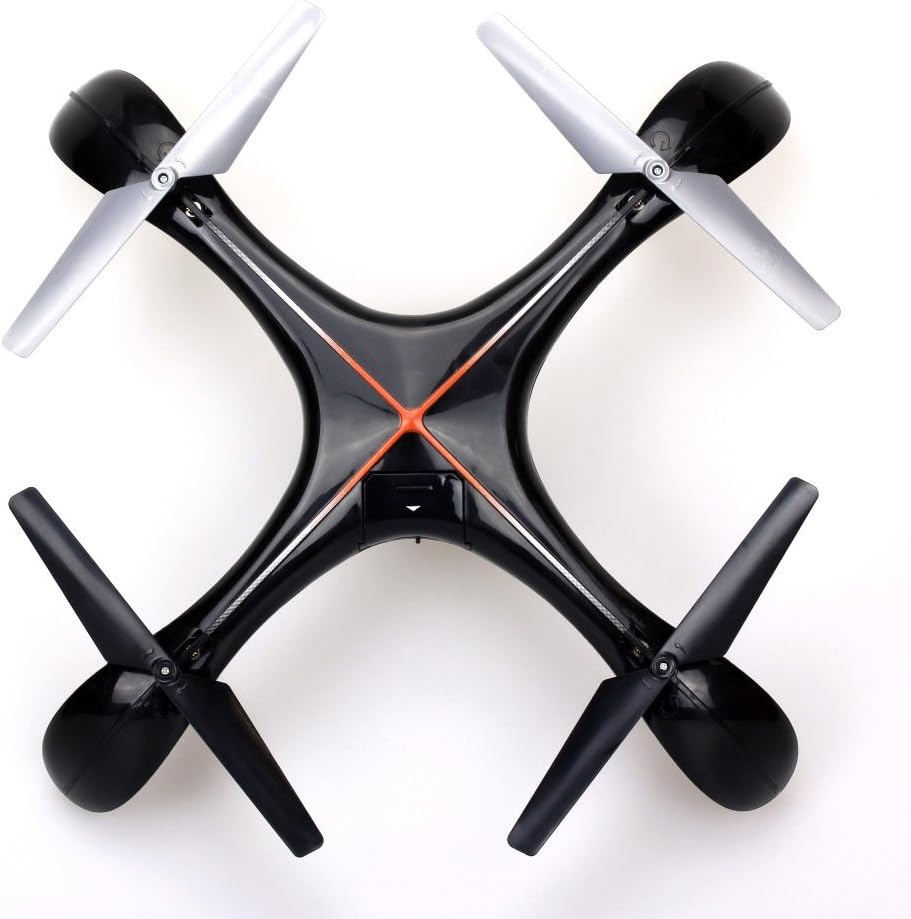
ภาพที่ 7.1: ด้านบน view of the Silverlit Xion FPV Drone, showing propeller orientation.
8 การแก้ไขปัญหา
| ปัญหา | สาเหตุที่เป็นไปได้ | สารละลาย |
|---|---|---|
| โดรนไม่ตอบสนองต่อการควบคุมระยะไกล | Low battery in drone or remote; not paired correctly. | Charge drone battery, replace remote control batteries, re-attempt pairing process. |
| โดรนบินแบบไม่สม่ำเสมอหรือลอยไปมา | Drone not calibrated on a flat surface; damaged propeller. | Ensure drone is placed on a level surface during pairing/initialization. Check and replace damaged propellers. Refer to manual for calibration steps if available. |
| Poor video quality or no FPV feed. | Weak signal; FPV goggles not connected properly. | Ensure drone is within range. Check FPV goggle connection and battery. |
| เวลาบินสั้น | แบตเตอรี่ไม่ได้ชาร์จเต็ม แบตเตอรี่เก่า | Ensure battery is fully charged (80-100 minutes). Consider replacing the battery if it's old and performance has degraded. |
9. ข้อมูลจำเพาะ
- ยี่ห้อ: สีเงิน
- ชื่อรุ่น : 84765
- ช่วงอายุ: เด็ก
- ความละเอียดในการบันทึกวิดีโอ: 1080p
- ความละเอียดของภาพนิ่งที่มีประสิทธิภาพ: 0.3 MP
- ระดับสกิล: Professional (Note: This may refer to advanced features, but basic operation is suitable for children with supervision)
- ประเภทการควบคุม: รีโมทคอนโทรล
- รวมแบตเตอรี่: ไม่ (สำหรับรีโมทคอนโทรล)
- รวมการควบคุมระยะไกล: ใช่
- น้ำหนักผลิตภัณฑ์: 1.5 กิโลกรัม
10. การรับประกันและการสนับสนุน
For warranty information or technical support, please refer to the documentation provided with your purchase or contact Silverlit customer service. Keep your proof of purchase for any warranty claims.