
1. บทนำ
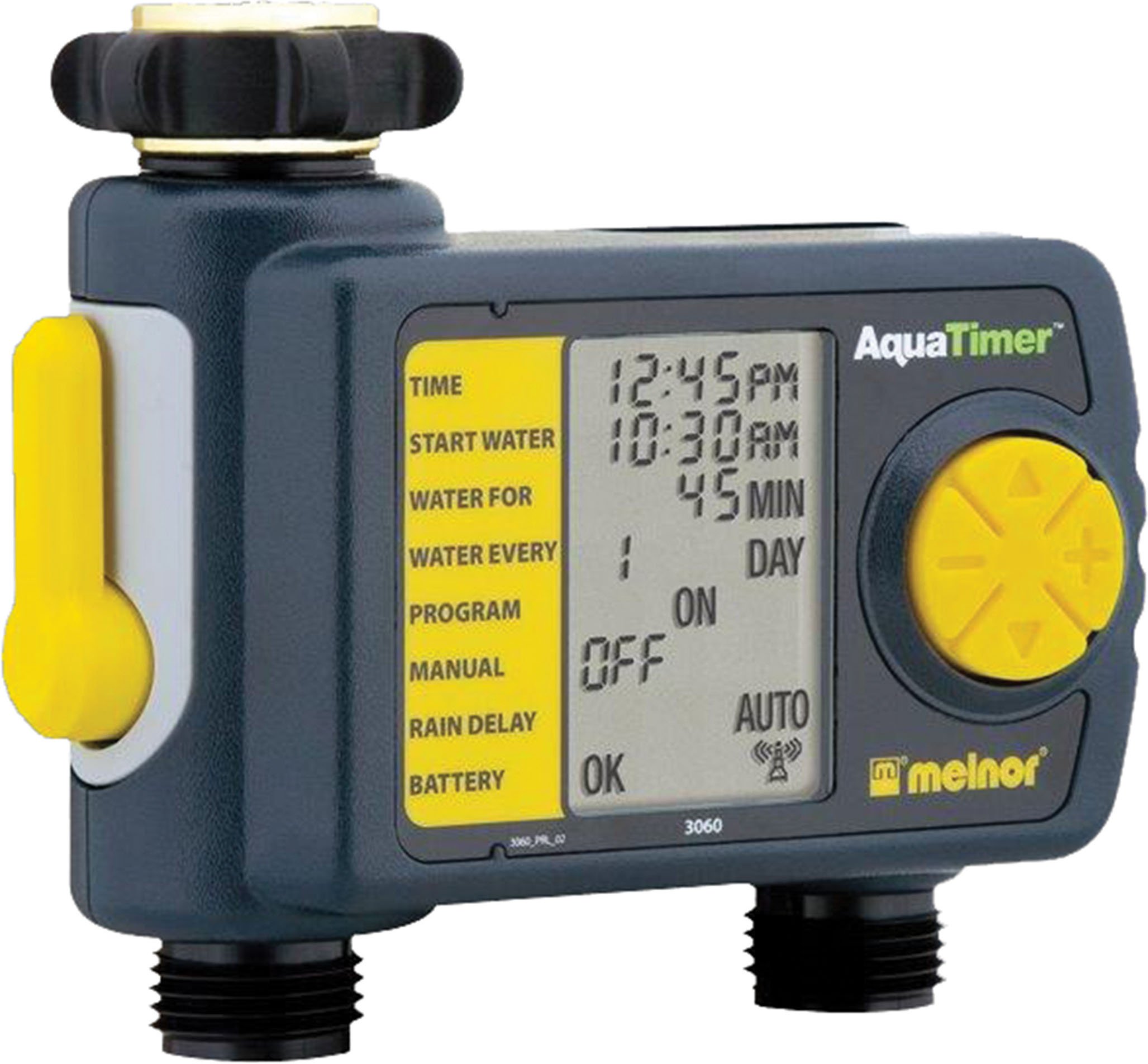
Thank you for choosing the Melnor 53100 2-Outlet Digital Water Timer. This device is designed to automate your watering schedule, providing convenience and efficiency for your garden or lawn. It features independent programming for two zones, a large LCD screen for clear information, and an easy-to-use interface for setting up your watering cycles.
2. ข้อมูลด้านความปลอดภัย
- ผลิตภัณฑ์นี้ได้รับการออกแบบมาเพื่อ ใช้ภายนอกเท่านั้น. Do not use indoors or with potable water systems unless specifically approved.
- ตรวจสอบให้แน่ใจว่าการเชื่อมต่อทั้งหมดแน่นหนาเพื่อป้องกันการรั่วไหลและความเสียหายจากน้ำ
- Do not expose the timer to freezing temperatures. Remove batteries and store indoors during winter months to prevent damage.
- Use only 1.5V AA alkaline batteries. Do not mix old and new batteries, or different types of batteries.
- คำเตือนของแคลิฟอร์เนียมาตรา 65: This product can expose you to chemicals including styrene, which is known to the State of California to cause cancer. For more information, please visit www.P65Warnings.ca.gov.
3. เนื้อหาบรรจุภัณฑ์
The Melnor 53100 package includes:
- 1 x Melnor 53100 2-Outlet Digital Water Timer
4. คุณสมบัติของผลิตภัณฑ์
- ช่องจ่ายไฟแบบคู่: Independently program two watering zones.
- หน้าจอ LCD ขนาดใหญ่: Provides clear, easy-to-read information on current settings and next watering cycle.
- การเขียนโปรแกรมแบบยืดหยุ่น: Set watering schedules up to 24 times per day for individual days of the week.
- การแทนที่ด้วยตนเอง: Easily start or stop watering manually without affecting programmed schedules.
- โครงสร้างทนทาน: Features a zinc connection nut with a non-slip rubberized grip for secure attachment.
- Soil Moisture Sensor Compatibility: Can be used with the HydroLogic soil moisture sensor (sold separately, SKU 15339).
5. การติดตั้ง
- ติดตั้งเข้ากับก๊อกน้ำ: Screw the timer onto your outdoor faucet. Ensure the zinc connection nut is tightened securely by hand to prevent leaks. Do not overtighten with tools.
- เชื่อมต่อท่อ: Attach your garden hoses to the two outlets at the bottom of the timer. Tighten connections firmly.
6. การติดตั้งแบตเตอรี่
- ค้นหาช่องใส่แบตเตอรี่ที่ด้านหลังของตัวจับเวลา
- เลื่อนเปิดฝาครอบแบตเตอรี่
- Insert two (2) fresh 1.5V AA alkaline batteries, observing the correct polarity (+/-) as indicated inside the compartment.
- Close the battery cover securely. The LCD screen should illuminate, and a battery status indicator will be visible.
- บันทึก: Use only 1.5V AA alkaline batteries. Do not use 1.2V NiMH or NiCad rechargeable batteries, as they may not provide sufficient power for optimal operation.
7. การตั้งนาฬิกา
- Turn the large dial to the ตั้งเวลา ตำแหน่ง.
- ใช้ ขึ้น/ลง arrow buttons to adjust the current hour (AM/PM). Press OK เพื่อยืนยัน.
- ใช้ ขึ้น/ลง arrow buttons to adjust the current minute. Press OK เพื่อยืนยัน.
- ใช้ ขึ้น/ลง arrow buttons to set the current day of the week. Press OK เพื่อยืนยัน.
- หมุนปุ่มกลับไป ปิดอัตโนมัติ or any other desired setting to save the time.
8. การตั้งโปรแกรมตารางการรดน้ำ
The Melnor 53100 allows independent programming for two zones. Follow these steps for each zone:
8.1. เลือกโซน
- กดปุ่ม โซน 1 2 button to toggle between Zone 1 and Zone 2. Ensure the desired zone is selected before proceeding.
8.2. Set Start Time (START WATER)
- หมุนแป้นหมุนไปที่ เริ่มน้ำ.
- ใช้ ขึ้น/ลง arrow buttons to set the desired start time for watering (AM/PM). Press OK เพื่อยืนยัน.
- You can set multiple start times for each zone if needed.
8.3. Set Watering Duration (HOW LONG)
- หมุนแป้นหมุนไปที่ นานแค่ไหน.
- ใช้ ขึ้น/ลง arrow buttons to set the watering duration in minutes or hours. Press OK เพื่อยืนยัน.
8.4. Set Watering Frequency (HOW OFTEN)
- หมุนแป้นหมุนไปที่ บ่อยแค่ไหน.
- ใช้ ขึ้น/ลง arrow buttons to select the watering frequency:
- Every X hours (e.g., every 6 hours)
- Every X days (e.g., every 2 days)
- Specific days of the week (e.g., Mon, Wed, Fri)
- กด OK เพื่อยืนยันการเลือกของคุณ
After programming, turn the dial to ปิดอัตโนมัติ to activate the schedule. The display will show the next scheduled watering time.
9. คู่มือการใช้งาน
วิธีรดน้ำด้วยตนเองโดยไม่กระทบกับตารางการรดน้ำที่ตั้งไว้:
- ตรวจสอบให้แน่ใจว่าหน้าปัดอยู่ในตำแหน่ง ปิดอัตโนมัติ ตำแหน่ง.
- กดปุ่ม ON/OFF MANUAL ปุ่ม.
- ใช้ โซน 1 2 button to select the desired zone (1 or 2).
- ใช้ ขึ้น/ลง arrow buttons to set the desired manual watering duration.
- กด OK to start manual watering. The timer will water for the set duration and then automatically turn off.
- หากต้องการหยุดการรดน้ำด้วยมือ prematurely ให้กดปุ่ม ON/OFF MANUAL ปุ่มอีกครั้ง
10. ฟังก์ชั่นหน่วงเวลาฝน
The rain delay function allows you to pause your watering schedule for a set period, conserving water after rainfall.
- ตรวจสอบให้แน่ใจว่าหน้าปัดอยู่ในตำแหน่ง ปิดอัตโนมัติ ตำแหน่ง.
- กดปุ่มค้างไว้ + (UP arrow) button for a few seconds. The display will show a rain delay duration.
- ใช้ ขึ้น/ลง arrow buttons to select the desired delay duration (e.g., 24, 48, 72 hours).
- กด OK to confirm. The timer will pause all programmed watering cycles for the selected duration and resume automatically afterward.
- To cancel rain delay, press and hold the + (UP arrow) button again until the delay is cleared.
11. การบำรุงรักษา
- การทำความสะอาด: เช็ดตัวจับเวลาด้วยโฆษณาamp cloth as needed. Do not use abrasive cleaners or submerge the unit in water.
- ฤดูหนาว: Before the first frost, disconnect the timer from the faucet and hoses. Remove the batteries. Store the timer in a dry, frost-free location indoors.
- การเปลี่ยนแบตเตอรี่: Replace batteries when the low battery indicator appears on the LCD screen to ensure continuous operation.
12 การแก้ไขปัญหา
| ปัญหา | สาเหตุที่เป็นไปได้ | สารละลาย |
|---|---|---|
| ตัวตั้งเวลาไม่รดน้ำ | แบตเตอรี่เหลือน้อยหรือหมดไฟ ก๊อกน้ำปิดอยู่ Program not set or activated Rain delay is active | เปลี่ยนแบตเตอรี่ Turn on the faucet Ensure dial is on AUTO OFF and program is set Cancel rain delay |
| น้ำรั่วจากการเชื่อมต่อ | การเชื่อมต่อหลวม Damaged washer | Tighten connections by hand ตรวจสอบและเปลี่ยนแหวนยางหากชำรุด |
| หน้าจอ LCD ว่างเปล่าหรือสว่างน้อย | แบตเตอรี่เหลือน้อยหรือหมด | Replace batteries with fresh 1.5V AA alkaline batteries |
| Timer not keeping correct time/settings reset | Extremely low batteries ความผิดปกติภายใน | เปลี่ยนแบตเตอรี่ หากปัญหายังคงอยู่ โปรดติดต่อฝ่ายบริการลูกค้า |
13. ข้อมูลจำเพาะ
- แบบอย่าง: 53100
- ช่องทางการจำหน่าย: 2
- แหล่งพลังงาน: แบตเตอรี่อัลคาไลน์ AA 1.5V จำนวน 2 ก้อน (ไม่รวมอยู่ในชุด)
- วัสดุ: โครงสร้างแข็งแรง
- น้ำหนักสินค้า: ประมาณ 11.98 ออนซ์
- จำนวนการตั้งค่า: 8 (หมายถึงตัวเลือกการเขียนโปรแกรม)
- สี: สีดำ/สีเทา
14. การรับประกันและการสนับสนุน
Melnor products are designed for durability and performance. For warranty information or technical support, please refer to the warranty card included with your purchase or visit the official Melnor webโปรดเตรียมหมายเลขรุ่น (53100) และวันที่ซื้อให้พร้อมเมื่อติดต่อฝ่ายสนับสนุน