
1. บทนำ
This manual provides detailed instructions for the setup, operation, and maintenance of your Enover TS18 7-Day Programmable Digital Timer. This device is designed to automate the control of electrical appliances by setting specific ON/OFF times throughout the week, offering convenience and energy management.
2. คุณสมบัติของผลิตภัณฑ์
- การกำหนดตารางเวลาที่ยืดหยุ่น: Program up to 10 distinct ON/OFF cycles within a 7-day period. Each program repeats weekly.
- การจัดการพลังงาน: Automatically controls lamps, holiday lights, humidifiers, and other electrical devices. Includes a feature to protect devices from overcharge.
- Security Function: Features a random ON/OFF option to vary lighting times, simulating occupancy when away from home.
- อินเทอร์เฟซที่เป็นมิตรกับผู้ใช้: Equipped with a large LCD display for clear visibility and a manual override switch for immediate control adjustments.
- แบตเตอรี่สำรอง: An integrated battery retains programmed settings during power outages, eliminating the need for reprogramming.

Image: Enover TS18 Digital Timer highlighting key features for easy home automation.
3. เนื้อหาบรรจุภัณฑ์
แพ็คเกจประกอบด้วยรายการต่อไปนี้:
- 1 x Enover Digital Timer Switch (Model TS18)
- 1 x คู่มือผู้ใช้

Image: Contents of the Enover TS18 Digital Timer package, including the timer and manual.
4. สินค้าหมดview
The Enover TS18 Digital Timer features a clear LCD display and intuitive buttons for easy programming. It plugs directly into a standard electrical outlet.

ภาพ: ด้านหน้า view of the Enover TS18 Digital Timer, displaying the time and control buttons.
ปุ่มฟังก์ชั่น:
- สัปดาห์: Sets the day(s) for programs.
- ชั่วโมง: Adjusts the hour for time and program settings.
- นาที: Adjusts the minute for time and program settings.
- RES/RCL: Resets or recalls settings.
- นาฬิกา: Enters or exits clock setting mode.
- ตัวจับเวลา: Cycles through program settings (P1 ON, P1 OFF, P2 ON, etc.).
- เปิด/อัตโนมัติ/ปิด: Selects operating mode (Always ON, Automatic, Always OFF).
- สุ่ม: Activates or deactivates the random ON/OFF function.
- รีเซ็ต: Small button (requires a pointed object) to clear all settings and reset the device.
Video: A brief demonstration of the Enover Digital Timer's basic functions and display.
5. การตั้งค่า
5.1 ค่าบริการเริ่มต้น
Before first use, plug the timer into an electrical outlet for approximately 5-10 minutes to charge the internal battery. This ensures the display is active and settings can be retained.
5.2 การตั้งเวลาและวันปัจจุบัน
- กดปุ่มค้างไว้ นาฬิกา ปุ่ม.
- ขณะถืออยู่ นาฬิกา, กดปุ่ม สัปดาห์ button repeatedly to set the current day of the week.
- ขณะถืออยู่ นาฬิกา, กดปุ่ม ชั่วโมง button repeatedly to set the current hour (AM/PM will display).
- ขณะถืออยู่ นาฬิกา, กดปุ่ม นาที กดปุ่มซ้ำๆ เพื่อตั้งนาทีปัจจุบัน
- ปล่อยตัว นาฬิกา เพื่อบันทึกการตั้งค่า
6. คู่มือการใช้งาน
6.1 การตั้งโปรแกรมรอบการเปิด/ปิด
ตัวตั้งเวลาสามารถตั้งโปรแกรมเปิด/ปิดได้สูงสุด 10 โปรแกรม ทำตามขั้นตอนต่อไปนี้เพื่อตั้งโปรแกรม:
- กดปุ่ม ตัวจับเวลา กดปุ่มหนึ่งครั้ง หน้าจอจะแสดง "1 ON"
- กด สัปดาห์ to select the day(s) for this program (e.g., MO, TU, WE, TH, FR, SA, SU, MO TU WE TH FR, SA SU, MO TU WE TH FR SA SU, etc.).
- กด ชั่วโมง เพื่อตั้งเวลาเปิดใช้งานที่ต้องการ
- กด นาที เพื่อตั้งค่านาทีที่ต้องการเปิดใช้งาน
- กดปุ่ม ตัวจับเวลา กดปุ่มอีกครั้ง หน้าจอจะแสดง "1 OFF"
- Repeat steps 2-4 to set the desired OFF time for Program 1. Ensure the correct day(s) are selected for the OFF time.
- กดต่อไป ตัวจับเวลา to cycle through and set additional programs (2 ON, 2 OFF, up to 10 ON, 10 OFF).
- หลังจากตั้งค่าโปรแกรมที่ต้องการทั้งหมดแล้ว ให้กดปุ่ม นาฬิกา ปุ่มเพื่อกลับสู่การแสดงเวลาปัจจุบัน
- ตรวจสอบให้แน่ใจว่าตัวจับเวลาเปิดใช้งานอยู่ ออโต้ mode for programs to execute. Press เปิด/อัตโนมัติ/ปิด เพื่อวนไป ออโต้.
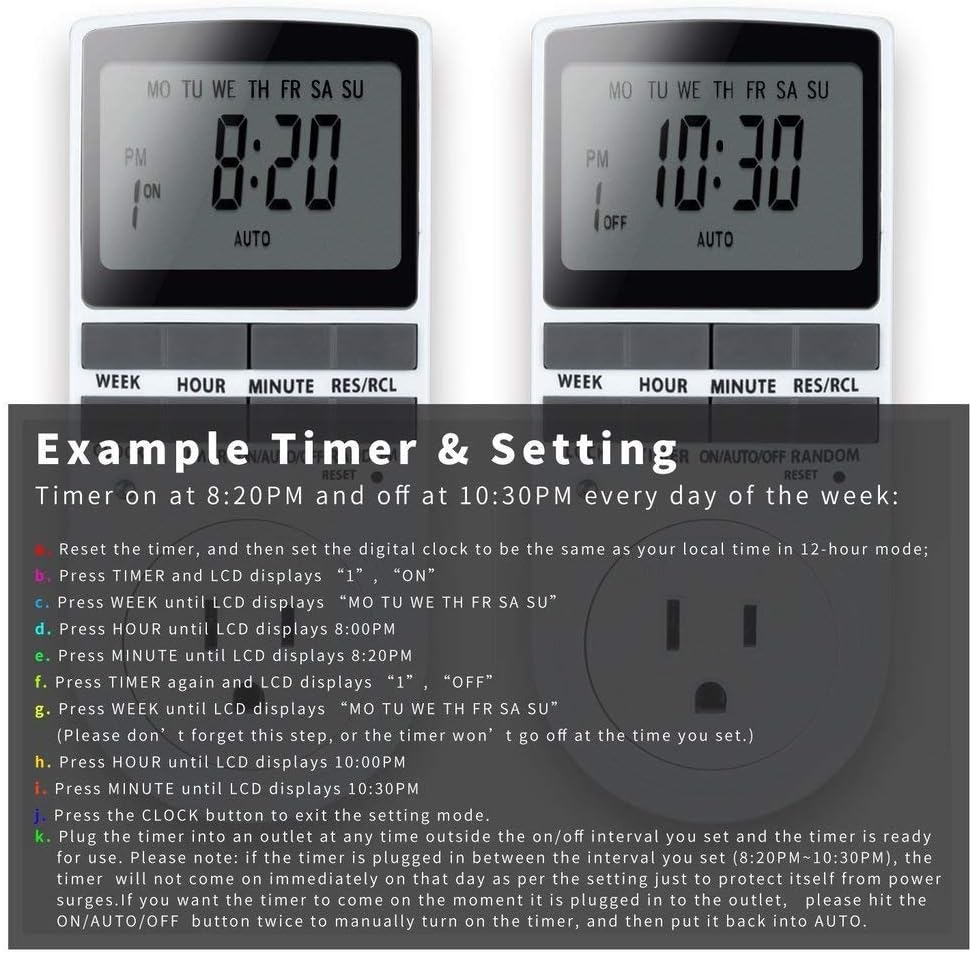
Image: Visual guide for setting an example timer program (ON at 8:20 PM, OFF at 10:30 PM daily).
6.2 Random Function (Anti-theft)
To activate the random ON/OFF feature:
- กดปุ่ม สุ่ม button. The word "RANDOM" will appear on the display.
- In random mode, the timer will turn ON and OFF at varying times within a set period, typically around the programmed ON/OFF times, to simulate occupancy.
- หากต้องการปิดใช้งาน ให้กดปุ่ม สุ่ม ปุ่มอีกครั้ง

Image: The anti-theft random feature of the Enover TS18 Digital Timer, designed to deter intruders.
6.3 การแทนที่ด้วยตนเอง
To manually switch the timer's output without affecting programmed settings:
- กดปุ่ม เปิด/อัตโนมัติ/ปิด ปุ่มเพื่อหมุนเวียนไปตามโหมดต่างๆ: ON (เปิดใช้งานตลอดเวลา) ออโต้ (ปฏิบัติตามโปรแกรม) ปิด (ปิดอยู่เสมอ)
- Select the desired temporary mode. The timer will revert to ออโต้ mode at the next programmed ON/OFF event.
Video: A detailed demonstration of setting programs and using the manual override function on the Enover Digital Timer.
7. การสมัคร
The Enover TS18 Digital Timer can be used to automate various household devices, enhancing convenience and energy efficiency.
- Coffee Makers: Program your coffee maker to start brewing before you wake up.
- Aquarium Lights/Pumps: Automate the lighting and filtration cycles for your aquarium.
- Indoor Grow Lights: Maintain consistent light schedules for plants.
- การตกแต่งวันหยุด: Set festive lights to turn on and off automatically.
- Fans/Humidifiers: Control environmental devices to operate only when needed.

ภาพ: อดีตamples of automating daily routines with the Enover TS18 Digital Timer, such as a coffee maker and aquarium.
8. ข้อมูลจำเพาะ
| หมายเลขรุ่น | TS18 |
| ยี่ห้อ | เอโนเวอร์ |
| สี | สีขาว |
| วัสดุ | พลาสติก |
| จำนวนการตั้งค่า | 10 (โปรแกรมเปิด/ปิด) |
| เล่มที่tage | 120 โวลต์ |
| วัดtage | 1800 วัตต์ |
| Ampกำลังการผลิตไฟฟ้า | 15 Amps |
| วิธีการติดตั้ง | ปลั๊กอิน |
| ประเภทการติดตั้ง | เสียบปลั๊ก |
| รูปแบบปลั๊ก | B - แบบอเมริกันพร้อมปลั๊กสายดิน |
| คุณสมบัติพิเศษ | 3-wire grounded plug and 3-prong grounded outlet |
| การใช้งาน | ใช้ภายในอาคารเท่านั้น |
| น้ำหนักสินค้า | 6.4 ออนซ์ |
| ขนาดแพ็คเกจ | 5.67 x 3.31 x 2.6 นิ้ว |
| ประเภทเซลล์แบตเตอรี่ | นิเกิลเอ็มเอช |
| อายุการใช้งานแบตเตอรี่ | 100 days (backup) |
9 การแก้ไขปัญหา
- ตัวตั้งเวลาไม่เปิด/ปิดตามที่ตั้งโปรแกรมไว้:
- ตรวจสอบให้แน่ใจว่าตัวจับเวลาเปิดใช้งานอยู่ ออโต้ โหมด.
- ตรวจสอบว่าเวลาและวันปัจจุบันตั้งค่าถูกต้องแล้ว
- Check that the ON and OFF times for the specific program are correctly entered and assigned to the desired days.
- Confirm the appliance connected to the timer is switched ON.
- จอแสดงผลว่างเปล่าหรือมืดลง:
- Plug the timer into an active electrical outlet for 5-10 minutes to charge the internal battery.
- การตั้งค่าทั้งหมดจะหายไปหลังจากไฟดับtage:
- The internal battery may not be sufficiently charged. Ensure the timer is regularly plugged in to maintain battery charge.
- To clear all settings:
- Use a pointed object (like a pen tip) to press the รีเซ็ต button. This will clear all programs and reset the clock. You will need to re-enter all settings.
10. การรับประกันและการสนับสนุน
For warranty information or technical support, please refer to the contact details provided on the product packaging or the official Enover webไซต์นี้ โปรดเก็บใบเสร็จรับเงินที่ซื้อไว้เพื่อใช้เรียกร้องการรับประกัน