
1. บทนำ
This manual provides detailed instructions for the operation and maintenance of your Supersonic SC-1495BT Bluetooth AM/FM Boombox. Please read this manual thoroughly before using the device to ensure proper function and to maximize your listening experience.
2. ข้อมูลด้านความปลอดภัย
- อย่าให้เครื่องโดนฝนหรือความชื้นเพื่อป้องกันไฟไหม้หรือไฟฟ้าช็อต
- อย่าปิดกั้นช่องระบายอากาศ ควรมีพื้นที่รอบเครื่องเพียงพอเพื่อให้อากาศถ่ายเทได้สะดวก
- ควรหลีกเลี่ยงการวางเครื่องไว้ใกล้แหล่งความร้อน เช่น เครื่องทำความร้อน ช่องระบายความร้อน เตา หรืออุปกรณ์อื่นๆ (รวมถึง) ampเครื่องให้ความร้อน) ที่ผลิตความร้อน
- ใช้เฉพาะอุปกรณ์เสริม/สิ่งที่แนบที่ผู้ผลิตกำหนดเท่านั้น
- ถอดปลั๊กอุปกรณ์นี้ในระหว่างพายุฝนฟ้าคะนองหรือเมื่อไม่ได้ใช้งานเป็นเวลานาน
- ส่งต่อการบริการทั้งหมดไปยังช่างบริการที่ผ่านการรับรอง จำเป็นต้องเข้ารับบริการเมื่ออุปกรณ์ได้รับความเสียหายแต่อย่างใด
3. เนื้อหาบรรจุภัณฑ์
เมื่อแกะกล่องแล้ว โปรดตรวจสอบให้แน่ใจว่ามีสิ่งของทั้งหมดที่ระบุไว้ด้านล่างนี้ครบถ้วน:
- Supersonic SC-1495BT Bluetooth AM/FM Boombox
- สายไฟ AC
4. คุณสมบัติของผลิตภัณฑ์
The Supersonic SC-1495BT Boombox offers a variety of features for versatile audio playback:
- Bluetooth Version 3.0 for wireless music streaming
- Built-in USB input for media playback
- Built-in SD card and Micro SD card slot for media playback
- 3.5 mm Line-in (AUX) jack for external audio devices
- Four-band radio: AM, FM, SW1, SW2
- Integrated rechargeable battery for portable use
- จอ LCD ที่ชัดเจน
- Fast forward and rewind functions for media playback
- 360-degree rod antenna for enhanced radio reception
- การควบคุมระดับเสียงแบบหมุน
- ช่องเสียบหูฟังสำหรับการฟังแบบส่วนตัว
- AC/DC operation for flexible power options
5. การควบคุมและการเชื่อมต่อ
Familiarize yourself with the various controls and connection ports on your boombox.
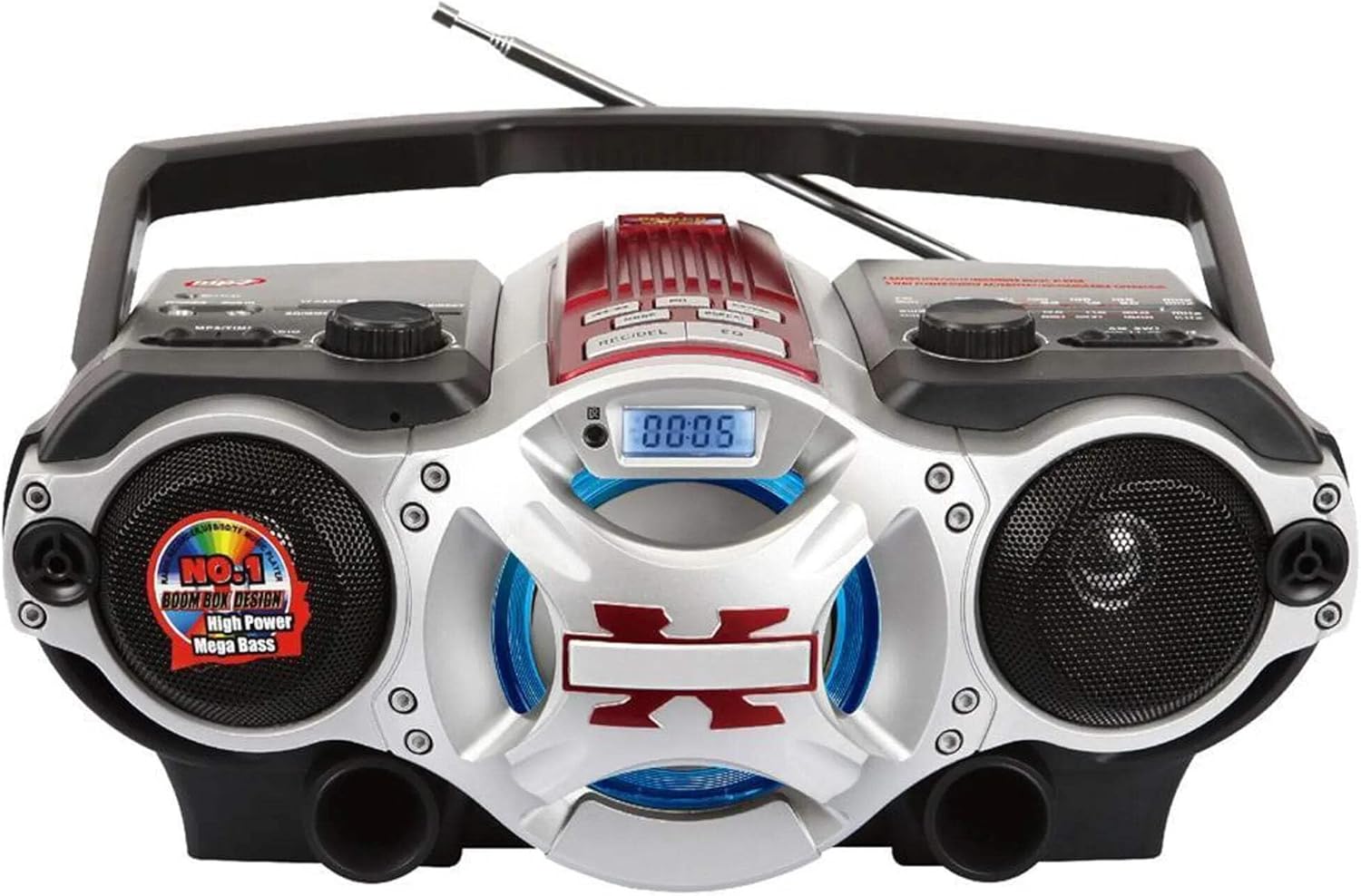
รูปที่ 1: ด้านหน้า view of the Supersonic SC-1495BT Boombox, showing the speakers, central display, and main control area.

รูปที่ 2: Left side controls, including USB input, SD/Micro SD card slot, AUX IN, PHONES jack, BT/MP3/RADIO mode switch, and Rotary Volume control.

รูปที่ 3: Right side controls, featuring the AM/FM/SW1/SW2 band selector, TUNING knob, and playback control buttons (Play/Pause, Skip, Mode, Clock, EQ).
6. การตั้งค่า
6.1 การเชื่อมต่อสายไฟ
- ไฟฟ้ากระแสสลับ: Connect the included AC power cord to the AC input on the back of the boombox and then plug it into a standard wall outlet. The internal rechargeable battery will begin charging.
- DC Power (Battery): The boombox has a built-in rechargeable battery. Ensure it is charged before portable use. The unit can also operate on DC power from the internal battery when not connected to AC.
6.2 การปรับเสาอากาศ
Extend the 360-degree rod antenna for optimal radio reception, especially for FM and SW bands. Adjust its position for the clearest signal.
7. คู่มือการใช้งาน
7.1 การเปิด/ปิดเครื่องและการเลือกโหมด
- To power on the unit, slide the BT/MP3/RADIO switch to the desired mode (BT, MP3, or RADIO).
- To power off, slide the switch to the OFF position.
7.2 การทำงานของบลูทูธ
- เลื่อนสวิตช์โหมดไปที่ BT (Bluetooth). The LCD display will indicate Bluetooth mode, and the unit will enter pairing mode.
- บนอุปกรณ์ที่รองรับ Bluetooth ของคุณ (สมาร์ทโฟน แท็บเล็ต ฯลฯ) ให้เปิดใช้งาน Bluetooth และค้นหาอุปกรณ์ที่มีอยู่
- Select "SC-1495BT" from the list of devices. Once paired, the unit will emit a confirmation sound.
- You can now play audio from your device through the boombox. Use your device or the boombox's playback controls (Play/Pause, Skip) to manage music.
7.3 Radio Operation (AM/FM/SW1/SW2)
- เลื่อนสวิตช์โหมดไปที่ วิทยุ.
- เลือกคลื่นความถี่ที่ต้องการ (AM, FM, SW1 หรือ SW2) โดยใช้สวิตช์เลือกคลื่นความถี่
- Extend and adjust the rod antenna for optimal reception.
- หมุน การปรับแต่ง knob to scan for radio stations. The frequency will be displayed on the LCD.
7.4 การเล่นไฟล์ผ่าน USB/การ์ด SD
- เลื่อนสวิตช์โหมดไปที่ เอ็มพี 3.
- Insert a USB flash drive into the USB input or an SD/Micro SD card into the corresponding slot. Ensure the card is inserted correctly.
- The unit will automatically detect and begin playing MP3 audio fileจากสื่อที่แทรกเข้าไป
- Use the playback control buttons (Play/Pause, Skip, Fast Forward, Rewind) to navigate tracks.
7.5 อินพุตเสริม (AUX)
- เลื่อนสวิตช์โหมดไปที่ เอ็มพี 3.
- เชื่อมต่ออุปกรณ์เสียงภายนอก (เช่น เครื่องเล่น MP3, สมาร์ทโฟน) เข้ากับ AUX IN เสียบเข้ากับแจ็คโดยใช้สายสัญญาณเสียงขนาด 3.5 มม. (ไม่รวมอยู่ในชุด)
- Play audio from your external device. The sound will be routed through the boombox speakers. Control playback from your external device.
7.6 การควบคุมระดับเสียง
หมุน ปริมาณ หมุนปุ่มตามเข็มนาฬิกาเพื่อเพิ่มระดับเสียง และหมุนทวนเข็มนาฬิกาเพื่อลดระดับเสียง
7.7 แจ็คหูฟัง
For private listening, plug standard 3.5mm earphones (not included) into the โทรศัพท์ jack. The main speakers will be muted.
8. การบำรุงรักษา
- การทำความสะอาด: ใช้ผ้านุ่มและแห้งเช็ดทำความสะอาดภายนอกตัวเครื่อง ห้ามใช้น้ำยาทำความสะอาดที่มีฤทธิ์กัดกร่อนหรือตัวทำละลาย
- พื้นที่จัดเก็บ: เมื่อไม่ได้ใช้งานเป็นเวลานาน ควรเก็บเครื่องเล่นเพลงไว้ในที่แห้งและเย็น หลีกเลี่ยงแสงแดดโดยตรงและอุณหภูมิที่สูงหรือต่ำเกินไป
- การดูแลแบตเตอรี่ To prolong the life of the built-in rechargeable battery, avoid fully discharging it frequently. Charge the unit regularly, even if not in use.
9 การแก้ไขปัญหา
If you encounter issues with your boombox, refer to the following common problems and solutions:
| ปัญหา | สาเหตุที่เป็นไปได้ | สารละลาย |
|---|---|---|
| ไม่มีไฟฟ้า | AC cord not connected; Battery discharged; Power switch off | Ensure AC cord is securely plugged in; Charge the battery; Slide power switch to ON/BT/MP3/RADIO. |
| ไม่มีเสียง | Volume too low; Mute activated (if applicable); Incorrect mode selected; Earphones connected | Increase volume; Ensure correct mode (BT, MP3, RADIO) is selected; Disconnect earphones. |
| บลูทูธไม่จับคู่ | Boombox not in pairing mode; Device Bluetooth off; Too far from boombox | Ensure boombox is in BT mode; Enable Bluetooth on your device; Move device closer (within 30 feet/10 meters); Try re-pairing. |
| การรับสัญญาณวิทยุไม่ดี | Antenna not extended/adjusted; Weak signal area | Fully extend and adjust the rod antenna; Try moving the unit to a different location. |
| ไม่สามารถเล่น USB/SD การ์ดได้ | ไม่ถูกต้อง file รูปแบบไม่ถูกต้อง; เสียบการ์ด/ไดรฟ์ไม่ถูกต้อง; ไฟล์เสียหาย files | ทำให้มั่นใจ files are MP3 format; Re-insert card/drive; Try a different USB drive or SD card. |
10. ข้อมูลจำเพาะ
- แบบอย่าง: SC-1495BT
- ยี่ห้อ: เหนือเสียง
- การเชื่อมต่อ: Bluetooth (Ver. 3.0), USB, SD/Micro SD, 3.5mm AUX
- วงวิทยุ: เอเอ็ม, เอฟเอ็ม, ซว1, ซว2
- รูปแบบเสียงที่รองรับ: เอ็มพี 3
- แหล่งพลังงาน: AC 110-220V, Built-in Rechargeable Battery
- วิทยากร: 2 (สเตอริโอ)
- ขนาด (ยาว x กว้าง x สูง): 15 x 10 x 12 นิ้ว
- น้ำหนัก: 4.3 ปอนด์
- ผู้ผลิต: Capitol Sales Company
- ยูพีซี: 639131814950
11. การรับประกัน
This product comes with a 1-year limited warranty. Please retain your proof of purchase for warranty claims. For specific warranty terms and conditions, refer to the documentation included with your purchase or contact Supersonic customer support.
12. การสนับสนุน
For further assistance, technical support, or inquiries regarding your Supersonic SC-1495BT Boombox, please visit the official Supersonic webหรือติดต่อฝ่ายบริการลูกค้า โดยทั่วไปข้อมูลการติดต่อจะอยู่ในเว็บไซต์ของผู้ผลิต webบรรจุภัณฑ์ไซต์หรือผลิตภัณฑ์