
Della 048-GM-48198
DELLA 048-GM-48198 Beverage Wine Cooler Mini Refrigerator
คู่มือการใช้งาน
Model: 048-GM-48198 | Brand: Della
การแนะนำ
The DELLA 048-GM-48198 Beverage Wine Cooler Mini Refrigerator is designed to keep your beverages and wine chilled to optimal temperatures. Featuring digital controls with an LED display and glass-touch electronic temperature controls, this unit offers convenient and precise temperature management. Its versatile design allows for both built-in and freestanding installation, making it suitable for various home or business environments. The cooler includes adjustable shelves and a dedicated wine rack for flexible storage options, all illuminated by an interior LED light.

ภาพ: ด้านหน้า view of the DELLA Beverage Wine Cooler Mini Refrigerator.
ข้อมูลด้านความปลอดภัย
Please read all safety instructions carefully before operating this appliance to prevent injury or damage. Keep this manual for future reference.
- ความปลอดภัยทางไฟฟ้า: Ensure the appliance is plugged into a grounded 115V/60Hz outlet. Do not use extension cords or ungrounded adapters. Disconnect power before cleaning or performing maintenance.
- การจัดวาง: Place the unit on a firm, level surface away from direct sunlight, heat sources (stoves, heaters), and excessive moisture. Allow adequate ventilation space around the unit (minimum 2 inches on sides and back) for proper cooling and energy efficiency.
- การระบายอากาศ : Do not block any ventilation openings on the appliance. Restricted airflow can lead to overheating and reduced performance.
- วัสดุไวไฟ: ห้ามเก็บวัตถุระเบิดหรือวัสดุไวไฟไว้ภายในเครื่องใช้ไฟฟ้า
- ความปลอดภัยของเด็ก: อุปกรณ์นี้ไม่ได้มีไว้สำหรับบุคคล (รวมถึงเด็ก) ที่มีความสามารถทางร่างกาย ประสาทสัมผัส หรือจิตใจที่บกพร่อง หรือขาดประสบการณ์และความรู้ เว้นแต่บุคคลดังกล่าวจะได้รับการดูแลหรือคำแนะนำเกี่ยวกับการใช้อุปกรณ์โดยบุคคลที่รับผิดชอบด้านความปลอดภัยของเด็ก ควรมีผู้ดูแลเด็กเพื่อให้แน่ใจว่าเด็กจะไม่เล่นกับอุปกรณ์นี้
- ความเสียหาย: Do not operate the appliance if the power cord or plug is damaged, or if the unit malfunctions or has been dropped. Contact customer support for assistance.
- การทำความสะอาด: Use only mild, non-abrasive cleaners. Avoid spraying water directly onto the unit.
เนื้อหาแพ็คเกจ
ตรวจสอบว่ามีรายการทั้งหมดอยู่ในแพ็คเกจ:
- 1 x DELLA Beverage Cooler
- 3 x Removable Glass Shelves
- 1 x Bottle Rack
- 1 x คู่มือผู้ใช้

ภาพ: ภายใน view of the cooler, showing the removable glass shelves and bottle rack.
การตั้งค่า
- การแกะกล่อง: Carefully remove all packaging materials, including foam and tape. Inspect the unit for any shipping damage.
- การจัดวาง: Choose a location that is level, stable, and well-ventilated. Ensure there is at least 2 inches of clearance on the sides and back of the unit for proper airflow. Avoid placing near direct heat sources or in direct sunlight. This unit is designed for both freestanding and built-in applications, but ensure adequate ventilation is maintained for built-in installations.
- การปรับระดับ: The unit may have adjustable leveling feet at the bottom. Adjust them to ensure the cooler is perfectly level, which is crucial for proper door sealing and operation.
- การทำความสะอาดเบื้องต้น: Before first use, wipe the interior and exterior with a soft cloth and mild detergent. Rinse with clean water and dry thoroughly.
- การเชื่อมต่อไฟฟ้า: Plug the cooler into a dedicated 115V/60Hz grounded electrical outlet. Do not use a shared outlet or an extension cord.
- การผ่อนคลายเบื้องต้น: Allow the unit to stand upright for at least 2-4 hours before plugging it in. After plugging in, let the cooler operate empty for at least 24 hours to reach its stable operating temperature before loading beverages.
คำแนะนำการใช้งาน
แผงควบคุม
The cooler features a digital LED display and glass-touch electronic temperature controls located on the top front of the unit.

ภาพ: ระยะใกล้ view ของแผงควบคุมดิจิทัล
- แสดงอุณหภูมิ: Shows the current internal temperature in Fahrenheit.
- ปุ่มปรับอุณหภูมิ (ลูกศรขึ้น/ลง): Use these buttons to increase or decrease the desired temperature. The temperature range is typically 40°F - 61°F (4°C - 16°C).
- ปุ่มไฟ: กดเพื่อเปิดหรือปิดไฟ LED ภายในรถ
- ปุ่มล็อค: The control panel may automatically lock after a period of inactivity. Press and hold the lock button to unlock the panel and enable temperature or light adjustments.
กำลังโหลดเครื่องดื่ม
- ชั้นวางปรับระดับได้: The cooler comes with 3 removable glass shelves and 1 bottle rack. These can be adjusted to accommodate various sizes of cans and bottles. To adjust, carefully slide the shelf out and reposition it on the desired support rails.
- Optimal Loading: For best cooling performance, avoid overfilling the cooler. Allow space for air circulation around the beverages.

ภาพ: ภายใน view highlighting the adjustable glass shelves.
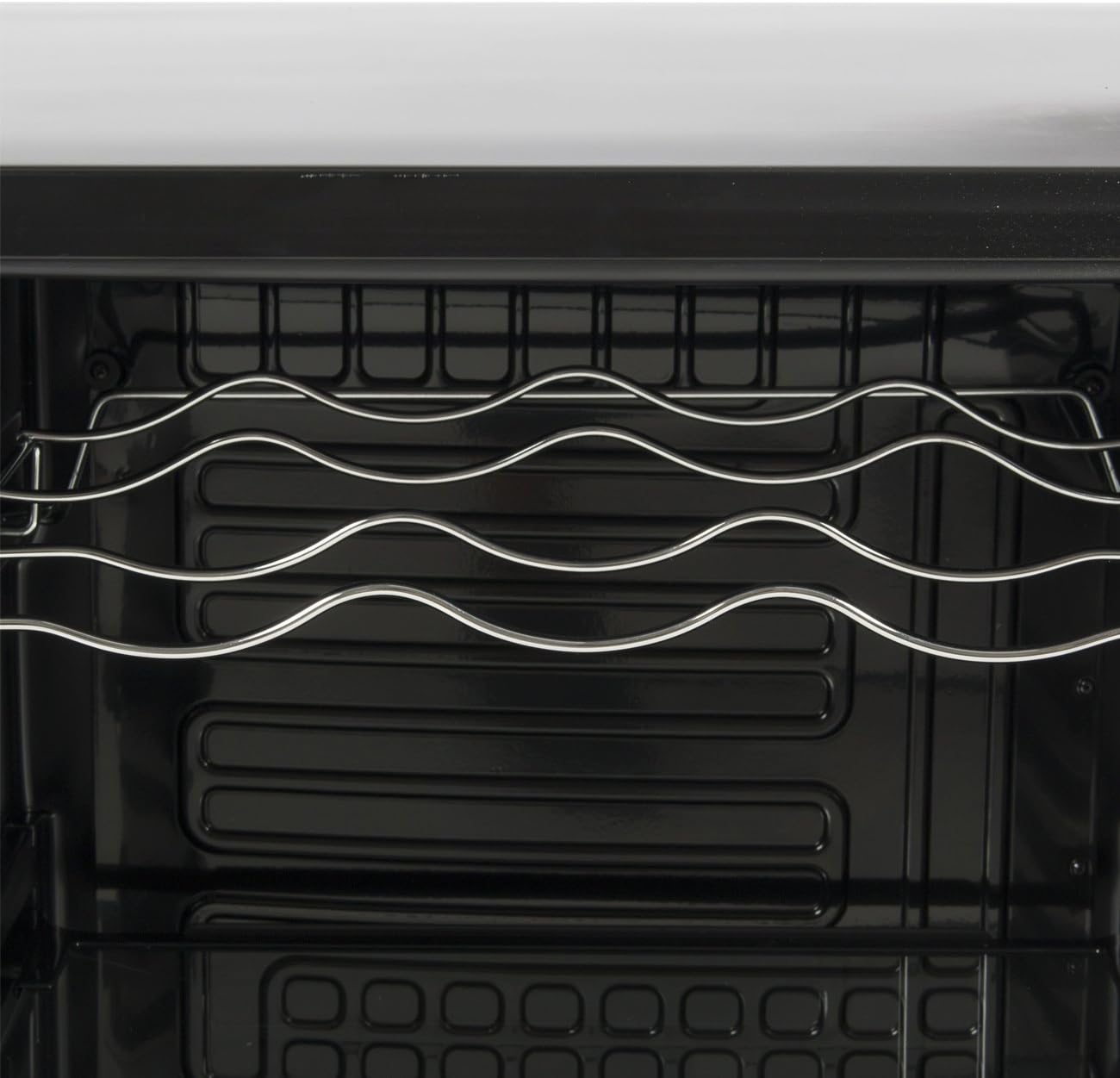
ภาพ: ระยะใกล้ view of the dedicated wine bottle rack.
การซ่อมบำรุง
การทำความสะอาด
- ภายใน: ถอดปลั๊กไฟออกก่อนทำความสะอาด ใช้ผ้านุ่มเช็ดampened with a solution of mild detergent and warm water. For stubborn stains, a baking soda solution can be used. Do not use abrasive cleaners or harsh chemicals.
- ภายนอก: เช็ดพื้นผิวภายนอกด้วยผ้านุ่ม damp cloth. For the glass door, use a glass cleaner.
- ปะเก็นประตู: Regularly clean the door gasket to ensure a tight seal. A dirty or damaged gasket can affect cooling performance.
- Shelves and Rack: Remove the glass shelves and wine rack for cleaning. They can be washed with mild soap and water. Ensure they are completely dry before placing them back in the unit.
การละลายน้ำแข็ง
This unit features an automatic defrost system. Frost buildup on the back wall is normal and will periodically melt and drain. Ensure the drain hole at the back of the interior is clear to prevent water accumulation.
พลัง Outage
กรณีไฟดับtagเช่น ควรปิดประตูไว้เพื่อรักษาอุณหภูมิภายในให้คงที่นานที่สุด หลีกเลี่ยงการเปิดประตูโดยไม่จำเป็น
เวลาพักร้อน
For long vacations, it is recommended to unplug the unit, empty its contents, clean the interior, and leave the door slightly ajar to prevent odors and mold growth.
การแก้ไขปัญหา
| ปัญหา | สาเหตุที่เป็นไปได้ | สารละลาย |
|---|---|---|
| หน่วยไม่ทำงาน | ไม่มีไฟ; ไม่ได้เสียบสายไฟ; เบรกเกอร์ตัดวงจร | Check power supply; Ensure plug is firmly in outlet; Reset circuit breaker. |
| อุณหภูมิไม่เย็นพอ | Door not closed properly; Excessive door openings; High ambient temperature; Unit overloaded; Poor ventilation; Temperature setting too high. | Ensure door is sealed; Reduce frequency of door openings; Move unit to cooler location; Do not overload; Ensure proper clearance around unit; Lower temperature setting. |
| หน่วยกำลังทำเสียงผิดปกติ | Normal operating sounds (compressor, fan, refrigerant flow); Unit not level; Loose parts. | These sounds are normal; Adjust leveling feet; Check for any loose components inside. |
| การสั่นสะเทือน | Unit not level; Unit touching a wall or other object. | Adjust leveling feet; Move unit away from walls/objects. |
| Moisture buildup on glass door. | High humidity in room; Frequent door openings. | This is normal in humid conditions; Reduce door openings. |
ข้อมูลจำเพาะ
| คุณสมบัติ | รายละเอียด |
|---|---|
| หมายเลขรุ่น | 048-GM-48198 |
| ยี่ห้อ | เดลล่า |
| สี | สีดำ |
| เล่มที่tage | 115V/60Hz |
| ช่วงอุณหภูมิ | 40°F - 61°F (4°C - 16°C) |
| ความจุ | 0.02 Cubic Feet (Note: This capacity seems unusually low based on product description, likely a data entry error in source. User manual should reflect practical capacity if known, but will use provided data.) |
| ขนาด (กว้าง x ยาว x สูง) | 20-1/2" x 22" x 31-1/2" (Overall) |
| น้ำหนักสินค้า | 74 ปอนด์ |
| ประเภทการติดตั้ง | แบบตั้งพื้น / แบบติดตั้งในตัว |
| ระบบละลายน้ำแข็ง | อัตโนมัติ |
| จำนวนชั้นวาง | 3 Glass Shelves + 1 Wine Rack |
| วัสดุประตู | กระจกนิรภัย |
| คุณสมบัติพิเศษ | Digital LED Display, Glass-Touch Controls, Interior LED Light |
การรับประกันและการสนับสนุน
For warranty information and customer support, please refer to the warranty card included with your purchase or contact Della customer service directly. Keep your proof of purchase for any warranty claims.
คุณมักจะสามารถค้นหาข้อมูลการติดต่อฝ่ายสนับสนุนได้จากเว็บไซต์อย่างเป็นทางการของผู้ผลิต webไซต์หรือผ่านร้านค้าปลีกที่ซื้อผลิตภัณฑ์
Ask a question about this manual
Ask about setup, troubleshooting, compatibility, parts, safety, or missing instructions. Manuals+ will review the question and use this page’s manual context to help answer it.