
1. บทนำ
The AXTON N-A480DSP-ISO19 is a vehicle-specific Plug & Play connection cable designed for seamless integration with AXTON DSP amplifiers in compatible Ford vehicles. This cable simplifies the installation process by providing a direct connection between your vehicle's factory radio harness and your AXTON DSP amplifier, eliminating the need for complex wiring modifications.
Compatible AXTON DSP Ampเครื่องฟอก: A430DSP, A480DSP, A500DSP, A530DSP, A580DSP, A590DSP
Compatible Ford Vehicles: Ford Fiesta, Ford Focus, Ford Explorer
2. ข้อมูลด้านความปลอดภัย
- ควรตัดการเชื่อมต่อแบตเตอรี่รถยนต์ทุกครั้งก่อนทำการซ่อมแซมหรือบำรุงรักษาใดๆ ที่เกี่ยวข้องกับระบบไฟฟ้า เพื่อป้องกันไฟฟ้าลัดวงจรและไฟฟ้าช็อต
- ตรวจสอบให้แน่ใจว่าการเชื่อมต่อทั้งหมดมีความปลอดภัยและมีฉนวนป้องกันอย่างเหมาะสมเพื่อหลีกเลี่ยงอันตรายจากไฟฟ้า
- Do not modify the cable. Any modifications may void the warranty and create safety risks.
- If you are unsure about any installation steps, consult a qualified car audio technician.
- Keep the cable away from moving parts, sharp edges, and sources of extreme heat or moisture.
3. เนื้อหาบรรจุภัณฑ์
Please check the package for the following item:
- 1x AXTON N-A480DSP-ISO19 Plug & Play Connection Cable (approx. 1.50 m length)
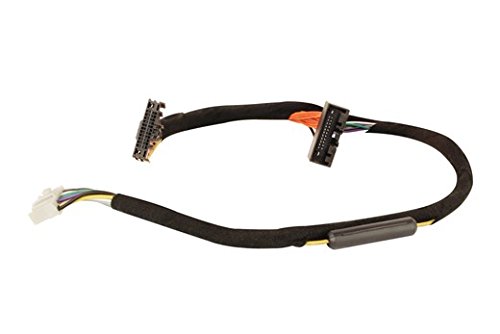
Image showing the AXTON N-A480DSP-ISO19 Plug & Play connection cable, featuring its multi-pin connectors designed for vehicle and ampการรวมลิเวอร์
4. การตั้งค่าและการติดตั้ง
Follow these steps for proper installation of the AXTON N-A480DSP-ISO19 connection cable:
- เตรียมยานพาหนะ: Ensure the vehicle's ignition is off and the negative terminal of the battery is disconnected to prevent any electrical issues during installation.
- Access Radio Harness: Carefully remove the vehicle's factory radio or infotainment unit to gain access to the rear connections and the factory wiring harness. Refer to your vehicle's service manual for specific instructions on how to safely remove the radio.
- Connect to Vehicle Harness: Locate the factory radio harness. Connect one end of the AXTON N-A480DSP-ISO19 cable to the corresponding connectors on the vehicle's factory harness. The Plug & Play design ensures a precise fit.
- Connect to DSP Ampเครื่องฟอก: Connect the other end of the N-A480DSP-ISO19 cable to the input/output ports of your compatible AXTON DSP amplifier (e.g., A430DSP, A480DSP, A580DSP). Ensure a firm and secure connection.
- การเดินสายไฟที่ปลอดภัย: Route the cable safely, ensuring it is not pinched, stretched, or exposed to sharp edges. Use cable ties if necessary to secure the wiring away from moving parts or heat sources.
- Reassemble and Reconnect: Carefully reassemble the vehicle's radio and trim panels. Reconnect the vehicle's battery.
- ระบบทดสอบ: Turn on the vehicle's ignition and test the audio system to ensure proper functionality of the DSP amplifier and sound output.
5. คู่มือการใช้งาน
The AXTON N-A480DSP-ISO19 cable acts as an interface, facilitating the audio signal and power connection between your Ford vehicle's audio system and the AXTON DSP amplifier. Once correctly installed, the cable requires no further direct operation.
The operation and configuration of your audio system, including sound adjustments and DSP settings, will be managed through your specific AXTON DSP amplifier and its accompanying software or controls. Please refer to the user manual provided with your AXTON DSP amplifier for detailed operating instructions.
6. การบำรุงรักษา
The AXTON N-A480DSP-ISO19 connection cable is designed for durability and requires minimal maintenance. To ensure optimal performance and longevity:
- การตรวจสอบเป็นระยะ: ตรวจสอบการเชื่อมต่อทั้งหมดเป็นระยะ เพื่อให้แน่ใจว่ายังคงแน่นหนาและปราศจากสนิม
- ความสะอาด : Keep the cable and its connectors clean and free from dust or debris. Use a dry, soft cloth for cleaning.
- การปกป้องสิ่งแวดล้อม: Avoid exposing the cable to extreme temperatures, direct sunlight for prolonged periods, or excessive moisture.
- ความเสียหายทางกายภาพ: Ensure the cable is not subjected to physical stress, sharp bends, or crushing, which could damage the internal wiring.
7 การแก้ไขปัญหา
If you encounter issues after installing the AXTON N-A480DSP-ISO19 cable, consider the following troubleshooting steps:
- ไม่มีเสียงออก:
- Verify that all connections between the vehicle harness, the N-A480DSP-ISO19 cable, and the DSP amplifier are firmly seated.
- Ensure the DSP amplifier is receiving power and is turned on. Check its power indicator light.
- Confirm that the vehicle's radio is functioning correctly and outputting an audio signal.
- Refer to your AXTON DSP amplifier's manual for specific troubleshooting related to the ampตัวลิไฟเออร์เอง
- เสียงรบกวนหรือสัญญาณรบกวนเป็นระยะ:
- Check for any loose connections along the cable path.
- Ensure the cable is not routed near sources of electromagnetic interference (e.g., power cables, ignition components).
- ตรวจสอบสายเคเบิลว่ามีร่องรอยความเสียหายหรือสายไฟชำรุดหรือไม่
- Incorrect Vehicle Compatibility:
- Double-check that your Ford vehicle model and year are listed as compatible with the N-A480DSP-ISO19 cable.
- Ensure your AXTON DSP amplifier model is compatible with this cable.
If problems persist after following these steps, contact AXTON customer support or an authorized dealer for further assistance.
8. ข้อมูลจำเพาะ
| แบบอย่าง: | N-A480DSP-ISO19 |
| หมายเลขชิ้นส่วน: | N-A480DSP-ISO19 |
| ความยาวสายเคเบิล: | ประมาณ 1.50 ม. |
| Compatible AXTON DSPs: | A430DSP, A480DSP, A500DSP, A530DSP, A580DSP, A590DSP |
| Compatible Ford Vehicles: | Fiesta, Focus, Explorer |
| ขนาดบรรจุภัณฑ์โดยประมาณ: | 20.32 x 15.24 x 10.16 ซม. |
| น้ำหนักแพ็คเกจโดยประมาณ: | 340 กรัม |
9. การรับประกันและการสนับสนุน
For detailed warranty information, terms, and conditions, please refer to the official AXTON website or the documentation provided with your purchase. For technical support, installation assistance, or any other inquiries, please contact your authorized AXTON dealer or visit the AXTON official support channels.


