
1. บทนำ
The INIM ELECTRONICS BD-D060 Optical Barrier is a sophisticated security device designed for perimeter protection. It utilizes double radii optical technology to detect intrusions over a 60-meter range. This manual provides essential information for the proper installation, operation, and maintenance of your BD-D060 optical barrier.
โปรดอ่านคู่มือนี้อย่างละเอียดก่อนทำการติดตั้งหรือใช้งานอุปกรณ์ เก็บรักษาคู่มือนี้ไว้เพื่อใช้อ้างอิงในอนาคต
2. ข้อมูลด้านความปลอดภัย
- การติดตั้งและการบำรุงรักษาต้องดำเนินการโดยบุคลากรที่มีคุณสมบัติเหมาะสมเท่านั้น
- Disconnect power before performing any installation or maintenance procedures.
- ตรวจสอบให้แน่ใจว่าสายไฟทั้งหมดเป็นไปตามกฎและข้อบังคับด้านไฟฟ้าในท้องถิ่น
- Do not expose the device to extreme temperatures or direct water spray beyond its IP54 rating.
- This device is designed for security detection and should not be used for life safety applications unless explicitly certified for such use.
3. เนื้อหาบรรจุภัณฑ์
ตรวจสอบว่าส่วนประกอบทั้งหมดอยู่ครบและไม่เสียหายเมื่อแกะกล่อง:
- BD-D060 Optical Barrier Transmitter Unit
- BD-D060 Optical Barrier Receiver Unit
- ขายึดและฮาร์ดแวร์
- Alignment Tools (if included)
- คู่มือการใช้งาน (เอกสารนี้)
4. สินค้าหมดview
The BD-D060 Optical Barrier consists of a transmitter and a receiver unit that create an invisible infrared beam. When this beam is interrupted, an alarm signal is generated.
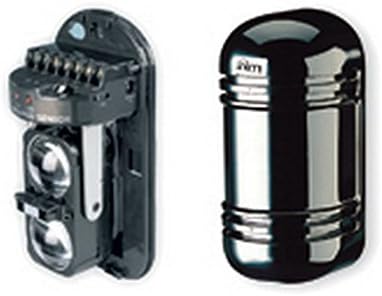
Figure 1: BD-D060 Optical Barrier Components. The image displays two main components of the BD-D060 Optical Barrier. On the left is the internal assembly of the barrier, showing the optical lenses and terminal connections. On the right is the external casing, a sleek, dark, cylindrical unit designed to protect the internal components.
คุณสมบัติที่สำคัญ ได้แก่:
- 60m double radii optical barrier for enhanced detection.
- Horizontal and vertical spoke adjustment for precise alignment.
- IP54 rated enclosure for protection against dust and splashing water.
- Programmable intervention time to customize alarm response.
5. การตั้งค่าและการติดตั้ง
การติดตั้งอย่างถูกต้องเป็นสิ่งสำคัญอย่างยิ่งต่อประสิทธิภาพสูงสุด โปรดปฏิบัติตามขั้นตอนทั่วไปเหล่านี้:
- การเลือกไซต์: Choose a location free from obstructions that could block the beam. Ensure stable mounting surfaces.
- การติดตั้ง: Securely mount the transmitter and receiver units facing each other, ensuring they are at the same height and within the 60m range. Use the provided mounting brackets.
- การเดินสายไฟ: Connect power and alarm output wires to the respective terminals on both units. Refer to the wiring diagram provided with the product for specific connections.
- การจัดตำแหน่ง: Power on the units. Use the horizontal and vertical adjustment mechanisms to precisely align the transmitter and receiver beams. Most units include visual indicators (e.g., LEDs) or audible tones to assist with alignment.
- การกำหนดค่า: Set the desired intervention time and other parameters using the internal jumpers or dip switches as per the detailed product sheet.
6. การใช้งานอุปกรณ์
Once installed and aligned, the BD-D060 operates automatically. The system is active when powered on and properly aligned.
- การทำงานปกติ: When the beam is clear, the alarm output remains in its normal state (e.g., closed contact).
- สภาพปลุก: If the infrared beam is interrupted for the programmed intervention time, the alarm output will change state (e.g., open contact), signaling an intrusion to the connected alarm panel.
- ตัวบ่งชี้สถานะ: Observe the status LEDs on the units for operational status (e.g., power, alignment, alarm). Consult the detailed product sheet for LED indicator meanings.
7. การบำรุงรักษา
Regular maintenance ensures the longevity and reliability of your optical barrier.
- การทำความสะอาด: Periodically clean the optical lenses of both the transmitter and receiver units using a soft, lint-free cloth. Dust, dirt, or spiderwebs can obstruct the beam and cause false alarms.
- การตรวจสอบการจัดตำแหน่ง: Verify the alignment of the units periodically, especially after strong winds or physical disturbances. Re-align if necessary.
- การตรวจสอบแหล่งจ่ายไฟ: ตรวจสอบให้แน่ใจว่าแหล่งจ่ายไฟมีเสถียรภาพและอยู่ภายในปริมาณที่กำหนดtagช่วงอี
- การตรวจสอบสิ่งแวดล้อม: Check for any new obstructions (e.g., growing vegetation) that might interfere with the beam path.
8 การแก้ไขปัญหา
If you experience issues with your BD-D060, refer to the following common problems and solutions:
| ปัญหา | สาเหตุที่เป็นไปได้ | สารละลาย |
|---|---|---|
| สัญญาณเตือนภัยเท็จ | Misalignment, dirty lenses, beam obstruction (e.g., vegetation, insects), strong sunlight interference. | Re-align units, clean lenses, remove obstructions, check for proper shielding from direct sunlight. |
| No Alarm on Intrusion | Units not powered, severe misalignment, faulty wiring, damaged unit. | Check power supply, re-align units, inspect wiring connections, test units individually. |
| ไฟ LED แสดงสถานะดับ | ไม่มีไฟเข้า เครื่องมีปัญหา | Verify power connection and supply, contact technical support if power is present. |
For persistent issues, contact INIM ELECTRONICS technical support.
9. ข้อมูลจำเพาะ
| คุณสมบัติ | รายละเอียด |
|---|---|
| แบบอย่าง | BD-D060 |
| ผู้ผลิต | อินิม |
| ระยะการตรวจจับ | 60 meters (double radii) |
| การปรับเปลี่ยน | Horizontal and vertical spoke adjustment |
| ระดับการป้องกันน้ำเข้า (IP) | IP54 |
| ระยะเวลาการแทรกแซง | สามารถตั้งโปรแกรมได้ |
| รวมแบตเตอรี่ | เลขที่ |
| แบตเตอรี่ที่จำเป็น | เลขที่ |
| ASIN | B01CNOY16Y |
| วันที่พร้อมใช้งานครั้งแรก | 6 มี.ค. 2016 |
10. การรับประกันและการสนับสนุน
This product is covered by a standard manufacturer's warranty. For specific warranty terms and conditions, please refer to the documentation provided with your purchase or visit the official INIM ELECTRONICS webเว็บไซต์.
For technical support, service, or replacement parts, please contact your authorized INIM ELECTRONICS dealer or distributor. Ensure you have your product model number (BD-D060) and purchase details available when seeking support.